Frostpunk Developer Mode (Secret Cheat Menu)
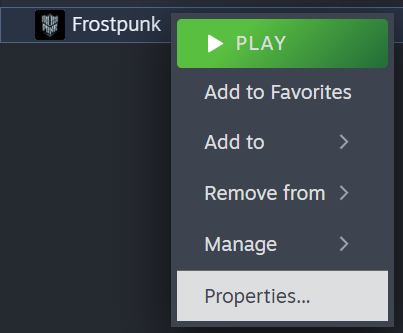
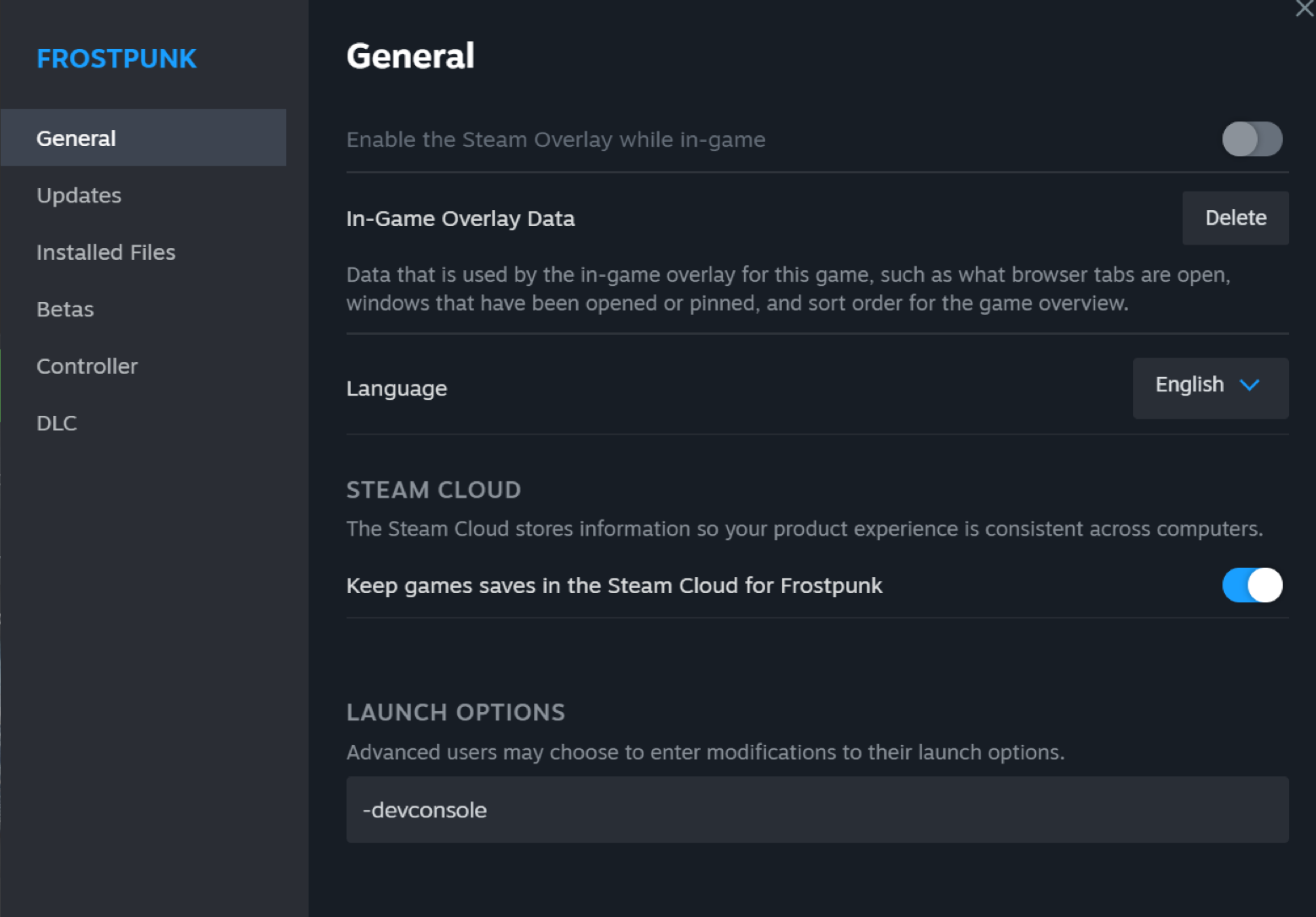
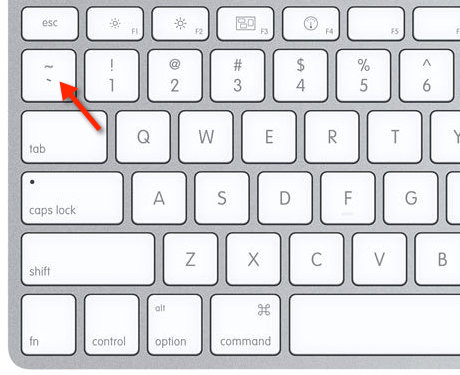
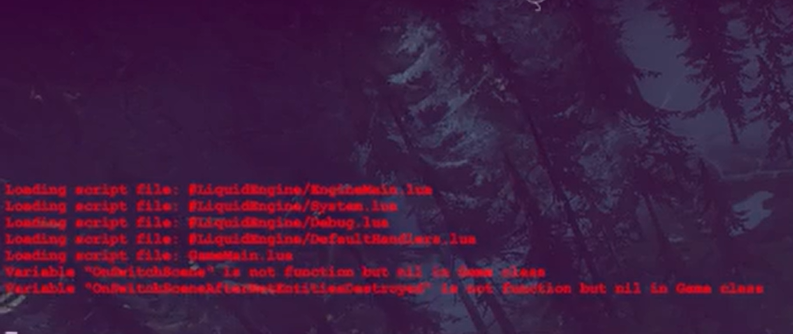
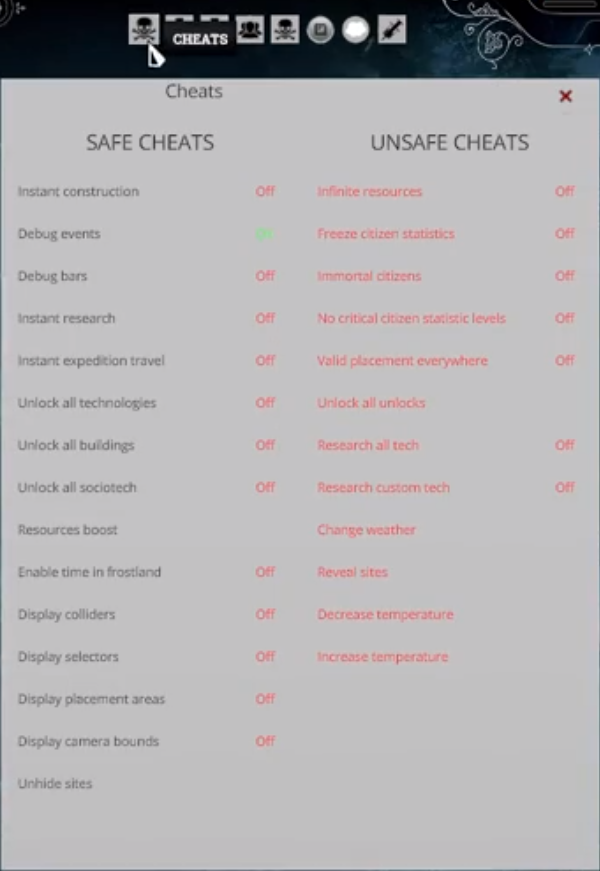
Steps to accessing the menu
FAQ
Will this remove my achievements and/or prevent me from getting achievements?
No, this method will not prevent you from getting achievements and it won't remove the achievements that you've already achieved on your save. Using this cheat menu will not change anything about your game save unless you want it to.
What are all the cheats this provides?
I'll split this list into the safe and unsafe cheats. Do note that while nobody has had their save corrupted by using unsafe cheats, it is still possible that this may occur.
Here are the safe cheats:
Instant construction, Instant research, Instant expedition travel, Unlock all technologies, Unlock all buildings, Unlock all sociotech, Resources boost, Display placement areas, Debug events, debug bars, enable time in frostland, display colliders, display selectors, display camera bounds, unhide sites
Here are the unsafe cheats:
Infinite resources, Freeze citizen statistics, immortal citizens, no critical citizen statistic levels, valid placement everywhere, unlock all unlocks, research all tech, research custom tech, change weather, reveal sites, decrease temperature*, increase temperature*
*Increasing/Decreasing temperature is done by 1 level at a time
Can I give myself a specific amount of a chosen resource?
Yes, simply open up the console in game (backtick) and type in
SetResource('ChosenResource', 'Amount').
Replace 'ChosenResource' with:
'Coal' for Coal
'Wood' for Wood
'Steel' for Steel
'Steam Cores' for Steam Cores
'Raw Food' for Raw Food
'Food Rations' for Food Rations
'Bodies' for Bodies (Organic Fertiliser Law)
'Wooden Materials' for Structural Profiles (Last Autumn + Builders Mode)
'Steam Tools' for Steam Exchangers (Last Autumn + Builders Mode)
'Steel Plates' for Steel Composites (Last Autumn + Builders Mode)
'Amount' is just the amount of the chosen resources you want.
Can I change what day it is?
Yes, type in SetGameTime('Day') in the console (backtick) and replace 'day' with the day that you want to set it to. You can use this to essentially skip storms at will.
Got anymore questions?
Comment below and I'll answer it as soon as I can.
- Frostpunk: Советы. Прохождение. Достижения. (обновлено 01.09.21)★ 5 (1.3k)46k views2.7k ♥55 minRussianUpdated Sep 18, 2023
- 101 of Surviving - Some Basic Hints and Tips★ 5 (664)44k views951 ♥7 minUpdated Apr 26, 2018
- Frost Punk how to survive for Dummies!★ 5 (403)36k views810 ♥14 minUpdated Jul 12, 2020
- Perfect City Management on Extreme Difficulty★ 5 (350)27k views866 ♥11 minUpdated May 24, 2025
- Достижения в Frostpunk (ОБНОВЛЕНО 14.03.20)★ 5 (678)27k views1.4k ♥15 minRussianUpdated Mar 14, 2020
- Achievements Guide Organised by Scenario★ 5 (735)25k views1.8k ♥25 min



- Upgrading to PremiumTeam Fortress 2★ 5 (20k)1441k views11k ♥6 minUpdated May 11, 2022
- No More Room in Hell Official ManualNo More Room in Hell★ 5 (2.8k)569k views2.1k ♥29 minUpdated Apr 22, 2019
- NMRiH Community Hosting GuidesNo More Room in Hell★ 5 (526)351k views653 ♥1 minUpdated Aug 10, 2022
- Лучшие кооперативные игры SteamPAYDAY 2★ 5 (1.5k)315k views2.1k ♥56 minRussianUpdated Apr 27, 2025
- Desert Eagle Heat Treated | Blue GemCounter-Strike 2★ 5 (1.6k)292k views1.5k ♥2 minUpdated Jan 16
- Treasure Hunt Puzzle SolutionsTotal War: WARHAMMER II★ 5 (6.9k)281k views15k ♥3 minUpdated Aug 19, 2021






This guide was created by its original author on the Steam Community. Are you the author and want it removed? Request removal.