Guide: Disk Space Help
Information Overview
This guide will show you a very simple way to install only a handful of maps.
We will also check out how to uninstall maps that you've already completed.
And we will also talk about the disk space requirement of all individual maps.
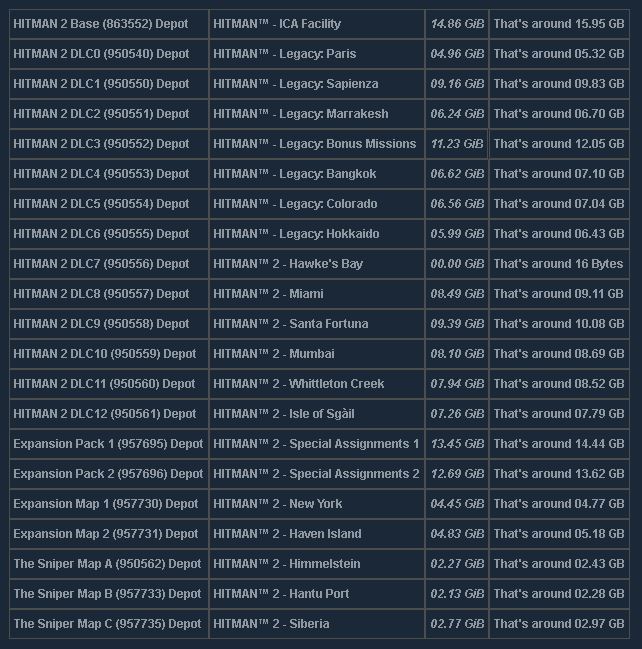
If you own everything, the game requires more than 110 GB's of disk space.
The Legacy Pack by itself takes around 40 GB's of required free disk space.
You will always need at least 15 GB's of free disk space for the game engine.
The game engine contains the ICA Facility and a huge chunk of Hawke's Bay.
And therefore you can't delete the ICA Facility, it's the only undeletable map.
I really don't recommend deleting Hawke's Bay, since it deletes only 16 Bytes.
But the rest of the maps can be safely removed to free up some disk space.
Before we get into the tutorial of it all: Here's a list of all the individual DLC's:
We will also check out how to uninstall maps that you've already completed.
And we will also talk about the disk space requirement of all individual maps.
If you own everything, the game requires more than 110 GB's of disk space.
The Legacy Pack by itself takes around 40 GB's of required free disk space.
You will always need at least 15 GB's of free disk space for the game engine.
The game engine contains the ICA Facility and a huge chunk of Hawke's Bay.
And therefore you can't delete the ICA Facility, it's the only undeletable map.
I really don't recommend deleting Hawke's Bay, since it deletes only 16 Bytes.
But the rest of the maps can be safely removed to free up some disk space.
Before we get into the tutorial of it all: Here's a list of all the individual DLC's:
Step 1: Preparation
1.Look at your free disk space to see how much you can currently use.
Open up your Local Disk and check how much free space you currently have.

Open up your Local Disk and check how much free space you currently have.
Step 2: Navigation
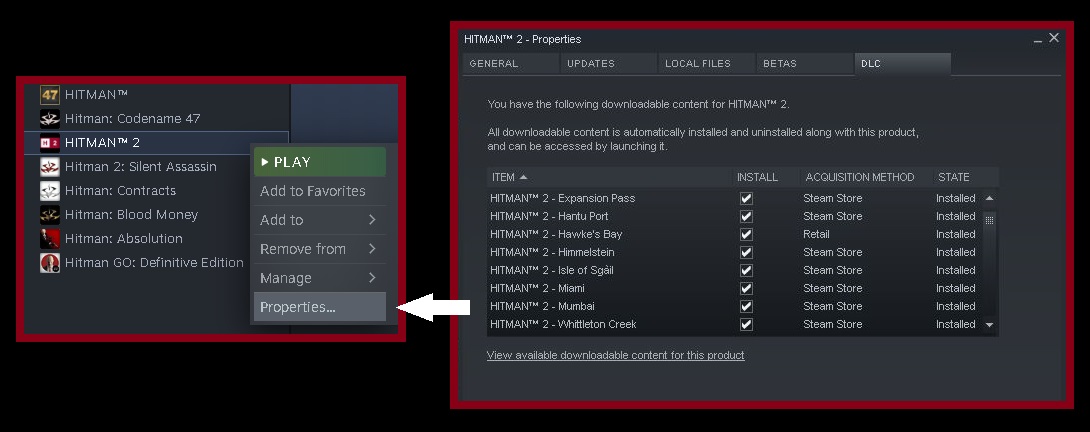
2.Go to the properties of your game and then click on the DLC section.
To go to the properties, you need to simply right click the game in your library.
To go to the properties, you need to simply right click the game in your library.
Step 3: Execution
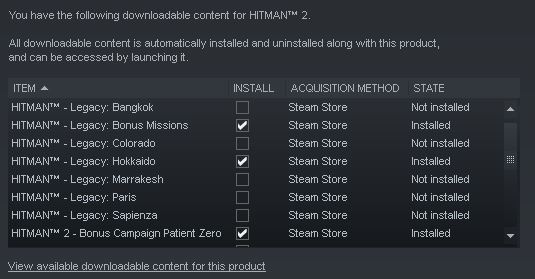
3.Now you just need to disable the DLC's that you do not want to download.
You can of course enable/disable them here again whenever you want in the future.
You can of course enable/disable them here again whenever you want in the future.
Thanks For Reading
If you have any questions: You can write a comment and I will try to reply as soon as possible.
You can save a lot of free space by simply downloading only a couple of owned maps at a time.
Once you finish one location, you can delete it and download another one, that's the way I do it.
Just keep in mind that there's no point in deleting the Hawke's Bay: It will delete only 16 Bytes.
And there's no way to delete the ICA Facility, since that's part of the base game and Engine.
There's also no need to delete the suit DLC's and weapon DLC's: They are extremely small.
You can save a lot of free space by simply downloading only a couple of owned maps at a time.
Once you finish one location, you can delete it and download another one, that's the way I do it.
Just keep in mind that there's no point in deleting the Hawke's Bay: It will delete only 16 Bytes.
And there's no way to delete the ICA Facility, since that's part of the base game and Engine.
There's also no need to delete the suit DLC's and weapon DLC's: They are extremely small.
More HITMAN™ 2 guides
- Versions, Legacy and DLC explained (Store Guide)★ 5 (808)50k views643 ♥36 minUpdated Feb 24, 2023
- Hitman 2 Item & Unlock List ~ And What to Get First★ 5 (738)30k views1.4k ♥53 minUpdated Feb 24, 2023
- HITMAN™ 2 - Гайд по достижениям и испытаниям★ 5 (1.3k)27k views2.2k ♥104 minRussianUpdated Jan 24, 2023
- HITMAN 2 | Chameleon | All Disguises★ 5 (196)19k views377 ♥7 minUpdated Mar 8, 2020
- HITMAN™ 2 Achievement Guide★ 5 (721)18k views1.1k ♥9 minUpdated Jan 29, 2022
- HAVEN Island, Last Resort - Challenges, Achievements & Walkthroughs★ 4 (127)14k views165 ♥11 minUpdated Sep 30, 2019




🔥 Popular guides
- Upgrading to PremiumTeam Fortress 2★ 5 (20k)1441k views11k ♥6 minUpdated May 11, 2022
- No More Room in Hell Official ManualNo More Room in Hell★ 5 (2.8k)569k views2.1k ♥29 minUpdated Apr 22, 2019
- NMRiH Community Hosting GuidesNo More Room in Hell★ 5 (526)351k views653 ♥1 minUpdated Aug 10, 2022
- ULTIMATE GUIDE FOR GAME DEV TYCOONGame Dev Tycoon★ 5 (5.8k)326k views10k ♥4 minUpdated 23 Jan, 2014
- How to 'Git Gud' Soon™MORDHAU★ 5 (2k)318k views3k ♥68 minUpdated Nov 16, 2024
- Лучшие кооперативные игры SteamPAYDAY 2★ 5 (1.5k)315k views2.1k ♥56 minRussianUpdated Apr 27, 2025






This guide was created by its original author on the Steam Community. Are you the author and want it removed? Request removal.