How to change the Viewmodel FOV
Step 1 - Install notepad++
You are going to need this it's free it's better than fkin default notepad.
don't worry it's safe

don't worry it's safe
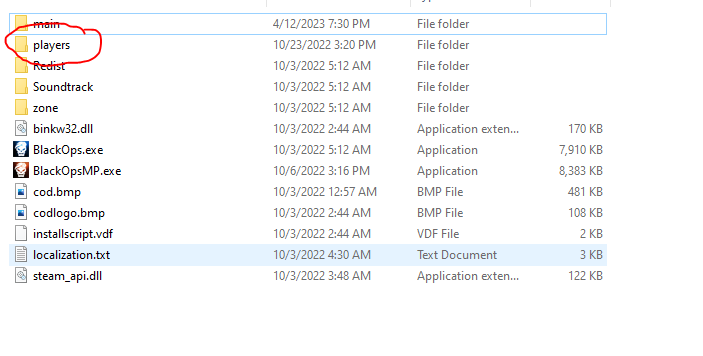
Step 2 - Open your black ops 1 folder
nothing to say, just look at the image shown, that's where it should be.
Step 3 - Open "players" folder
Step 4 - Open config_mp.cfg with the notepad++
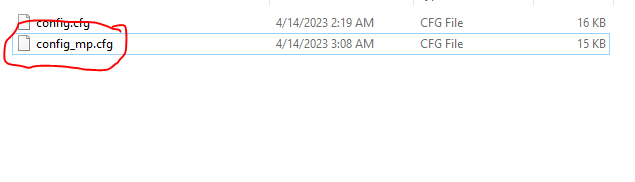
Right click on the cfg file and then click on "Edit with Notepad++"
cfg file above is for the singleplayer/zombies bo1 u can change fov there aswell.
Step 5 - Press CTRL+F and write "fov" in the search bar.
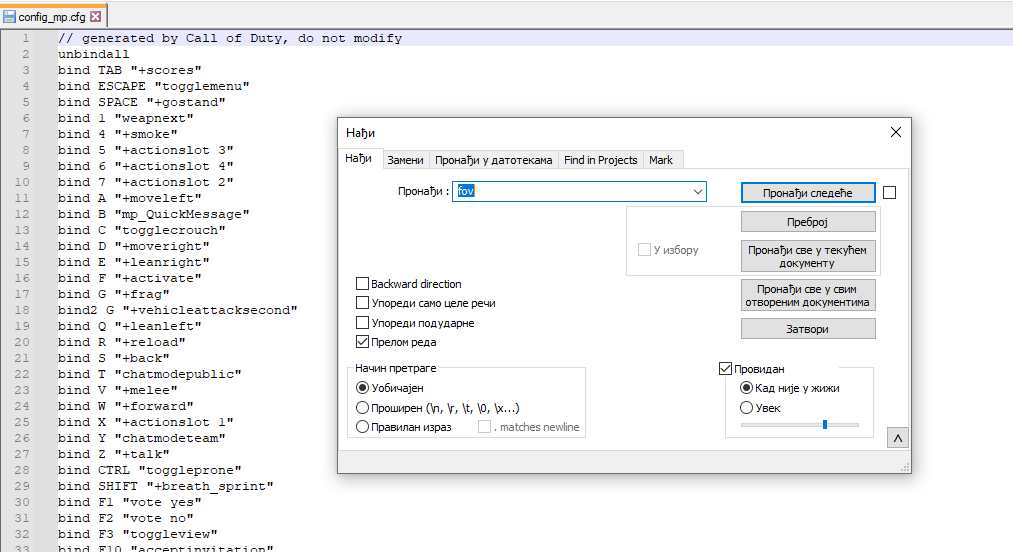
Step 6 - Change the fov to any number u want between the quotes
 "seta cg_fov_default "65"" is the command u want to edit, change it to any number.
and yo don't forget to save it n ♥♥♥♥ after u edit!!!
Step 7 - Have fun
:sunglasses;

Conclussion!!
u still suck at the game lmaooo

More Call of Duty: Black Ops - Multiplayer guides
- Black Ops config★ 5 (246)24k views387 ♥5 minUpdated Dec 5, 2019
- How to change the color of your custom classes.★ 5 (270)19k views218 ♥1 minUpdated Jul 17, 2019
- How to be a great sniper Engl/Fre/Ger/Rus★ 4 (223)13k views52 ♥2 minUpdated Feb 12, 2016
- How to not get banned on servers 101★ 5 (236)11k views58 ♥1 minUpdated Oct 8, 2020
- possible Rank reset fix★ 4 (102)11k views59 ♥1 minBulgarianUpdated Jun 30
- Black ops 1 Smooth L96a1★ 4 (155)8.8k views155 ♥5 minUpdated Jan 2, 2017




This guide was created by its original author on the Steam Community. Are you the author and want it removed? Request removal.