How to create a private server to play with your friends!? | (Listen Server)
Intro / basics + tutorial video


 • With over ??k concurrent players[steamcharts.com] on this Day of Infamy Free Weekend!. it has been recently quite hard to find available slot on Co-op servers. this Steam guide will help us getting a coop session between friends!
• Easier than dedicated one to create, Listen servers are run on the same machine as the game client.
When the client disconnects, the server is shut down, as the server and host client are run together.
So check game cache integrality (game properties) before host it in order to avoid crashs.
• Listen servers usually cannot support too many players, due to bandwidth and CPU requirements.
So please optimize your internet connection so close others useless programs and run only the minimal requiered.
(Do not even try if you are on the neighbourhood wireless!)
http://steamcommunity.com/sharedfiles/filedetails/?id=952405515
How to proceed?!
• Launch the command prompt (executable name cmd.exe )
Enter:
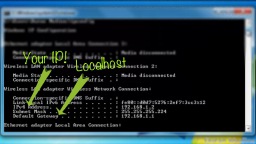
Port Forwarding:
• Copy/paste your default gateway IP in your web browser: (url tab)
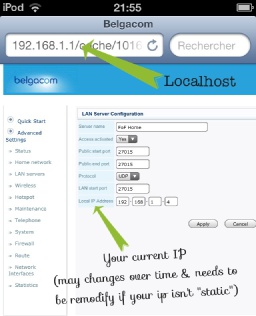
Day of Infamy requieres only the port for the Steam Server:
• port: 27015 UDP & your IPv4 address
• Right click on the game on your steam library and click "Properties". Once you're there, click on "Set Launch Options". An empty caption box will show up.
In it, simply type:
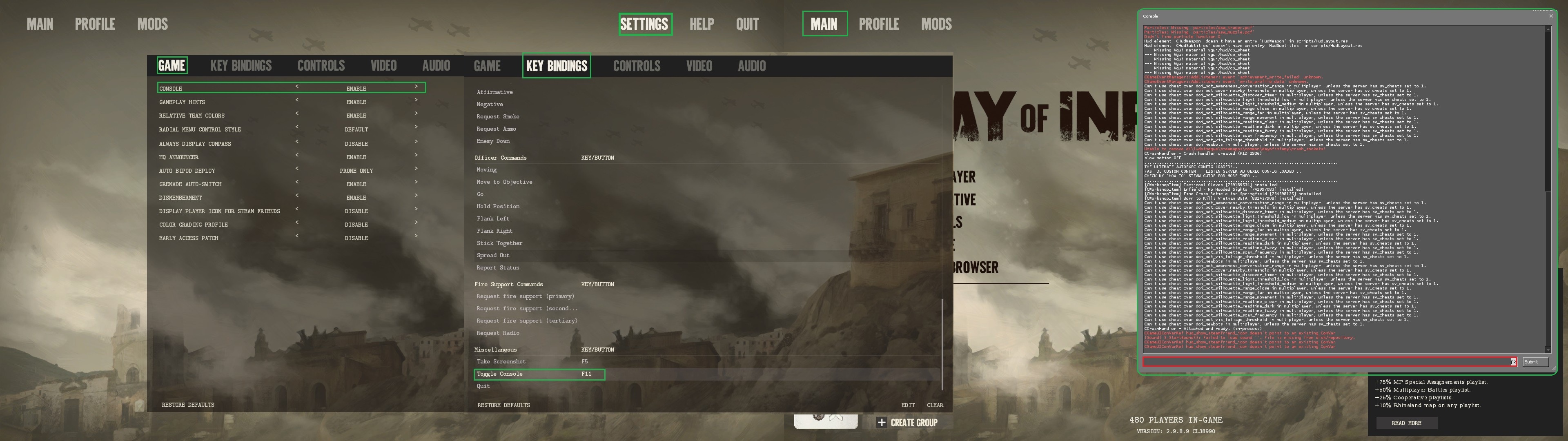 • You will notice that a console has now appeared on the main menu. Keep it there! (Dev-console is used to submit some commands variables == cvar)
• You can also pop it up when needed by binding it (F11 as an example) with the following cvar: (with quotes)
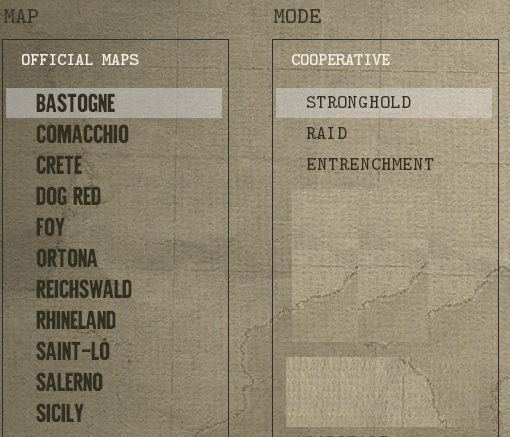
• If you go above your limit all the other players in your server will see their ping increased to extreme heights.
• You just have to test how many players your network can handle but most of the times 6+ slots becomes harder to manage. • Once it's done display console again and type in:
• There you go! You have a fully working server now! Invite your friends in!
• If it still doesn't work or you're having other issues see the troubleshooting section bellow:
Server Configuration and Handy Tweaks
connect <IP>;password <passwd> (And how your steam friend join it later once secured)
nextlevel <...>
set next lvl
Save following code as autoexec.cfg in doi/cfg folder:
Troubleshooting
If your friends still cannot join your server even after you've set it up properly it's most likely because something is blocking network traffic coming from outside. Many anti-virus and firewalls do that by default and you'll have to either temporarily disable them or add Steam and Day of Infamy to the restrictions.[www.dummies.com]
If it still doesn't work you might want to try these ports too:UDP 1200
UDP 27000 to 27015
UDP 27020
TCP 27030 to 27039
TCP 27015
If you don't know how you just have to follow the instructions on this website[portforward.com]
There you simply have to enter your router's brand and model and then ports for what game you want to forward.
Real LAN Party with a few computers & 1 Shared Steam account!

Outro
 http://steamcommunity.com/groups/Insurgency2United
http://steamcommunity.com/sharedfiles/filedetails/?id=297737704
Special thanks mention to "+[SP]+ Kaede" for his understanding and provided me helpful ressources for my guide which is based on.
- All Weapon Skins / Cosmetics and How To Get Them [WIP]★ 5 (249)13k views302 ♥6 minUpdated Dec 21, 2017
- Complete Unit Showcase★ 5 (317)11k views300 ♥26 minUpdated Feb 17, 2022
- Next Level Gore Setting for DOI★ 5 (176)8.5k views283 ♥1 minUpdated Oct 29, 2025
- Obscure Tips n' Stuff★ 5 (220)8.3k views145 ♥2 minUpdated Oct 18, 2017
- Fix Bayonets! How to Master the Pokey Stick★ 5 (187)7.1k views162 ♥21 minUpdated May 26, 2017
- Wibble's Brutal Class Guide For Newbies★ 5 (260)6.3k views221 ♥15 minUpdated Mar 29, 2017





- Upgrading to PremiumTeam Fortress 2★ 5 (20k)1441k views11k ♥6 minUpdated May 11, 2022
- No More Room in Hell Official ManualNo More Room in Hell★ 5 (2.8k)569k views2.1k ♥29 minUpdated Apr 22, 2019
- NMRiH Community Hosting GuidesNo More Room in Hell★ 5 (526)351k views653 ♥1 minUpdated Aug 10, 2022
- How to 'Git Gud' Soon™MORDHAU★ 5 (2k)318k views3k ♥68 minUpdated Nov 16, 2024
- Лучшие кооперативные игры SteamPAYDAY 2★ 5 (1.5k)315k views2.1k ♥56 minRussianUpdated Apr 27, 2025
- Desert Eagle Heat Treated | Blue GemCounter-Strike 2★ 5 (1.6k)293k views1.5k ♥2 minUpdated Jan 16





This guide was created by its original author on the Steam Community. Are you the author and want it removed? Request removal.