How to Determine Your Pawn's Kill Count
Overview
This guide will tell you how to determine your pawn's invisible kill count, typically for bestiary purposes. While the game does track your personal kill count in the "History" sub menu, it is not entirely accurate to how many kills your pawn has. This is because the game also tracks the kills your pawn gets during rents.
This method technically should work with all platform, assuming you can manage to extract your save file into a computer. That said, it is obviously easiest to do on PC, and since it is the platform I am playing the game on, it is the one that I will use to demonstrate the method. I can offer no support should you attempt to extract your save file from platforms other than PC, you do so at your own risks.
This guide is meant for informational purposes only. Any attempt at save editing can be subject to save file corruption or bans from Capcom. The author will provide no support for errors caused by save editing.
What You Need
- Fluffyquack's DDsavetool (https://steamcommunity.com/app/367500/discussions/8/451850849187495873/)
- Notepad ++ (https://notepad-plus-plus.org/downloads/),
or other software capable of viewing xml files and use a 'go to line:x' command
(If for some reason Steam decided that the link is "malicious' and refused to open it for you, you'll have to search for it by google yourself. Just search for the softwares' names on google and select the first results.)
Instructions
- Download the required softwares
- Install notepad++, and extract the DDsavetool into a new folder
- Locate your game's save file, by default it is in
C:\Program Files (x86)\Steam\userdata\*YourSteamID*\367500\remote
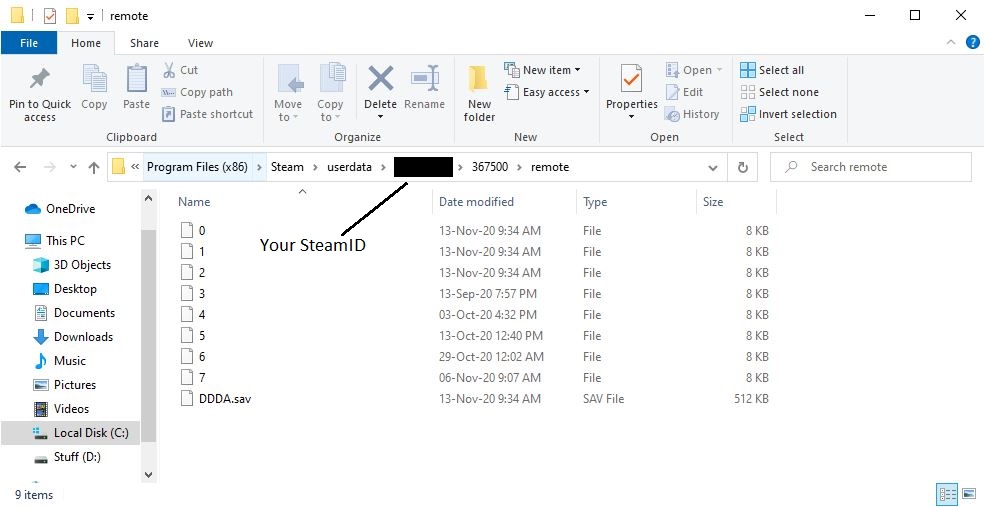
- Copy your 'DDDA.sav' file into another folder, preferably the same folder you've placed the DDsave tool in
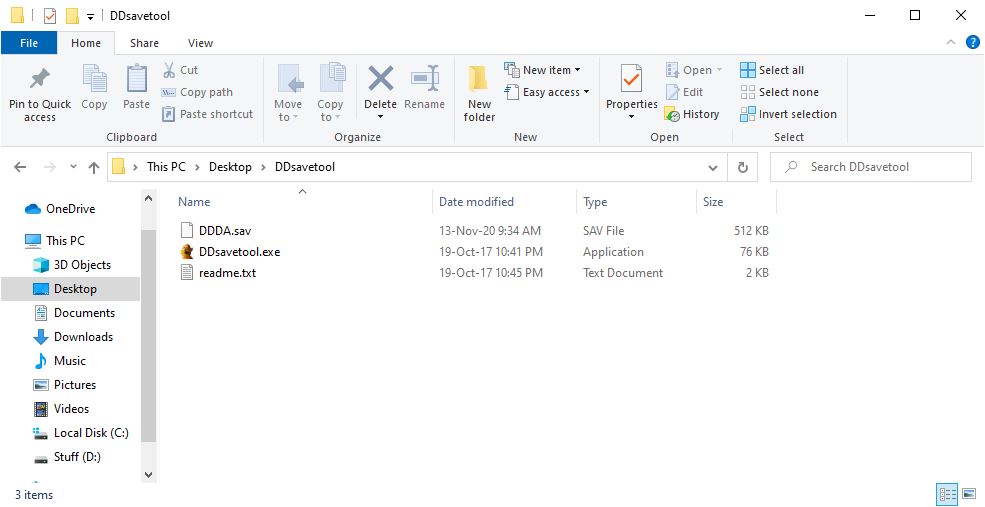
- Click and drag your save file into the 'DDsavetool.exe. A command window should briefly appear, and after a few second a new 'DDDA.sav.xml' file should appear in the folder. Open this xml with notepad++(Right click on the file, under 'Open with', select notepad ++)
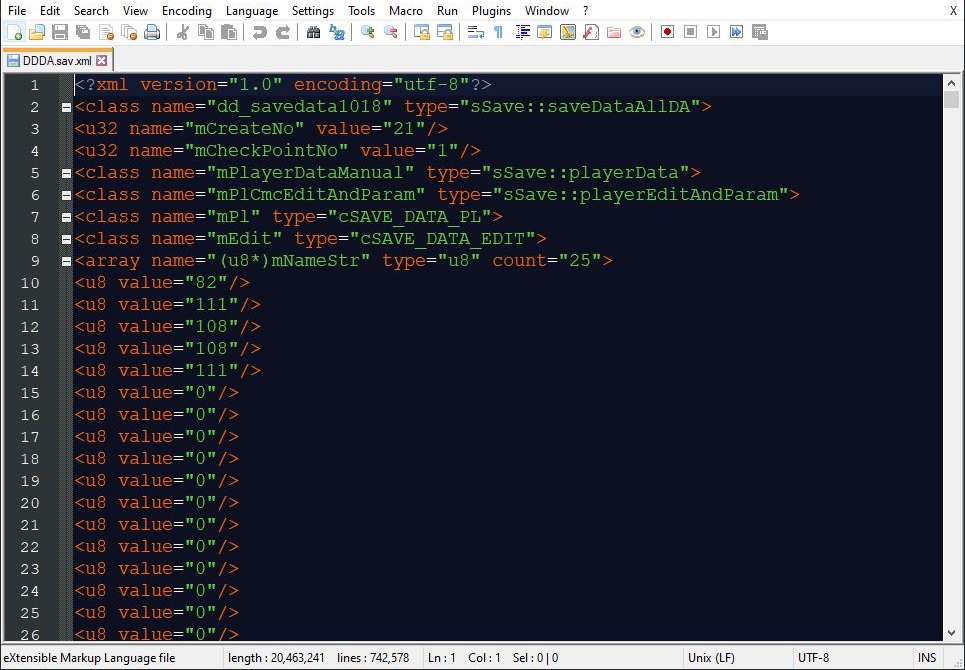
- Use the 'Go to' command by pressing Ctrl+G. Alternatively, you can select it from under the 'Search' toolbar. Select to go to line '2024', this is where the lines for your pawn's kill count start. Note the line numbers on the left side of the window
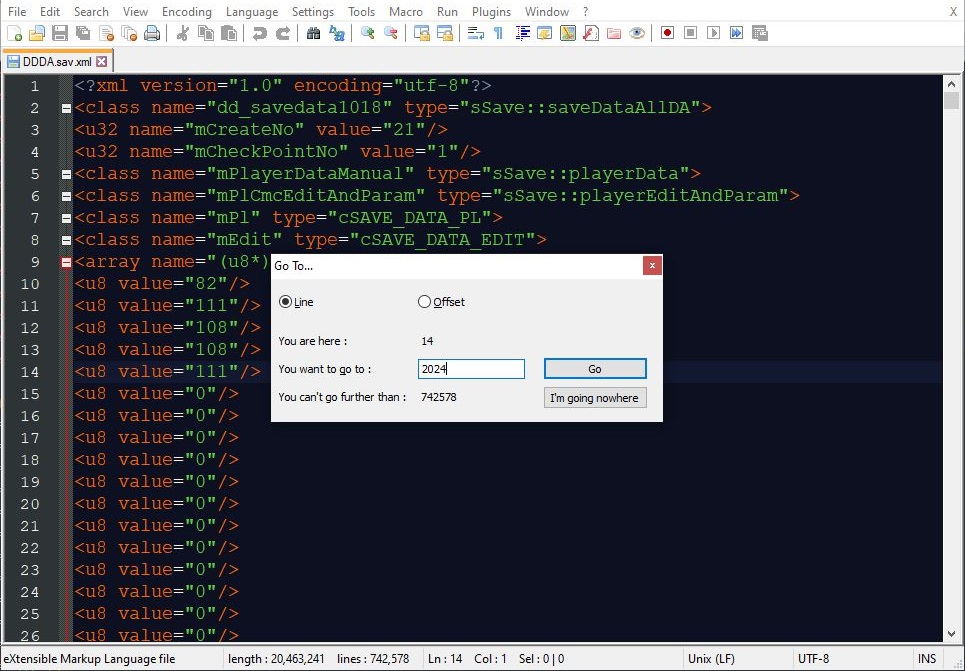
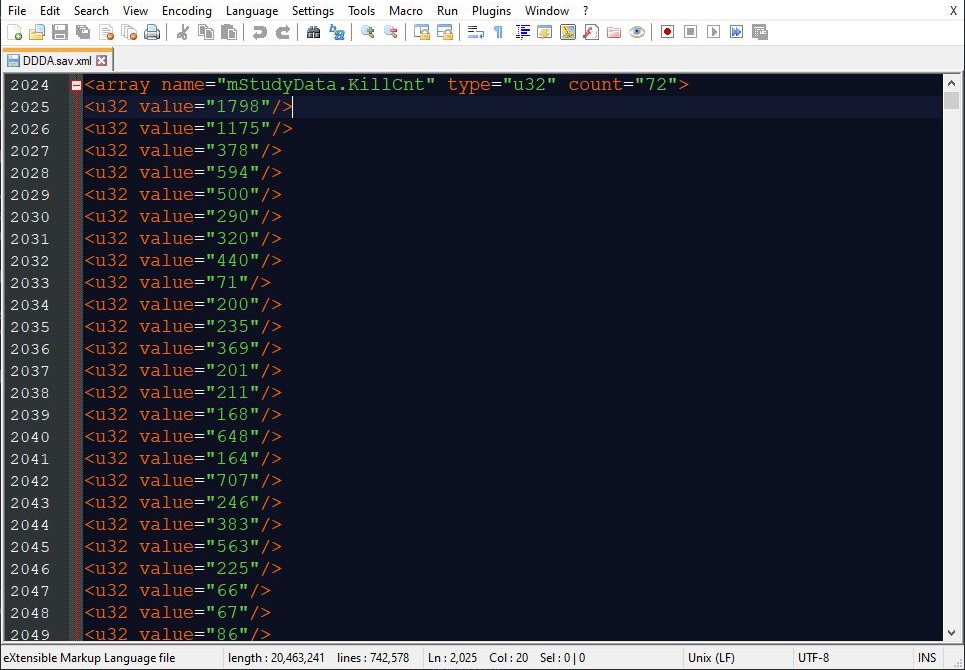
Each line starting from 2025 correspond to a different enemy type in the game, but typically only those with a bestiary attached to them. You won't find a line for Leapworms, or harmless fauna there, for example. The entries continue until line 2096.
In order to determine which line tracks the kill of which enemy, cross check your xml file with the images that I listed below, in which I have marked each line with a comment denoting its corresponding enemy type.
Part 1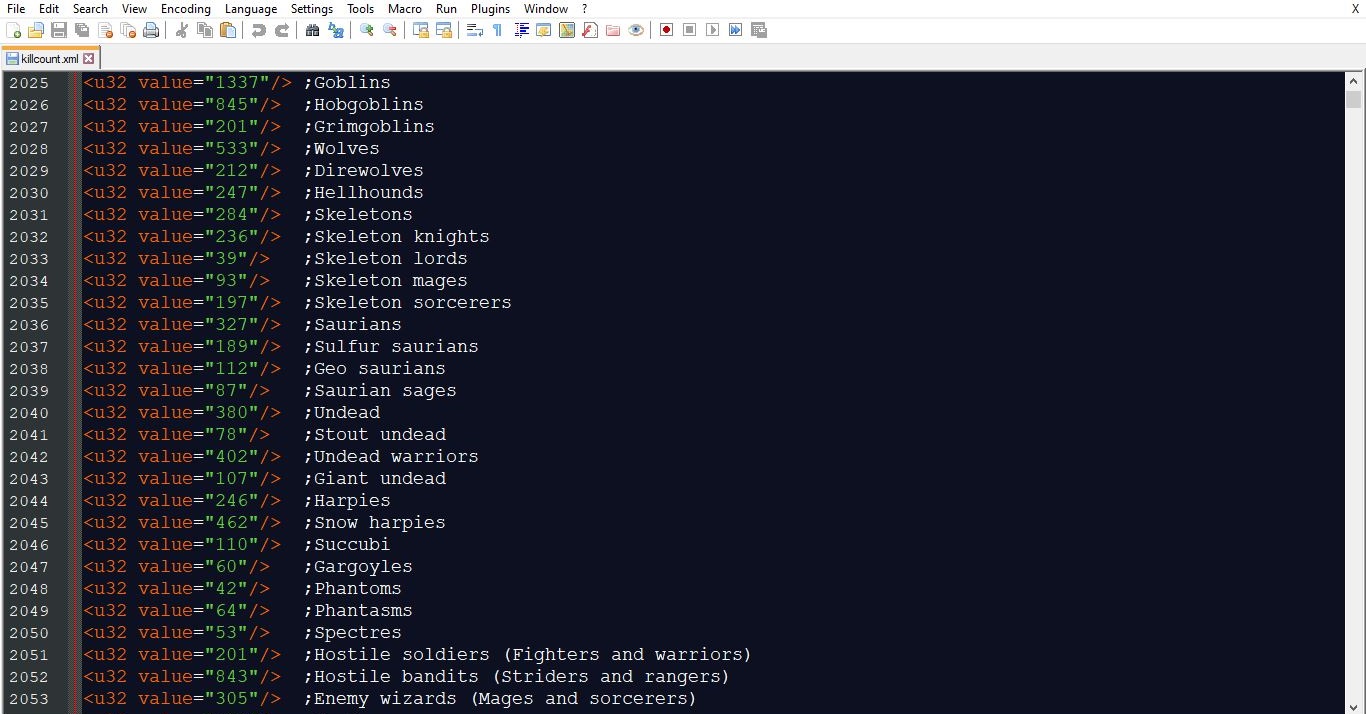
Part 2
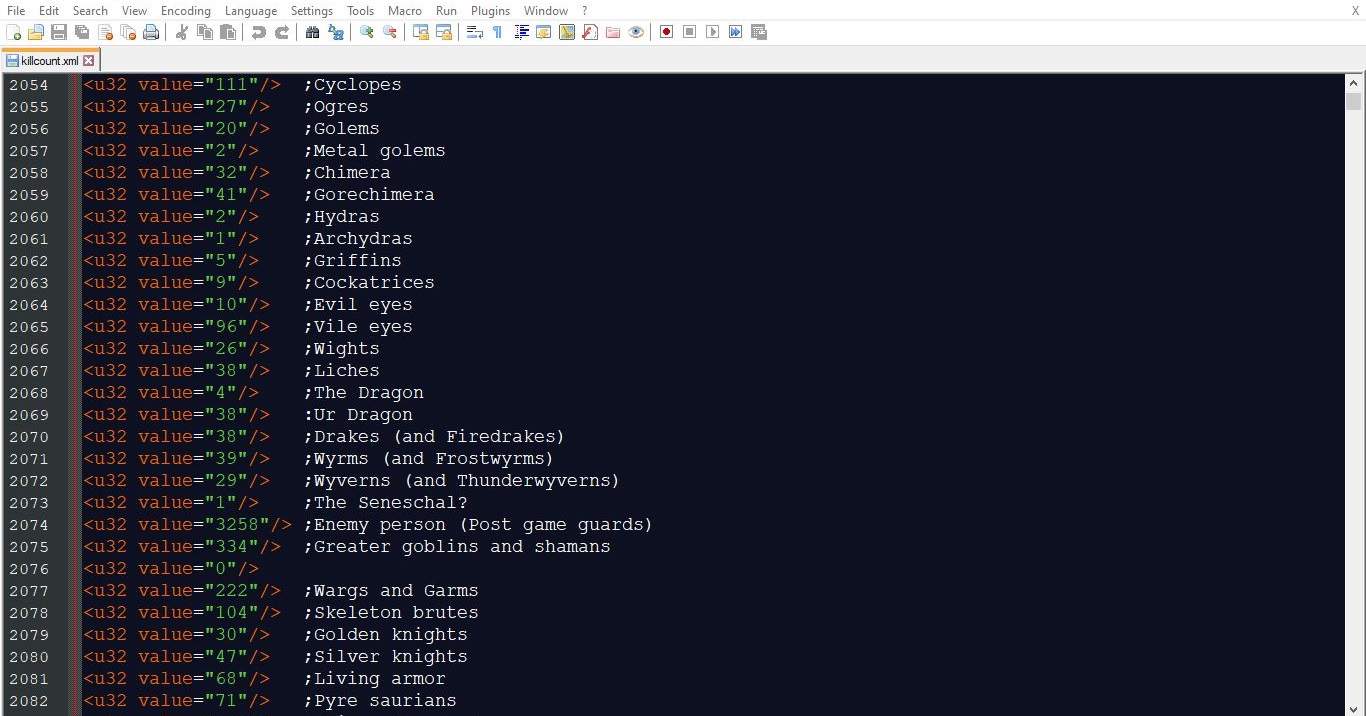
Part 3
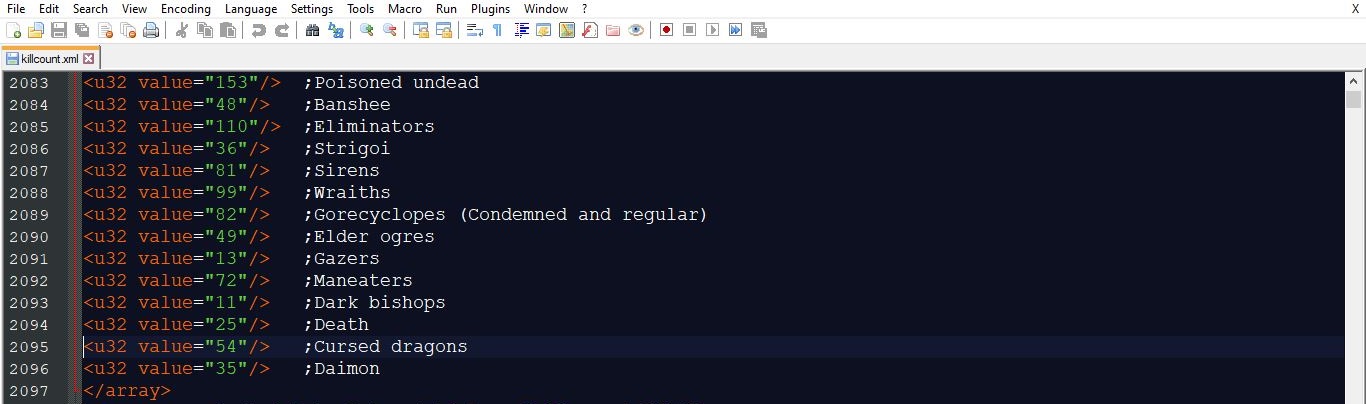
(Click on the images to zoom in)
That's pretty much it.
Credits
- Hero Achievement and Missable Quests Guide★ 5 (3.5k)58k views7.1k ♥30 minUpdated Aug 2, 2016
- Dragon's Dogma: Dark Arisen. Getting started 101 and "did you know's?"★ 5 (918)53k views1.1k ♥17 minUpdated Jan 20, 2016
- The Arisen's Handbook: A Guide to Adventuring in Gransys★ 5 (1.7k)42k views3.4k ♥91 minUpdated Oct 8, 2023
- The Guide to Vocations and Skills★ 5 (806)42k views1.9k ♥86 minUpdated Jan 1, 2020
- Chronological Quest Guide for dd:da★ 5 (779)33k views2k ♥54 minUpdated Jul 5, 2023
- Vocations, Strengths and Weaknesses, all Part of a Whole - Writings of an Aged Arisen★ 5 (575)32k views873 ♥33 minUpdated Jan 3, 2021



- Upgrading to PremiumTeam Fortress 2★ 5 (20k)1441k views11k ♥6 minUpdated May 11, 2022
- No More Room in Hell Official ManualNo More Room in Hell★ 5 (2.8k)569k views2.1k ♥29 minUpdated Apr 22, 2019
- NMRiH Community Hosting GuidesNo More Room in Hell★ 5 (526)351k views653 ♥1 minUpdated Aug 10, 2022
- ULTIMATE GUIDE FOR GAME DEV TYCOONGame Dev Tycoon★ 5 (5.8k)326k views10k ♥4 minUpdated 23 Jan, 2014
- How to 'Git Gud' Soon™MORDHAU★ 5 (2k)318k views3k ♥68 minUpdated Nov 16, 2024
- Лучшие кооперативные игры SteamPAYDAY 2★ 5 (1.5k)315k views2.1k ♥56 minRussianUpdated Apr 27, 2025






This guide was created by its original author on the Steam Community. Are you the author and want it removed? Request removal.