How to get Sith Lord Achievement without doing DS playthrough
1. Kotor2 file
First you have to find your Kotor2 file. It is mostly installed in your random disc file.
My Computer/Disc C, D or anything you have named and where you installed your steam etc/Program files (x86 if you are using 64 bit OS)/Steam/Steamapps/common\Knights of the Old Republic II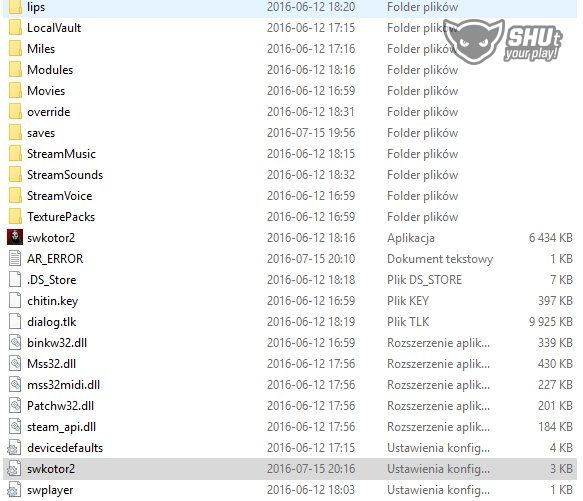
Now double-click on that ini file.
2. swkotor2.ini
Now that you have opened swkotor2.ini search for the line called: CurSithLord. You can also press ctrl+f and paste this line. After you found CurSithLord line, change the current number (mostly 3 if you have completed the game) to 4 and save. it should be like that:
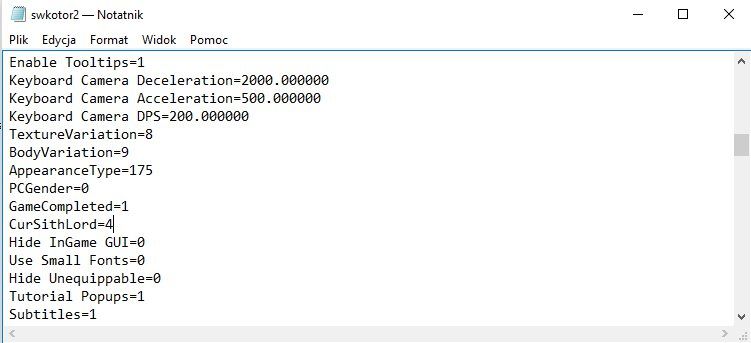
The current numbers in order are:
0=Darth Sion
1=I have no idea
2=Darth Nihilus
3=Darth Traya
4=Your Current PC. (Playable character)
Number 4 is automatically selected after you completed the game in Dark side.
3. Conclusion
Beat STAR WARS™ Knights of the Old Republic™ II: The Sith Lords™'s achievements?
Flex it — let your friends know you pulled it off.
- KotOR II Cheat Codes★ 5 (1.6k)116k views4.4k ♥17 minUpdated Jul 20, 2017
- KOTOR II: The Sith Lords - Go-To Essential Mods★ 5 (768)56k views2.2k ♥13 minUpdated Feb 28
- Character and Party Optimizing Guide - Archival★ 5 (1.1k)56k views2.7k ♥51 minUpdated Apr 24, 2024
- KotOR II Steam Workshop Modding Guide★ 5 (499)46k views1.1k ♥9 minUpdated Dec 20, 2015
- KOTOR: Tips and Tricks★ 5 (386)42k views756 ♥5 minUpdated Jun 12, 2023
- Ultima Pearl (Code)★ 5 (329)32k views749 ♥1 minUpdated Nov 25, 2025


- Upgrading to PremiumTeam Fortress 2★ 5 (20k)1441k views11k ♥6 minUpdated May 11, 2022
- No More Room in Hell Official ManualNo More Room in Hell★ 5 (2.8k)569k views2.1k ♥29 minUpdated Apr 22, 2019
- NMRiH Community Hosting GuidesNo More Room in Hell★ 5 (526)351k views653 ♥1 minUpdated Aug 10, 2022
- ULTIMATE GUIDE FOR GAME DEV TYCOONGame Dev Tycoon★ 5 (5.8k)326k views10k ♥4 minUpdated 23 Jan, 2014
- How to 'Git Gud' Soon™MORDHAU★ 5 (2k)318k views3k ♥68 minUpdated Nov 16, 2024
- Лучшие кооперативные игры SteamPAYDAY 2★ 5 (1.5k)315k views2.1k ♥56 minRussianUpdated Apr 27, 2025






This guide was created by its original author on the Steam Community. Are you the author and want it removed? Request removal.