How to get the best GTA IV experience
Installing GTA IV
Install it anywhere BUT your Program Files folder. AKA your C drive. Problems booting up are likely related to Windows' file permissions. Make a new folder in another drive of yours and create a new library of it in Steam settings. Or split at least 30GB from your C drive and make a new partition if you only got one drive in your computer.
Installing FusionFix
Get it here: https://github.com/ThirteenAG/GTAIV.EFLC.FusionFix
Drop all the contents from the folder to the folder where GTAIV.exe is found.
That's it. There will be options where you can turn on the console gamma to make the game darker, change tree visuals and such in the Display settings in-game.
I advise capping your FPS to 60, at most 120 if you really want to. Anything higher is guarenteed to cause issues.
Drop all the contents from the folder to the folder where GTAIV.exe is found.
That's it. There will be options where you can turn on the console gamma to make the game darker, change tree visuals and such in the Display settings in-game.
I advise capping your FPS to 60, at most 120 if you really want to. Anything higher is guarenteed to cause issues.
Installing DXVK
DXVK NOW INCLUDED IN FUSIONFIX, ENABLE VULKAN IN GAME AND RESTART GAME
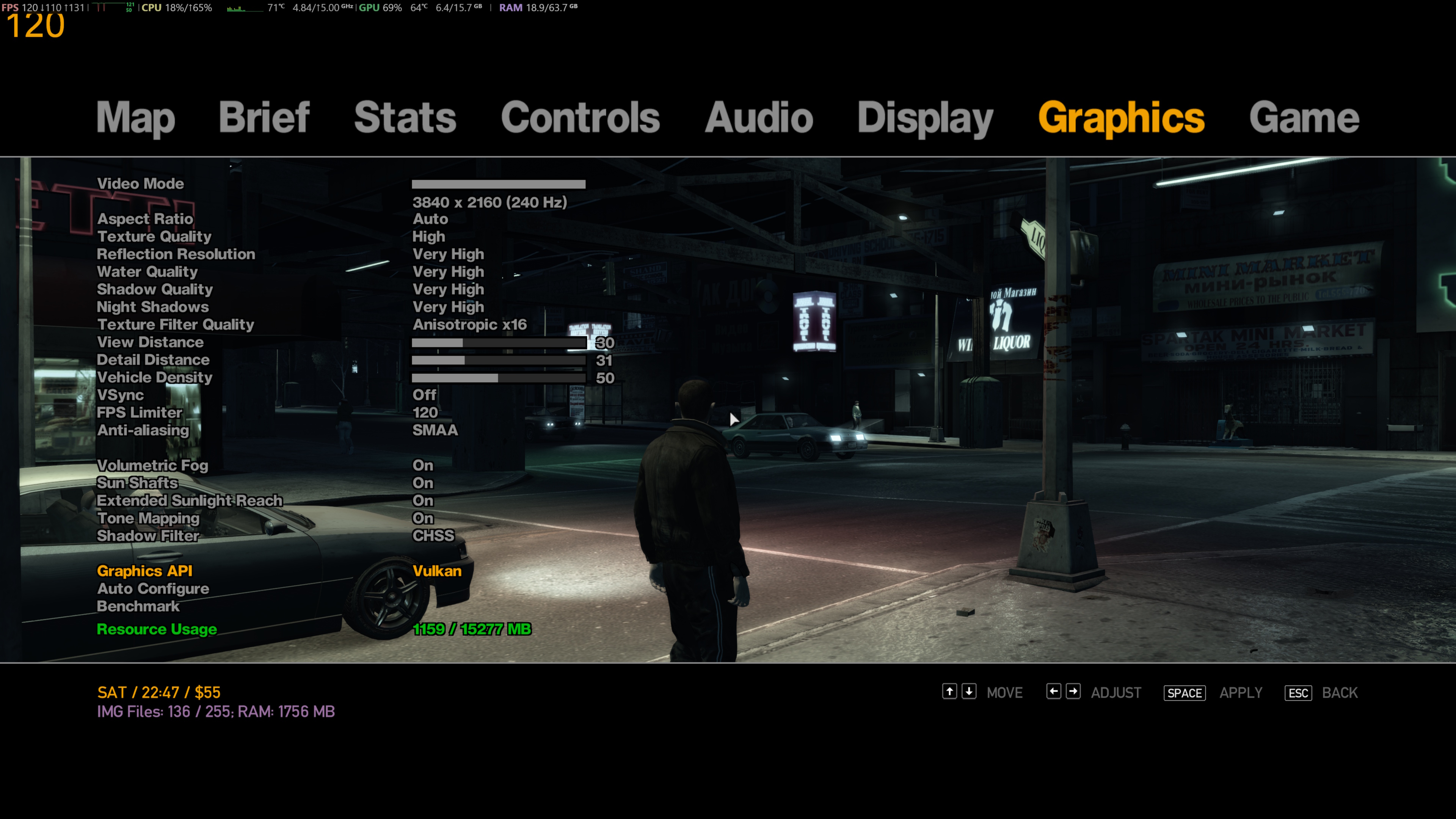
DXVK is a translation layer for DirectX games. This significantly improves performance for GTA IV.
Get it here: https://github.com/doitsujin/dxvk
Download the latest release, and obtain d3d9.dll and dxgi.dll from the x32 folder and drop it into the folder where GTAIV.exe is found.
You might see some stutters but driving around will let the shaders compile and the experience should be seemless.
DXVK is a translation layer for DirectX games. This significantly improves performance for GTA IV.
Get it here: https://github.com/doitsujin/dxvk
Download the latest release, and obtain d3d9.dll and dxgi.dll from the x32 folder and drop it into the folder where GTAIV.exe is found.
You might see some stutters but driving around will let the shaders compile and the experience should be seemless.
Installing Radio Restoration
As some of you know, Rockstar refuses to renew licenses for certain songs so when they update the game they just remove them entirely.
https://github.com/Tomasak/GTA-Downgraders/releases/tag/iv-latest
You will need a file extractor such as 7zip.
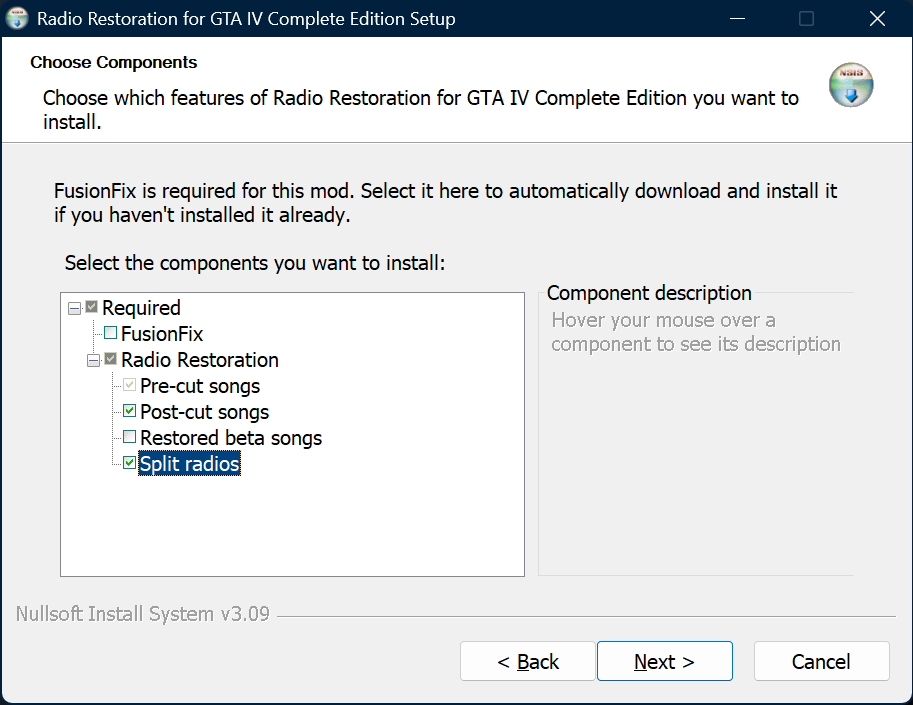
Run the setup and copy these settings, you may check beta songs if you'd like but I'm keeping it as close to vanilla as possible. It should find your install on its own.
https://github.com/Tomasak/GTA-Downgraders/releases/tag/iv-latest
You will need a file extractor such as 7zip.
Run the setup and copy these settings, you may check beta songs if you'd like but I'm keeping it as close to vanilla as possible. It should find your install on its own.
Various Fixes
This restores certain things, while also improving inconsistencies with textures and such.
Get it here: https://github.com/valentyn-l/GTAIV.EFLC.Various.Fixes/releases
https://gtaforums.com/topic/975211-various-fixes/ (explains what the optional content.zip does)
Download Installation.through.Fusion.Overloader.2.0.2.rar and in it theres a update folder. Just drag it into the same folder where GTAIV.exe is located.
Get it here: https://github.com/valentyn-l/GTAIV.EFLC.Various.Fixes/releases
https://gtaforums.com/topic/975211-various-fixes/ (explains what the optional content.zip does)
Download Installation.through.Fusion.Overloader.2.0.2.rar and in it theres a update folder. Just drag it into the same folder where GTAIV.exe is located.
Console Visuals (Optional)
This mod aims to restore console assets to PC. I highly recommend it as it looks stunning with FusionFix.
Get it here: https://gtaforums.com/topic/989098-console-visuals-the-complete-edition/
Download whatever you want (preferably all zip files)
Then go into each one you downloaded and drag the update folder to the same folder where GTAIV.exe is located. They all go into FusionFix's update folder so it doesnt actually modify anything.
Get it here: https://gtaforums.com/topic/989098-console-visuals-the-complete-edition/
Download whatever you want (preferably all zip files)
Then go into each one you downloaded and drag the update folder to the same folder where GTAIV.exe is located. They all go into FusionFix's update folder so it doesnt actually modify anything.
Launch options
Due to DXVK your VRAM capacity will likely not be seen correctly, defaulting to 512MB and limiting you to medium textures. To fix this right click on GTA IV in Steam and click properties. Then type in the launch options:
-nomemrestrict -norestrictions -availablevidmem XXXX (replace the Xs with the amount of VRAM your GPU has in MB)
Examples-
1024MB (1 GB)
2048MB (2 GB)
4096MB (4 GB)
6144MB (6 GB)
8192MB (8 GB)
16384MB (16 GB)
24576MB (24GB)
-nomemrestrict -norestrictions -availablevidmem XXXX (replace the Xs with the amount of VRAM your GPU has in MB)
Examples-
1024MB (1 GB)
2048MB (2 GB)
4096MB (4 GB)
6144MB (6 GB)
8192MB (8 GB)
16384MB (16 GB)
24576MB (24GB)
Recommended Distance Settings
Do not max out those distance settings. They go over the engine's limits, no idea why Rockstar even configured it like this.
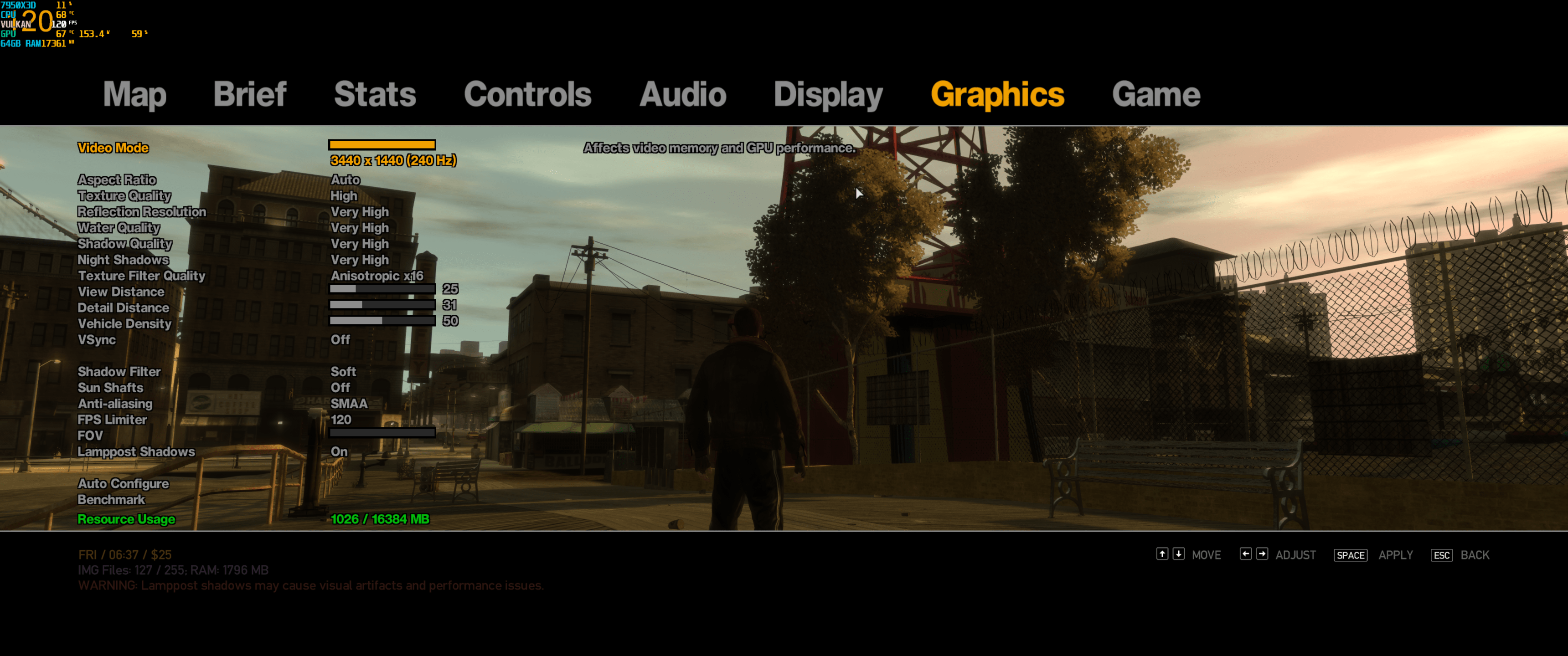
FusionFix even will warn you on the bottom if you have unrecommended values set.
If you play on a gamepad and playing above 60FPS, you will encounter the handbrake cam bug where it will spin violently. Either cap the game to 60FPS or play on keyboard and mouse as it doesnt happen there.
FusionFix even will warn you on the bottom if you have unrecommended values set.
If you play on a gamepad and playing above 60FPS, you will encounter the handbrake cam bug where it will spin violently. Either cap the game to 60FPS or play on keyboard and mouse as it doesnt happen there.
FusionFix Visuals Tweaks
FusionFix offers toggling console alpha textures and even lighting for trees plus other post processing effects.
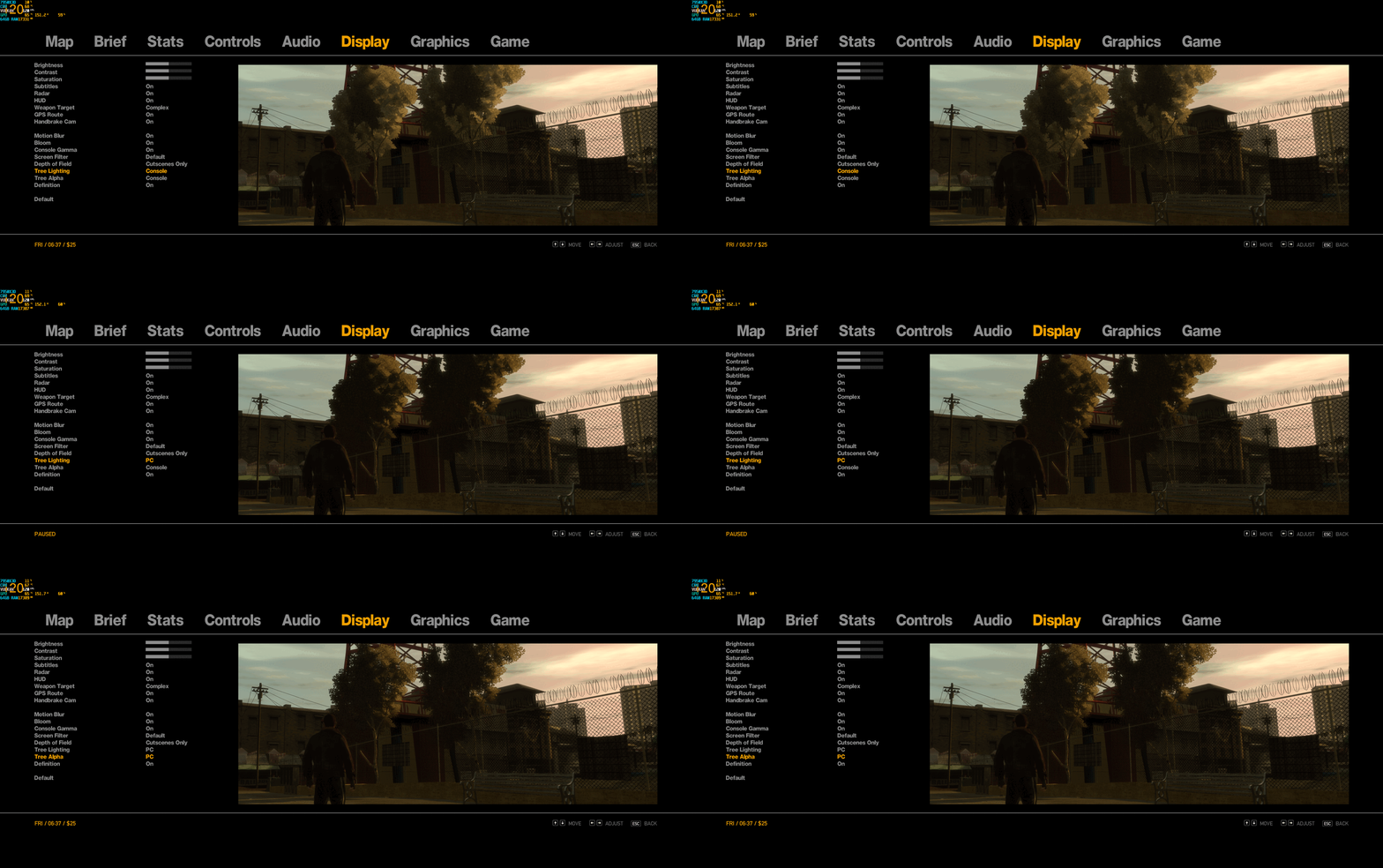
I mentioned earlier you can toggle the console gamma as well which makes the game overall darker.
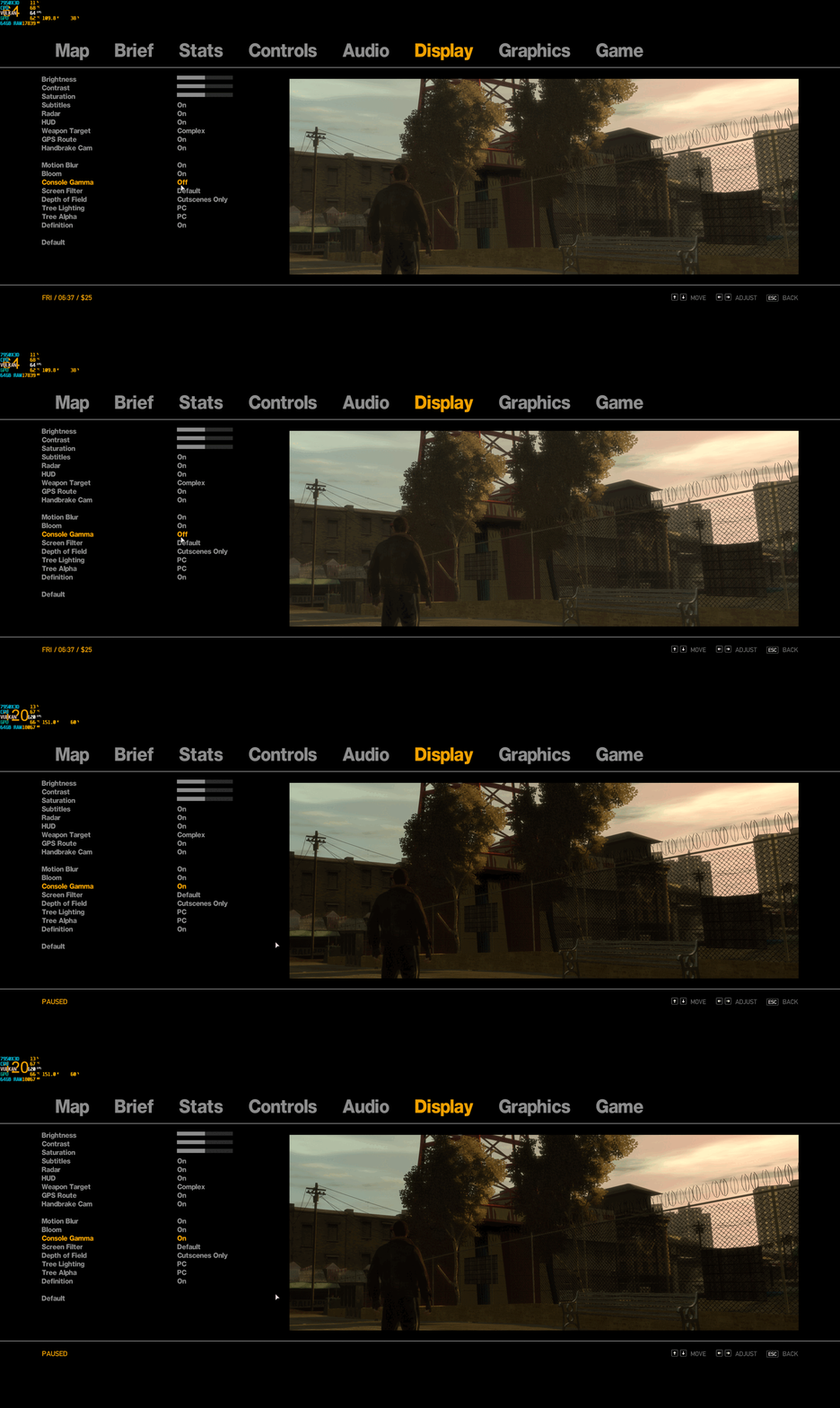
I mentioned earlier you can toggle the console gamma as well which makes the game overall darker.
More FusionFix settings
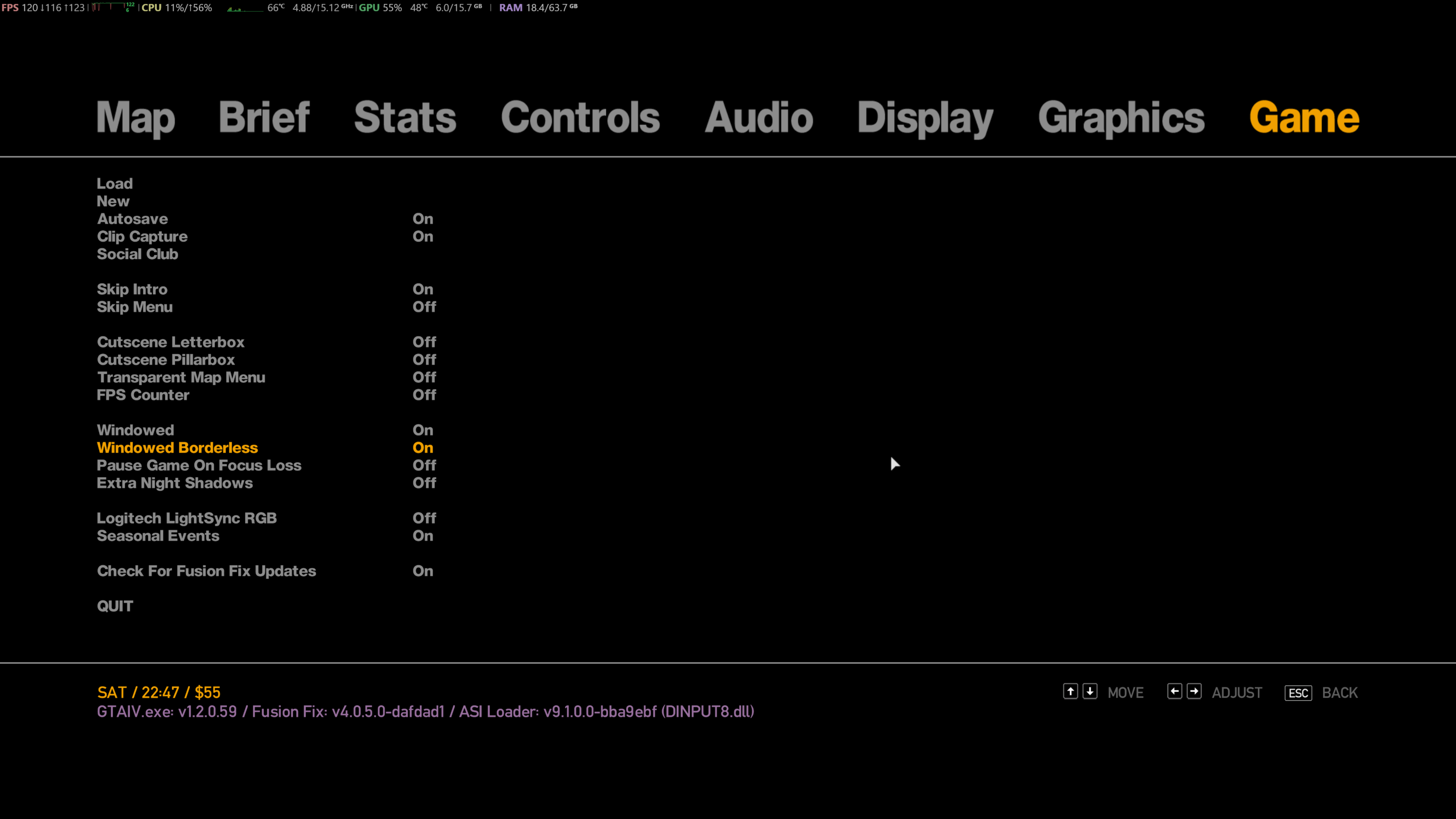
For you borderless users out there, FusionFIx also offers borderless mode. Just enable Windowed and Windowed Borderless and you are good to go.
Finished
Congratulations! You are finished and ready to delve into Liberty City. Enjoy.
More Grand Theft Auto IV: The Complete Edition guides
- How to make GTA IV: The Complete Edition perfectly playable in 2026★ 5 (2.7k)106k views5.2k ♥11 minUpdated May 2
- Grand Theft Auto IV: CE - The Improved Classic★ 5 (1.4k)53k views3k ♥4 minUpdated May 4
- Optimization, Performance and Improvements★ 5 (1.3k)52k views2.7k ♥9 minBulgarianUpdated Apr 18
- Fixing GTA IV with 4 Mods (2026 Guide)★ 5 (677)44k views1.4k ♥8 minUpdated Feb 2
- GTA IV: The Complete Edition Achievement Guide [2024]★ 5 (1.7k)32k views3.3k ♥15 minUpdated Jul 2, 2024
- GTA 4 COMPLETE EDITION: THE DEFINITIVE MOD GUIDE★ 5 (692)31k views1.3k ♥13 minUpdated Mar 11, 2024


This guide was created by its original author on the Steam Community. Are you the author and want it removed? Request removal.