How to make Mika revival work at higher framerates
The Problem
The Fix
First, go into the area with the Killer Is Dead config files. This should be, from where Steam is installed:
\steamapps\common\KillerIsDead\KidGame\Config
From there, find and open DefaultGame.ini. Near the top, there should be these lines:
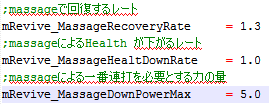
These are the numbers the game uses to determine how much you need to mash for reviving. At 60 FPS, you'll need to set the numbers to this to make everything act as close to normal as I can get:
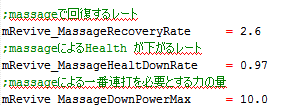
I don't have a 120 Hz monitor to test with, but at 120 FPS, these numbers might work.
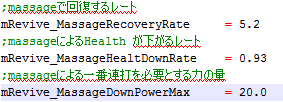
Of course, if you don't want to mash, you can try setting DownRate much lower, or RecoveryRate much higher. It's your game, play it how you wish.
Bonus Funny

Nice to see the developers inserting jokes in the hidiest of holes
- How to Change FPS from 30 to 60 / 120★ 5 (852)41k views924 ♥2 minUpdated 7 Nov, 2023
- Mondo Girl's Guide★ 5 (433)21k views527 ♥8 minUpdated 12 Jan, 2016
- Scarlett Location Guide★ 5 (536)13k views565 ♥12 minUpdated 26 Jun, 2014
- 100% Achievement Guide (by THN)★ 5 (620)12k views660 ♥14 minUpdated 7 Jan, 2021
- AAA rank guide★ 5 (348)8.6k views462 ♥5 minUpdated 30 Nov, 2024
- Free Items and Easy Items Unlock.★ 4 (103)8.3k views126 ♥2 minUpdated 12 Jun, 2014



- Upgrading to PremiumTeam Fortress 2★ 5 (20k)1441k views11k ♥6 minUpdated May 11, 2022
- No More Room in Hell Official ManualNo More Room in Hell★ 5 (2.8k)569k views2.1k ♥29 minUpdated Apr 22, 2019
- NMRiH Community Hosting GuidesNo More Room in Hell★ 5 (526)351k views653 ♥1 minUpdated Aug 10, 2022
- ULTIMATE GUIDE FOR GAME DEV TYCOONGame Dev Tycoon★ 5 (5.8k)326k views10k ♥4 minUpdated 23 Jan, 2014
- How to 'Git Gud' Soon™MORDHAU★ 5 (2k)318k views3k ♥68 minUpdated Nov 16, 2024
- Лучшие кооперативные игры SteamPAYDAY 2★ 5 (1.5k)315k views2.1k ♥56 minRussianUpdated Apr 27, 2025






This guide was created by its original author on the Steam Community. Are you the author and want it removed? Request removal.