How to play SR2 (2024) Fixes + Remaster + Mods
Credits + Video before guide
This guide was created Inspired by
If you are unintrested in reading this guide and would like to watch the video instead please use the video above
Fixes/Mods used in this guide
-- SR2 Juiced [www.kobraworks.com] Uzis
-- Gentlemen of the Row [www.saintsrowmods.com] IdolNinja
-- NOVA SPE 23 [www.saintsrowmods.com] F13
-- GTA V Camera [www.saintsrowmods.com] YeehawPhoenix
-- Destructible trees [www.saintsrowmods.com] MasakoTeam
BladeOpotato
BladeOpotato has created a Video which gives High Detail about Modding/Fixing Saints row 2.If you are unintrested in reading this guide and would like to watch the video instead please use the video above
Fixes/Mods used in this guide
-- SR2 Juiced [www.kobraworks.com] Uzis
-- Gentlemen of the Row [www.saintsrowmods.com] IdolNinja
-- NOVA SPE 23 [www.saintsrowmods.com] F13
-- GTA V Camera [www.saintsrowmods.com] YeehawPhoenix
-- Destructible trees [www.saintsrowmods.com] MasakoTeam
Easy Installation Pre-built patch
Don't want to learn how to build custom patches and just want the All-in-one patch folder?
here you go.
https://drive.google.com/file/d/1Ya0DHPYnP8qVnhFnb10Yh2xtoD5DlOnV/view?usp=sharing
just drag and drop all the files into the Main game directory and enjoy the Remastered experience
Mods added are
-- SR2 Juiced Uzis
-- Gentlemen of the Row IdolNinja
-- GTA V Camera YeehawPhoenix
-- Destructible trees MasakoTeam
here you go.
https://drive.google.com/file/d/1Ya0DHPYnP8qVnhFnb10Yh2xtoD5DlOnV/view?usp=sharing
just drag and drop all the files into the Main game directory and enjoy the Remastered experience
Mods added are
-- SR2 Juiced Uzis
-- Gentlemen of the Row IdolNinja
-- GTA V Camera YeehawPhoenix
-- Destructible trees MasakoTeam
Vanila SR2 Fixes
First Fix we can install is a Updated SR2_pc.exe
This is a must and can help with crashes
Download https://github.com/doitsujin/dxvk/files/8829740/SR2_QINLILI_PATCH.zip
File location Steam\steamapps\common\Saints Row 2
Drag and drop the SR2_pc.exe into the file location.
Ensure if asked do you want to replace this file select yes and overwrite the .exe
*CONTEXT*
when GOG reuploaded SR2 to their store front they have a more up to date excutable file compared to steam's which hasn't been updated since its final update.
This helps with modern drives and crashes when playing SR2.
running off of the Monkey Patch Framework by Scanti
This patch adds in features to make the game more playable and enjoyable while keeping the game Vanila and true to its self.
Download https://kobraworks.com/
Installation process
1. Before dragging in the files into the game directory Find file DFEngine.dll in SR2 File and rename it too pass_DFEngine.dll
This keeps in game billboards working.
2. Drag all the files from SR2_JUICED into the game directory and you are basically done. the patch is installed.
My personal favouite settings i like to set in Reloaded.ini
VanillaFXPlus - set value to 1
nhances lighting and screen effects substantially, keeps the SR2 feel while removing the yellowy/orange tint to the entire screen and makes graphics sharper.
*May Cause performance issues*
BetterAmbientOcclusion - set value to 1
*May Cause performance issues*
ExtendedRenderDistance - set value to 1
*May Cause performance issues*
ExtendedTreeFadeDistance - set value to 1
*May Cause performance issues*
ExtendedShadowRenderDistance - set value to 1
RemoveBlackBars - set value to 1
Disables black bars during cutscenes
RemoveVignette - set value to 1
Removes Ugly Vignette
BetterHandbrakeCam - set value to 1
Makes it so the camera doesn’t chase the car when you do a powerslide/handbrake.
SkipIntros - set value to 1
Skip game intro (Loads into game faster)
DisableCheatFlag - set value to 1
Disables cheat flagging.
This is a must and can help with crashes
Download https://github.com/doitsujin/dxvk/files/8829740/SR2_QINLILI_PATCH.zip
File location Steam\steamapps\common\Saints Row 2
Drag and drop the SR2_pc.exe into the file location.
Ensure if asked do you want to replace this file select yes and overwrite the .exe
*CONTEXT*
when GOG reuploaded SR2 to their store front they have a more up to date excutable file compared to steam's which hasn't been updated since its final update.
This helps with modern drives and crashes when playing SR2.
Saints row 2 Juiced
Juiced Patch is a patch for the Saints Row 2 PC Portrunning off of the Monkey Patch Framework by Scanti
This patch adds in features to make the game more playable and enjoyable while keeping the game Vanila and true to its self.
Download https://kobraworks.com/
Installation process
1. Before dragging in the files into the game directory Find file DFEngine.dll in SR2 File and rename it too pass_DFEngine.dll
This keeps in game billboards working.
2. Drag all the files from SR2_JUICED into the game directory and you are basically done. the patch is installed.
BEFORE LOADING THE GAME IT IS SUGGESTED TO LOOK AT THE RELOADED.INI AND EDIT SETTINGS YOU LIKE.
My personal favouite settings i like to set in Reloaded.ini
VanillaFXPlus - set value to 1
nhances lighting and screen effects substantially, keeps the SR2 feel while removing the yellowy/orange tint to the entire screen and makes graphics sharper.
*May Cause performance issues*
BetterAmbientOcclusion - set value to 1
*May Cause performance issues*
ExtendedRenderDistance - set value to 1
*May Cause performance issues*
ExtendedTreeFadeDistance - set value to 1
*May Cause performance issues*
ExtendedShadowRenderDistance - set value to 1
RemoveBlackBars - set value to 1
Disables black bars during cutscenes
RemoveVignette - set value to 1
Removes Ugly Vignette
BetterHandbrakeCam - set value to 1
Makes it so the camera doesn’t chase the car when you do a powerslide/handbrake.
SkipIntros - set value to 1
Skip game intro (Loads into game faster)
DisableCheatFlag - set value to 1
Disables cheat flagging.
Gentlemen of the Row Mega customizable modpack + Mods installer.
Gentlemen of the Row (GOTR) Is a Mega Modpack+Fixer installer that doubles as a mod installer.
the ultimate tool for SR2
Download https://www.saintsrowmods.com/forum/threads/gentlemen-of-the-row.24/
this will open up the installer
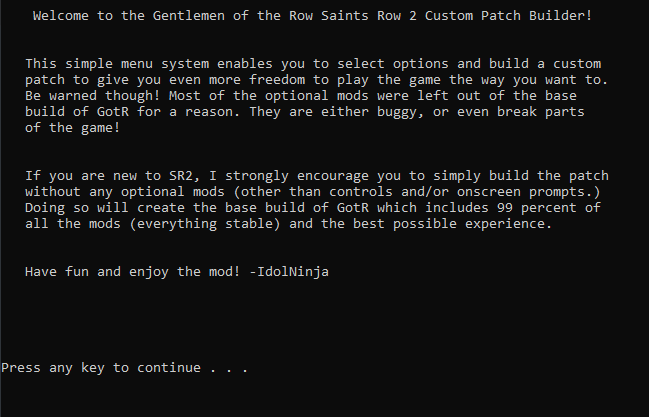
Press any key to continue and you'll be met with the mods installtion menu
this is where you can install the mods you like.
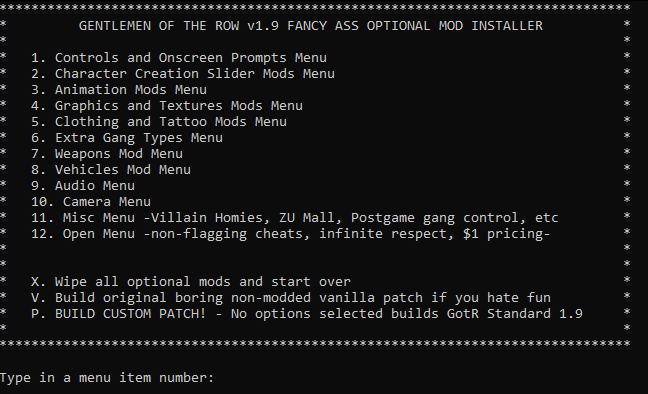
once built the patch files will be created in
Gentlemen_of_the_Row_Saints_Row_2_Super_Mod_v1.9.2\MY_CUSTOM_PATCH
in this folder you should have 3 files
- patch.vpp_pc
- preload.tbl
- preload_anim.tbl
drag these files into the main Saints row 2 Game directory folder and replace all files.
if installed correctly when you load the game you'll see this on the main menu.
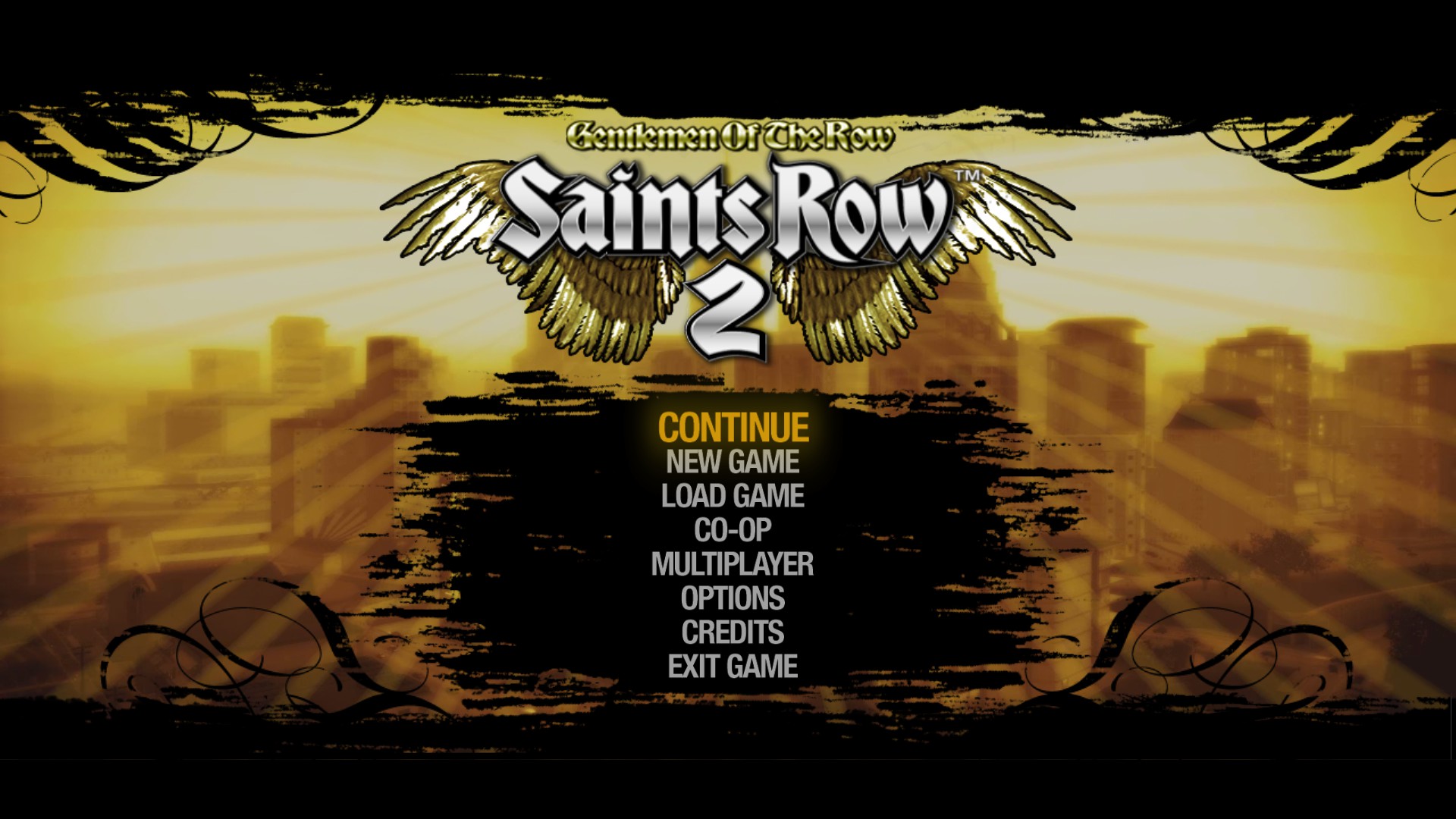
If you see Gentlemen of the row above Saints row 2 means you have correctly installed the modpack!
the ultimate tool for SR2
Download https://www.saintsrowmods.com/forum/threads/gentlemen-of-the-row.24/
Installation process
Upon downloading you want to extra the folder out of the rar file and then run the Create_Custom_GotR.bat file this will open up the installer
Press any key to continue and you'll be met with the mods installtion menu
this is where you can install the mods you like.
HIGHTLY SUGGEST BUILDING CUSTOM PATCH BY TYPING P AND PRESSING ENTER.
in patch includes Tons of added features + fixes that make the game much more full of content expanding the playstyle of SR2once built the patch files will be created in
Gentlemen_of_the_Row_Saints_Row_2_Super_Mod_v1.9.2\MY_CUSTOM_PATCH
in this folder you should have 3 files
- patch.vpp_pc
- preload.tbl
- preload_anim.tbl
drag these files into the main Saints row 2 Game directory folder and replace all files.
if installed correctly when you load the game you'll see this on the main menu.
If you see Gentlemen of the row above Saints row 2 means you have correctly installed the modpack!
Extra Quality of Life mods.
Nova SPE Modpack
this modpack contains Extra mods you can choose to add using the GOTR installer.Mods include
- 8 new jogging animations
- 3 new sprint animations
- New taunts and compliments
- New outfits and clothing item
- 18 new outfits for NPCs
- New homies
- Gangs after story completion
- Optional HUD edits
- New main menu music radios
- New main menu logos
- New themes
- More idle animations
- 29 new weapon skins
- 3 new gangs (plus the return of the Vice Kings!)
- 2 new weapons
- A flying car
- New cribs
- Saints HQ now customizable
- Unmarked cop cars
Download saintsrowmods.com/forum/threads/nova-spe-23.14232/
Once downloaded you can open the file and find tons of folders with mods inside
here are the ones i enjoy and installed for myself.
CRIBS - CUSTOMIZABLE SAINTS HQ
GANGS AFTER STORY COMPLETION
ANIMATIONS - NEW TAUNTS & COMPLIMENTS
when you go inside these folders you'll find files inside them.
These files must be put inside
Gentlemen_of_the_Row_Saints_Row_2_Super_Mod_v1.9.2\optional_mod_stuff\1-MODDERS_-_PUT_YOUR_OWN_PERSONAL_MODS_HERE
Folder location
Once you have put mods you like inside there you can build the patch again with GOTR custom patch installer again and rewrite the files with the steps from GOTR above.
Other mods i use are
GTA V Camera & Destructible trees
GTA V Camera saintsrowmods.com/forum/threads/gta-v-camera-styles-for-sr2.19300/Destructible trees saintsrowmods.com/forum/threads/destructible-trees-saints-row-2-edition.20751/
once downloaded put mods inside
Gentlemen_of_the_Row_Saints_Row_2_Super_Mod_v1.9.2\optional_mod_stuff\1-MODDERS_-_PUT_YOUR_OWN_PERSONAL_MODS_HERE and build custom patch again.
Support is Appreciated
If this guide has helped please rate and like and maybe chuck a award.
these guides take time to write and any support helps and only takes a second
these guides take time to write and any support helps and only takes a second
More Saints Row 2 guides
- Prevent Crashes And Fix FPS In Saints Row 2 (2025 Update)★ 5 (1.3k)76k views2.4k ♥12 minUpdated Apr 10
- 2025 Saints Row 2 PC Fix (Performance, Crashes)★ 5 (790)54k views1.7k ♥3 minUpdated Jun 1
- Доведение до ума (русификатор, баг фиксы)★ 5 (649)21k views724 ♥2 minRussianUpdated Aug 27, 2021
- Unlockables for the Gentlemen of the Row★ 5 (219)17k views514 ♥6 minUpdated Jun 3, 2024
- How To Fast Travel (Hidden gameplay mechanic)★ 5 (260)15k views326 ♥1 minUpdated Dec 30, 2025
- Phone Numbers Guide★ 5 (273)14k views526 ♥1 min


This guide was created by its original author on the Steam Community. Are you the author and want it removed? Request removal.