How to skip Shadow of Mordor's intro videos
What to do
- Open an Explorer window by pressing [Windows key] + [E]
- Navigate to your Shadow of Mordor directory in your Steam installation, usually C:\Program Files (x86)\Steam\steamapps\common\ShadowOfMordor\
- Navigate further into the game's subdirectory \ShadowOfMordor\game\interface\videos\
- Delete the files I have highlighted in blue in the following screenshot or move them to another directory as a backup. Do not touch any other files.
- Start the game. You should be in the main menu now right away.
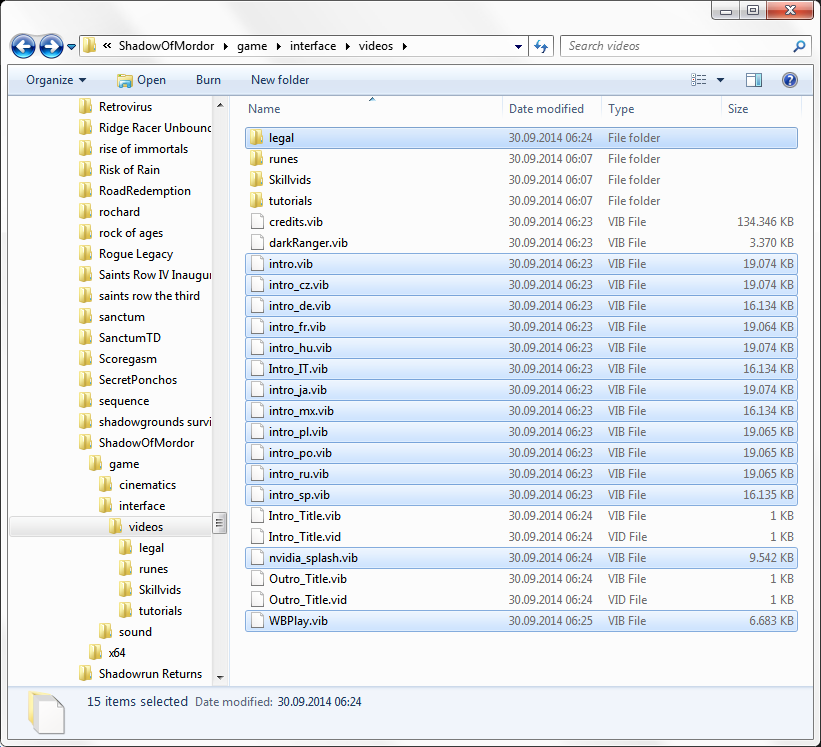
List of files to delete
Steam\steamapps\common\ShadowOfMordor\game\interface\videos\intro_cz.vib
Steam\steamapps\common\ShadowOfMordor\game\interface\videos\intro_de.vib
Steam\steamapps\common\ShadowOfMordor\game\interface\videos\intro_fr.vib
Steam\steamapps\common\ShadowOfMordor\game\interface\videos\intro_hu.vib
Steam\steamapps\common\ShadowOfMordor\game\interface\videos\intro_ja.vib
Steam\steamapps\common\ShadowOfMordor\game\interface\videos\intro_mx.vib
Steam\steamapps\common\ShadowOfMordor\game\interface\videos\intro_pl.vib
Steam\steamapps\common\ShadowOfMordor\game\interface\videos\intro_po.vib
Steam\steamapps\common\ShadowOfMordor\game\interface\videos\intro_ru.vib
Steam\steamapps\common\ShadowOfMordor\game\interface\videos\intro_sp.vib
Steam\steamapps\common\ShadowOfMordor\game\interface\videos\intro.vib
Steam\steamapps\common\ShadowOfMordor\game\interface\videos\legal\legaltext.vib
Steam\steamapps\common\ShadowOfMordor\game\interface\videos\legal\legaltext_fr.vib
Steam\steamapps\common\ShadowOfMordor\game\interface\videos\legal\middleware.vib
Steam\steamapps\common\ShadowOfMordor\game\interface\videos\nvidia_splash.vib
Steam\steamapps\common\ShadowOfMordor\game\interface\videos\WBPlay.vib
An update on Oct 11, 2014 downloaded more videos that cannot be skipped. Also delete, move or rename the following files. The screenshot above still applies:
Steam\steamapps\common\ShadowOfMordor\game\interface\videos\legal\legaltext_Patch.vib
Steam\steamapps\common\ShadowOfMordor\game\interface\videos\legal\legaltext_fr_Patch.vib
Steam\steamapps\common\ShadowOfMordor\game\interface\videos\legal\middleware_Patch.vib
Thank you to GODzilla for the heads-up.
Plagiarism
- 100% Achievement Guide★ 5 (2.6k)65k views3.6k ♥23 minUpdated 7 Aug, 2015
- Руководство по всем достижениям!★ 5 (3.2k)42k views3.6k ♥19 minRussianUpdated 13 Oct, 2021
- 7 Beginner’s Tips For Shadow Of Mordor★ 5 (592)42k views418 ♥4 minUpdated 3 Jul, 2017
- 100% Achievement Guide: Shadow of Mordor★ 5 (1.3k)38k views2.7k ♥112 minUpdated 15 May
- A Guide, Tips, Tricks, Harder Difficulties, Runes, and more.★ 5 (221)24k views307 ♥16 minUpdated 4 Oct, 2014
- Руна Надвигающаяся буря(легендарная)★ 4 (230)22k views69 ♥1 minRussianUpdated 3 Aug, 2016


- Upgrading to PremiumTeam Fortress 2★ 5 (20k)1441k views11k ♥6 minUpdated May 11, 2022
- No More Room in Hell Official ManualNo More Room in Hell★ 5 (2.8k)569k views2.1k ♥29 minUpdated Apr 22, 2019
- NMRiH Community Hosting GuidesNo More Room in Hell★ 5 (526)351k views653 ♥1 minUpdated Aug 10, 2022
- ULTIMATE GUIDE FOR GAME DEV TYCOONGame Dev Tycoon★ 5 (5.8k)326k views10k ♥4 minUpdated 23 Jan, 2014
- How to 'Git Gud' Soon™MORDHAU★ 5 (2k)318k views3k ♥68 minUpdated Nov 16, 2024
- Лучшие кооперативные игры SteamPAYDAY 2★ 5 (1.5k)315k views2.1k ♥56 minRussianUpdated Apr 27, 2025






This guide was created by its original author on the Steam Community. Are you the author and want it removed? Request removal.