How to use any skin on any character!
Step 0: Introduction
The last one is probably a yes, so this is a guide for you. ( ͡° ͜ʖ ͡°)
Step 1: Getting Started
Before we get started, you need any text based program. Notepad works but I recommend Notepad++. You may also need Winrar to download some mods. The workshop is very buggy and at times won't download subscribed mods.
Download for Notepad++: https://notepad-plus-plus.org/downloads/
Download for WinRar: https://www.rarlab.com/download.htm
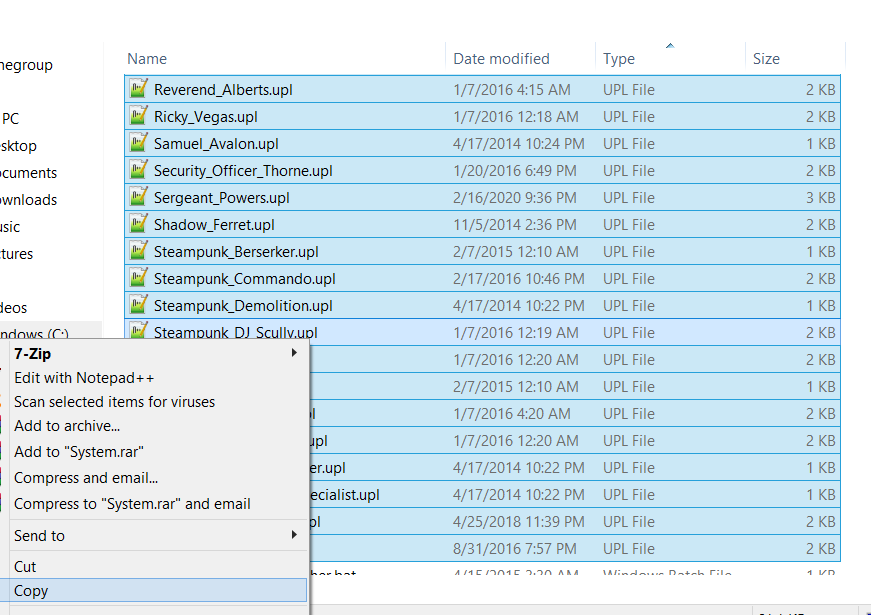 You will also need to backup your upl files!
 This is in case you mess up or just want any vanilla characters back without doing the whole verify cache thing, which can remove other mods. Go to your system folder:
(I think the Pyros are free for everyone, regardless if they have TF2 in their library...)
Step 2: Downloading our skin
Let say you have this mod installed, (shameless plugin!)
https://steamcommunity.com/sharedfiles/filedetails/?id=198722105
But also want this mod as well and don't want to replace your existing mod.
https://steamcommunity.com/sharedfiles/filedetails/?id=1098925826
So we are going to keep the top mod and have Azusa replace someone else.
Go ahead and download Azusa: Dropox: Nakano Azusa[www.dropbox.com]After your download is complete go to
Step 3 A: (Replacement)
For this method we will call it The Replacement method.
From our downloaded Azusa file, inside the System folder, drag & drop Pyro_Blue.upl anywhere, like on your desktop.
Next we will open up the upl.So open up the file in a text based program and you should see this:
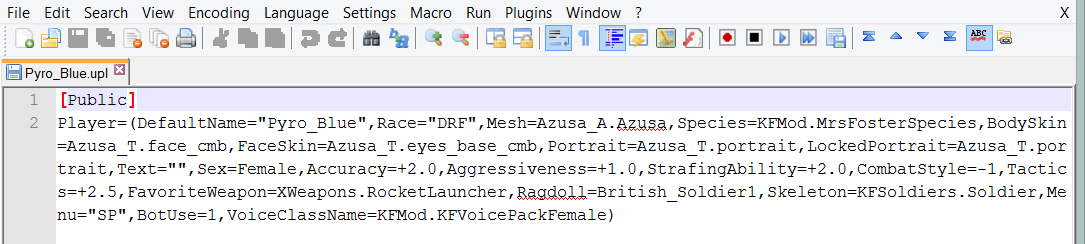
Or if your like me and have Word Warp Off
 (You can disable Word Warp in the View tab, but i will enable it for our example)
First replace
(You can disable Word Warp in the View tab, but i will enable it for our example)
First replace Hit ctrl + s to save. You know its saved when the red floppy turns blue.
 --->
---> Secondly rename the file from
 Now place the edited upl file into your system folder, replacing the existing Schnieder file.
Start your game and you should now have Azusa in your game.
[screen]
To revert Schnieder, copy and paste your backup you made.
Step 3 B: (Copy&paste)
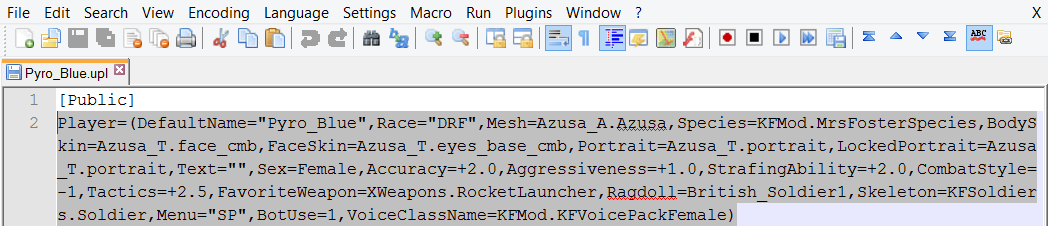
Open up the Azusa's Pyro_Blue.upl and copy (ctrl + c) everything below [Public]/the entire 2nd code line like so:
Now open up your Private_Schnieder.upl thats already in your system folder.
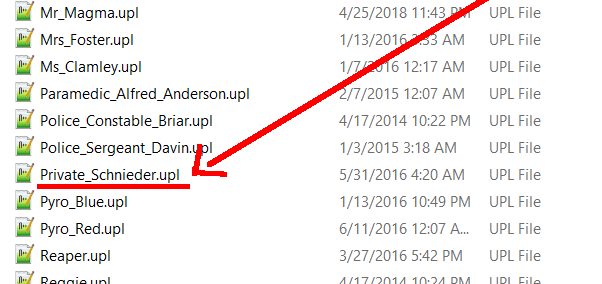 and you should see this:
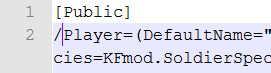
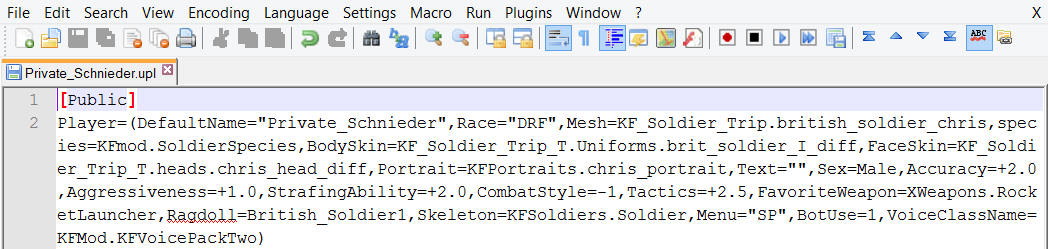 on the 2nd code line, add a / in front of "player". So it should be
  Now skip line 3 and on line 4, paste the Azusa Pyro code. You should have this now: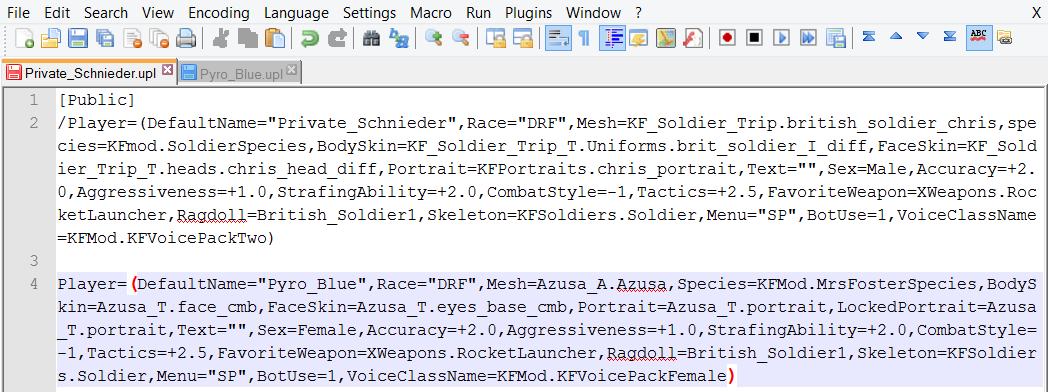
Finally change
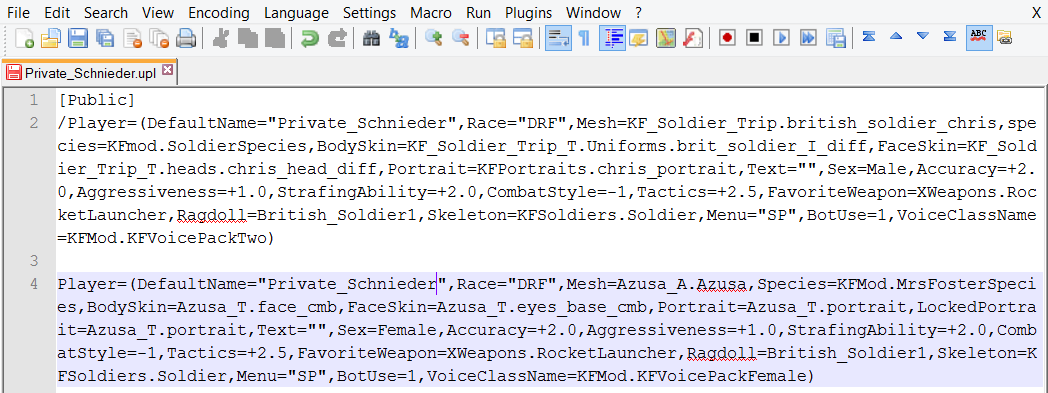
Start your game and you should now have Azusa in your game.
[screen]
To revert Schnieder, you can place a slash on the Azusa code (line 4) and remove the slash from the original code.
The beauty of the slash is that it tells the game to skip over this line and move on to the next one. With this method, you can have a single upl hold up to several characters and change who you want to use with just slashes.
You can use your backup to completely revert your file back.
Notes
If you didn't make those upl back ups i asked earlier, well no problem cause here is a link to them:
https://drive.google.com/file/d/1LSKDEflOcd39eEiwqIweslYHXiYOZcrO
As you can see, the name from DefaultName=" " must match the upl file name.
There is only ONE exception to this and thats for the 2nd Harchier they released (The one you get for owning The Ball. He wears a black jacket ingame instead of his usual Brown one) His file name is Harchier__Spebbington while his default name text is Harchier_Spebbington_II
And speaking about the 2nd Harchier, you can't copy and paste the coding from Harchier II onto someone else's upl and get the "No Time for Love, Dr. Jones" achievement that way. It has to be done with either Harchier upl.
You can replace anyone regardless if you own them or not, of course you still need to buy/unlock characters to actually use them.
You can't make your own upls and play with them like this. The game is coded to only use those specific 50 upls as characters. Anyone else added in can't be used as tested way back since 2009 or something.
Thank you for reading and have fun.
- How to fix technical problems, perk issues, achievement issues★ 5 (854)42k views1.1k ♥35 minUpdated Mar 24, 2020
- Получение достижений Killing Floor★ 5 (2.2k)20k views2.5k ♥62 minRussianUpdated May 11
- How To Be The Best Berserker Ever★ 5 (694)19k views727 ♥17 minUpdated Feb 2
- KNOWLEDGE IS POWER★ 5 (496)17k views563 ♥2 minBulgarianUpdated Dec 9, 2014
- Hell on Earth - Solo - All Maps★ 5 (1.3k)17k views1.6k ♥24 minUpdated Oct 5, 2025
- [Полное Руководство] Perks, Weapons & Anti-FP Tutorial★ 5 (1.2k)16k views1k ♥69 minRussianUpdated Jun 27, 2019




- Upgrading to PremiumTeam Fortress 2★ 5 (20k)1441k views11k ♥6 minUpdated May 11, 2022
- No More Room in Hell Official ManualNo More Room in Hell★ 5 (2.8k)569k views2.1k ♥29 minUpdated Apr 22, 2019
- NMRiH Community Hosting GuidesNo More Room in Hell★ 5 (526)351k views653 ♥1 minUpdated Aug 10, 2022
- ULTIMATE GUIDE FOR GAME DEV TYCOONGame Dev Tycoon★ 5 (5.8k)326k views10k ♥4 minUpdated 23 Jan, 2014
- How to 'Git Gud' Soon™MORDHAU★ 5 (2k)318k views3k ♥68 minUpdated Nov 16, 2024
- Лучшие кооперативные игры SteamPAYDAY 2★ 5 (1.5k)315k views2.1k ♥56 minRussianUpdated Apr 27, 2025






This guide was created by its original author on the Steam Community. Are you the author and want it removed? Request removal.