How to use your old Gaijin account on Steam. Fixed addition!
basic overview
So the general gist of how this works is you need steam to launch the Gaijin launcher
instead of the game itself.
this is achieved by telling steam to launch the game in manual update mode.
From there just log in with your Gaijin account.
And that's literally it!
the downside is it takes longer because it has to check for updates, and you have to do this every time you want to boot up the game.
But the upside is that you practically do nothing to get this to work.
instead of the game itself.
this is achieved by telling steam to launch the game in manual update mode.
From there just log in with your Gaijin account.
And that's literally it!
the downside is it takes longer because it has to check for updates, and you have to do this every time you want to boot up the game.
But the upside is that you practically do nothing to get this to work.
instructions
1 Start War Thunder using steam.
When the launch option prompt appears select "Launch Manual Game Update" and click play.
You will have to edit your launch settings if you already have a default launch setting selected.
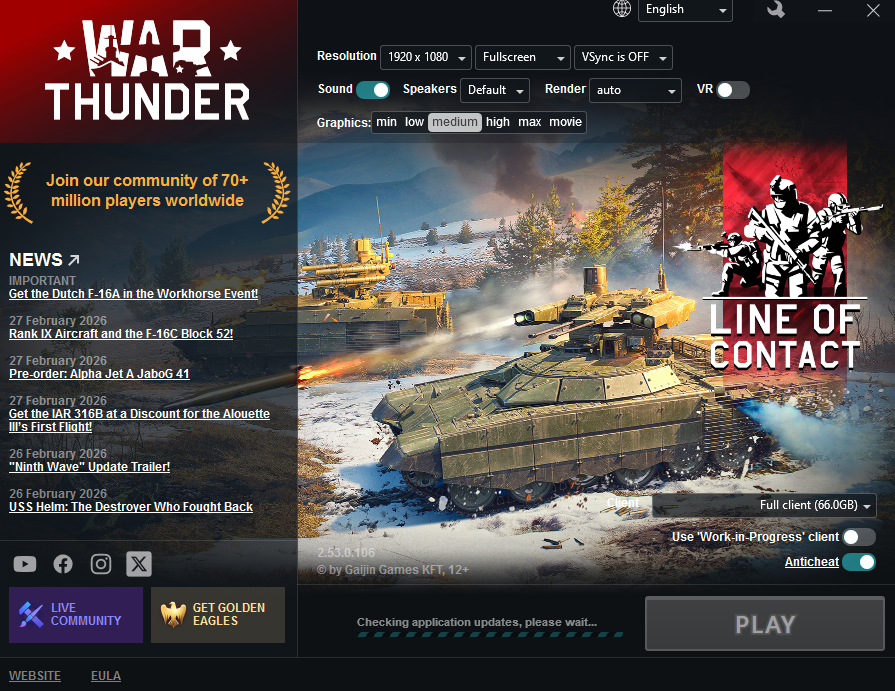
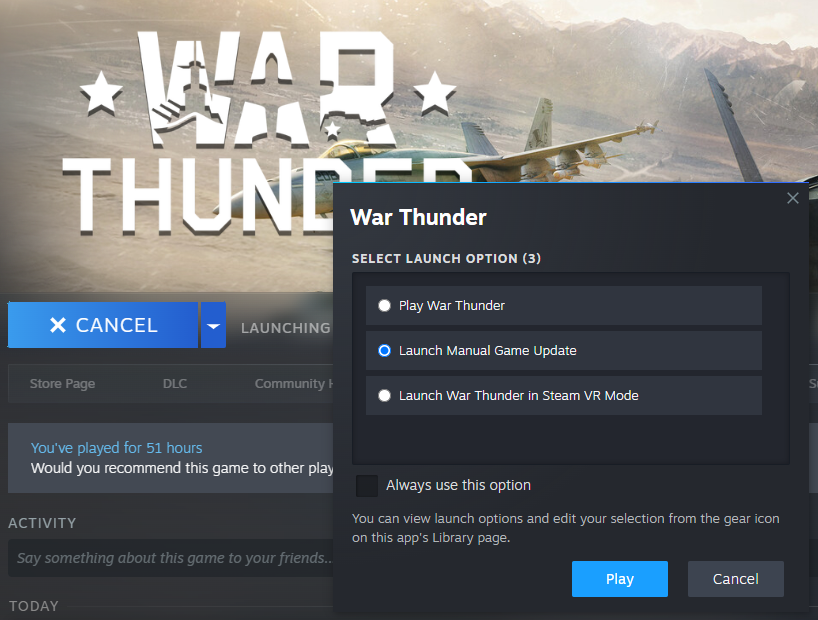 2 This will boot up the War Thunder Gaijin launcher.
It will run a short update check, once it's done click the play button.
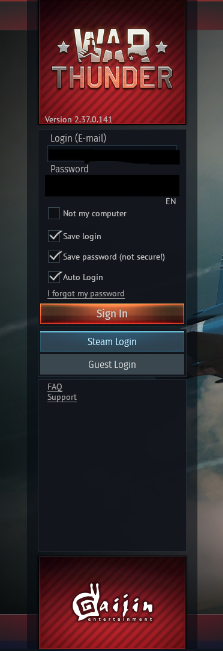
 3 It should launch War Thunder on the sign in Page.
From there login with your previous Gaijin account information.
When the launch option prompt appears select "Launch Manual Game Update" and click play.
You will have to edit your launch settings if you already have a default launch setting selected.
2 This will boot up the War Thunder Gaijin launcher.It will run a short update check, once it's done click the play button.
3 It should launch War Thunder on the sign in Page.From there login with your previous Gaijin account information.
If all went well it should've booted up using your old Gaijin account!
And that should be it. We have once again outsmarted the accursed snail... For now.
Until they release another update that breaks it.
More War Thunder guides
- The Event and Sale Calendar★ 5 (385)75k views618 ♥7 minUpdated Jul 18
- List of Classified Document Leaks★ 5 (415)60k views579 ♥5 minUpdated Jul 5, 2025
- How to cheat in War Thunder?[FREE]★ 5 (1.7k)46k views308 ♥1 minBulgarianUpdated Mar 8, 2022
- Screenshot Competition - How to Participate★ 5 (311)40k views164 ♥1 min
- Календарь мероприятий и распродаж War thunder📅★ 4 (156)40k views311 ♥4 minRussianUpdated Feb 1
- Как получить дакимакуры в вар тандер в 2026★ 5 (191)27k views240 ♥1 minRussianUpdated Jun 4



🔥 Popular guides
- Upgrading to PremiumTeam Fortress 2★ 5 (20k)1441k views11k ♥6 minUpdated May 11, 2022
- No More Room in Hell Official ManualNo More Room in Hell★ 5 (2.8k)569k views2.1k ♥29 minUpdated Apr 22, 2019
- NMRiH Community Hosting GuidesNo More Room in Hell★ 5 (526)351k views653 ♥1 minUpdated Aug 10, 2022
- ULTIMATE GUIDE FOR GAME DEV TYCOONGame Dev Tycoon★ 5 (5.8k)326k views10k ♥4 minUpdated 23 Jan, 2014
- How to 'Git Gud' Soon™MORDHAU★ 5 (2k)318k views3k ♥68 minUpdated Nov 16, 2024
- Лучшие кооперативные игры SteamPAYDAY 2★ 5 (1.5k)315k views2.1k ♥56 minRussianUpdated Apr 27, 2025






This guide was created by its original author on the Steam Community. Are you the author and want it removed? Request removal.