input lag and hitreg problems fix
Hitreg fix if you are missing shots
We are now going to check your MTU size:
- Run cmd as administrator (in windows, click start, type cmd, open as administrator)
- Paste this command into cmd and press enter: netsh interface ipv4 show subinterfaces
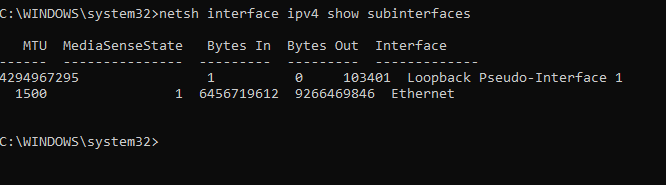
The most important thing now, in my case, are word: Ethernet and MTU value 1500. What is the interface name and your MTU value? Remember it.
Check yours and copy paste it, should be on the same position as mine, last word second row.
Second row under MTU – in my case, its 1500 (1500bites). What is the value in your PC? Remember your value.
Lets test 1500 (my default value) with DB Game Server IP. (game server IP – IP of one gaming server, objective 8v8 location Frankfurt)
- copy paste this command into CMD and press enter: ping 188.122.68.71 -f -l 1500
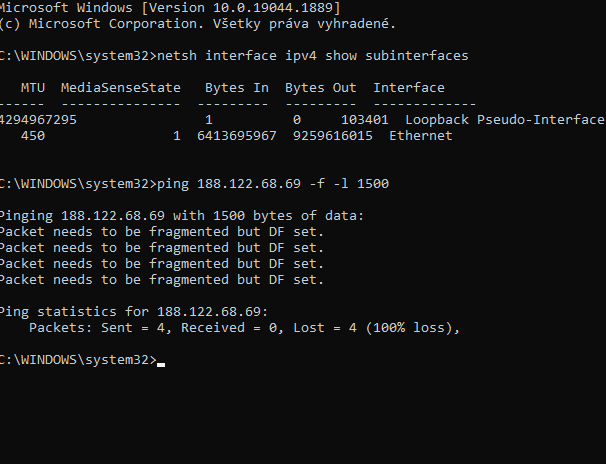 As you may see, my results are:
Packet needs to be fragmented but DF set. 100% packet loss.
This is maybe the reason why I was missing shots, headshots, my hitreg was bad. 100% packet loss on the game servers.
So we need to change the MTU values for better resuts.
Lets test better MTU values now.
Copy paste this command and lets check how it will ping our DB game server (add some low value, for example 400):
ping 188.122.68.69 -f -l 400
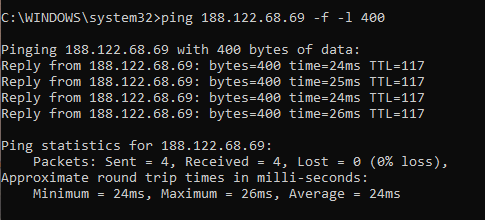
As you may see, with value 400 no more packet loss!
Finding the best MTU that will work for you can be time consuming, so lets do this like a PRO!
Please continue here: https://seriouslyweird.net/possible-hitreg-fix-for-games-working-in-dirty-bomb/
- How to try out mercs without buying them or waiting for rotation! (ADDED: Redeye Update!)★ 5 (292)26k views403 ♥3 minUpdated Aug 14, 2015
- Wall Jumps Everyone Should Know★ 5 (520)19k views602 ♥6 minUpdated Jul 1, 2017
- Super Secret Protips + Community Protips★ 4 (156)12k views46 ♥3 minBulgarianUpdated Sep 23, 2015
- Long Jump keybind (Crouch jumps made ez)★ 5 (190)11k views225 ♥1 minUpdated Sep 10, 2016
- List of Loadout Card Variants [Final Update]★ 5 (198)10k views221 ♥24 minUpdated Jul 10, 2020
- Dirty Bomb Console Commands (updated)★ 5 (263)9.4k views416 ♥12 minUpdated Aug 30, 2018






- Upgrading to PremiumTeam Fortress 2★ 5 (20k)1441k views11k ♥6 minUpdated May 11, 2022
- No More Room in Hell Official ManualNo More Room in Hell★ 5 (2.8k)569k views2.1k ♥29 minUpdated Apr 22, 2019
- NMRiH Community Hosting GuidesNo More Room in Hell★ 5 (526)351k views653 ♥1 minUpdated Aug 10, 2022
- ULTIMATE GUIDE FOR GAME DEV TYCOONGame Dev Tycoon★ 5 (5.8k)326k views10k ♥4 minUpdated 23 Jan, 2014
- How to 'Git Gud' Soon™MORDHAU★ 5 (2k)318k views3k ♥68 minUpdated Nov 16, 2024
- Лучшие кооперативные игры SteamPAYDAY 2★ 5 (1.5k)315k views2.1k ♥56 minRussianUpdated Apr 27, 2025






This guide was created by its original author on the Steam Community. Are you the author and want it removed? Request removal.