Launching CoH without Intro
1. Step (All Screen's language: German)
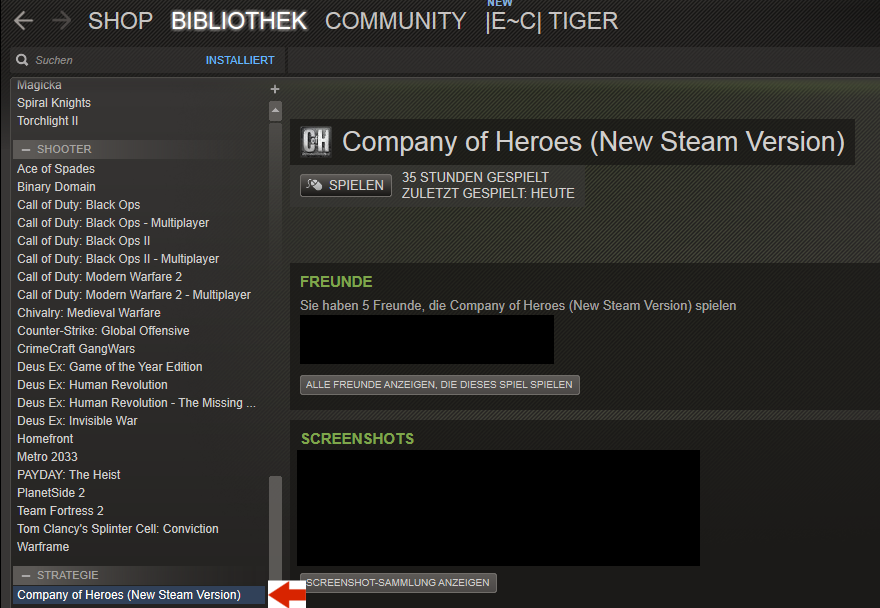
Find in your Steam-Libary the entry "Company of Heroes (New Steam Version)"
2. Step
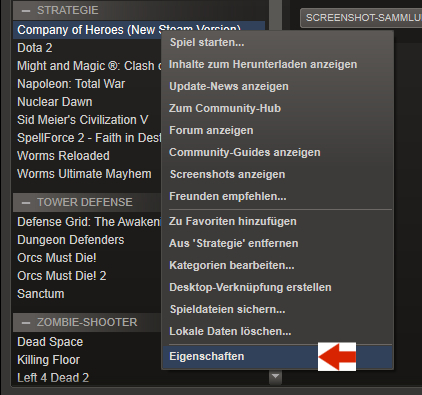
Rightclick on it and leftclick on "Properties"
3. Step
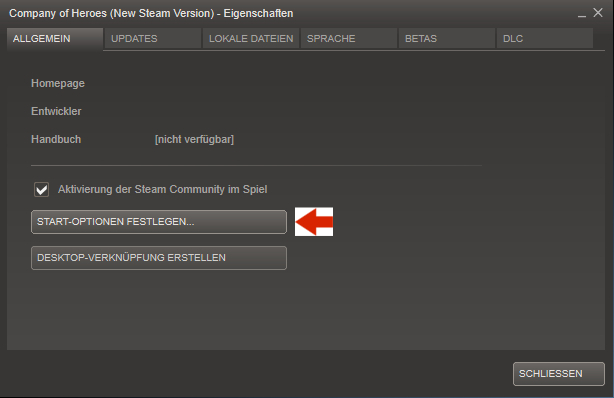
Now it have to open a new window where you can find the button who named like Launching- or Starting-Options, leftclick on it.
Final Step
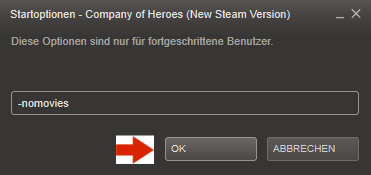
Type "-nomovies" (without " ) in the new openend window. Now confirm and close all windows again and at the next start you won't have any intros.
More Company of Heroes guides
- How to use console commands on Company of Heroes★ 5 (367)25k views720 ♥3 minUpdated Jan 29, 2021
- Big D*** Boss' Guide to Company of Heroes - The Basics★ 5 (274)19k views313 ♥28 minUpdated Jul 26, 2015
- Bootcamp: What you need to know★ 5 (271)18k views240 ♥12 minUpdated Nov 30, 2016
- Trouble Shooting Crashes and Connection Issues Possible Fixes for COH 1 NSV★ 5 (239)18k views271 ♥10 minUpdated Apr 19, 2018
- FPS BOOST TUTORIAL★ 5 (267)17k views343 ♥11 minUpdated Feb 14, 2018
- FAQ: New Steam Version, Legacy Edition, DLCs, Mods★ 5 (176)15k views148 ♥6 minUpdated Nov 9, 2025





This guide was created by its original author on the Steam Community. Are you the author and want it removed? Request removal.