My modding guide for the dumb [UPDATED OCT 2025]
Intro
Here is what you are expecting to see in this guide.
- What Skyrim Version are you are on
- What is SKSE?
- Mod Manager
- How to disable auto updates?
- Where and how to install mods?
- Mod Recommendations.
- Load Order & Conflicts
Before you get started...
Please leave a like on these videos in this guide. Without them, this guide would be long af lol. It would also help creators with their channel.
Please leave a like on these videos in this guide. Without them, this guide would be long af lol. It would also help creators with their channel.
What Skyrim Version are you are on?
It is important to know what version of Skyrim you are using because some mods are not compatible with certain versions or is not compatible with versions below that.
Example:
A mod is meant for game version 1.6.1170 but you are using version 1.6.640. It will not work or will have problems if you install that mod.
Locate your Skyrim Folder
1. Go to your Game Library.
2. Find Skyrim Special Edition and open the Properties.
3. Go to Installed Files and click on the 'Browse' button.
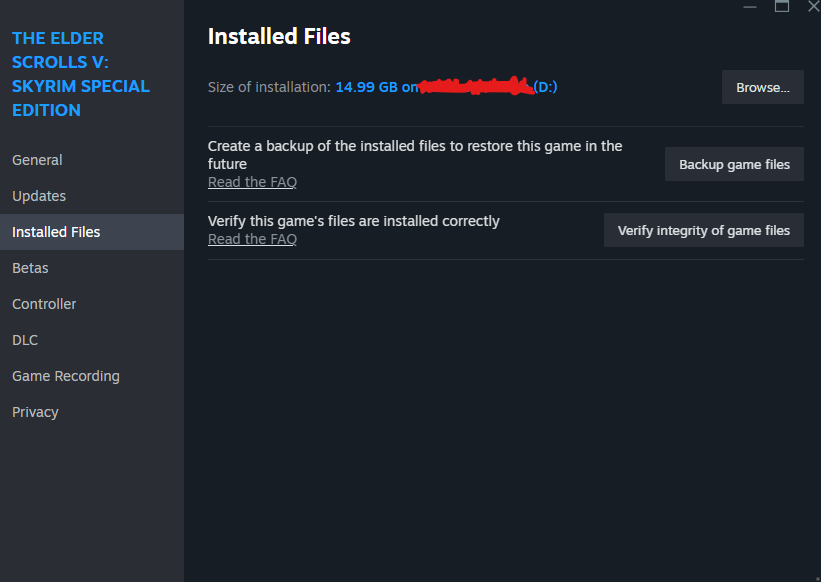
Once you have located your Skyrim Folder do the following:
Locate SkyrimSE.exe --> open PROPERTIES --> Go to DETAILS
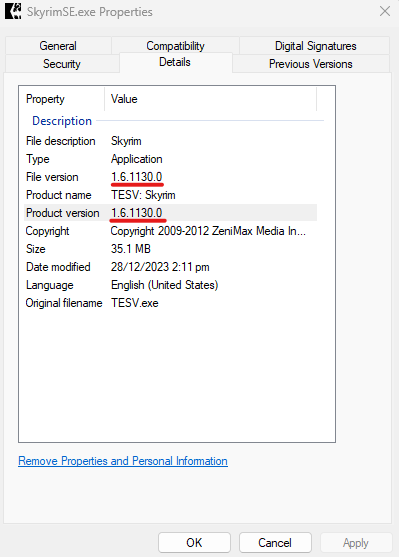
Example:
A mod is meant for game version 1.6.1170 but you are using version 1.6.640. It will not work or will have problems if you install that mod.
How to check your Skyrim Version
Locate your Skyrim Folder
1. Go to your Game Library.
2. Find Skyrim Special Edition and open the Properties.
3. Go to Installed Files and click on the 'Browse' button.
Once you have located your Skyrim Folder do the following:
Locate SkyrimSE.exe --> open PROPERTIES --> Go to DETAILS
Lists of Skyrim Versions in order (STEAM duh)
- 1.6.1170 (Latest)
- 1.6.1130
- 1.6.640
- 1.6.353
- 1.5.97
Now if you want to downgrade/upgrade Skyrim versions, watch this guide.
(OPTIONAL)
(OPTIONAL)
Once you are done. You can now download SKSE.
What is SKSE?
SKSE is short for Skyrim Script Extender.
It is a third-party tool that adds scripting capability to the game and allows users to create mods.
If you're on 1.6.1170, you can download the latest version of SKSE. If you're below that version here's a list of what version of SKSE you should download for your Skyrim.
It is a third-party tool that adds scripting capability to the game and allows users to create mods.
Here's a video that properly explains SKSE and how to install SKSE.
Now you should be aware of what version of SKSE you should download depending on your Skyrim Version.
If you're on 1.6.1170, you can download the latest version of SKSE. If you're below that version here's a list of what version of SKSE you should download for your Skyrim.
- 1.6.1130 = skse64_2_02_05 aka (2.2.5)
- 1.6.640 = skse64_2_02_03 aka (2.2.3)
- 1.6.629 = skse64_2_02_00 aka (2.2.0)
- 1.5.97 = skse64_2_00_20 aka (2.0.2)
Mod Manager
As the name suggests, it is a useful tool for managing mods.
Now there are TWO main Mod Managers that I know exists.
MOD ORGANIZER 2 (MO2)
Download Page for MO2 [www.nexusmods.com]VORTEX
Download Page for Vortex[www.nexusmods.com]Which Mod Manager is the best?
My opinion:
MO2 is the best opinion for begineers because it's easier to organize mods and organize your loadorder.
Here is an install Guide for MO2 and Vortex.
MO2 Install Guide
Vortex Install Guide
How to disable auto updates?
Why should you disable auto updates?
Explanation:
- If Bethesda release a new version of Skyrim, your game would update automatically and all your mods would be incompatible with that version.
Explanation 2:
- If you have downgraded to whatever Skyrim version. Steam will try to update your game to the latest version. You don't want that so you have to disable auto updates for Skyrim.
To disable auto updates. Do the following:
1. Go to your Game Library.
2. Find Skyrim Special Edition.
3. Open the properties
4. Go to Updates and take note of the App ID
489830
(This is the same for everyone btw)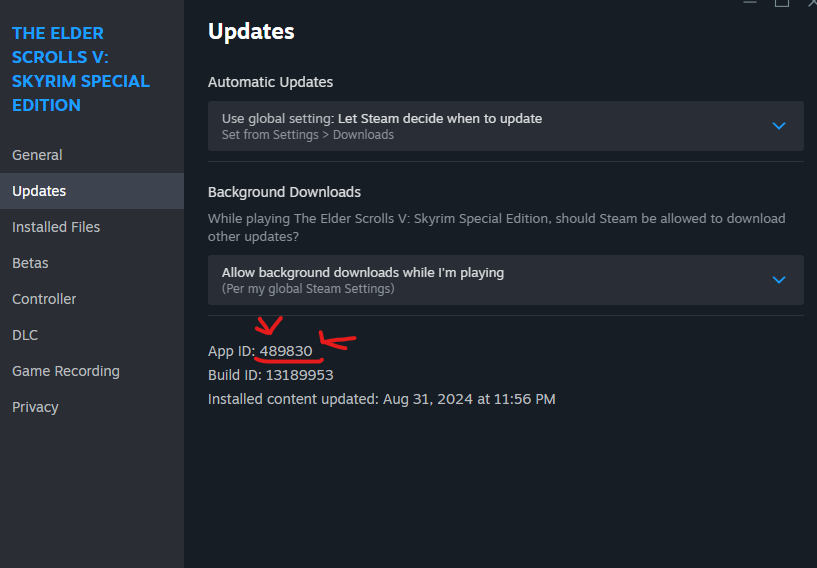
5. Go to your SteamLibrary Folder
6. Go to steamapps Folder
7. Find appmanifest_489830 and go to properties.
8. Go to attributes and enable 'Read-Only'. That's all.
Now if you are stuck or don't understand how to do it. Here's a video that demonstrates it.
Where and how to install mods?
Majority of the mods uploaded are in Nexus.
Before you start downloading, you need to know RRD (I made it up).
Reading is important when it comes to modding because sometimes there are certain instructions you need to follow provided by the mod author. You can usually find these in the comment section or the description.
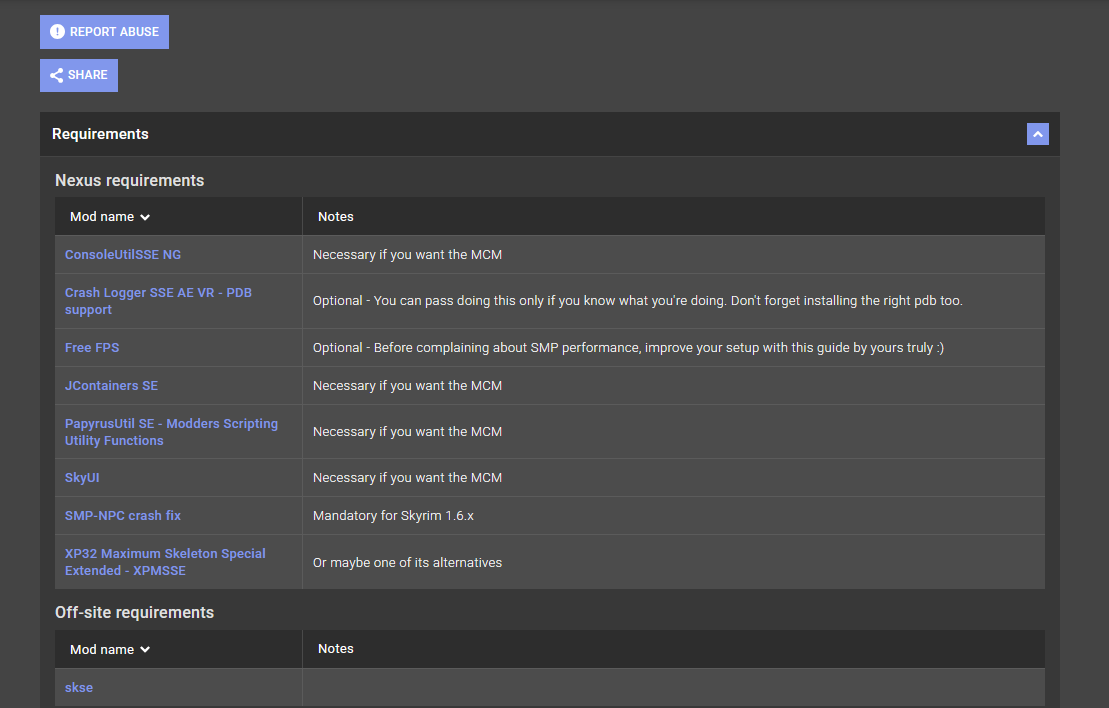
For requirements, you have to check the requirements to see what mod is needed/required. Sometimes the mod author includes "Optional/Recommended" mods in the requirements so you have to READ carefully.
Hard Requirement = REQUIRED
[b[ Soft Requirement [/b] = Recommended but NOT required
Here is an example of requirements w/ Optional Description.
NEXUSMODS[www.nexusmods.com]
Before you start downloading, you need to know RRD (I made it up).
1. READ
2. REQUIREMENTS
3. DON'T BE AN IDIOT
Reading is important when it comes to modding because sometimes there are certain instructions you need to follow provided by the mod author. You can usually find these in the comment section or the description.
For requirements, you have to check the requirements to see what mod is needed/required. Sometimes the mod author includes "Optional/Recommended" mods in the requirements so you have to READ carefully.
Hard Requirement = REQUIRED
[b[ Soft Requirement [/b] = Recommended but NOT required
Sometimes, NOT ALL are required to be downloaded. TAKE NOTE OF THAT!!!!
Here is an example of requirements w/ Optional Description.
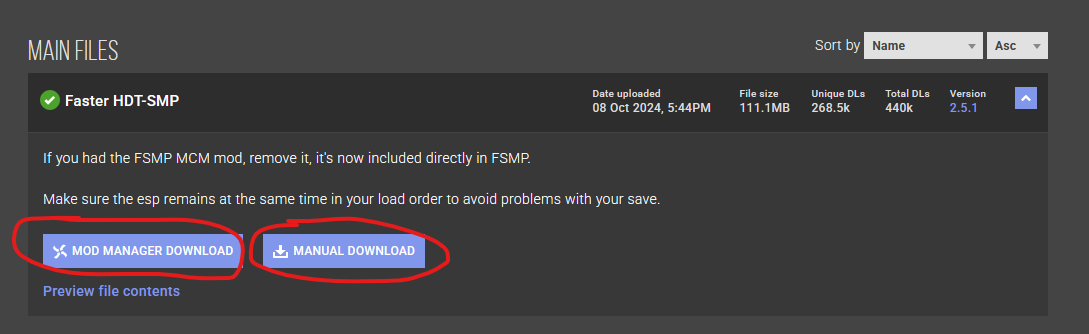
Now how to download mods?
There is always two options in Nexus, Mod Manager Download and Manual Download.Mod Manager Download
The mod will be downloaded straight into your mod manager and can be found in the download section. For Vortex idk, I don't use Vortex.Manual Download
It will go straight to your 'Download' folder.To add the mod into your mod manager, just drag it in. It's that simple!
Mod Recommendations
Now here are the mods I recommend for newbies.
- Unofficial Skyrim Special Edition Patch
- SkyUI
- Address Library for SKSE Plugins
- Payprus Tweaks NG
- Racemenu
- ECE Sliders Addon for Racemenu
- Alternate Start - Live Another Life - SSE (Optional if you want to skip the cart scene)
- Fuz Ro D-oh - Silent Voice
- ConsoleUtil NG
- Faster HDT SMP
- Skyrim Priority SE AE - CPU Performance FPS Optimizer
- SSE Display Tweaks
- Crash Logger SSE AE VR - PDB support
- Vanilla Scripting Enhancements
- Modern Brawl Bug Fix
- Lightened Skyrim
- Face Discoloration Fix
- Actor Limit Fix
- Bug Fixes SSE
- RemoveAllItems Freeze Fix
Main and Important Mods
- Unofficial Skyrim Special Edition Patch
- SkyUI
- Address Library for SKSE Plugins
- Payprus Tweaks NG
- Racemenu
- ECE Sliders Addon for Racemenu
- Alternate Start - Live Another Life - SSE (Optional if you want to skip the cart scene)
- Fuz Ro D-oh - Silent Voice
- ConsoleUtil NG
- Faster HDT SMP
Useful Patches
- Skyrim Priority SE AE - CPU Performance FPS Optimizer
- SSE Display Tweaks
- Crash Logger SSE AE VR - PDB support
- Vanilla Scripting Enhancements
- Modern Brawl Bug Fix
- Lightened Skyrim
- Face Discoloration Fix
- Actor Limit Fix
- Bug Fixes SSE
- RemoveAllItems Freeze Fix
Load Order & Conflicts
What is Load Order?
- Load Order is where your mod is positioned in your plugins. (This is the best explanation I can think of lol)
MO2 tip:
MO2 has LOOT built-in. You can sort your plugins by pressing the "Sort" button. YOU SHOULD NEVER sort your plugins mid game. It's recommended to sort your plugins when starting a new game.
What is Conflicts?
- Conflicts is when a mod is conflicting with another mod's files. Commonly this happens if a mod's file/s has the SAME file name and directory with another mod's file/s.Example:
Mod1 and Mod2 both have a file called Test.dds or Test.esp, they would conflict with each other.
TAKE NOTE!
Not all conflicts are bad. It really depends on the mod and the requirements.
For example:

'Whose Quest Is It Anyways' is conflicting with 'Whose Quest Is It Anyways NG'
I need 'Whose Quest Is It Anyways NG' overwrite 'Whose Quest Is It Anyways' files so that it can work for my version of Skyrim or better yet improve it.
Now, 'Winning Conflict' or overwriting files really depend on the LOAD ORDER.
When it comes to Load Order in your Mod Manager. The BOTTOM always wins the conflict.
The End
I hope this guide helps a lot of people get started with modding and helps them avoid making common mistakes as well
That is all for this guide. Thanks for reading and happy modding!
More The Elder Scrolls V: Skyrim Special Edition guides
- How to get an GF while playin The Elder Scrolls V: Skyrim★ 5 (1.4k)69k views538 ♥1 minBulgarian
- Кооперативный мод на Skyrim★ 5 (435)52k views1.1k ♥6 minRussianUpdated Jul 8, 2025
- The Basics: Modding Skyrim SE Properly in 2025 (All versions)★ 5 (1.5k)46k views2.2k ♥83 minUpdated Mar 19, 2025
- The Elder Scrolls V: Skyrim - Complete Achievement Guide (Inc. DLC)★ 5 (1.5k)40k views3.9k ♥29 minUpdated May 19
- Подборка проверенных модов + Vortex (TES V: Skyrim SE/AE)★ 5 (913)36k views2.4k ♥35 minRussianUpdated Jun 10, 2025
- Skyrim - 100% Achievement Guide★ 5 (969)27k views2.6k ♥21 minUpdated Feb 9




This guide was created by its original author on the Steam Community. Are you the author and want it removed? Request removal.