New Multiplayer-Focused Black Ops 3 Patch – Enhanced Gameplay and Security
Introduction
Hi everyone,
Together with a few friends who are passionate about Black Ops 3, we’ve created a new patch.

Together with a few friends who are passionate about Black Ops 3, we’ve created a new patch.
CleanopsT7
Designed to enhance the multiplayer experience and tackle longstanding issues in the game.
What’s Included in the Patch:
- P2P Hosting: Lets you host your own public P2P Multiplayer Lobby. -> Quick Guide [www.cleanops.dev]
- Improved Performance: Fixes FPS issues for smoother gameplay.
- Exploit Patches: Addresses known exploits to maintain fair gameplay and provides full crash protection — unlike the outdated T7 patch.
- Anti-Cheat System: Automatically removes previously identified cheaters to ensure a better gaming environment.
- IP Spoofing Protection: Keeps your IP address safe from potential threats.
- Quality-of-Life Features: Includes a server browser, name changer, and more to improve your overall experience.
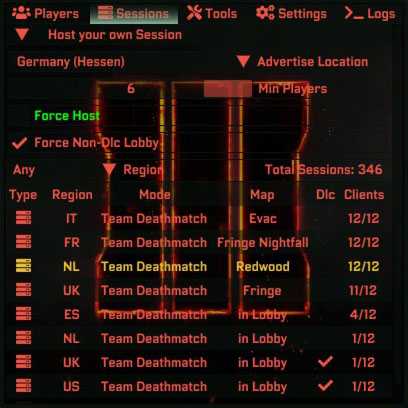
- Improved Performance: Fixes FPS issues for smoother gameplay.
- Exploit Patches: Addresses known exploits to maintain fair gameplay and provides full crash protection — unlike the outdated T7 patch.
- Anti-Cheat System: Automatically removes previously identified cheaters to ensure a better gaming environment.
- IP Spoofing Protection: Keeps your IP address safe from potential threats.
- Quality-of-Life Features: Includes a server browser, name changer, and more to improve your overall experience.
Why This Patch?
As previous patches were discontinued and never had multiplayer in focus, we built this patch from the ground up to enhance the multiplayer experience. It’s actively maintained to ensure it stays relevant and effective for today’s community.
How to Get Started:
Installing Clean Ops is quick and easy. Follow the steps below or watch our video guide to get started:
- Download the d3d11.dll here [raw.githubusercontent.com].
- Move the d3d11.dll into your Black Ops 3 directory (usually located in C:\Program Files (x86)\Steam\steamapps\common\Call of Duty Black Ops III).
Tip: Right-click the game in Steam → Manage → Browse local files - Launch the game through Steam as you normally would.
Linux Note: If Clean Ops doesn't load, set your Steam Launch Options to: WINEDLLOVERRIDES="d3d11=n,b" %command%
How to Uninstall Clean Ops:
To disable Clean Ops T7 or remove its core files:
- Temporary Disable (Vanilla Mode): Hold the **Shift** key immediately after launching the game through Steam. Continue holding it until a popup appears; Clean Ops will not load for that session.
- Via the Clean Ops In-Game UI: Launch Black Ops 3, open the Clean Ops UI, go to Settings -> System [github.com], and click the "Delete Clean Ops" button.
- Manual Removal: While Call of Duty: Black Ops 3 is not running, navigate to your game's root directory (e.g., C:\Program Files (x86)\Steam\steamapps\common\Call of Duty Black Ops III) and delete the d3d11.dll file.
Note: The Clean Ops folder will stay in your game directory but won't do anything without the `d3d11.dll`.
How to Get Involved:
- Check out our GitHub Repository[github.com] for details and download.
- Join our Discord server[discord.gg] to connect with us and other players.
- Join our Discord server[discord.gg] to connect with us and other players.
Community Feedback Wanted!
We’d love to hear your thoughts. If you encounter issues or have suggestions, please let us know! This patch was created for the community, and your feedback will help make it even better.
Final Notes
While we’ve aimed to be as transparent as possible, the source code isn’t included in the repository to prevent malicious use of the patch.
Let’s make Black Ops 3 multiplayer great again. See you in the game!
Best regards,
- Cleanops Team
https://cleanops.dev/
Let’s make Black Ops 3 multiplayer great again. See you in the game!
Best regards,
- Cleanops Team
https://cleanops.dev/
More Call of Duty: Black Ops III guides
- All Around Enhancement Mod Description And Info★ 5 (597)211k views1.2k ♥34 minUpdated Aug 10, 2023
- Black Ops 3: Console Commands★ 5 (1.1k)123k views2.4k ♥7 minUpdated Feb 13, 2020
- Origins Ultimate Guide★ 5 (562)72k views1.7k ♥17 minUpdated Jun 24, 2017
- Guide for Shadows of Evil [2020 updated]★ 5 (1.4k)67k views4.5k ♥24 minUpdated Mar 22, 2024
- Guide for Der Eisendrache [2020 updated]★ 5 (1.3k)65k views4.6k ♥30 minUpdated Feb 22, 2024
- How to download the community T7patch by Serious and play online zombies safely (also FPS Fix)★ 5 (491)62k views1.2k ♥4 minUpdated Apr 30






This guide was created by its original author on the Steam Community. Are you the author and want it removed? Request removal.