No Intro Videos / Remove FOX, AMD, CA Intros
Disabling the videos
Thankfully very quick and easy:
- Open your file browser (i.e. explorer on windows).
- In there navigate to the video folder of the game, i.e.:C:\Steam\SteamLibrary\SteamApps\common\Alien Isolation\DATA\UI\MOVIES\
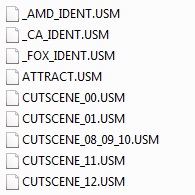
- Rename the following three files (i prefer to just add an underscore "_" at the beginning):
- AMD_IDENT.USM
- CA_IDENT.USM
- FOX_IDENT.USM
- AMD_IDENT.USM
- Start the game without the videos.
Linux
Linux users need to rename the files (in the GUI or via terminal with the "mv [OLDNAME] [NEWNAME]" command)
thanks to worzel910
- ca_feral_ident.webm
- fox_ident.webm
thanks to worzel910
More Alien: Isolation guides
- How To Not Get Spooked★ 5 (1.4k)46k views804 ♥5 minUpdated Apr 2, 2015
- Alien: Isolation 100% Achievement Guide★ 5 (1.2k)31k views2k ♥20 min
- What's Behind That Door?★ 5 (730)31k views582 ♥2 minUpdated Oct 11, 2014
- The Silent Walk★ 5 (428)26k views303 ♥1 minUpdated Feb 27, 2017
- Alien: Isolation maps★ 5 (704)22k views1.1k ♥3 minUpdated Mar 17
- All Collectibles★ 5 (1.1k)22k views1.8k ♥75 minUpdated Jan 10, 2015


This guide was created by its original author on the Steam Community. Are you the author and want it removed? Request removal.