Random crashing with no error message
How can I know if I am affected by this particular issue ?
Type Windows + R > Powershell, and copy/paste all the following lines in the terminal :
After executing this command (takes a few seconds), you will find two log files in your explorer containing all the errors encountered during HITMAN 2 execution.
- In hitman2_app.log, look for "0x80000003" error code.
- in hitman2_system.log look for "display driver nvlddmkm stopped responding" message.
If you find both of these errors, you are affected by this issue.
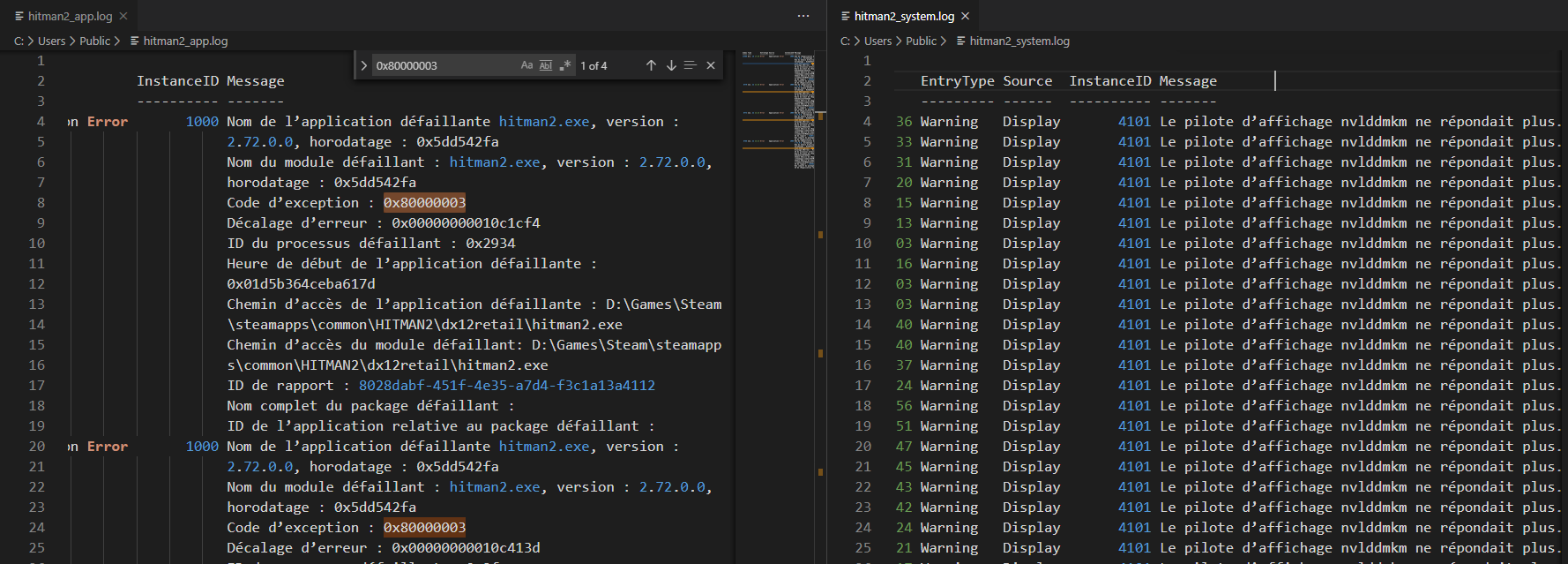 Example of both files but in French because I don't have an English Windows build..
Disclaimer
Some informations about TDR and the nvlddmkm error can be found on GeForce forum.
It's important to note that it can affect both Nvidia and AMD cards. A TDR crash can be caused by many different things so it’s difficult to pin down. Lots of people have seen these errors with HITMAN 2 DirectX 11 and latest Nvidia Turing cards, but keep in mind that it's not necessarily the only reason.
The generic error people visit this guide for is :
Display driver nvlddmkm stopped responding and was recovered.
Common issues that can cause a TDR :
- Incorrect memory timings or voltages
- Insufficient / problematic PSU
- Corrupt driver install
- Overheating
- Unstable overclocks (GPU or CPU)
- Incorrect MB voltages (generally NB/SB)
- Faulty graphics card
- A badly written driver or piece of software
- ...
Most of these issues are not covered in this guide.
How can I fix these crashes ?
These steps are independent and are the result of multiple feedbacks from the community. After each one, try to play and if it doesn't work, go to the next step.
- 1. First, try to start the game in DirectX 12 mode (available in launcher settings). This is the official solution recommended by IOI for people using a Nvidia Turing card.
Notes :
- DirectX 12 requires a recent and updated Windows 10 build with all drivers update to date and compatible hardware.
- 2. Underclock your RAM by disabling any XMP (Intel Extreme Memory Profile) or AMP (AMD Memory Profile) profile in your BIOS/UEFI interface.
- 3. Use the Nvidia reference clock speeds for your GPU. If your GPU has been factory overclocked by the manufacturer or if you have applied a custom overclocking, underclock your core clock using MSI Afterburner or an equivalent tool.
- 4. Use HITMAN Vulkan Enabler[www.nexusmods.com]. This mod can allows you to get rid of this issue if you can't use DirectX 12 (you're not using Windows 10 for example) but it has some downsides about performances, especially with big resolutions like 2K / 4K.
Notes : The game will be very laggy at the start, because it needs to recalculate and cache all the shaders in real time on each map. Once this step is done, the game will be stable with no stutter.
The game won't start / crashes at start-up
More informations
- Versions, Legacy and DLC explained (Store Guide)★ 5 (808)50k views643 ♥36 minUpdated Feb 24, 2023
- Hitman 2 Item & Unlock List ~ And What to Get First★ 5 (738)30k views1.4k ♥53 minUpdated Feb 24, 2023
- HITMAN™ 2 - Гайд по достижениям и испытаниям★ 5 (1.3k)27k views2.2k ♥104 minRussianUpdated Jan 24, 2023
- HITMAN 2 | Chameleon | All Disguises★ 5 (196)19k views377 ♥7 minUpdated Mar 8, 2020
- HITMAN™ 2 Achievement Guide★ 5 (721)18k views1.1k ♥9 minUpdated Jan 29, 2022
- HAVEN Island, Last Resort - Challenges, Achievements & Walkthroughs★ 4 (127)14k views165 ♥11 minUpdated Sep 30, 2019




- Upgrading to PremiumTeam Fortress 2★ 5 (20k)1441k views11k ♥6 minUpdated May 11, 2022
- No More Room in Hell Official ManualNo More Room in Hell★ 5 (2.8k)569k views2.1k ♥29 minUpdated Apr 22, 2019
- NMRiH Community Hosting GuidesNo More Room in Hell★ 5 (526)351k views653 ♥1 minUpdated Aug 10, 2022
- ULTIMATE GUIDE FOR GAME DEV TYCOONGame Dev Tycoon★ 5 (5.8k)326k views10k ♥4 minUpdated 23 Jan, 2014
- How to 'Git Gud' Soon™MORDHAU★ 5 (2k)318k views3k ♥68 minUpdated Nov 16, 2024
- Лучшие кооперативные игры SteamPAYDAY 2★ 5 (1.5k)315k views2.1k ♥56 minRussianUpdated Apr 27, 2025






This guide was created by its original author on the Steam Community. Are you the author and want it removed? Request removal.