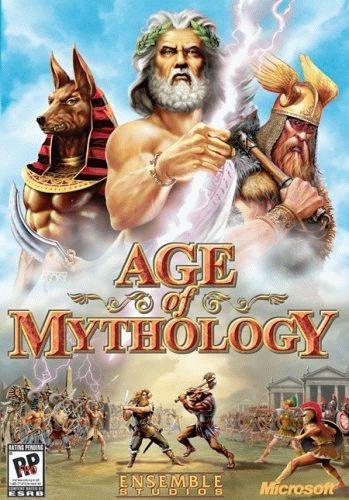
Recovering the Colors of Age of Mythology Extended Edition on the Steam Library
Step 1: Access SteamGridDB
Navigate to the Website: Open your browser and go to SteamGridDB [www.steamgriddb.com]. In case you don't know, this website offers custom artwork for many Steam games, including classic covers and logos.
Step 2: Find Age of Mythology Extended Edition
Search for the Game: Use the search function on SteamGridDB to look for "Age of Mythology Extended Edition". Once you've typed in the name, you should see various grid images, logos, and banners for the game.
Step 3: Select Classic Artwork
Browse Artwork: Look through the available artwork, focusing on those that match the original game's aesthetic, including:
Covers: The main images that appear on your Steam library.
Banners: Horizontal images used for the game's page.
Logos: Logos for the game which can appear in the game's title on your library.
Grid Image: The rectangular image that appears when the game was last played.
Download the Artwork: Click on the images you want to use. Save these files to your computer in a place where you can easily find them.
Covers: The main images that appear on your Steam library.
Banners: Horizontal images used for the game's page.
Logos: Logos for the game which can appear in the game's title on your library.
Grid Image: The rectangular image that appears when the game was last played.
Download the Artwork: Click on the images you want to use. Save these files to your computer in a place where you can easily find them.
Step 4: Update Your Steam Library
Covers: Right-click the current cover in your Steam library and select "Manage" > "Set Custom Artwork". Replace it with the classic cover you downloaded.
Banners: Right-click the current banner and select "Manage" > "Set Custom Background". Replace with the classic banner.
Logos: Right-click the current logo and select "Manage" > "Set Custom Logo". Replace with the classic logo.
Grid Image: Right-click the grid image and select "Manage" > "Set Custom Artwork" to update this as well.
Banners: Right-click the current banner and select "Manage" > "Set Custom Background". Replace with the classic banner.
Logos: Right-click the current logo and select "Manage" > "Set Custom Logo". Replace with the classic logo.
Grid Image: Right-click the grid image and select "Manage" > "Set Custom Artwork" to update this as well.
Step 5: Enjoy the game's original artwork in all its glory
Now, you've successfully restored the vibrant, classic look of "Age of Mythology Extended Edition" on your Steam library, bringing back the nostalgia and beauty of the original game's presentation. And with this, tell the devs they can shove the remake in that place.
More Age of Mythology: Extended Edition guides
- Age of Mythology Cheats *UPDATED 2022 with NEW cheats! (2.8)*★ 5 (954)42k views1.4k ♥2 minUpdated May 16, 2022
- How to play as Thor★ 5 (241)18k views199 ♥13 minUpdated Feb 8, 2016
- Age of Mythology: Extended Edition Cheat Overview★ 5 (208)13k views349 ♥3 minUpdated Mar 10, 2017
- Русификаторы для Age of Mythology: Extended Edition★ 5 (176)11k views242 ♥1 minRussianUpdated Dec 28, 2016
- Age of Mythology; a Broad Overview for Newbies★ 4 (156)9.8k views127 ♥15 min
- Age of Mythology: Hersir Names (Norse gods)★ 5 (169)6.9k views102 ♥25 minUpdated Oct 10, 2019



🔥 Popular guides
- Upgrading to PremiumTeam Fortress 2★ 5 (20k)1441k views11k ♥6 minUpdated May 11, 2022
- No More Room in Hell Official ManualNo More Room in Hell★ 5 (2.8k)569k views2.1k ♥29 minUpdated Apr 22, 2019
- NMRiH Community Hosting GuidesNo More Room in Hell★ 5 (526)351k views653 ♥1 minUpdated Aug 10, 2022
- ULTIMATE GUIDE FOR GAME DEV TYCOONGame Dev Tycoon★ 5 (5.8k)326k views10k ♥4 minUpdated 23 Jan, 2014
- How to 'Git Gud' Soon™MORDHAU★ 5 (2k)318k views3k ♥68 minUpdated Nov 16, 2024
- Лучшие кооперативные игры SteamPAYDAY 2★ 5 (1.5k)315k views2.1k ♥56 minRussianUpdated Apr 27, 2025






This guide was created by its original author on the Steam Community. Are you the author and want it removed? Request removal.