Remapping Hotkeys using AutoHotkey (wasd instead of arrow keys)
Intro
Company Of Heros does not have an in game option that allows for the remaping of keys. I found a good solution posted on the relic forums (http://forums.relicnews.com/showthread.php?111795-Remapping-Hotkeys-Alternative-Solution) that was helpful.
AutoHotkey
You will need to download AutoHotkey for this to work: http://www.autohotkey.com/ if you are unfamiliar with the program start here: http://www.autohotkey.com/docs/
Running the script
1) Create a new text document / or autohotkey script:
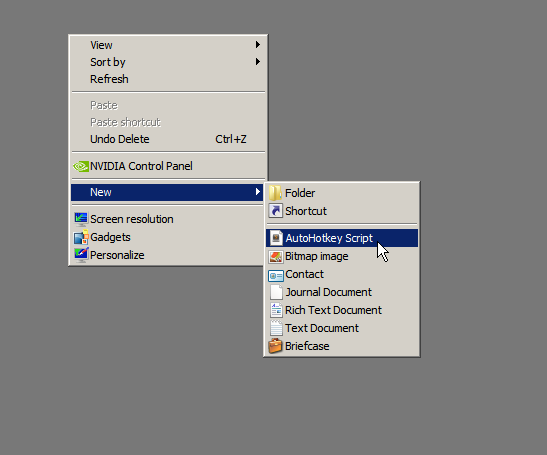
Name it coh.ahk (or something similar)
------------------------------------
2) Paste the following lines of code into your script doc:
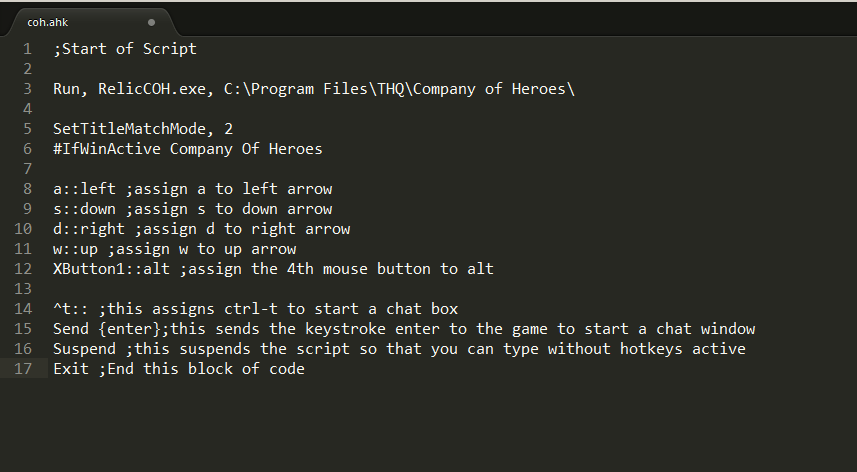
Save your code an close out your editor.
------------------------------------
3) Double click the script to run it.
Name it coh.ahk (or something similar)
------------------------------------
2) Paste the following lines of code into your script doc:
a::left
s::down
d::right
w::up
q::Numpad0
c::a
XButton1::alt
~capslock::Suspend
~capslock UP::Suspend
`::Suspend
^!z::
WinSet, Style, -0xC40000, a
WinMove, a, , 0, 0, % A_ScreenWidth, % A_ScreenHeight
Save your code an close out your editor.
------------------------------------
3) Double click the script to run it.
More Company of Heroes guides
- How to use console commands on Company of Heroes★ 5 (367)25k views720 ♥3 minUpdated Jan 29, 2021
- Big D*** Boss' Guide to Company of Heroes - The Basics★ 5 (274)19k views313 ♥28 minUpdated Jul 26, 2015
- Bootcamp: What you need to know★ 5 (271)18k views240 ♥12 minUpdated Nov 30, 2016
- Trouble Shooting Crashes and Connection Issues Possible Fixes for COH 1 NSV★ 5 (239)18k views271 ♥10 minUpdated Apr 19, 2018
- FPS BOOST TUTORIAL★ 5 (267)17k views343 ♥11 minUpdated Feb 14, 2018
- FAQ: New Steam Version, Legacy Edition, DLCs, Mods★ 5 (176)15k views148 ♥6 minUpdated Nov 9, 2025





This guide was created by its original author on the Steam Community. Are you the author and want it removed? Request removal.