Rocket League Ranks, MMR, and BakkesMod: The Complete Guide
Help support the guide & keep it updated!

Rocket League Ranks Explained
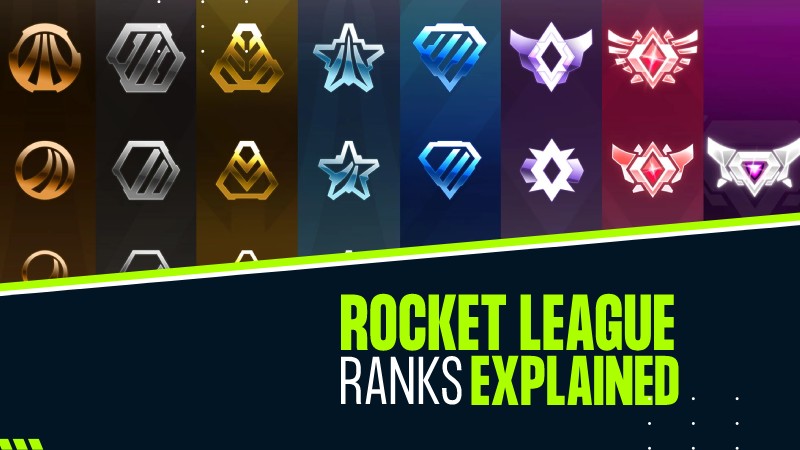
- Unranked (before placement matches)
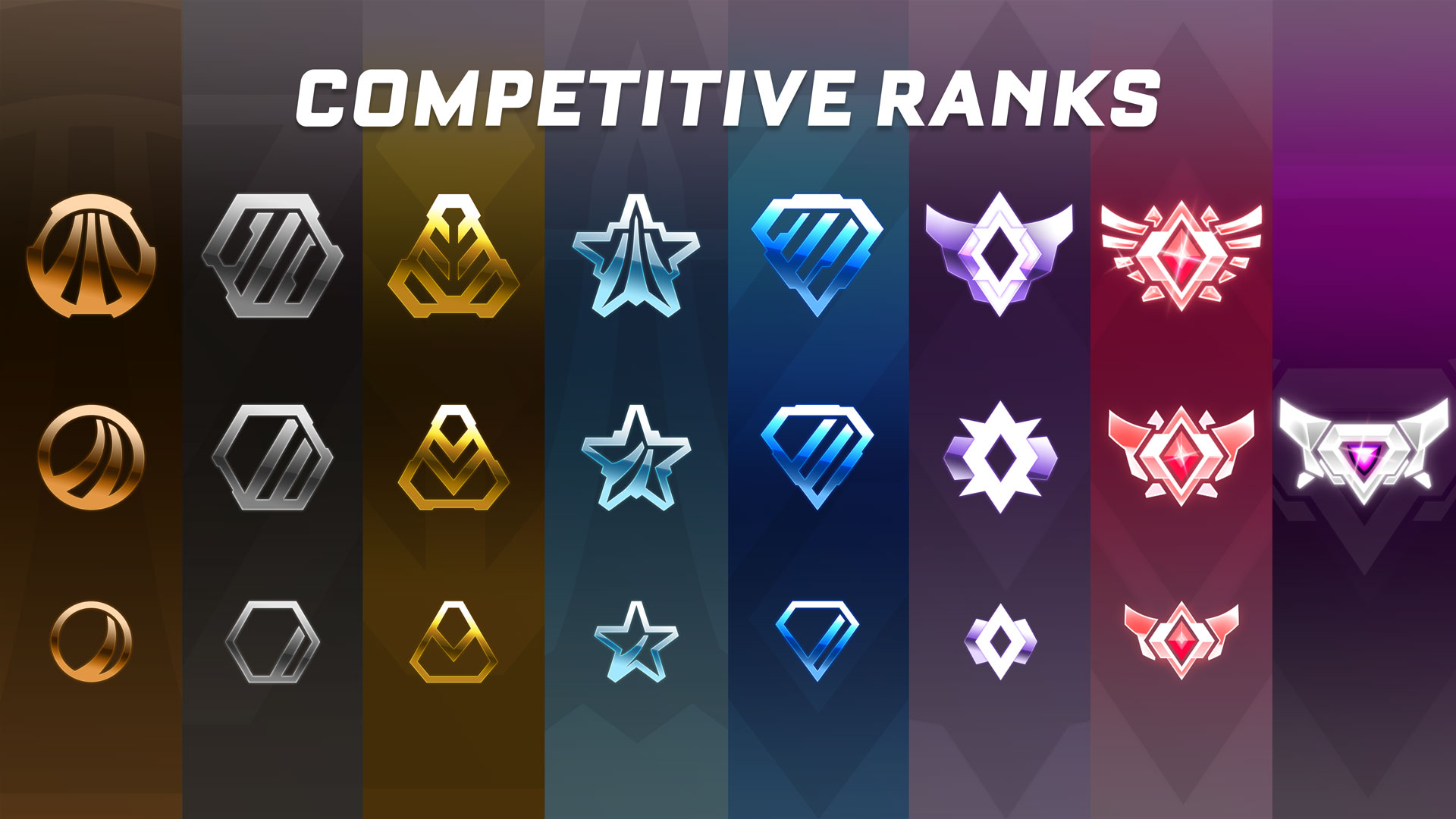
- Bronze (I, II, III)
- Silver (I, II, III)
- Gold (I, II, III)
- Platinum (I, II, III)
- Diamond (I, II, III)
- Champion (I, II, III)
- Grand Champion (I, II, III)
- Supersonic Legend (top rank, no divisions)
- MMR is a hidden numerical value that determines your rank.
- Winning games increases your MMR, while losing decreases it.
- The amount of MMR gained or lost depends on the skill difference between teams.
- Each playlist (e.g., 1v1, 2v2, 3v3) has its own separate MMR.
Tips for Ranking Up
- Practice Mechanics: Work on aerials, dribbling, and shooting.
- Play Consistently: Focus on improving over time rather than chasing quick wins.
- Team Communication: In team modes, communication and rotation are key.
- Watch Replays: Analyze your mistakes and learn from them.
Let me know if you'd like more details about a specific rank or playlist!
How to Check Your MMR
- MMR is hidden in the game, but you can use third-party tools like BakkesMod (PC only) or websites like RLTracker to view your MMR and rank progress.
How to install BakkesMod

- Platform: BakkesMod is only available for PC (Windows). It does not work on consoles (PlayStation, Xbox, or Nintendo Switch) or macOS.
- Game Version: Ensure you have Rocket League installed via Steam or Epic Games Store.
- Go to the official BakkesMod website: https://bakkesmod.com/.
- Click on the Download button to get the latest version of BakkesMod.
- Save the installer file to your computer.
- Locate the downloaded installer file (usually in your Downloads folder).
- Double-click the installer to launch it.
- Follow the on-screen instructions:
- Accept the terms and conditions.
- Choose the installation location (default is usually fine).
- Accept the terms and conditions.
- Once the installation is complete, click Finish.
- Launch Rocket League via Steam or Epic Games Store.
- Open the BakkesMod application (search for "BakkesMod" in your Start menu if needed).
- In the BakkesMod window, click the Inject button.
- If successful, you’ll see a message saying "Injected successfully!".
- Minimize BakkesMod (do not close it) and return to Rocket League.
- In Rocket League, press F2 on your keyboard to open the BakkesMod menu.
- If the menu appears, BakkesMod is working correctly.
- You can now customize settings, use training tools, and view your MMR.
- BakkesMod Not Injecting:
- Make sure Rocket League is running before injecting.
- Run BakkesMod as an administrator (right-click the BakkesMod icon and select Run as Administrator).
- Ensure your antivirus or firewall isn’t blocking BakkesMod.
- Epic Games Store Issues:
- If you’re using the Epic Games Store version, make sure you’ve enabled Allow BakkesMod on Epic in the settings (found in the BakkesMod application).
- MMR Tracking: View your MMR and rank progress.
- Custom Training: Enhance training packs with additional tools.
- Cosmetic Customization: Use custom decals, colors, and items (client-side only).
- Gameplay Plugins: Install plugins for additional functionality.
That’s it! You’ve successfully installed BakkesMod and are ready to enhance your Rocket League experience. Let me know if you need help with specific features or settings!
Rocket League Resources
- RLTracker[rocketleague.tracker.network]: For tracking MMR and stats.
- Ballchasing[ballchasing.com]: For replay analysis.
- Rocket League Garage[rocket-league.com]: For trading and finding teammates.
- BakkesMod[bakkesmod.com]
MMR Ranges 1v1
For 1v1 (Duel) in Rocket League, the MMR ranges are slightly different compared to 2v2 or 3v3 playlists. This is because 1v1 is generally considered more challenging, and players tend to have lower MMR in this mode compared to team-based playlists. Below is the up-to-date MMR range for 1v1 ranks as of recent seasons:
- Lower MMR in 1v1: Players typically have lower MMR in 1v1 compared to 2v2 or 3v3 because the mode is more mechanically demanding and less forgiving.
- Placement Matches: New players or those who haven't played 1v1 in a while will start with an MMR around 500-700 after placement matches.
- Supersonic Legend: As with other playlists, this rank is reserved for the top 0.1% of players, and the MMR threshold can vary depending on the season.
- Focus on Mechanics: Improve your dribbling, flicks, and shadow defense.
- Play Patiently: Avoid overcommitting and wait for your opponent to make mistakes.
- Practice Consistency: Work on hitting accurate shots and saves consistently.
- Review Replays: Analyze your gameplay to identify weaknesses and areas for improvement.
MMR Ranges 2v2
For 2v2 (Standard Doubles) in Rocket League, the MMR ranges are the most commonly referenced because it’s one of the most popular playlists. Below is the up-to-date MMR range for 2v2 ranks as of recent seasons (Season 12 and beyond):
- Placement Matches: New players or those who haven’t played ranked in a while will start with an MMR around 600-800 after completing their 10 placement matches.
- Supersonic Legend: This rank is reserved for the top 0.1% of players, and the MMR threshold can vary slightly depending on the season and player distribution.
- MMR Gains/Losses: The amount of MMR you gain or lose depends on the skill difference between teams. Beating a higher-ranked team will reward more MMR, while losing to a lower-ranked team will cost more MMR.
- Teamwork and Rotation: Communicate with your teammate and maintain proper rotation to avoid double commits.
- Mechanical Skills: Practice aerials, dribbling, and power shots to outplay opponents.
- Game Sense: Learn to read the game, anticipate your opponent’s moves, and position yourself effectively.
- Consistency: Focus on playing consistently rather than going for risky plays.
- Review Replays: Analyze your gameplay to identify mistakes and areas for improvement.
MMR Ranges 3v3
For 3v3 (Standard) in Rocket League, the MMR ranges are similar to 2v2 but can feel slightly different due to the faster pace and increased complexity of team play. Below is the up-to-date MMR range for 3v3 ranks as of recent seasons (Season 12 and beyond):
- Placement Matches: New players or those who haven’t played ranked in a while will start with an MMR around 600-800 after completing their 10 placement matches.
- Supersonic Legend: This rank is reserved for the top 0.1% of players, and the MMR threshold can vary slightly depending on the season and player distribution.
- MMR Gains/Losses: The amount of MMR you gain or lose depends on the skill difference between teams. Beating a higher-ranked team will reward more MMR, while losing to a lower-ranked team will cost more MMR.
- Teamwork and Rotation: Communication and proper rotation are crucial in 3v3. Avoid ball-chasing and trust your teammates.
- Positioning: Stay aware of your position on the field. Always be ready to support your teammates on offense or defense.
- Mechanical Skills: Practice aerials, clears, and power shots to make impactful plays.
- Game Sense: Learn to read the game and anticipate your opponent’s moves. This is especially important in the faster-paced 3v3 mode.
- Consistency: Focus on playing consistently and avoid risky plays that could leave your team vulnerable.
- Review Replays: Analyze your gameplay to identify mistakes and areas for improvement.
Bronze Rank



Silver Ranks



Gold Ranks



Platinum Ranks



Diamond Ranks



Champion Ranks



Grand Champion Ranks



Supersonic Legend

- Pro's camera★ 5 (1.4k)101k views1.3k ♥1 minBulgarianUpdated 4 Feb, 2017
- Rocket League Workshop Maps Upload Guide★ 5 (606)64k views850 ♥3 min
- New Scamming Tactics★ 5 (760)62k views285 ♥2 minBulgarianUpdated 15 Oct, 2022
- Rocket League Trading★ 5 (2.4k)57k views1.7k ♥2 minUkrainianUpdated 4 Nov, 2024
- Rocket League Achievements★ 5 (565)36k views553 ♥24 minBulgarianUpdated 16 Oct, 2016
- In-depth Basic Aerial Guide [w/Gif illustrations]★ 5 (403)27k views476 ♥12 min



- Upgrading to PremiumTeam Fortress 2★ 5 (20k)1441k views11k ♥6 minUpdated May 11, 2022
- No More Room in Hell Official ManualNo More Room in Hell★ 5 (2.8k)569k views2.1k ♥29 minUpdated Apr 22, 2019
- NMRiH Community Hosting GuidesNo More Room in Hell★ 5 (526)351k views653 ♥1 minUpdated Aug 10, 2022
- ULTIMATE GUIDE FOR GAME DEV TYCOONGame Dev Tycoon★ 5 (5.8k)326k views10k ♥4 minUpdated 23 Jan, 2014
- How to 'Git Gud' Soon™MORDHAU★ 5 (2k)318k views3k ♥68 minUpdated Nov 16, 2024
- Лучшие кооперативные игры SteamPAYDAY 2★ 5 (1.5k)315k views2.1k ♥56 minRussianUpdated Apr 27, 2025






This guide was created by its original author on the Steam Community. Are you the author and want it removed? Request removal.