Rome: Total War All possible bad FPS fixes
The Retail version Fix (Worked for me)
ATTENTION, THIS ALONE SHOULD BE ENOUGH TO FIX FPS, ONLY TRY OTHER METHODS IF THIS FAILS
Source: https://youtu.be/KD66jDZj6Q0?list=LL
In short, this fix was what worked for me, for some reason the steam version 1.51, runs poorly, the retail version 1.5, runs much better, easily 2x, if not 3x the FPS
Link to the v 1.5 of the game: https://drive.google.com/file/d/1KfzWr1JkOeZUxA9NsrZ4-SByOtHPULVh/view
What you should find
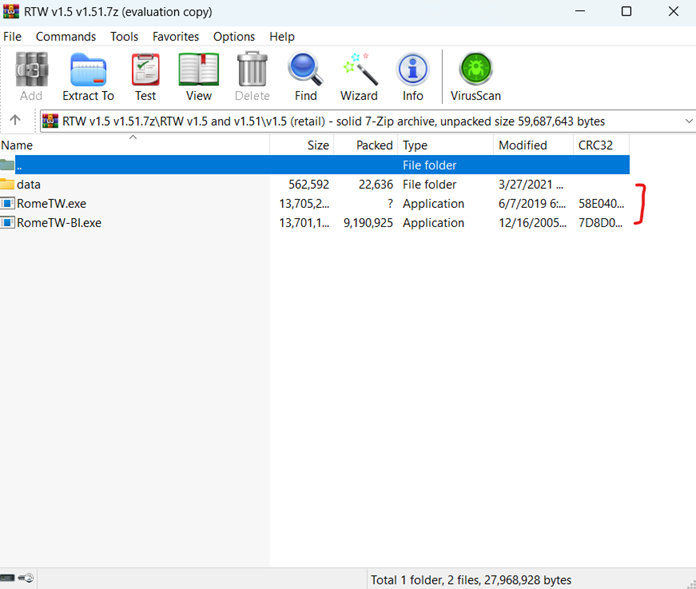
Right click on the game in your steam Library
-> Properties
->Installed files
->Browse
->Drop the 2 exe files, and the data file, and replace all in the main RTW folder
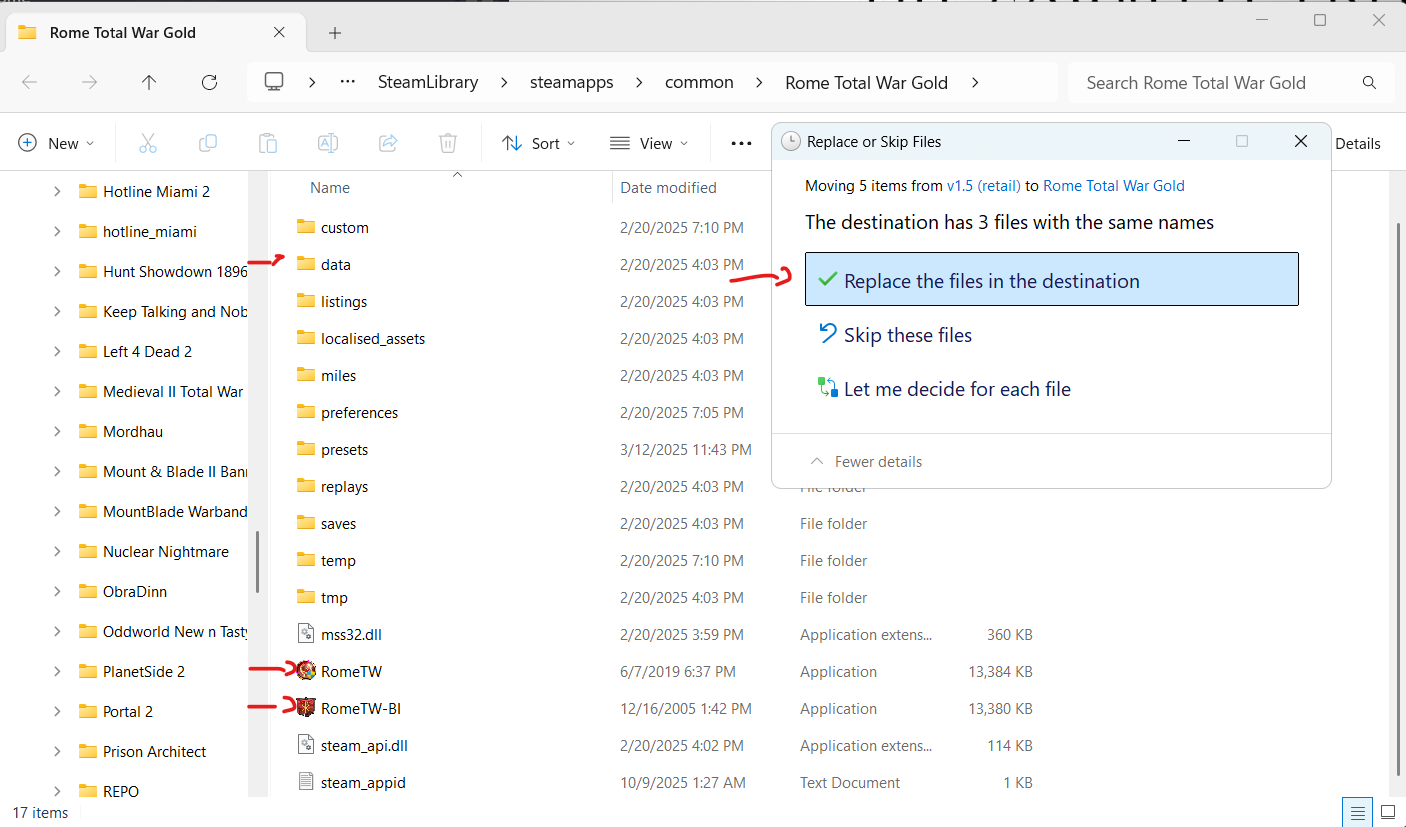
That's it, however this does break the steam overlay so the best fix is to again
Right click on the game in your steam Library
-> Go General
-> Launch options
-> In the bar where you can type, type "-ne"
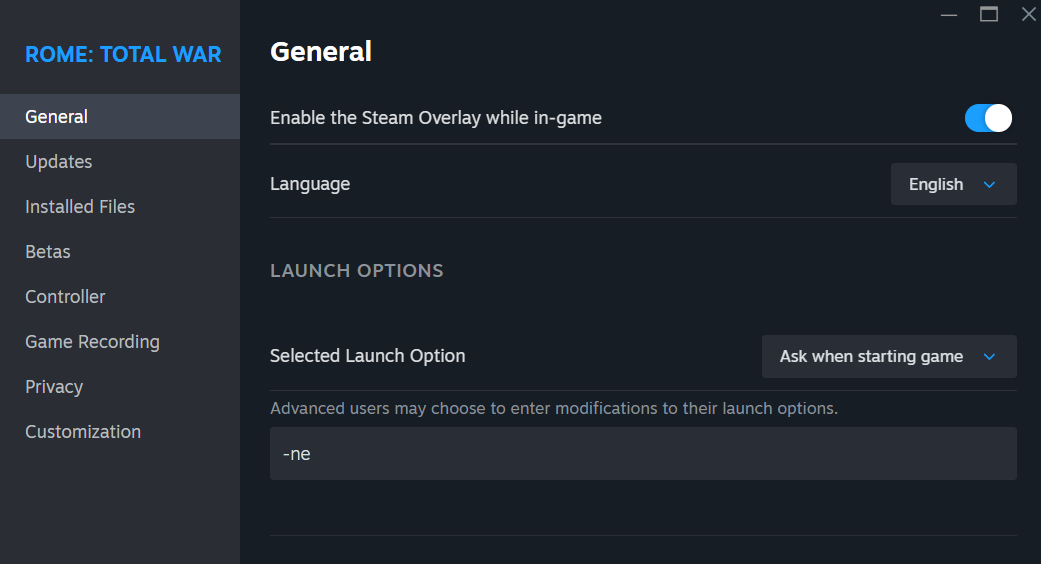
Makes it so the game tabs out properly
Source: https://youtu.be/KD66jDZj6Q0?list=LL
In short, this fix was what worked for me, for some reason the steam version 1.51, runs poorly, the retail version 1.5, runs much better, easily 2x, if not 3x the FPS
Link to the v 1.5 of the game: https://drive.google.com/file/d/1KfzWr1JkOeZUxA9NsrZ4-SByOtHPULVh/view
What you should find
Right click on the game in your steam Library
-> Properties
->Installed files
->Browse
->Drop the 2 exe files, and the data file, and replace all in the main RTW folder
That's it, however this does break the steam overlay so the best fix is to again
Right click on the game in your steam Library
-> Go General
-> Launch options
-> In the bar where you can type, type "-ne"
Makes it so the game tabs out properly
D3D8.DLL File fix
Source: https://youtu.be/LYM6FaNe_24
This fix only offered me marginal FPS improvements, but it's been around a long time and worked for others and might be worth a try
You just download the file and drop it in the main game folder that your get through via
properties -> installed files
Here is a supposedly more recent version of the .dll files, use this (Found it on steam forums)
https://github.com/crosire/d3d8to9/releases
This fix only offered me marginal FPS improvements, but it's been around a long time and worked for others and might be worth a try
You just download the file and drop it in the main game folder that your get through via
properties -> installed files
Here is a supposedly more recent version of the .dll files, use this (Found it on steam forums)
https://github.com/crosire/d3d8to9/releases
Compatability, Admin, and Optimization modes
You right click the game .exe files, go
->Properties
->Compatability
And then set it so Windows 7, or Windows XP service packages, may grant stability or FPS
You may also try running the game in Admin mode, but that may cause some issues
Or disable the fullscreen optimization, that may work for some
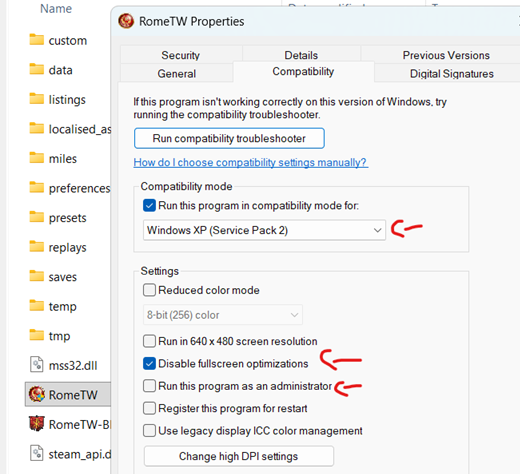
->Properties
->Compatability
And then set it so Windows 7, or Windows XP service packages, may grant stability or FPS
You may also try running the game in Admin mode, but that may cause some issues
Or disable the fullscreen optimization, that may work for some
Making the game run on 1 core
Basically, the game was optimized to run on 1 core, so you make it run on one core to gain performance
Just follow this video
https://youtu.be/XgnV73-ibRg
Just follow this video
https://youtu.be/XgnV73-ibRg
PC Gaming Wiki fixes
More available fixes are in this link, including DG Voodoo and DirectX 9 stuff
https://www.pcgamingwiki.com/wiki/Rome:_Total_War#Low_FPS
https://www.pcgamingwiki.com/wiki/Rome:_Total_War#Low_FPS
4 GB Patch
https://ntcore.com/4gb-patch/
Use this tool to patch the .exe file of the game to have it use more Ram
Use this tool to patch the .exe file of the game to have it use more Ram
How to reset if you messed up
Go to the installed files and delete those first, then delete the game, this will make steam re-download the game fresh, because otherwise if you just un install through steam it re-downloads the game with all the changes
More Rome: Total War guides
- Rome: Total War Cheat Guide (inc. Barbarian Invasion) [2004]★ 5 (534)33k views1.1k ♥26 minUpdated Apr 7, 2021
- Rome: Total War cheats★ 5 (342)31k views508 ♥3 minUpdated Oct 20, 2013
- Configuration for enhanced FPS on modern PC’s★ 5 (222)19k views426 ♥5 min
- how to move citizens from one town to another★ 5 (208)18k views64 ♥1 minUpdated Jun 26, 2013
- How to kill yourself quickly.★ 5 (331)18k views147 ♥3 minUpdated Feb 16, 2021
- Русификатор текста и звука для Rome: Total War и Barbarian Invasion★ 5 (620)16k views715 ♥2 minRussianUpdated Nov 6, 2024




This guide was created by its original author on the Steam Community. Are you the author and want it removed? Request removal.