RTCW FPS AND WIDESCREEN FIX
FPS FIX
First Go In To The Game
------------------------------------
Than Open Save Or New Game
---------------------------------------------
Than Click " Button Under The ESC
----------------------------------------------------
Than Write:
----------------------------------------------------------
/r_primitives 2 (this will fix fps issue)
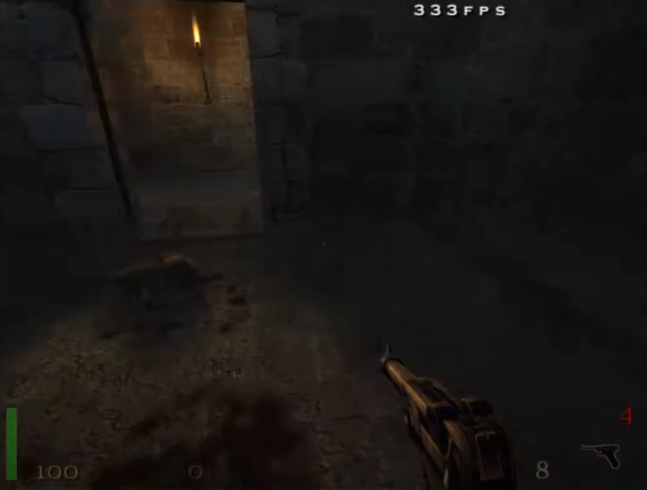
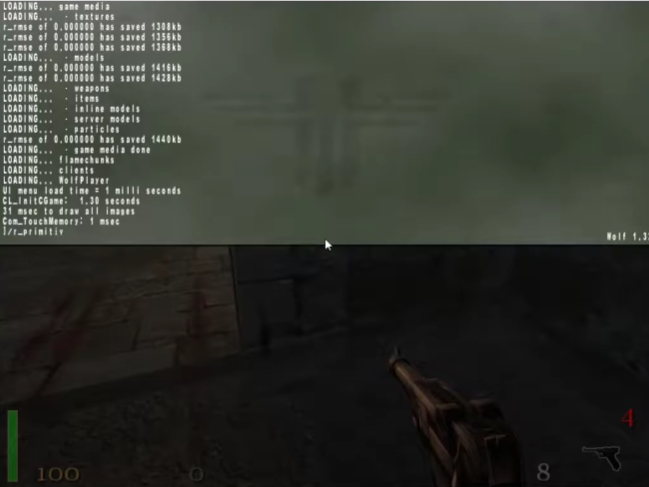 /seta com_maxfps 333 (this will close v_sync)
/cg_drawfps 1 (this will show how many fps do you have)
------------------------------------
Than Open Save Or New Game
---------------------------------------------
Than Click " Button Under The ESC
----------------------------------------------------
Than Write:
----------------------------------------------------------
/r_primitives 2 (this will fix fps issue)
/seta com_maxfps 333 (this will close v_sync)/cg_drawfps 1 (this will show how many fps do you have)
WIDESCREEN FIX
Okay First Go In To The
C:\Program Files (x86)\Steam\steamapps\common\Return to Castle Wolfenstein
Than Go To The Main File
Than Edit Wolfconfig
Make Like This
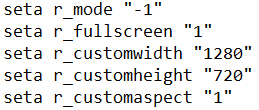
Yea Its 1280x720 But If You Make Highter Game Crashes Or Being Like That
SO THATS ALL We Need If It Works Pls Add To Favorite And Like Cya Have Fun:)
C:\Program Files (x86)\Steam\steamapps\common\Return to Castle Wolfenstein
Than Go To The Main File
Than Edit Wolfconfig
Make Like This
Yea Its 1280x720 But If You Make Highter Game Crashes Or Being Like That
SO THATS ALL We Need If It Works Pls Add To Favorite And Like Cya Have Fun:)
More Return to Castle Wolfenstein guides
- RtCW Troubleshooting Guide★ 5 (379)29k views491 ♥9 minUpdated Jan 6, 2022
- Guide to ALL SECRET AREAS★ 5 (848)21k views1.2k ♥6 minUpdated Oct 17, 2019
- RtCW with modern graphics (ioRtCW 1.51c, VenomMod 6.5.6, RealRtCW 3.0) - Feb 3, 2020★ 5 (293)21k views566 ♥5 minUpdated Feb 5, 2020
- RTCW Cheat Guide★ 5 (275)20k views508 ♥2 minUpdated Nov 28, 2013
- RTCW HD Graphics Guide★ 5 (268)17k views379 ♥1 minUpdated Mar 24, 2021
- Wide screen resolution★ 4 (174)14k views163 ♥1 min


This guide was created by its original author on the Steam Community. Are you the author and want it removed? Request removal.