Run borderless windowed / windowed fullscreen - KOTOR 2
Main steps
Step 1 - Download
Grab this borderless tool:
http://westechsolutions.net/sites/WindowedBorderlessGaming/(west tech solutions by Windowed borderless gaming if the link doesn't work. all the cool kid streamers use it)
Yes I tried:
Flawless Widescreen
Fullscreenizer
Borderless gaming by facepunch.
It's the only one that worked for me.
You'll need Winrar or 7zip to extract the file.
Step 2 - Installation
- Just grab the .exe and put it in a folder.
- Launch it, it will create a config file.
- Launch it again if necessary. It minimizes itself to a monitor icon, you can find it in your taskbar notification tray (right side of taskbar, arrow up).
Step 3 - Process
- Launch KOTOR 2
- ALT + ENTER
- Go into your tray. Hover over "Windowed Borderless gaming"
- Right click, "Add window (F3)".
- Restore the game by either clicking on it or ALT + TAB.
- Press F3.
It should go into borderless mode.
Mouse fix
The mouse may be a little wack. To fix that:
- Right click on "Windowed Borderless gaming"
- "Game Settings."
- Copy these settings.
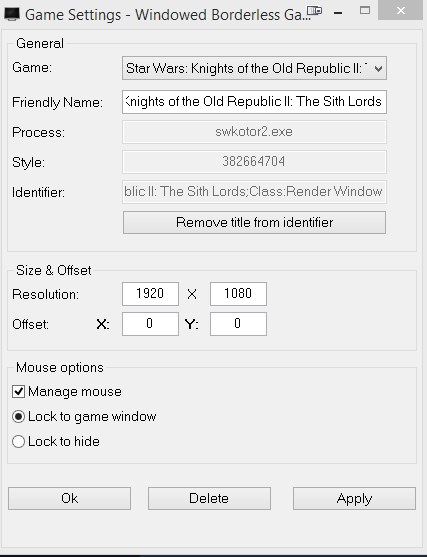
The main menu will be wack at first but it fixes itself after loading into a game.
Optional steps
Doing this should make the above steps work however from my experience, I didn't need to do this.
Step 1
Edit the swkotor2.iniYou'll find it where you installed your game.
Open it using notepad and just copy and overwrite the following:
[Display Options]
FullScreen=0
Disable Movies=0
Disable Intro Movies=0
Sort Modules=1
Width=1920
Height=1080
BitsPerPixels=32
RefreshRate=60
[Graphics Options]
ForceSpeed=0
Brightness=57
RefreshRate=60
Height=1080
Width=1920
V-Sync=1
Anisotropy=4
Frame Buffer=1
Anti Aliasing=4
Texture Quality=2
Grass=1
Soft Shadows=0
Shadows=1
EnableHardwareMouse=1
FullScreen=1
DisableVertexBufferObjects=1
AllowWindowedMode=1
Note:
- I don't disable intro movies due to the possibility of the game crashing.
- This will overwrite some of your graphic options, if you wish to edit the file manually the only relevant lines to edit are:
[Display Options].
FullScreen=0
Height=1080
Width=1920
[Graphics Options]
Height=1080
Width=1920
FullScreen=0
AllowWindowedMode=1 - Add it to the bottom.
Save and exit.
Step 2
- Right click on the swkotor2.exe
- Properties
- Compatibility
- "Run this program as an Administrator"
Worth mentioning that I am running a modded game, I only use this mod so might help to install it ¯\_(ツ)_/¯
https://steamcommunity.com/sharedfiles/filedetails/?id=1402798020Credits.
Found the solution from this dude on this post:
https://steamcommunity.com/app/208580/discussions/0/541906989390989342/
I just compiled the info.
And nope it does not appear as a first result on google lol.
More STAR WARS™ Knights of the Old Republic™ II: The Sith Lords™ guides
- KotOR II Cheat Codes★ 5 (1.6k)116k views4.4k ♥17 minUpdated Jul 20, 2017
- KOTOR II: The Sith Lords - Go-To Essential Mods★ 5 (768)56k views2.2k ♥13 minUpdated Feb 28
- Character and Party Optimizing Guide - Archival★ 5 (1.1k)56k views2.7k ♥51 minUpdated Apr 24, 2024
- KotOR II Steam Workshop Modding Guide★ 5 (499)46k views1.1k ♥9 minUpdated Dec 20, 2015
- KOTOR: Tips and Tricks★ 5 (386)42k views756 ♥5 minUpdated Jun 12, 2023
- Ultima Pearl (Code)★ 5 (329)32k views749 ♥1 minUpdated Nov 25, 2025


🔥 Popular guides
- Upgrading to PremiumTeam Fortress 2★ 5 (20k)1441k views11k ♥6 minUpdated May 11, 2022
- No More Room in Hell Official ManualNo More Room in Hell★ 5 (2.8k)569k views2.1k ♥29 minUpdated Apr 22, 2019
- NMRiH Community Hosting GuidesNo More Room in Hell★ 5 (526)351k views653 ♥1 minUpdated Aug 10, 2022
- ULTIMATE GUIDE FOR GAME DEV TYCOONGame Dev Tycoon★ 5 (5.8k)326k views10k ♥4 minUpdated 23 Jan, 2014
- How to 'Git Gud' Soon™MORDHAU★ 5 (2k)318k views3k ♥68 minUpdated Nov 16, 2024
- Лучшие кооперативные игры SteamPAYDAY 2★ 5 (1.5k)315k views2.1k ♥56 minRussianUpdated Apr 27, 2025






This guide was created by its original author on the Steam Community. Are you the author and want it removed? Request removal.