S.K.I.L.L. - How to use the Support / Report Cheaters
Introduction
Hello Community,
First let me introduce myself:- P5ykoOHD[board.skill.gameforge.com]
- Game Master - EN FR
- Forum Moderator - EN FR
- Steam Moderator
- Game Master - EN FR
As such, I am one of the GM's taking care of your Support Tickets.
(English & French tickets only)
Over my time as a Game Master, I have had the occasion to see many not so well put tickets which sadly delayed the help the user would have received, simply because there was missing information.
When you're trying to get a ticket treated, it can be frustrating when we ask for information that should have been included from the start.
So don't delay your tickets any longer, and follow this simple and practical guide.
Kind regards,
P5ykoOHD[board.skill.gameforge.com]
Specific to Steam Accounts (Deletion)
As you probably noticed if you are playing "S.K.I.L.L. Special Force 2" via Steam, upon your first time launching the game, the game automatically created an account for you, which is now linked to your Steam Account.
We are working on a solution to allow users to use their Gameforge Live Accounts on Steam and vice versa through a log-in screen similar to the one you get with Gameforge Live.
Seeing as your account is linked to Steam, if you wish to delete that account, you will notice that you are unable to do so, and as such, will need to contact us at the Support directly:
http://support.skill.gameforge.com/
- Your exact IGN ( ♠ ♡ ♣ ♤ ♥ ♧ ♨ ♩ ♪ )
(In game name of your soldier) - Your Contact Email Address
- Open Steam
- Steam
- Settings
- Account
- Contact Email
- Open Steam
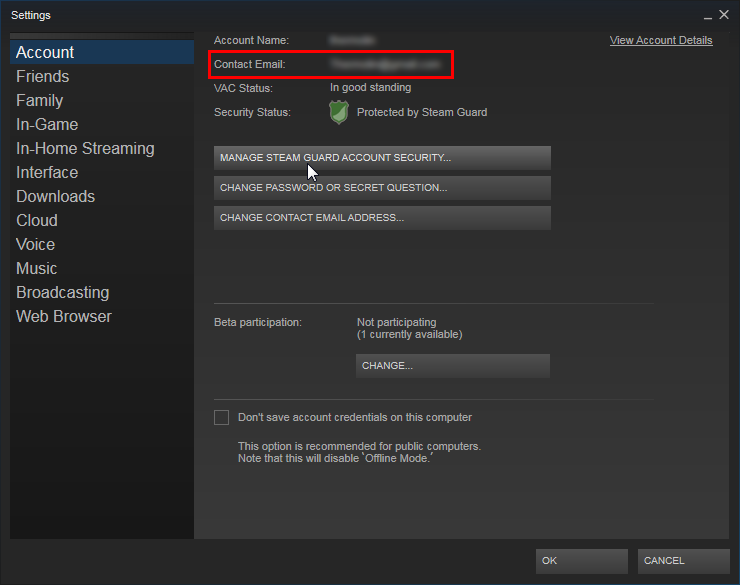
If you fail to provide us with that information, the treatment of your Support Ticket will take that much longer, as we will request it in an answer to the ticket ... delaying the process of deletion.
Create your Support Account & Register Email
Before you go wild creating tickets, please make sure that you complete these few steps first ...
If any of this information is missing, we will request you add it, thus delaying the proper treatment of your ticket, so be sure to do everything right the first time ^^
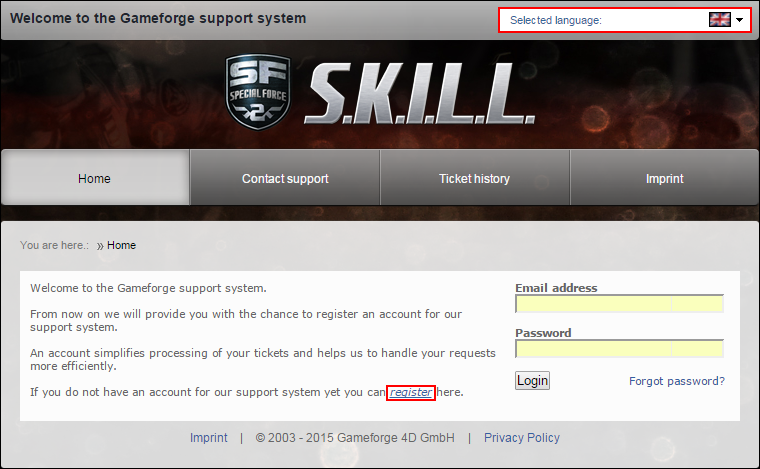 It is important to select your language first, then to proceed.
Click on "Register[support.skill.gameforge.com]"
This will lead you to entering your Email Address, Nickname and Password.
This information must now be used every time you contact the Support.
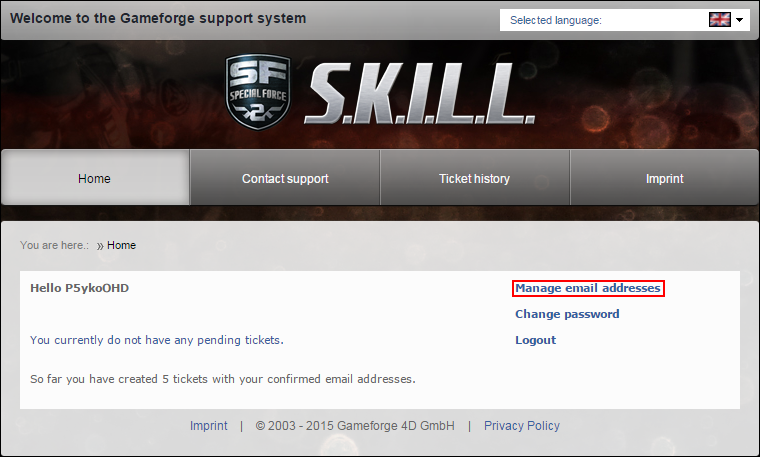
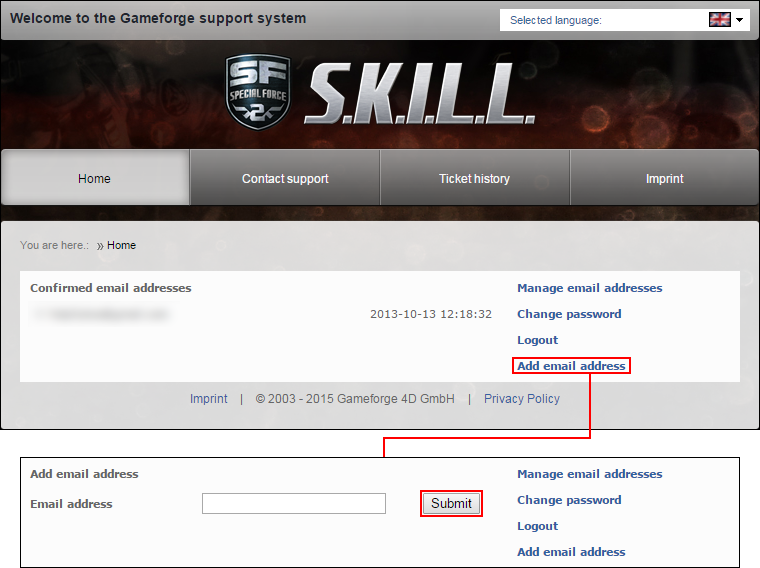 Be sure to add the Email Address of the account you use to play the game, this will link your Support Account to your Game Account, thus proving you are the owner of that account.
It is most important to do so, as it will allow us GM's to track information related to you.
For users playing via Steam, the Game account email is the same as mentioned above in the first part of this guide, it's your "Contact Email".
How to Contact the Support
Once you are logged in, navigate to the "Contact Support" button on the header.
From there, you only need to follow the steps ... it's really as simple as that.
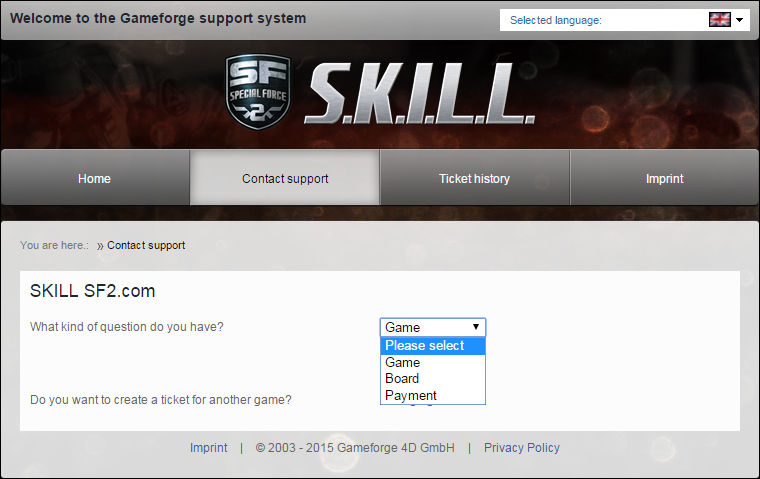
- Game
For any game related issues
- Forum
For any Forum related issues
- Payment
Here, we will redirect you towards the Billing Support, which is a different department.
https://billing.gameforge.com/
At the regular Support, we are not equipped to deal with money related issues, so please do not try to bypass the Billing Support and creating a Billing related Ticket.
We will redirect you ...
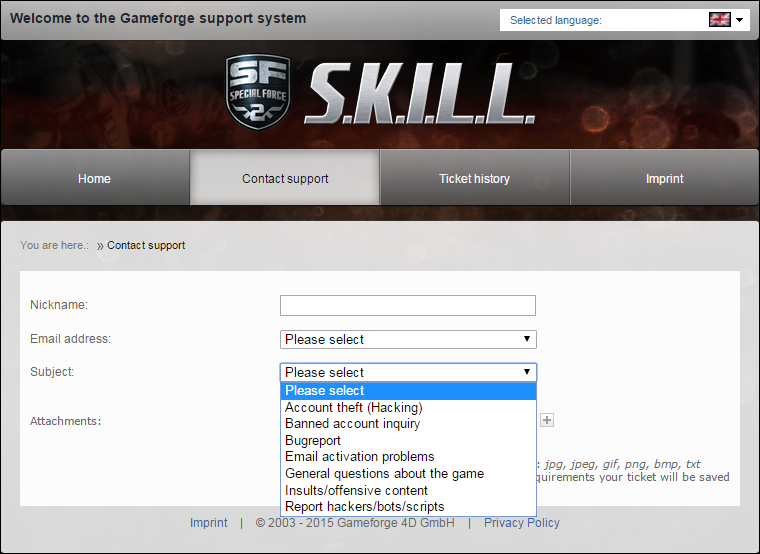 For your Nickname please use your Exact IGN, with special symbols if you are using any
 ( ♠ ♡ ♣ ♤ ♥ ♧ ♨ ♩ ♪ ), and regarding the Email Address, this is where you select the email address related to the account experiencing the issue.
For the rest, please just fill in the preset information that is requested of you, and do provide as many on point details as possible, once again, this does help us avoid having to ask you in a reply, delaying the ticket.
How to Report a Cheater
Some players use "Special Symbols" in their names, and it might not be easy to reproduce them.
So here they are: ♠ ♡ ♣ ♤ ♥ ♧ ♨ ♩ ♪
(Copy / Paste the ones you need)
When reporting a cheater, it is imperative to give as much information as possible.
This will greatly help speed up the process of treating the report, and ultimately, banning the player in question, which I am sure, everyone will be happy with ^^
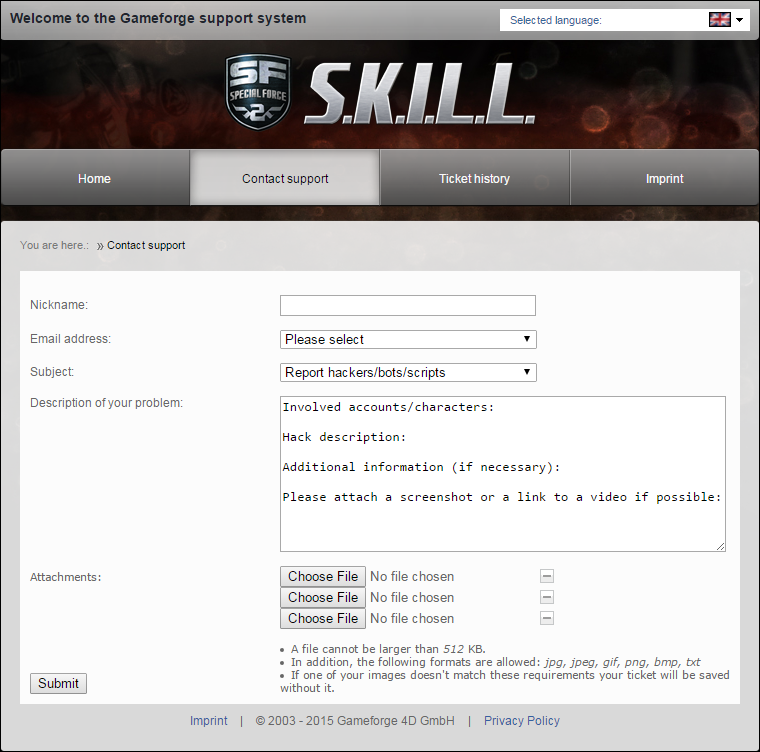
- Involved Accounts / Characters
Here, you need to enter the exact IGN of the hacker
(Including special symbols if they are using any) - Hack description
Be specific as to what hack was used ...
Wallhack, Aimbot, Super Bullets, OPK, Name Stealing ... etc. - Additional Information
Here we will need you to explain in detail what happened, what hack was used.
If you have included a full length video, please also provide time-stamps here so we can go directly to the moments where the hack occurs instead of wasting time looking at the entire video.
Giving us as many details as possible will make it easier for us to understand, and eventually what to look for if it is very specific. - Please Attach a Screenshot or Video
Here, simply include the links to the Screenshots and Video. - Attachments
As you can see, you can attach up to 3 files to your ticket, please read the limitations, as a file not respecting those limitations will not get saved.
- Videos
Must be uploaded to Youtube, then simply give us the link to the video. - Screenshots
Upload them, if you are unable to add them as attachments, to an image hosting site such as Imgur, then provide us with the image links.
- S.K.I.L.L. - Leveling up (Ranks)★ 4 (98)6.7k views110 ♥7 minUpdated 18 Jul, 2015
- Découverte de skill special force 2★ 3 (37)4.8k views22 ♥1 minBulgarianUpdated 4 Jul, 2015
- Tutoriel Skill spécial force 2 [Le Shoot] [FR]3.7k views15 ♥1 minBulgarianUpdated 4 Jul, 2015
- Bloominator раскажет как повысить KD, и стать топовым игроков в S.K.I.L.L SPECIAL FORCE 22.6k views10 ♥1 minBulgarian
- JAK WKURZYC KOLEGE W SKILLU★ 3 (31)2.1k views9 ♥1 minPolishUpdated 24 Nov, 2017
- French Review An94 Atlantis1.2k views2 ♥1 minBulgarian





- Upgrading to PremiumTeam Fortress 2★ 5 (20k)1441k views11k ♥6 minUpdated May 11, 2022
- No More Room in Hell Official ManualNo More Room in Hell★ 5 (2.8k)569k views2.1k ♥29 minUpdated Apr 22, 2019
- NMRiH Community Hosting GuidesNo More Room in Hell★ 5 (526)351k views653 ♥1 minUpdated Aug 10, 2022
- ULTIMATE GUIDE FOR GAME DEV TYCOONGame Dev Tycoon★ 5 (5.8k)326k views10k ♥4 minUpdated 23 Jan, 2014
- How to 'Git Gud' Soon™MORDHAU★ 5 (2k)318k views3k ♥68 minUpdated Nov 16, 2024
- Лучшие кооперативные игры SteamPAYDAY 2★ 5 (1.5k)315k views2.1k ♥56 minRussianUpdated Apr 27, 2025






This guide was created by its original author on the Steam Community. Are you the author and want it removed? Request removal.