Savegame tool for sharing Create-A-Soul creations
Description
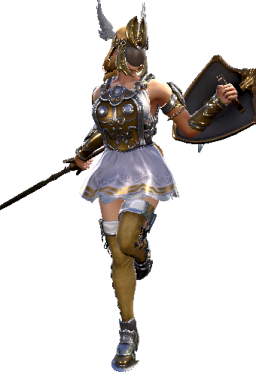 This lets you export and import Create-A-Soul characters as PNG files with CAS data embedded from and to your savegame. These PNG files can be shared with other players for easy sharing of characters.
For instance, The Elysium PNG image you see to the right is something you can import into your savegame as a Create-A-Soul character.
If you're experienced with hex editing, you can also use the tool for doing other, manual changes to the savegame.
Download and usage
Download link:
https://www.fluffyquack.com/tools/sc6save.rar
Video guide:
Usage:
- Run create-backup-of-save.bat once to generate a backup of your SC6 savegame.
- Run sc6save-export-CAS.bat to export all CAS creations from your savegame into PNG files (you'll see a new directory with a long number which corresponds to your savegame data).
- Insert or replace PNG files in the "Import" directory (filename should be between 00.png and 100.png corresponding to the slot you want to replace) and then run sc6save-import-CAS.bat to import other CAS creations into your save file.
Notes
Keep a savegame backup, just in case somethng goes wrong (ie, you accidentally overwrite a custom character you want to keep). Just run create-backup-of-save.bat to make a backup (if you want to manually copy or replace the savegame, you can find it at this location: %LocalAppData%\SoulcaliburVI\Saved\SaveGames\ ).
Take care not to replace CAS creations you want to keep. The tool will try to import EVERY character in the "Import" directory whenever you run sc6save-import-CAS.bat. You can delete PNG files from the directory to have better control over which ones are imported.
If you share CAS creations requiring DLC items (like 2B or the upcoming CAS item pack), then please mention what DLC it uses (or simply say it needs the season pass). The game might lock your savegame if it has references to DLC items you don't own.
If you manually edit the PNG files (or simply save them in any image editor) the stored CAS data will be lost. Some image uploading sites might strip the data too (I know it will happen with imgur). Most image sharing sites should work, though.
The SC6 modding community has created a website for sharing custom characters compatible with the tool. You can find that here: https://cascards.fluffyquack.com/post/list
And here are rules for how to tag uploaded custom characters to the above site: https://cascards.fluffyquack.com/forum/index.php?q=/forum/view/5
For more advanced usage and details, check the readme.txt.
- How to find and install mods for SC6★ 5 (410)38k views831 ♥1 minUpdated 26 Dec, 2020
- Tutorial To Remove Ingame Background Blur Easy !★ 5 (183)17k views179 ♥1 minUpdated 21 Oct, 2018
- Soulcalibur VI PC Configuration Guide★ 4 (109)8.3k views190 ♥6 minUpdated 15 May, 2020
- PlayStation DualShock 4 button prompts/icons★ 4 (110)7.8k views136 ♥1 minUpdated 27 Oct, 2018
- How To Make Black Swordsman Guts in Soul Calibur 6★ 4 (86)7.4k views103 ♥1 minUpdated 3 Feb, 2022
- How to remove all the blurr (CA, DoF, Grain)★ 4 (110)6.9k views115 ♥1 minUpdated 29 Oct, 2018




- Upgrading to PremiumTeam Fortress 2★ 5 (20k)1441k views11k ♥6 minUpdated May 11, 2022
- No More Room in Hell Official ManualNo More Room in Hell★ 5 (2.8k)569k views2.1k ♥29 minUpdated Apr 22, 2019
- NMRiH Community Hosting GuidesNo More Room in Hell★ 5 (526)351k views653 ♥1 minUpdated Aug 10, 2022
- ULTIMATE GUIDE FOR GAME DEV TYCOONGame Dev Tycoon★ 5 (5.8k)326k views10k ♥4 minUpdated 23 Jan, 2014
- How to 'Git Gud' Soon™MORDHAU★ 5 (2k)318k views3k ♥68 minUpdated Nov 16, 2024
- Лучшие кооперативные игры SteamPAYDAY 2★ 5 (1.5k)315k views2.1k ♥56 minRussianUpdated Apr 27, 2025






This guide was created by its original author on the Steam Community. Are you the author and want it removed? Request removal.