Shortened Version of Manual for Experienced players
Abreviations and explanations
Batts = Batteries
SN = Serial Number
Wires
3 wires:
1: No reds - Second wire
2: More than one blue & Last wire isn't white - Last blue wire
Else - Last wire
4 wires
1: More than one red & SN finishes odd - Last red wire
2: No reds & last wire yellow - First wire
3: 1 blue - First wire
4: More than one yellow - Last wire
Else - Second wire
5 wires
1: Last wire is black and SN finishes odd - Fourth wire
2: 1 red & More than one yellow - First wire
3: No blacks - Second wire
Else - First wire
6 wires
1: No yellow and SN finishes odd - Third wire
2: 1 Yellow & More than one white - Fourth wire
3: No reds - Last wire
Else - Fourth wire
Buttons
Follow these steps, and if none works, just hold.
1: Blue and says Abort: Hold the button.
2: 2+ batts and written Detonate: Press and release
3: Button is white and has CAR lit: Hold the button
4: Button has 3+ batts and lit FRK: Press and release
5: Red and written Hold: Press and release
If those doesn't work, hold.
Blue: Release on 4
Yellow: Release on 5
Others: Release on 1
Keypads
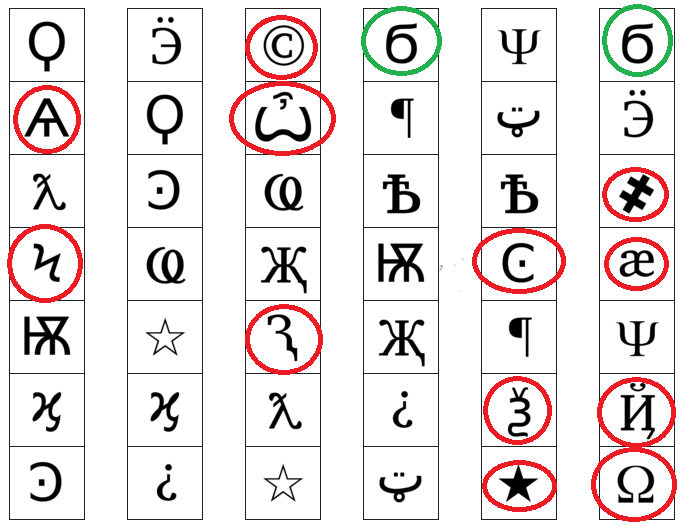
The symbols circled in RED are symbols that only appear in that specific column. If you see it, you can already tell which column you gotta pick.
The wierd 6s circled in green will ALWAYS be the first one you'll press if they appear, and only have 2 columns for them. I thought it could be important to note.
If you can remember both of these tips, it will make Symbols much faster, at least for the expert to select the correct column.
Simon Says (Credits to Cypher for picture)
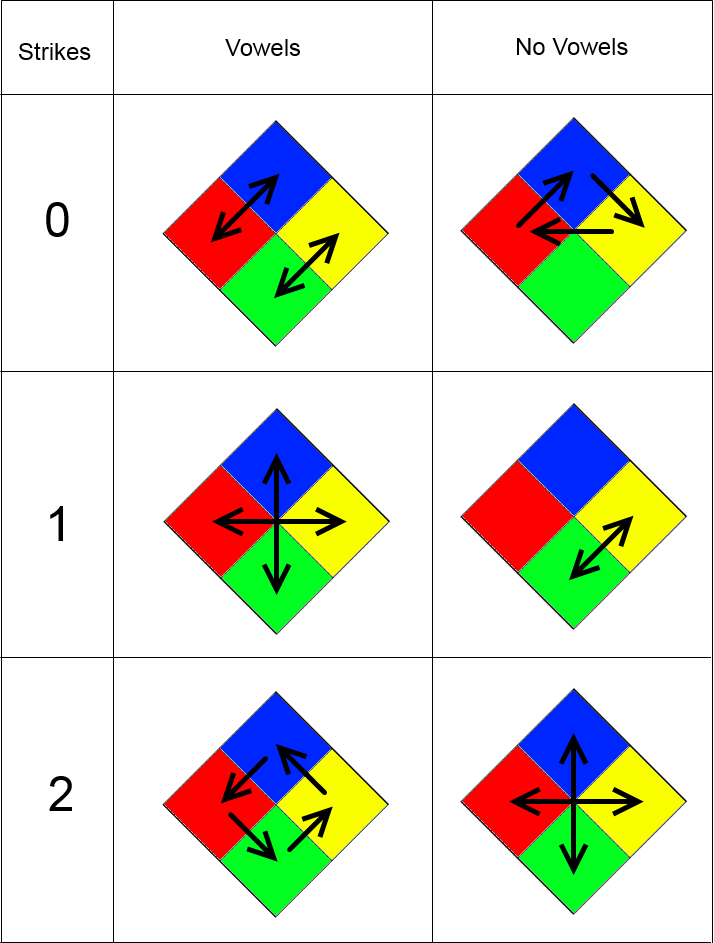
With a bit of practice, a defuser should be able to remember the patterns for Vowel and No Vowel 0 strike and defuse it first thing without any help, similar to The Button.
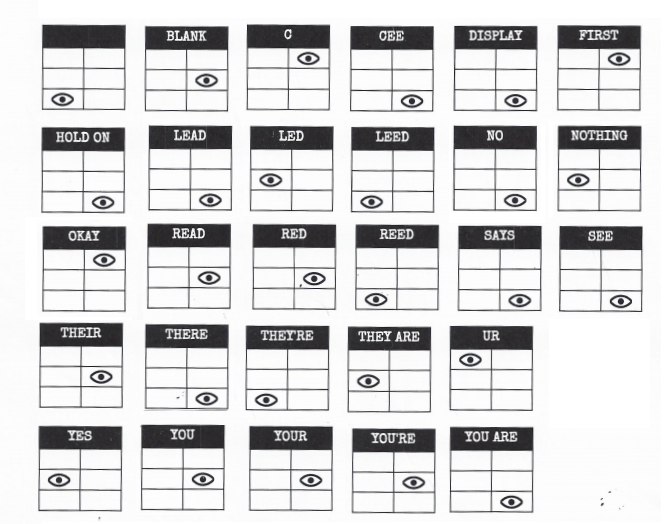
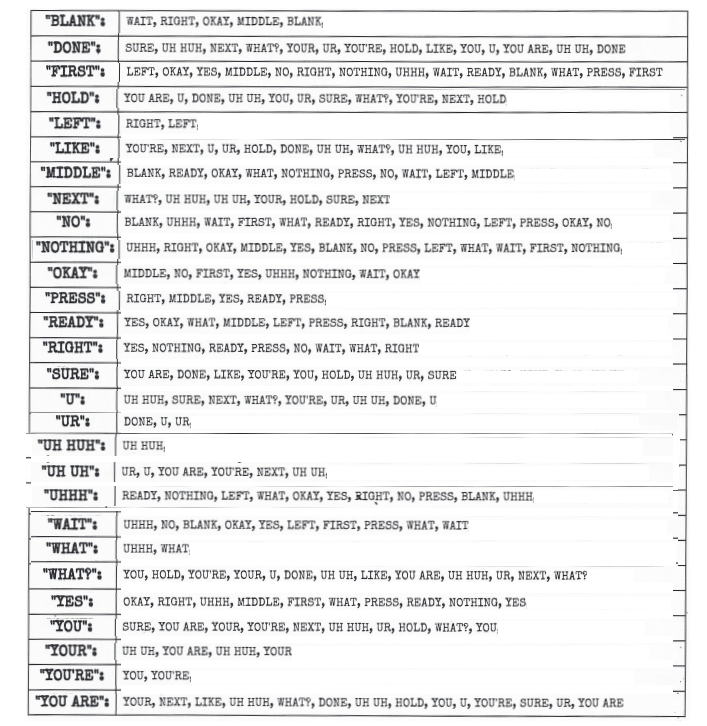
Who's on First (Credits to Cypher for pictures)
Memory
This list will shorten the sentences for faster reading. I will add some tips for it under the list.
Stage 1
1: Position 2
2: Position 2
3: Position 3
4: Position 4
Stage 2
1: Number 4
2: Same position as Stage 1
3: Position 1
4: Same position as Stage 1
Stage 3
1: Same number as Stage 2
2: Same number as Stage 1
3: Position 3
4: Number 4
Stage 4
1: Same position as Stage 1
2: Position 1
3: Same position as Stage 2
4: Same position as Stage 2
Stage 5
1: Same number as Stage 1
2: Same number as Stage 2
3: Same number as Stage 4
4: Same number as Stage 3
Things to remember:
Position of Stage 1 and Stage 2
Numbers of all stages (For stage 5)
For the first stage, an experienced Defuser should be able to easily do it on his own by remembering this: Display = Position you must press, except if the Display says 1 where it's position 2
Morse Code
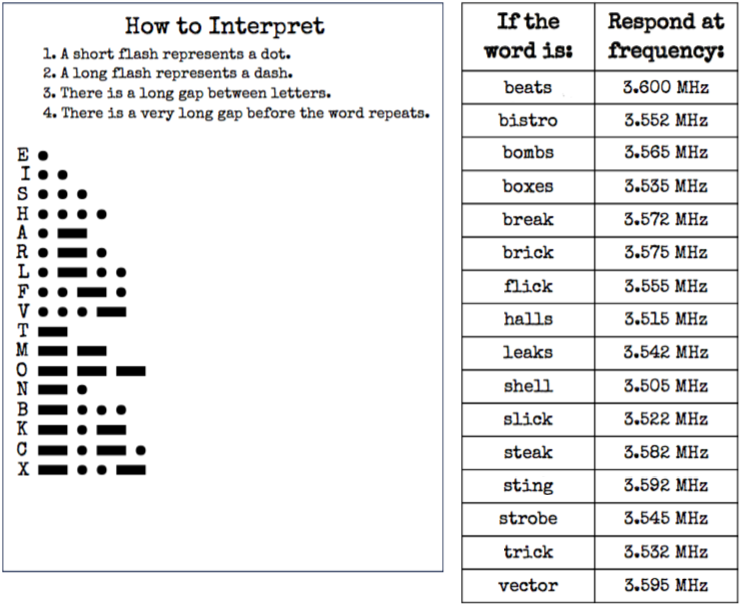
It is not necessary to fully translate the words, as the first 2-3 letters usually give you the correct word, as follows:
be 3.600 MHz
bi 3.552 MHz
bom 3.565 MHz
box 3.535 MHz
bre 3.572 MHz
bri 3.575 MHz
f 3.555 MHz
h 3.515 MHz
l 3.542 MHz
sh 3.505 MHz
sl 3.522 MHz
ste 3.582 MHz
sti 3.592 MHz
str 3.545 MHz
t 3.532 MHz
v 3.595 MHz
Complicated Wires
You can use the CTRL+F function to find easily results in this, but it may be a bit confusing
If the wire has the blue color, add B
If the wire has the red color, add R
If the wire has a star, add S
If the wire has a lit Led, add L
Exemple: Wire is blue, has star and LED. Your wire is "BSL"
The order of things is B, R, S, L. If you search for a Red wire with a Led on with "LR" and can't find it, that's because it's "RL", not "LR"
Wire is plain white: Cut
B - Cut if last number on SN is even
BR - Cut if last number on SN is even
BS - Do NOT Cut
BL - Cut if there is a Parallel Port
BRS - Cut if there is a Parallel Port
BRL - Cut if last number on SN is even
BSL - Cut if there is a Parallel Port
BRSL - Do NOT Cut
R - Cut if last number on SN is even
RS - Cut it
RL - Cut if there is 2+ batteries
RSL - Cut if there is 2+ batteries
S - Cut it
SL - Cut if there is 2+ batteries
L - Do NOT Cut
Wire Sequence
Maze
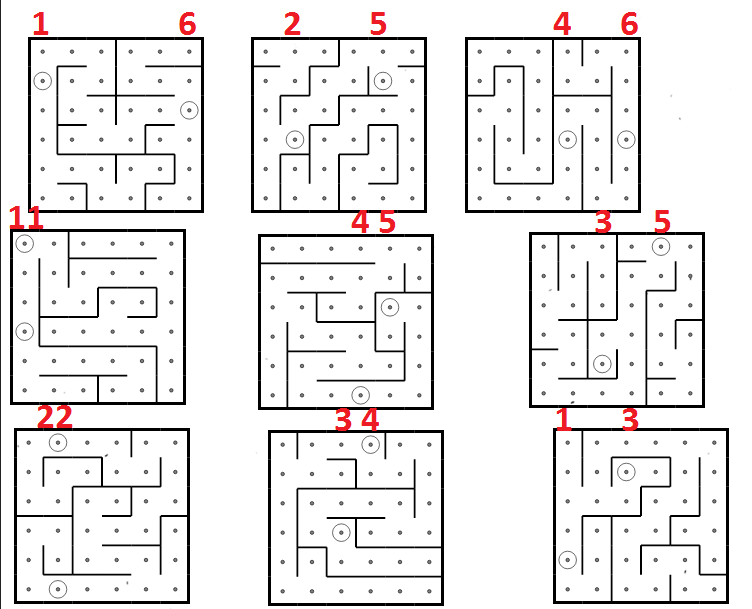
For exemple, if the defuser says "Column 2 and Column 5", that'd be the maze on the top middle.
I don't have much other tips for this, aside of using letters and numbers to give coordinates (Like B2, C5 or D1 for exemple) much similar to how Battleship works.
Password (Credits to Cypher for method)
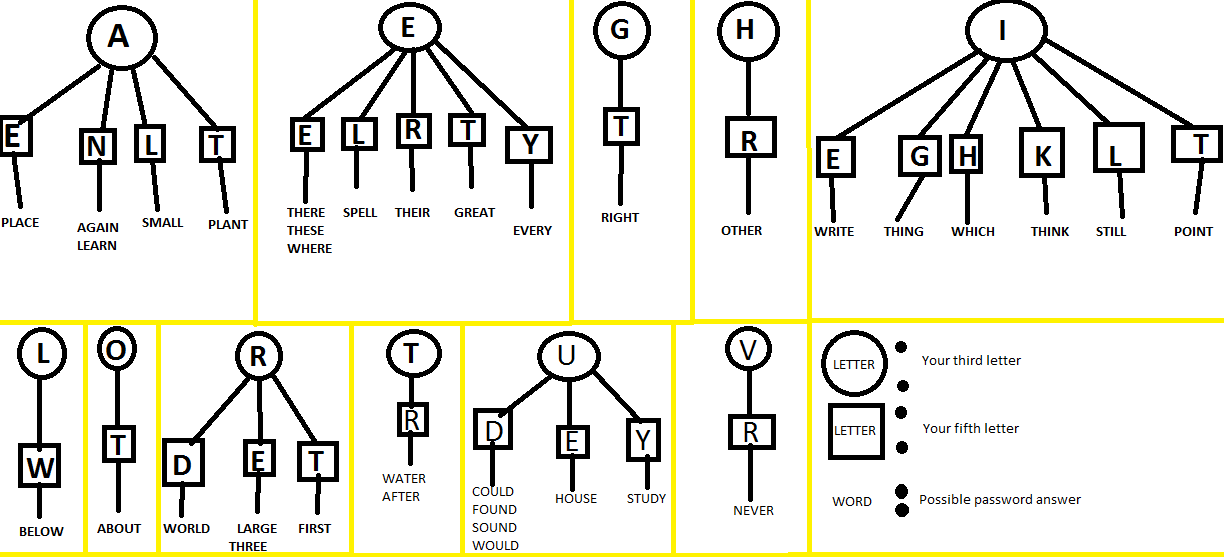
To use this picture, here is how it works:
First, the letter circled is the THIRD letter possibilities
Then, the letters under the circled ones are the FIFTH letter possibilities
Finally, under the Fifth letter is a list of words that could be the answer. If it's not it, find another combo of third and fifth letter and retry.
Venting Gas
If it says "Detonate?" - Press N
If it says "Vent Gas?" - Press Y
Capacitor Discharger
Knobs (Credits to Daido for the method)
This section is nearly word for word Daido's guide on Knobs.
Since naming all LEDs takes a long time, naming only LEDs that appears on both rows saves you time. Here's a list of the LEDs that appears on both rows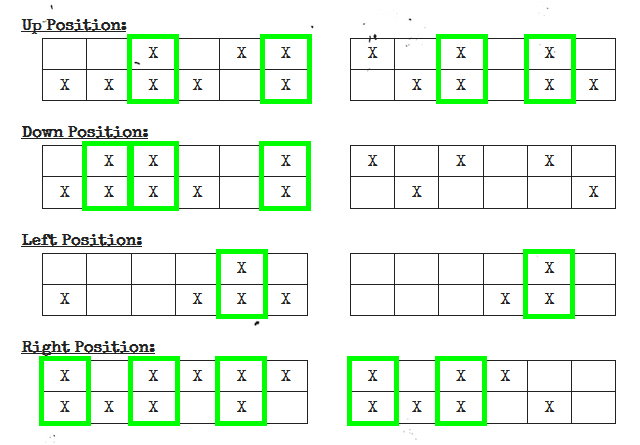
Quick identification for Experts:
UP: 3 - 6 or 3 - 5
DOWN: 2 - 3 - 6 or 0 (No double LEDs)
LEFT: 5
RIGHT: 1 - 3 - 5 or 1 - 3
Credits
Cypher for the Password and other images/methods
http://steamcommunity.com/sharedfiles/filedetails/?id=553805286
Mewcancraft for giving an updated version of the morse code picture.
Jarvisjj509 for additional morse code tricks
Pilot YELDAH for assisting in giving an updated Wires section after many of you died to it being wrong (sorry!)
- How to quickly copy morse code without memorization!★ 5 (463)27k views629 ♥2 minUpdated Dec 26, 2017
- Упрощённое руководство + моды★ 5 (187)12k views442 ♥7 minRussianUpdated Mar 7
- Assorted Cheat Sheets for Bomb Manual Version 1★ 4 (167)11k views340 ♥3 minUpdated Nov 20, 2015
- Tips And Tricks To Save Time And Your Life★ 4 (100)9k views179 ♥11 minUpdated Nov 18, 2019
- Pocket Manual★ 4 (115)8.6k views174 ♥1 minUpdated Nov 26, 2021
- Having A Crack At Passwords★ 4 (44)8.4k views82 ♥4 minUpdated Nov 13, 2015


- Upgrading to PremiumTeam Fortress 2★ 5 (20k)1441k views11k ♥6 minUpdated May 11, 2022
- No More Room in Hell Official ManualNo More Room in Hell★ 5 (2.8k)569k views2.1k ♥29 minUpdated Apr 22, 2019
- NMRiH Community Hosting GuidesNo More Room in Hell★ 5 (526)351k views653 ♥1 minUpdated Aug 10, 2022
- ULTIMATE GUIDE FOR GAME DEV TYCOONGame Dev Tycoon★ 5 (5.8k)326k views10k ♥4 minUpdated 23 Jan, 2014
- How to 'Git Gud' Soon™MORDHAU★ 5 (2k)318k views3k ♥68 minUpdated Nov 16, 2024
- Лучшие кооперативные игры SteamPAYDAY 2★ 5 (1.5k)315k views2.1k ♥56 minRussianUpdated Apr 27, 2025






This guide was created by its original author on the Steam Community. Are you the author and want it removed? Request removal.