[Solved] How to beat "Out of Commission" (Helicopter Bug - SPOILERS)
1. Play the mission normally until you get on the dirt bike
After making it inside the factory, you will start chasing Pegorino. You will need to kill all of Pegorino's henchmen and follow him to the dock. He will take off in the speedboat and Niko will need to get on the dirtbike.
2. Pause the game and go to desktop
Press [Alt + Tab] to switch windows
3. Open Task Manager and go to Details tab
Two easy ways to open Task manger are by pressing [Ctrl + Shift + Esc] or by right clicking on the taskbar and selecting "Task Manager."
Then click "Details" tab on the top of the window.
Then click "Details" tab on the top of the window.
4. Find GTA IV and right click on it
It is sorted by alphabetical order by default, so scroll until you find the GTA IV executable.
5. Click "Set affinity"
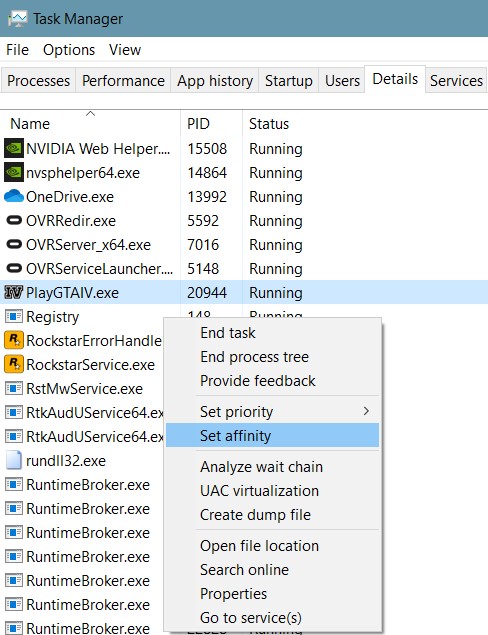
6. Only select one of the CPU cores in the drop down menu
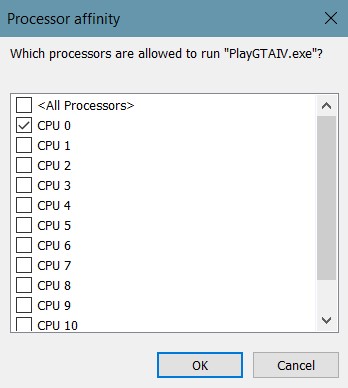
7. Press "OK" and return to the game
8. Drive the dirt bike to the ramp
Play the mission normally. The game will probably be preforming considerably worse, but trust me, this is supposed to happen.
For whatever reason, higher processor speeds of modern CPUs have made the next animation impossible to complete. Having a lower frame rate allows it to work as intended. This is the easiest fix for this issue without installing any programs or changing any advanced settings.
For whatever reason, higher processor speeds of modern CPUs have made the next animation impossible to complete. Having a lower frame rate allows it to work as intended. This is the easiest fix for this issue without installing any programs or changing any advanced settings.
9. Rapidly tap space as the game tells you and you will be able to get up!
Once you jump the ramp, Niko will automatically grasp onto the helicopter and from here you will be expected to spam the space bar. Now working as intended, Niko will eventually climb up and get in the pilot seat.
10. Once controlling the helicopter, switch the game back to normal CPU settings
From here onward, you can revert back to using all the cores again and running the game normally. This is the only portion of the game that I've encountered which needs this modification to function properly.
Pause your game again, and complete steps 2-7 again. Right click GTA IV and set affinity back to "All Processes." Return to the game and complete the rest of the mission.
Pause your game again, and complete steps 2-7 again. Right click GTA IV and set affinity back to "All Processes." Return to the game and complete the rest of the mission.
11. Finishing the mission
In the helicopter all you need to do is just avoid the missiles by maneuvering the helicopter and try to shoot at Pegorino in the speedboat. You will eventually be shot by a missile no matter what you do, just make sure you don't crash into the water and keep the helicopter steady while following the speedboat. A cutscene will transition you to landing on the dock. From there, it's up to you complete the story!
Thanks for reading! + Additional Tips
Thanks for making it to the end of this guide! I hope it helped you fix this annoying issue. If you have any questions, please ask in the comment section below and I'll do my best to respond.
Note: You will have to repeat these steps again if you do fail the mission because you will be put all the way back to outside the factory in the beginning of the mission.
Still doesn't work?: If my fix doesn't work: try capping the fps at 30, play on the lowest graphics settings, play with controller, or check the comments for some other ways to get around this annoying bug!
Note: You will have to repeat these steps again if you do fail the mission because you will be put all the way back to outside the factory in the beginning of the mission.
Still doesn't work?: If my fix doesn't work: try capping the fps at 30, play on the lowest graphics settings, play with controller, or check the comments for some other ways to get around this annoying bug!
More Grand Theft Auto IV: The Complete Edition guides
- How to make GTA IV: The Complete Edition perfectly playable in 2026★ 5 (2.7k)106k views5.2k ♥11 minUpdated May 2
- Grand Theft Auto IV: CE - The Improved Classic★ 5 (1.4k)53k views3k ♥4 minUpdated May 4
- Optimization, Performance and Improvements★ 5 (1.3k)52k views2.7k ♥9 minBulgarianUpdated Apr 18
- Fixing GTA IV with 4 Mods (2026 Guide)★ 5 (677)44k views1.4k ♥8 minUpdated Feb 2
- GTA IV: The Complete Edition Achievement Guide [2024]★ 5 (1.7k)32k views3.3k ♥15 minUpdated Jul 2, 2024
- GTA 4 COMPLETE EDITION: THE DEFINITIVE MOD GUIDE★ 5 (692)31k views1.3k ♥13 minUpdated Mar 11, 2024



This guide was created by its original author on the Steam Community. Are you the author and want it removed? Request removal.