Story Flowchart
Explanations
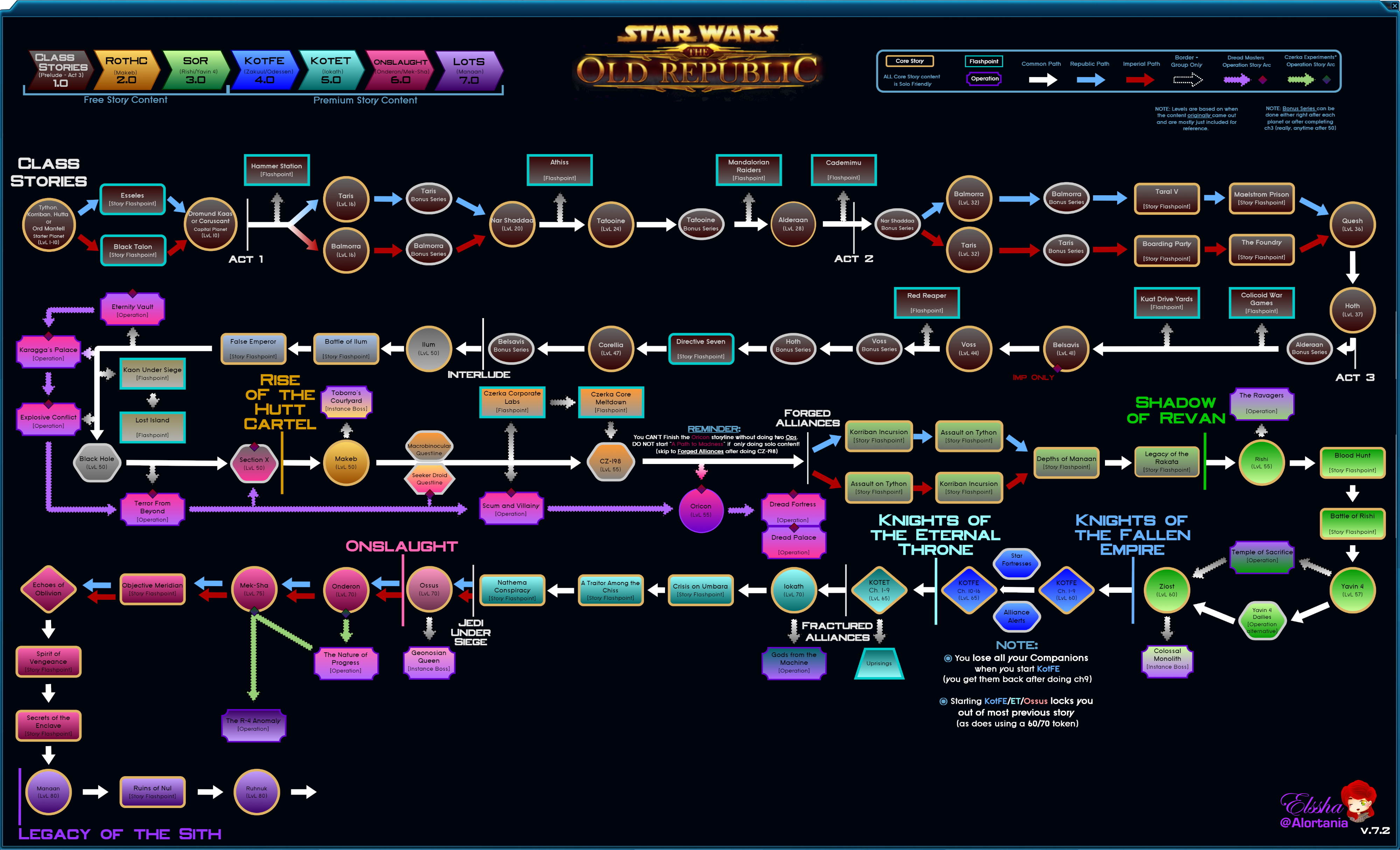
From 6.2 on, I've redesigned the flowchart into two types; Serpentine [i.redd.it]and Linear[i.redd.it].
I believe linear to be far easier for new players to follow, while serpentine is more convenient for those looking to get the order of a specific section, or want to see more of the story in one go.
For both charts, I've added a lot of indicators to help add information without overloading the graphic.
I believe linear to be far easier for new players to follow, while serpentine is more convenient for those looking to get the order of a specific section, or want to see more of the story in one go.
For both charts, I've added a lot of indicators to help add information without overloading the graphic.
- All the non-soloable content has been shifted from the main line of story progression as offshoots. In the linear version this is anything NOT in the central column; for serpentine it's anything not following the main progression line and the arrows have an uneven boarder around them
- Anything with a gold boarder is core story - other colored boarders are optional/extra and can be skipped without affecting story progression
- Circles are planets where you do missions (solo)
- Oblongs are planetary bonus missions
- Diamonds are planet-independent content (chapters)
- Rectangles are flashpoints (4-man dungeons)
- All flashpoints with solo versions are named "story flashpoint" and have rounded corners (plus are in-line with the main story)
- Hexagons are daily areas or (if squished) non-standard content
- Purple plaques are Operations (8 or 16-man raids); these DO NOT have solo versions
- Smaller plaques are Instance bosses = single operation boss (8 or 16m)
- The Dreadmaster story is indicated by purple arrows and a small red diamond. This is a side story mainly told (and ending with) operations. NOT solo-friendly
Serpentine
Linear

More STAR WARS™: The Old Republic™ guides
- ALL Free SWTOR codes NEW FEB 2024 CODE!★ 5 (701)63k views836 ♥3 minUpdated 14 Feb, 2024
- Русификатор★ 5 (775)59k views1.6k ♥1 minRussianUpdated 6 Jun, 2025
- Redeem Free Vehicles / Mounts★ 5 (862)41k views804 ♥1 minUpdated 20 May
- How to make SW:TOR a fun single-player RPG★ 5 (532)18k views67 ♥1 min
- The Class Playstyles★ 5 (236)16k views270 ♥6 minUpdated 3 Sep, 2024
- The Ultimate Guide of Guides for SWTOR 2021★ 5 (331)14k views627 ♥10 min



🔥 Popular guides
- Upgrading to PremiumTeam Fortress 2★ 5 (20k)1441k views11k ♥6 minUpdated May 11, 2022
- No More Room in Hell Official ManualNo More Room in Hell★ 5 (2.8k)569k views2.1k ♥29 minUpdated Apr 22, 2019
- NMRiH Community Hosting GuidesNo More Room in Hell★ 5 (526)351k views653 ♥1 minUpdated Aug 10, 2022
- How to 'Git Gud' Soon™MORDHAU★ 5 (2k)318k views3k ♥68 minUpdated Nov 16, 2024
- Лучшие кооперативные игры SteamPAYDAY 2★ 5 (1.5k)315k views2.1k ♥56 minRussianUpdated Apr 27, 2025
- Desert Eagle Heat Treated | Blue GemCounter-Strike 2★ 5 (1.6k)292k views1.5k ♥2 minUpdated Jan 16





This guide was created by its original author on the Steam Community. Are you the author and want it removed? Request removal.