SW: Kotor II: TSL 3D (Vision) Surround /Eyefinity setup guide
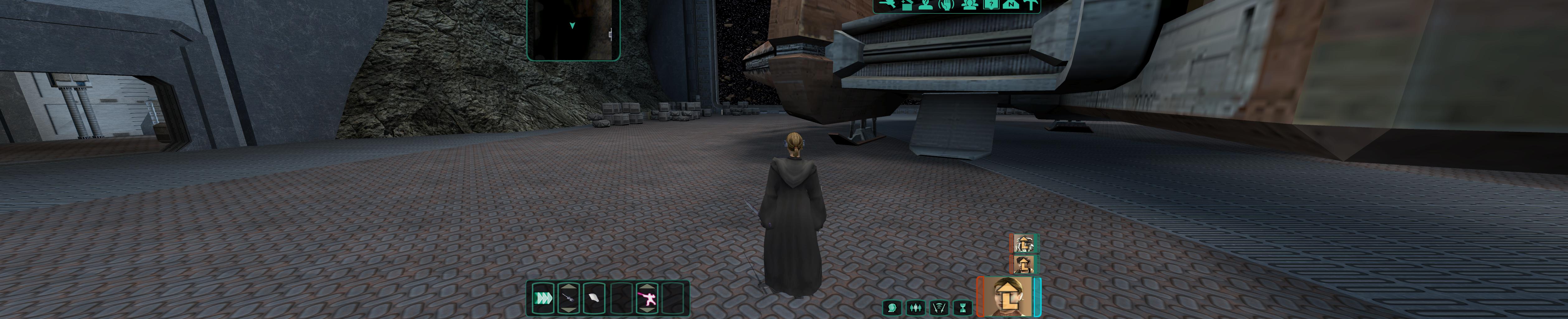
Screenshot:
How-To
I will keep this brief:
- SWKOTOR 1&2 are OpenGL games. Therefore not working natively with 3D Vision.
However, I developed a 3DVision wrapper/driver that enables 3D Vision in OpenGL games. (Use Google and search: "opengl 3dvision wrapper". You will find the page.) There select and download the 3D Vision patch.
- Surround/Eyefinity. I redesigned the whole HUD to work with Surround/Eyefinity resolutions. You can also find it on my website.
- You will require the latest version of "Flawless Widescreen Fixer" as well to enable multiple required fixes.
PS: UNIWS is not required anymore...
Some issues might still exist regarding the UI placement.
Other information can be seen here as well: https://forums.geforce.com/default/topic/682130/3d-vision/-opengl-3d-vision-wrapper-enabling-3d-vision-in-opengl-apps/post/4521551/#4521551
Hopefully this will help you make it work.
If you don't understand the instructions... try harder:)
- KotOR II Cheat Codes★ 5 (1.6k)116k views4.4k ♥17 minUpdated Jul 20, 2017
- KOTOR II: The Sith Lords - Go-To Essential Mods★ 5 (768)56k views2.2k ♥13 minUpdated Feb 28
- Character and Party Optimizing Guide - Archival★ 5 (1.1k)56k views2.7k ♥51 minUpdated Apr 24, 2024
- KotOR II Steam Workshop Modding Guide★ 5 (499)46k views1.1k ♥9 minUpdated Dec 20, 2015
- KOTOR: Tips and Tricks★ 5 (386)42k views756 ♥5 minUpdated Jun 12, 2023
- Ultima Pearl (Code)★ 5 (329)32k views749 ♥1 minUpdated Nov 25, 2025


- Upgrading to PremiumTeam Fortress 2★ 5 (20k)1441k views11k ♥6 minUpdated May 11, 2022
- No More Room in Hell Official ManualNo More Room in Hell★ 5 (2.8k)569k views2.1k ♥29 minUpdated Apr 22, 2019
- NMRiH Community Hosting GuidesNo More Room in Hell★ 5 (526)351k views653 ♥1 minUpdated Aug 10, 2022
- ULTIMATE GUIDE FOR GAME DEV TYCOONGame Dev Tycoon★ 5 (5.8k)326k views10k ♥4 minUpdated 23 Jan, 2014
- How to 'Git Gud' Soon™MORDHAU★ 5 (2k)318k views3k ♥68 minUpdated Nov 16, 2024
- Лучшие кооперативные игры SteamPAYDAY 2★ 5 (1.5k)315k views2.1k ♥56 minRussianUpdated Apr 27, 2025






This guide was created by its original author on the Steam Community. Are you the author and want it removed? Request removal.