The Giant Space Saver
What Do You Lose?
The content you will be uninstalling is called campaign and Multiplayer, these unfinished zombies mode both tried to achieve something but fell short as on release and as for now (10/11/2023) lacks zombies. There is a DLC called NUK3TOWN Bonus Map that does have a Zombies Easter Egg however falls short as it is simple and lacks the round based gameplay that we know and love.
In addition to the modes we will be removing the DLC packs for the Multiplayer maps (Awakening, Eclipse, Decent, Salvation) as you no longer have need for them as on Steam the zombies content is it's own DLC.
EDIT: You apparently could lose the whimicle gobble gum, to keep it leave Descent and Salvationchecked.
In addition to the modes we will be removing the DLC packs for the Multiplayer maps (Awakening, Eclipse, Decent, Salvation) as you no longer have need for them as on Steam the zombies content is it's own DLC.
EDIT: You apparently could lose the whimicle gobble gum, to keep it leave Descent and Salvationchecked.
How To Save Space
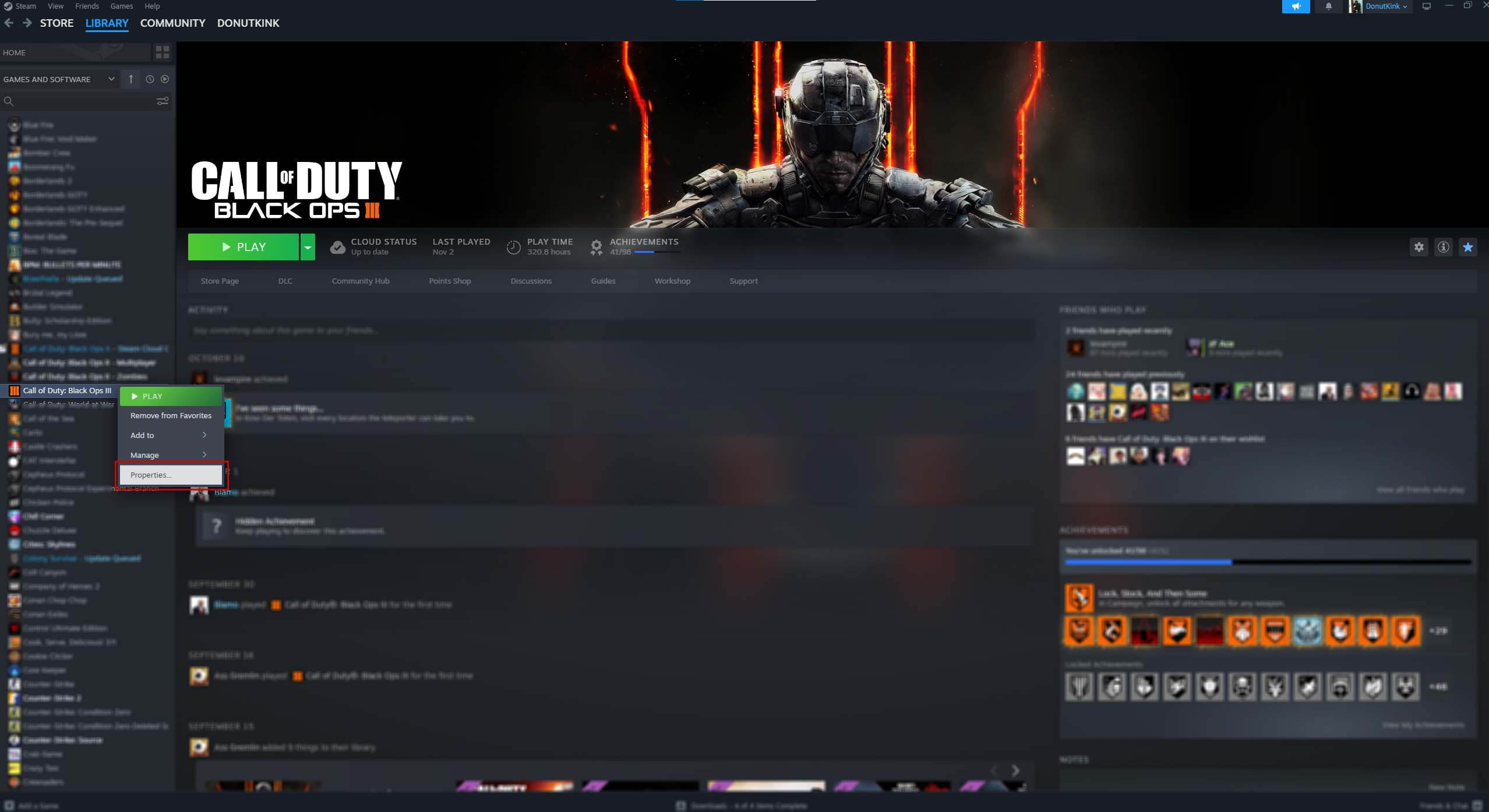
Firstly, you will want to navigate to your library and right click on Call of Duty: Black Ops III. The click on the Properties... button down the bottom.
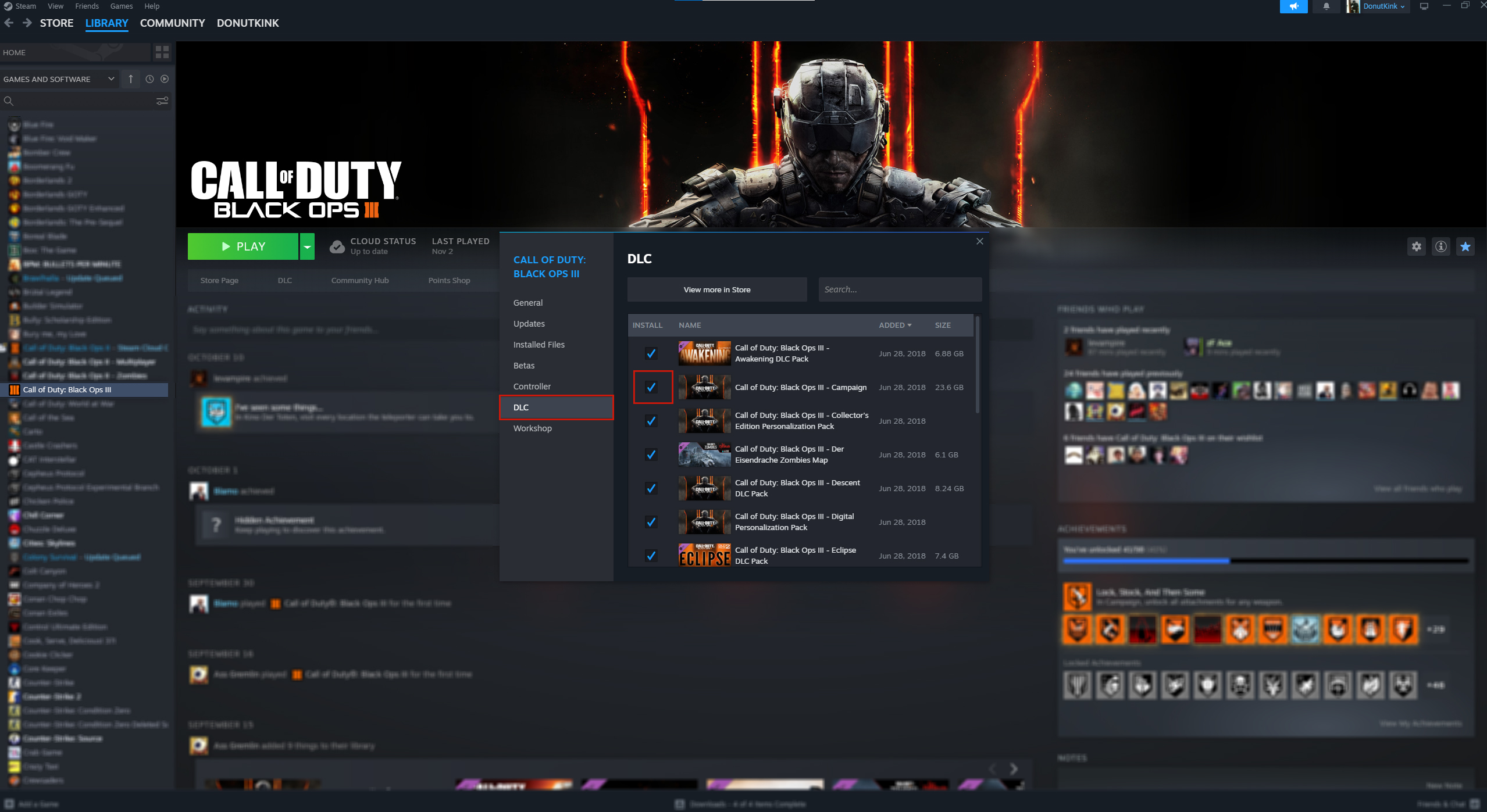
A pop-up window will open, you want to go down to the DLC tab on the left side. This will reveal all the DLC you have for the game. The checked content is what you either have installed or will be installing.
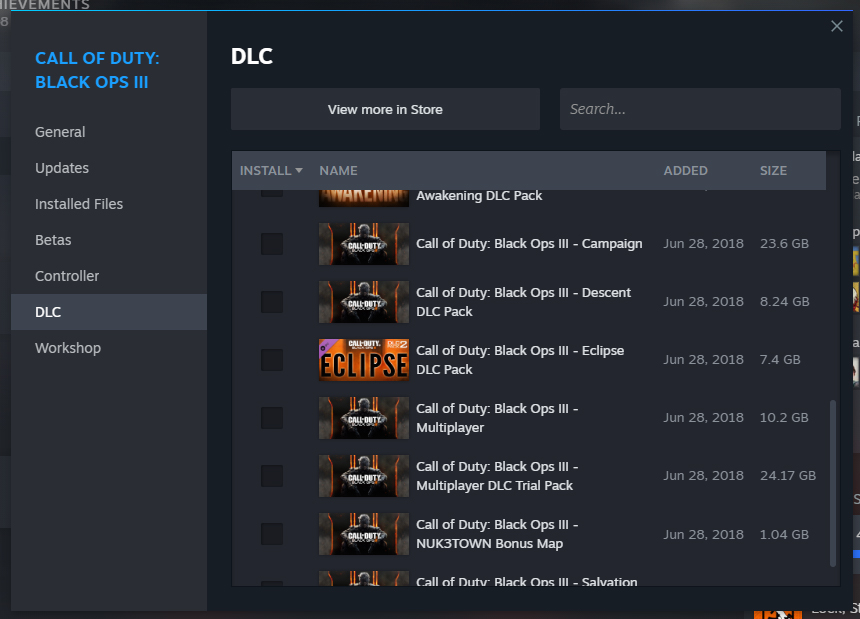
The Content you will want to UNCHECK for the optimal Zombies Experience is:
All up this should save you 94.41gb, have fun.
If you ever want to reinstal this content, just go into the DLC tab again and re-tick all the content you want.
A pop-up window will open, you want to go down to the DLC tab on the left side. This will reveal all the DLC you have for the game. The checked content is what you either have installed or will be installing.
The Content you will want to UNCHECK for the optimal Zombies Experience is:
- Awakening DLC Pack
- Campaign
- Decent DLC Pack
- Eclipse DLC Pack
- Multiplayer
- Multiplayer DLC Trial Pack
- NUK3TOWN Bonus Map
- Salvation DLC Pack
All up this should save you 94.41gb, have fun.
If you ever want to reinstal this content, just go into the DLC tab again and re-tick all the content you want.
More Call of Duty: Black Ops III guides
- All Around Enhancement Mod Description And Info★ 5 (597)211k views1.2k ♥34 minUpdated Aug 10, 2023
- Black Ops 3: Console Commands★ 5 (1.1k)123k views2.4k ♥7 minUpdated Feb 13, 2020
- Origins Ultimate Guide★ 5 (562)72k views1.7k ♥17 minUpdated Jun 24, 2017
- Guide for Shadows of Evil [2020 updated]★ 5 (1.4k)67k views4.5k ♥24 minUpdated Mar 22, 2024
- Guide for Der Eisendrache [2020 updated]★ 5 (1.3k)65k views4.6k ♥30 minUpdated Feb 22, 2024
- How to download the community T7patch by Serious and play online zombies safely (also FPS Fix)★ 5 (491)62k views1.2k ♥4 minUpdated Apr 30






This guide was created by its original author on the Steam Community. Are you the author and want it removed? Request removal.