Unlimited gold (treasury)
Unlimited gold (treasury)
Hello,
Disclaimer: May not work for everyone.
Step 1 - Download https://www.cheatengine.org (I am using v6.8.1 in this guide)
Step 2 - Start the game. Choose your campaign
Step 3 - Alt+tab and start Cheat Engine. You must have administrator rights
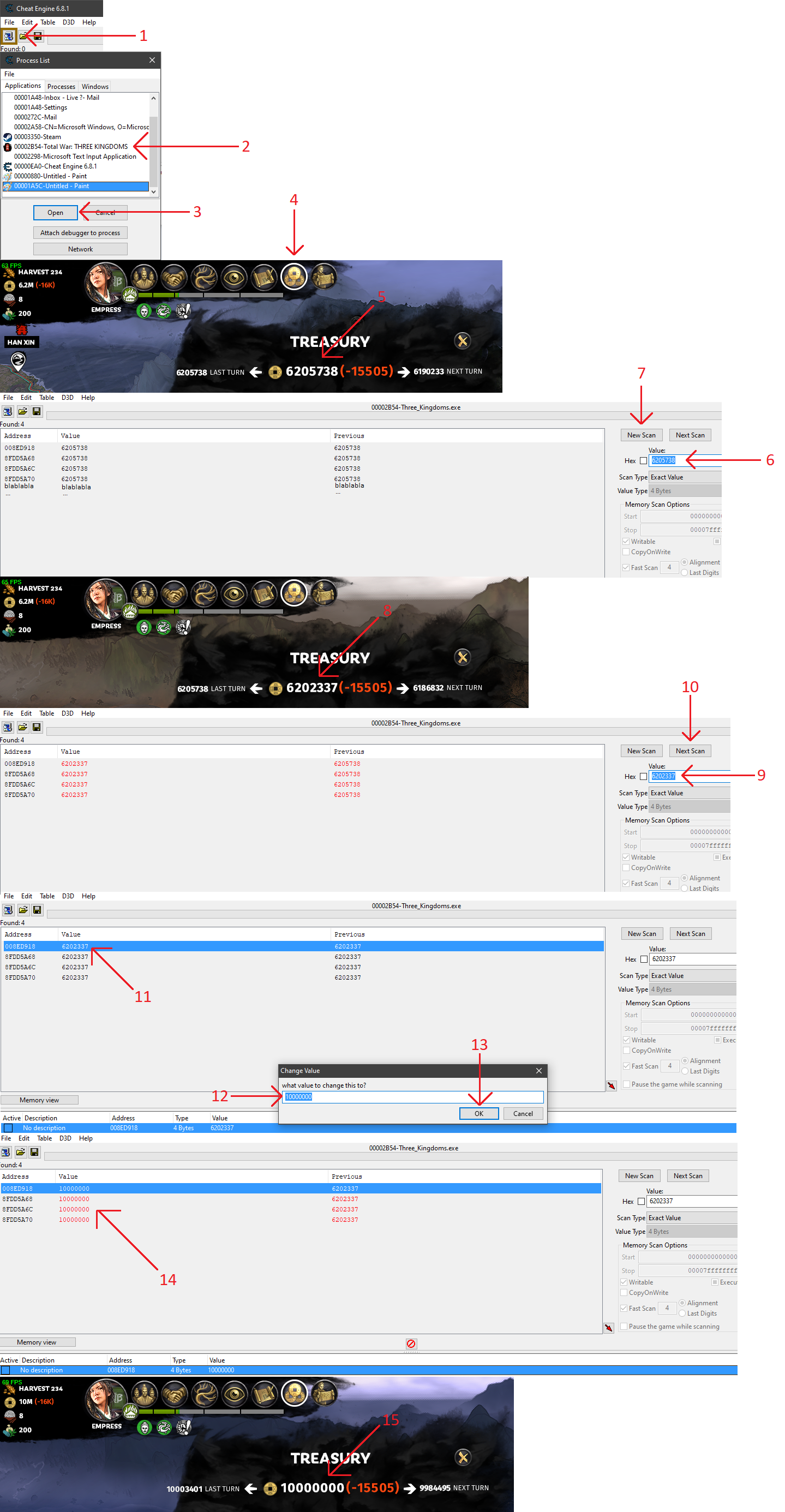
Step 4 - Follow these substeps with the picture attached to this guide:
Substep 1 - Press this icon
Substep 2 - Select "Total War: THREE KINGDOMS"
Substep 3 - Open
Substep 4 - Alt+tab to Total War: THREE KINGDOMS and press this icon in-game
Substep 5 - Remember this number exactly
Substep 6 - Alt+tab to Cheat Engine and type that number here
Substep 7 - Press "New Scan"
Substep 8 - Alt+tab to Total War: THREE KINGDOMS and buy something to change your current treasury and then remember this number exactly
Substep 9 - Alt+tab to Cheat Engine and type that number here
Substep 10 - Press "Next Scan"
Substep 11 - You will have one of these lines, previously red and as you make a new scan the numbers will change to the exact value in-game. With an investigative eye you will see that 4 lines shows this current exact value. The address for 3 of these lines start with the same number and the last one starts with something different. Right click that one and "Change value of of selected adresses".
Substep 12 - Change the current value to your preferred value (this will be the gold (treasury) you want in-game)
Substep 13 - Press OK
Substep 14 - See that the value for all 4 lines go red and starts to change towards the value you chose
Substep 15 - Alt+tab to Total War: THREE KINGDOMS and update the "Treasury" tab.
You are done!
You can keep doing this if you run out of money, hence the title "Unlimited gold (treasury)".
Sincerely,
payrate
- 《全面战争:三国》全方位懒人攻略★ 5 (685)39k views962 ♥3 minSimplified ChineseUpdated Mar 26, 2021
- Total War 3K: TheGathering sandbox mod★ 5 (312)37k views729 ♥76 minUpdated Jun 2, 2021
- 【更新日志】黑熊的非官方DLC (最后更新2024/6/28)★ 5 (312)36k views387 ♥3 minSimplified ChineseUpdated Jun 28, 2024
- Guide for TROM mod★ 5 (166)36k views395 ♥20 minUpdated Aug 7, 2023
- Three Kingdoms: Income guide★ 5 (382)27k views987 ♥17 minUpdated Jun 21, 2022
- Advanced Tips and Tricks★ 5 (329)25k views639 ♥42 minUpdated Jun 14, 2019


- Upgrading to PremiumTeam Fortress 2★ 5 (20k)1441k views11k ♥6 minUpdated May 11, 2022
- No More Room in Hell Official ManualNo More Room in Hell★ 5 (2.8k)569k views2.1k ♥29 minUpdated Apr 22, 2019
- NMRiH Community Hosting GuidesNo More Room in Hell★ 5 (526)351k views653 ♥1 minUpdated Aug 10, 2022
- ULTIMATE GUIDE FOR GAME DEV TYCOONGame Dev Tycoon★ 5 (5.8k)326k views10k ♥4 minUpdated 23 Jan, 2014
- How to 'Git Gud' Soon™MORDHAU★ 5 (2k)318k views3k ♥68 minUpdated Nov 16, 2024
- Лучшие кооперативные игры SteamPAYDAY 2★ 5 (1.5k)315k views2.1k ♥56 minRussianUpdated Apr 27, 2025






This guide was created by its original author on the Steam Community. Are you the author and want it removed? Request removal.