Using Modifications
Where To Get The Mod-loader
"TLDWorkhop.exe" will download the game patcher.
The patcher will install the "Mod-Loader" patch
First you will have to patch the game.
The newest patcher/mod-loader is installed by the "TLD Workshop" tool.
You can always find the newest version of TLDWorkshop in the discord and official site.
Join the discord https://discord.gg/GeneServer
The Workshop tool is still Beta and not finished.
Do not report bugs or problems with the workshop here. I am not the author.
DOWNLOAD → https://kolbenlp.gitlab.io/WorkshopTLDMods/
Installing the Patcher / Mod-Loader
NOTE: Windows security settings may interfere with patching the game if;
- your steam library is installed in the default system programs folder.
- you have ransomware protection enabled with one-drive and Windows Defender.
The solution to the first problem is to run TLDWorkshop as admin, and the second problem will need you to temporarily disable one-drive or the ransomware features.
The Workshop tool can be run from wherever you saved it, but it is wise to put it in the TLD folder in your Documents folder, because it will put a few files in the same folder as itself when you run it (and this is also where the mods will be installed anyway).
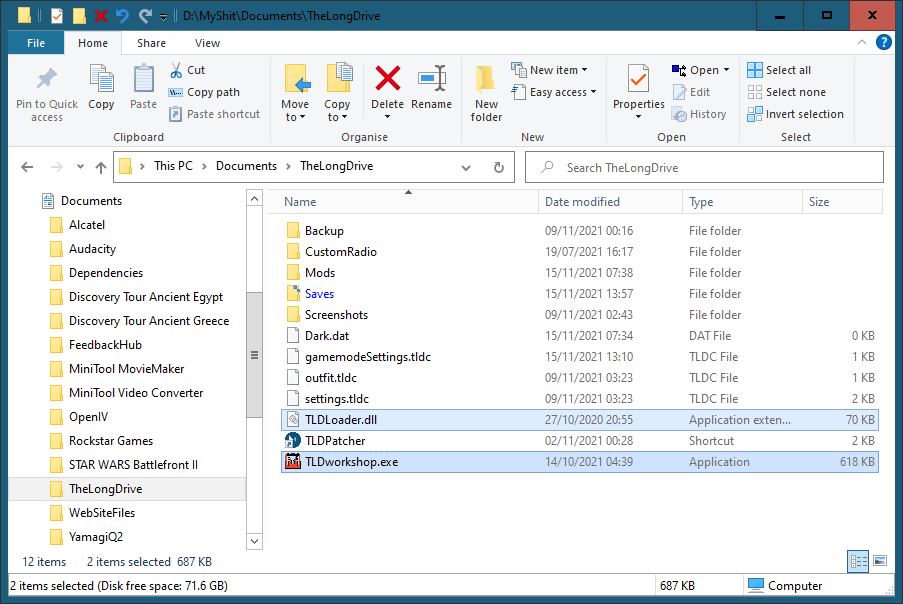 IMPORTANT - You MUST close the game while patching.
When you first run the Workshop you will be prompted to install the patch.
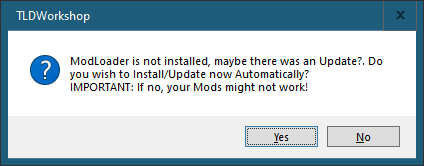
Click "Yes"
The patcher should now install and the Workshop will open.
If it fails you may need to right-click and run as Admin.
This will patch one of the game files (Assembly-CSharp.dll) and make a backup of the original so you can remove TLDLoader if you need to.
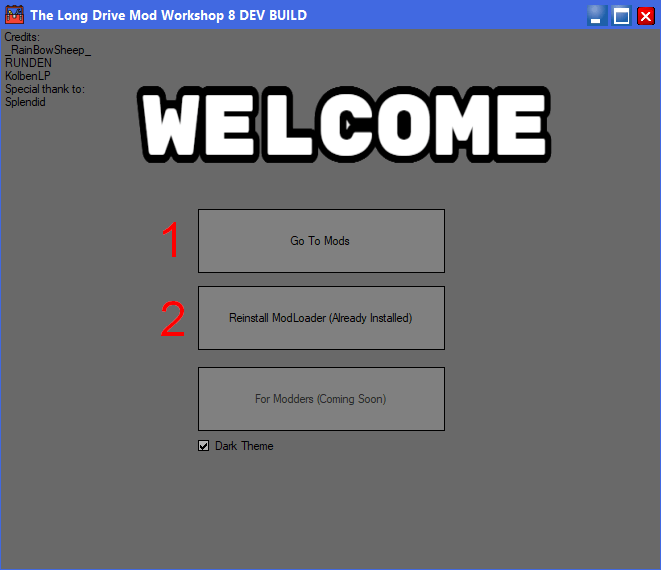
1. You can now use the top button in the workshop to view and install the mods.
2. You will need to re-patch the game after any new game updates have been installed by Steam.
Installing Modifications
The easiest way is to use the TLD Workshop tool you used to install the patcher.
Click on the button "Go To Mods" to open the curated collection.
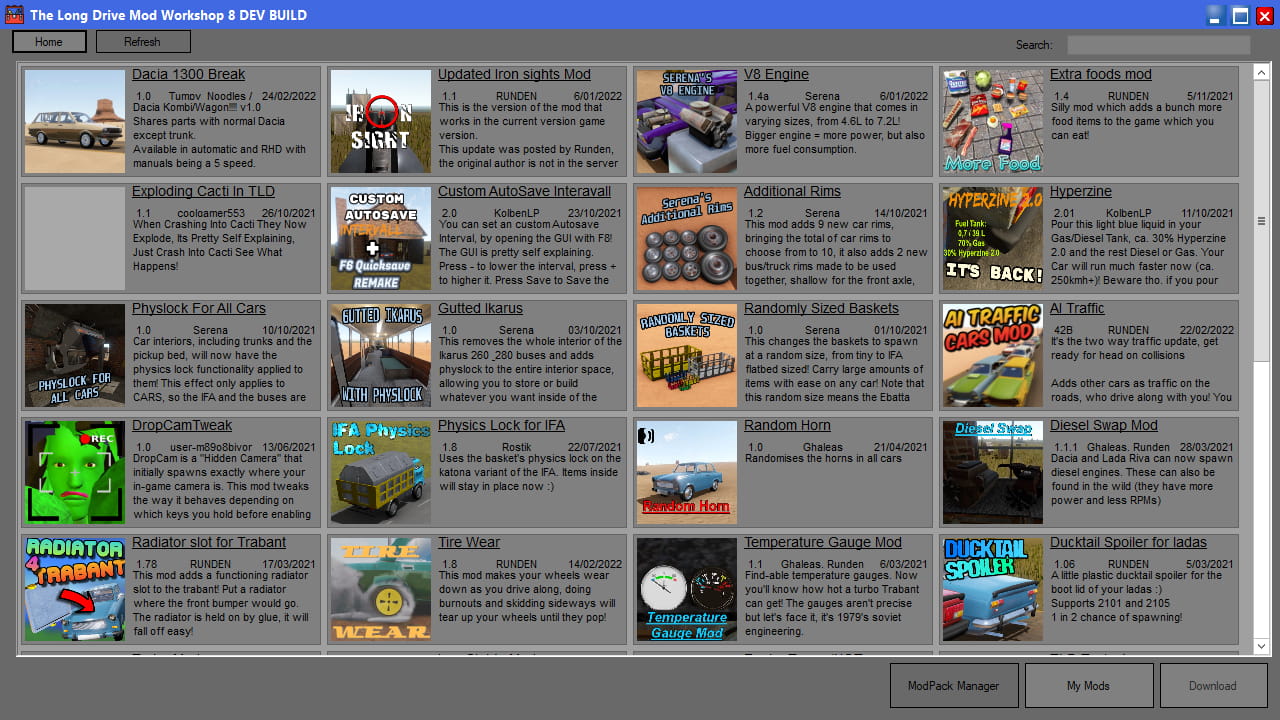
Some mods need special instructions or have bugs, so please read the text before installing.
eg. You cannot use the item spawner until you have travelled far enough to unlock it.
You can also use the Workshop tool to update existing mods.
For mods not listed in TLD Workshop, you will have to place the files in the correct folders.
Most small mods will just be 1 file with a *.DLL file extension.
Place the DLL files in the mods folder and you are done.
Bigger mods and those with extra assets will be packaged as compressed archives such as ZIP, RAR or 7z.
If you cannot open them by double-clicking, you need to install either WinRAR[www.rarlab.com] or 7zip[www.7-zip.org] (both are free and can open many types of compressed files).
Open the mod archive and drag the contents to the mods folder.
DLLs go in "Mods" and assets go in "Assets".
NOTE: Any mods you manually installed that are also in the Workshop, can be updated with the Workshop.
Some files may be named differently if installed by the Workshop tool.
The Workshop will attempt to detect these files and offer to change the names.
TLDR - The Guide as a Video
Tips
- Read the information for the mod you want to use. Some mods have limits or are now obsolete.
- Add one mod at a time to test, because some will add lag and others may conflict with existing mods, or the current game build you are using.
- When you start the game, pre-load the mods before loading your saved game. Do this by starting a new game and waiting for the mods to load, then loading your save.
- Beginner's guide★ 5 (346)42k views580 ♥14 minUpdated Aug 29, 2020
- [?] КАК ИГРАТЬ в The Long Drive MULTIPLAYER ✅★ 4 (104)33k views158 ♥1 minRussianUpdated Dec 21, 2024
- Интересные сиды/семя★ 4 (97)25k views219 ♥2 minRussianUpdated Sep 3, 2023
- Мир The Long Drive★ 5 (259)25k views437 ♥61 minRussianUpdated Apr 22
- TLD Engine Recognition Guide★ 5 (260)22k views664 ♥1 minUpdated Jun 22, 2023
- Как установить моды на TheLongDrive★ 4 (87)20k views150 ♥1 minRussianUpdated Jul 4



- Upgrading to PremiumTeam Fortress 2★ 5 (20k)1441k views11k ♥6 minUpdated May 11, 2022
- No More Room in Hell Official ManualNo More Room in Hell★ 5 (2.8k)569k views2.1k ♥29 minUpdated Apr 22, 2019
- NMRiH Community Hosting GuidesNo More Room in Hell★ 5 (526)351k views653 ♥1 minUpdated Aug 10, 2022
- ULTIMATE GUIDE FOR GAME DEV TYCOONGame Dev Tycoon★ 5 (5.8k)326k views10k ♥4 minUpdated 23 Jan, 2014
- How to 'Git Gud' Soon™MORDHAU★ 5 (2k)318k views3k ♥68 minUpdated Nov 16, 2024
- Лучшие кооперативные игры SteamPAYDAY 2★ 5 (1.5k)315k views2.1k ♥56 minRussianUpdated Apr 27, 2025






This guide was created by its original author on the Steam Community. Are you the author and want it removed? Request removal.