[WOTC] Workshop Mods Not Working [FIX]
How To Make Them Work With The New Launcher
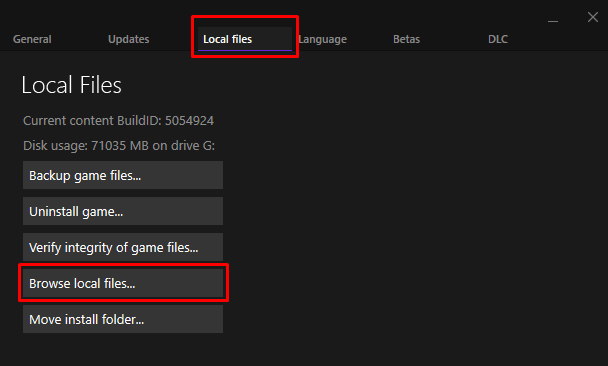
First, we need to open the game's folder, you can do it easily like this
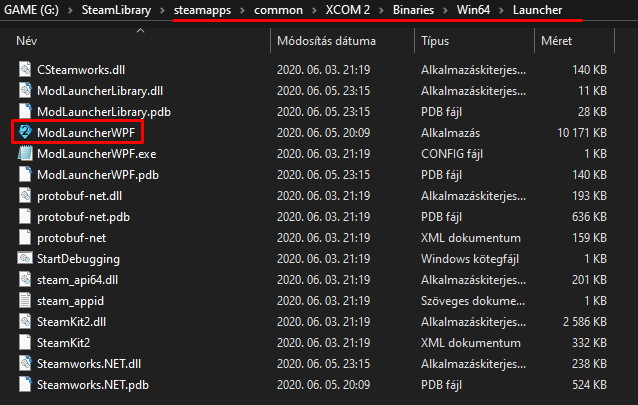
Once you get to this folder you have to launch "ModLauncherWPF" as administrator, otherwise an error pops up.
The old launcher will come up which looks like this
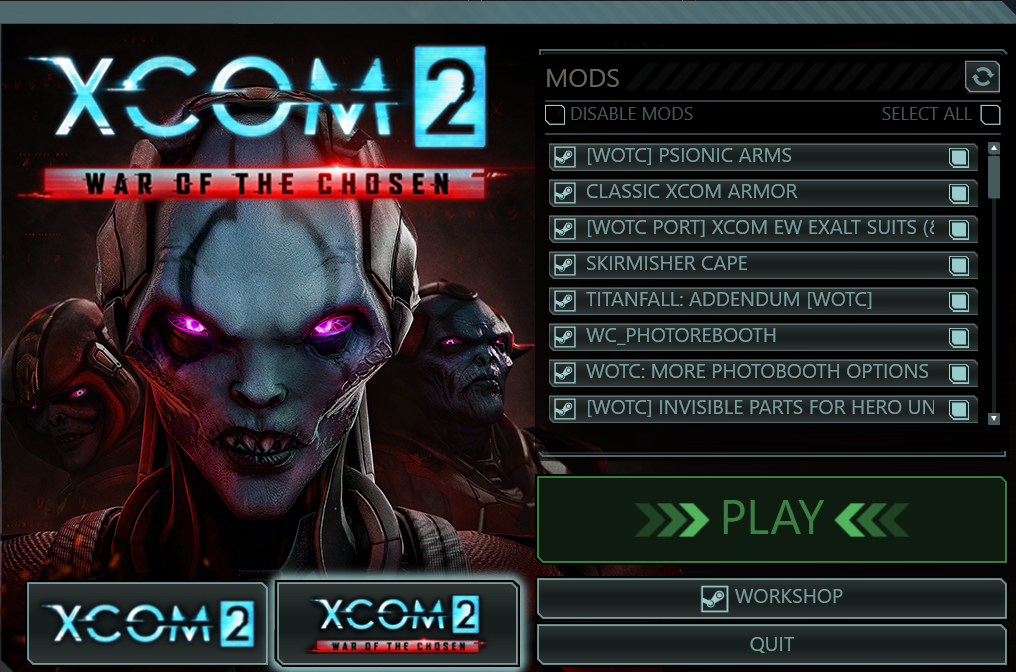
Now all you have to do is choose the mods you'd like to use and then boot up the game with this launcher.
Once you launched the game, let it load a bit, A red screen may appear, don't panic. Then you can press Alt + F4 to quit.
After you've done this, launch up the game with the new launcher and select the mods you'd want to use and that's it. Your workshop mods will now work.
Unfortunately, if you want to use the new launcher, then you have to do this every time you download another mod from the workshop.
Alternative Way to Make Them Work Using The Old Launcher (Much Easier)
Make a Desktop Shortcut using "ModLauncherWPF" from your "XCOM 2\Binaries\Win64\Launcher" Folder.
After you've made the Shortcut to your desktop, open up the shortcut's properties then go to direct access from there you have to add "-noRedScreens -review" (Without the quotation marks ["]) after the address where it leads.After that it should look like this:

Now, you just have to start your game from the desktop using the shortcut instead of going through Steam. Oh and also make sure that Steam is running.
What To Do If Mods Do Not Turn Off
Locate the "DefaultModOptions" file which can be found in this directory "steamapps\common\XCOM 2\XCom2-WarOfTheChosen\XComGame\Config"
After you've opened the ini file. you will see lines like this for example:
" ActiveMods="[Mod Name]" "
Now just delete the ones you don't want to use.
That's It

Take Care!
- What I Wish I Knew When I First Played Xcom 2★ 5 (1.6k)85k views3k ♥27 minUpdated 1 Nov, 2021
- XCOM 2 with great visuals and high FPS★ 5 (902)60k views1.8k ♥7 minUpdated 11 May, 2022
- Xcom 2 CHEATS & TWEAKS★ 5 (1.1k)54k views2.7k ♥3 minUpdated 15 Feb, 2016
- XCOM 2:All console commands and IDs [WOTC]★ 5 (713)49k views2.1k ♥18 minUpdated 20 Jan, 2023
- Vel's Guide To XCom 2 (Formerly "Stuff that works for me")★ 5 (592)34k views1.5k ♥135 minUpdated 24 Mar, 2018
- Проект "Аватар" - отключение счётчика★ 5 (781)26k views870 ♥1 minRussianUpdated 8 Feb, 2016




- Upgrading to PremiumTeam Fortress 2★ 5 (20k)1441k views11k ♥6 minUpdated May 11, 2022
- No More Room in Hell Official ManualNo More Room in Hell★ 5 (2.8k)569k views2.1k ♥29 minUpdated Apr 22, 2019
- NMRiH Community Hosting GuidesNo More Room in Hell★ 5 (526)351k views653 ♥1 minUpdated Aug 10, 2022
- How to 'Git Gud' Soon™MORDHAU★ 5 (2k)318k views3k ♥68 minUpdated Nov 16, 2024
- Лучшие кооперативные игры SteamPAYDAY 2★ 5 (1.5k)315k views2.1k ♥56 minRussianUpdated Apr 27, 2025
- Desert Eagle Heat Treated | Blue GemCounter-Strike 2★ 5 (1.6k)293k views1.5k ♥2 minUpdated Jan 16





This guide was created by its original author on the Steam Community. Are you the author and want it removed? Request removal.