Xbox One controller configuration guide
Purpose
As probably many other people here, I was rather disappointed at how undriveable the car is with the default controller settings in the game. The steering speed out of the box is just crazy strong and makes me wonder if anyone can even set any decent lap times with such settings.
After spending lots of time testing and analyzing various settings I decided to write a guide and attempt to explain the options available to us in the game (of which there are plenty) and share some good baseline configurations that should make the game far more enjoyable out of the box.
Obviously the configurations that I've shared are my personal ones and there is no guarantee that you will find them as drivable as I do but hopefully the explanations of each individual setting will give you an understanding of what you need to tweak to make them work for you. Try them out and see if you like them and please leave a comment below if you think you've found better ones.
Speed Sensitivity
The faster your car is travelling the less sensitive steering input becomes.
If set to 0% wheel goes from full lock to full lock in an instant and the car becomes almost impossible to control. If set to 100% the steering almost completely stops reacting to any inputs and the car becomes like a cruise ship.
Values between 50% and 60% (depending on your preferences) seem to work best. When set to higher than that turning the car on the little straight before turn 6 at Nurburgring and through the long turn 12 becomes very difficult. Less than 50% makes it far too twitchy at high speeds for my liking.
Use this Nürburgring track map[upload.wikimedia.org] as a guide if required.
My preference: 55%.
Steer Filter
Determines the reduction of steering input. 100% turns the wheel very slowly and 0% turns it almost instantly resulting in almost an instant steering lock.
After playing around for a while I stopped on 98%, which seems to be a good balance between the wheel turning quick enough but not too fast for the car to become twitchy on straights.
For some reason the value doesn't seem to be linear and even dropping it down to 97% makes it far more sensitive to steering inputs than 98%. 100% on the other hand could be compared to setting speed sensitivity to 100%, except steer filter affects inputs at all speeds.
My preference: 98%.
Steer Gamma
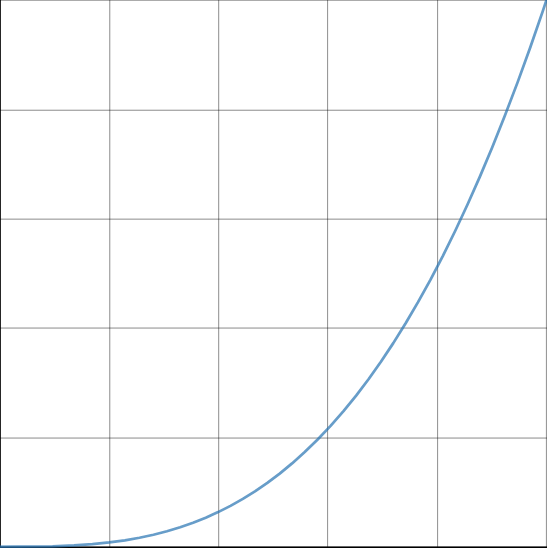
Steering gamma determines the steering response curve.
Value of 1 means linear steering input - analogue stick pushed halfway to either of the sides means wheels are turned at 50% of the available angle:

Value of 4 means that the initial stick inputs are reduced and pushing the analogue stick halfway through to either of the sides results in a smaller movement than it would be if steer gamma was set to 1.0:
My preference: 3.0.
Steer Speed
My preference: 15%.
Steer Assist
From what I can tell enabling steering assist dampens the initial inputs and makes them less twitchy or instant than they normally would be. Turning it off causes all settings to behave completely differently and unfortunately I am not able to give an explanation on how it works exactly.
One thing I have noticed is that it causes the game to catch your slides - e.g. if you're going off the track and rear starts sliding out then the game automatically counter-steers to negate that slide. It can be a useful feature especially for those who are not very good at catching the rear end when it starts sliding but it can sometimes take control away from the player for what feels like an eternity.
Overall, I think the benefits of having it outweigh the negatives as you shouldn't be going off the track and losing the rear end too often anyway. If you do decide to turn it off be aware that the settings tailored for steering assist enabled won't work. Please see the summary section for a good baseline setup without it.
Note on the 1.8 patch
For those who prefer to have steering assist off, please see the Summary section for an updated configuration that should make the car relatively smooth in both, slow speed and high speed corners and no longer exhibit the twitchy behavior that the default configuration does. One issue I personally have after the 1.8 update is the rear end being unstable and a bit skittish when turning in but I'm assuming it's related to the recent physics changes so it's just something we need to get used to going forward.
Summary
To summarize, these are the values that I find perfectly drivable with auto steer to set to ON:
Alternatively, here is an OK baseline for everyone willing to experiment with steer assist set to OFF:
Hope this helps and makes the game more enjoyable!
Update history
23/10/2018 - Updated values from decimals to percentages following update #2.
15/07/2020 - Minor typos and corrections.
11/12/2021 - Added 1.8 update section and updated settings for steer assist off.
- Logitech G29/G27/DGFT Force Feedback LUT Settings★ 5 (329)27k views740 ♥2 minUpdated Jan 3, 2020
- FREE stable race setups & simplified setup tweak guide★ 5 (1.4k)22k views2.6k ♥8 minUpdated Aug 2, 2025
- Assetto Corsa Competizione - ECU Map Guide★ 5 (607)20k views1.2k ♥5 minUpdated May 20, 2020
- Beginner steps to setup★ 5 (530)18k views1k ♥5 minUpdated Apr 25, 2023
- VR quality guide (+ Quest 2 & 3 in depth settings)★ 4 (123)17k views379 ♥5 minUpdated Feb 16, 2025
- Setup Checklist★ 5 (425)17k views980 ♥1 minUpdated Jul 27, 2025


- Upgrading to PremiumTeam Fortress 2★ 5 (20k)1441k views11k ♥6 minUpdated May 11, 2022
- No More Room in Hell Official ManualNo More Room in Hell★ 5 (2.8k)569k views2.1k ♥29 minUpdated Apr 22, 2019
- NMRiH Community Hosting GuidesNo More Room in Hell★ 5 (526)351k views653 ♥1 minUpdated Aug 10, 2022
- How to 'Git Gud' Soon™MORDHAU★ 5 (2k)318k views3k ♥68 minUpdated Nov 16, 2024
- Лучшие кооперативные игры SteamPAYDAY 2★ 5 (1.5k)315k views2.1k ♥56 minRussianUpdated Apr 27, 2025
- Desert Eagle Heat Treated | Blue GemCounter-Strike 2★ 5 (1.6k)293k views1.5k ♥2 minUpdated Jan 16





This guide was created by its original author on the Steam Community. Are you the author and want it removed? Request removal.