Как исправить ошибку: 0xc000007b? / How do I fix the error: 0xc000007b?
Решение: / Decision:
Далее выбрать File -> Open и exe файл игры.
После этого нужно пролистать все жёлтые знаки вопроса, до красных квадратиков/ошибок.
Важно: Нас не интересуют ошибки с числом 64!.
Далее нужно скачать dll файлы (32 бит версии и 64 бит версии), которые выделены красным квадратиком и заменить их в папке System32 и SystemWOW64.
Теперь ошибка должна быть исправлена, проверьте запускается игра или нет.
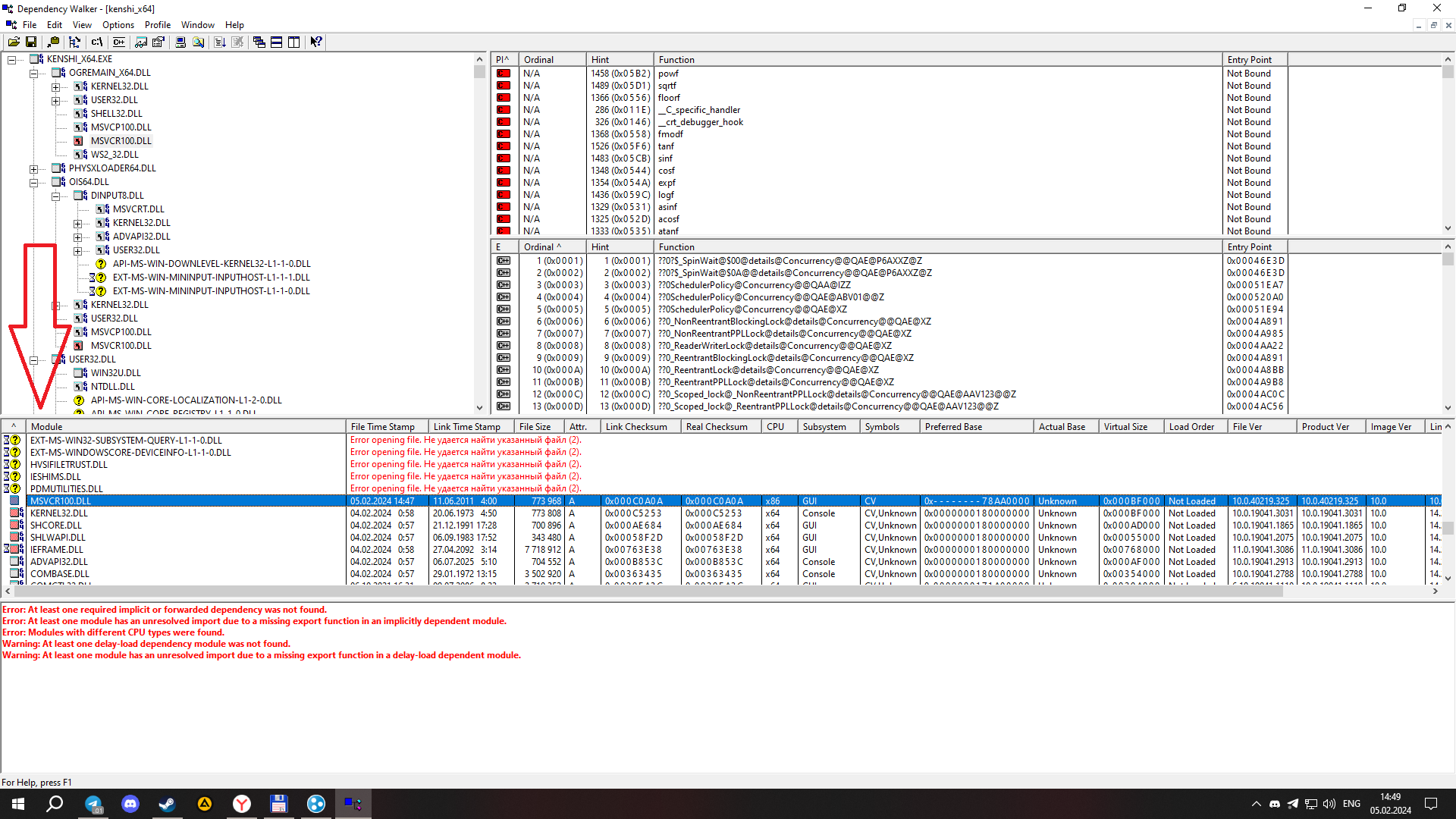
Если игра не запускается, то закиньте dll файлы (которые скачали) в папку с игрой и тогда должно все заработать.
P.s. Когда я решал эту проблему, у меня всё равно игра не запускалась из за ошибки msvcr100.dll. Игра не могла принять эти файлы, которые я скачал, но потом я решил заменить файлы с ноутбука на компьютер и тогда все заработало. Так что видимо не везде где можно скачать dll файлы - исправны для работы с игрой.
Если же у вас всё равно не получилось запустить игру, могу предложить вам скачать мои dll файлы благодаря которым, Kenshi смог запуститься: https://disk.yandex.ru/d/QgDu63ro4AmmHA
To fix the error, you need to install the Dependency Walker program.Next, select File -> Open and the exe file of the game.
After that, you need to scroll through all the yellow question marks, up to the red squares / errors.
Important: We are not interested in errors with the number 64!.
Next, you need to download the dll files (32 bit versions and 64 bit versions), which are highlighted in a red square and replace them in the System32 and SystemWOW64 folders.
Now the error should be fixed, check whether the game is running or not.
If the game does not start, then drop the dll files (which you downloaded) into the folder with the game and then everything should work.
P.s. When I solved this problem, the game didn't start anyway because of an error msvcr100.dll . The game couldn't accept these files that I downloaded, but then I decided to replace the files from the laptop to the computer and then everything worked. So apparently not everywhere where you can download dll files are working properly to work with the game.
If you still couldn't start the game, I can offer you to download my dll files, thanks to which Kenshi was able to start:
https://disk.yandex.ru/d/QgDu63ro4AmmHA
- Proper Load Order & You.★ 5 (1.8k)78k views3.6k ♥10 minUpdated 20 Oct, 2022
- Save Editing 101★ 5 (729)51k views1.6k ♥28 minUpdated 16 Aug, 2025
- Roadmap for New Players and Basebuilding (Up-to-date)★ 5 (807)51k views2.4k ♥76 minUpdated 23 Apr, 2019
- Tips and Tricks of a Veteran Kenshi Player★ 5 (551)38k views1k ♥15 minUpdated 18 Nov, 2024
- Quickstart Newbie Walkthrough 1.0★ 5 (562)35k views1.5k ♥54 minUpdated 20 May, 2025
- Новички, я научу Вас выживать и наслаждаться КЕНШИ!★ 5 (380)23k views789 ♥34 minRussianUpdated 28 Oct, 2025


- Upgrading to PremiumTeam Fortress 2★ 5 (20k)1441k views11k ♥6 minUpdated May 11, 2022
- No More Room in Hell Official ManualNo More Room in Hell★ 5 (2.8k)569k views2.1k ♥29 minUpdated Apr 22, 2019
- NMRiH Community Hosting GuidesNo More Room in Hell★ 5 (526)351k views653 ♥1 minUpdated Aug 10, 2022
- ULTIMATE GUIDE FOR GAME DEV TYCOONGame Dev Tycoon★ 5 (5.8k)326k views10k ♥4 minUpdated 23 Jan, 2014
- How to 'Git Gud' Soon™MORDHAU★ 5 (2k)318k views3k ♥68 minUpdated Nov 16, 2024
- Лучшие кооперативные игры SteamPAYDAY 2★ 5 (1.5k)315k views2.1k ♥56 minRussianUpdated Apr 27, 2025






This guide was created by its original author on the Steam Community. Are you the author and want it removed? Request removal.