2 ways to Fix Ubisoft's built-in 20-30 min crash + Multiplayer info
The Easy Way
In Steam, enter your games Properties by right clicking on the title in the menu on the left or by left clicking on the gear at the right on the game's page.
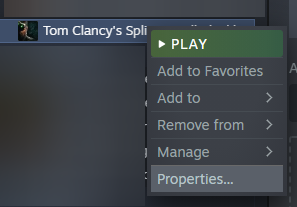
or

Select the General tab (if it's not already selected).
In the Launch Options field type...
-offline
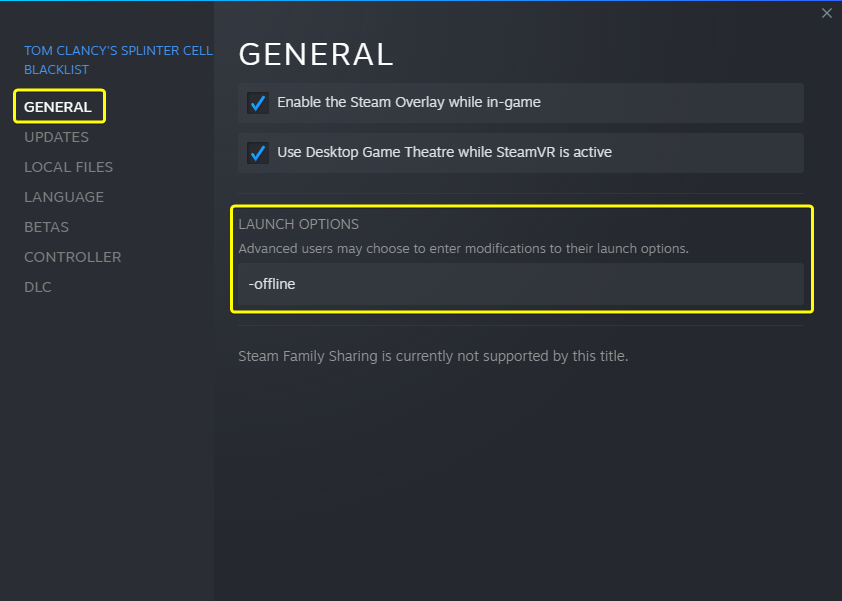
You should now be able to play the single player campaign without it crashing
The Hard Way
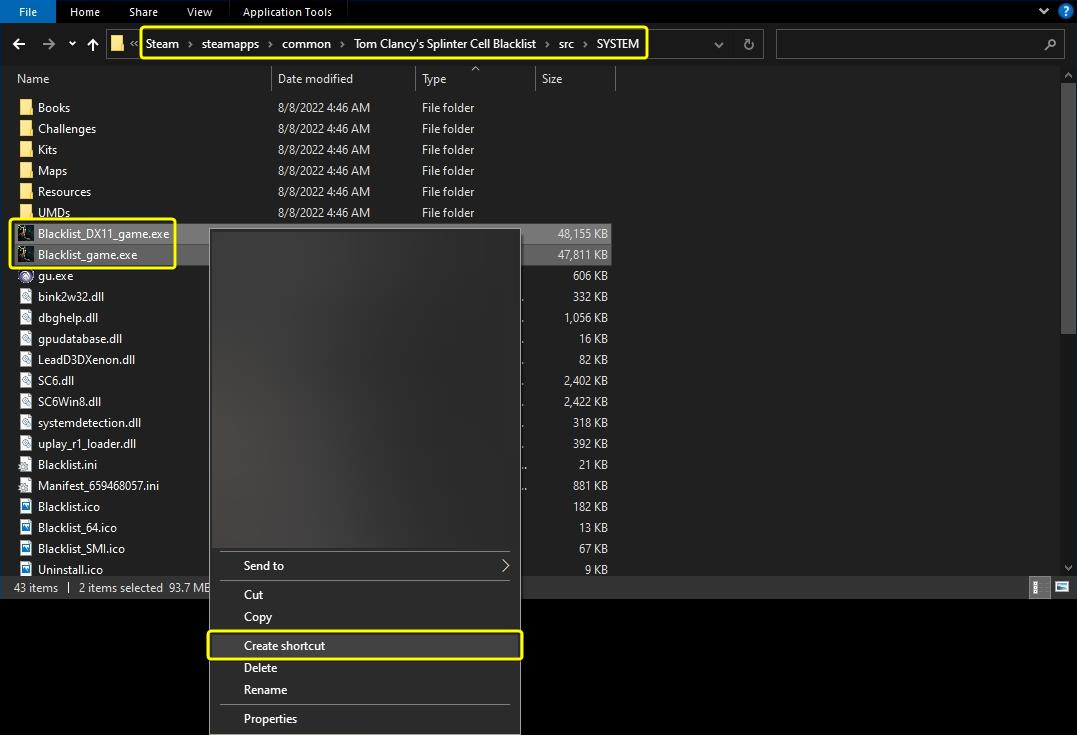
Find your executable files. They're going to be in "...\Steam\steamapps\common\Tom Clancy's Splinter Cell Blacklist\src\SYSTEM".
After you've done that, select and right click either "Blacklist_DX11_game.exe", "Blacklist_game.exe" or both, then click "Create shortcut"
Select a shortcut and right click it, then select "Properties"
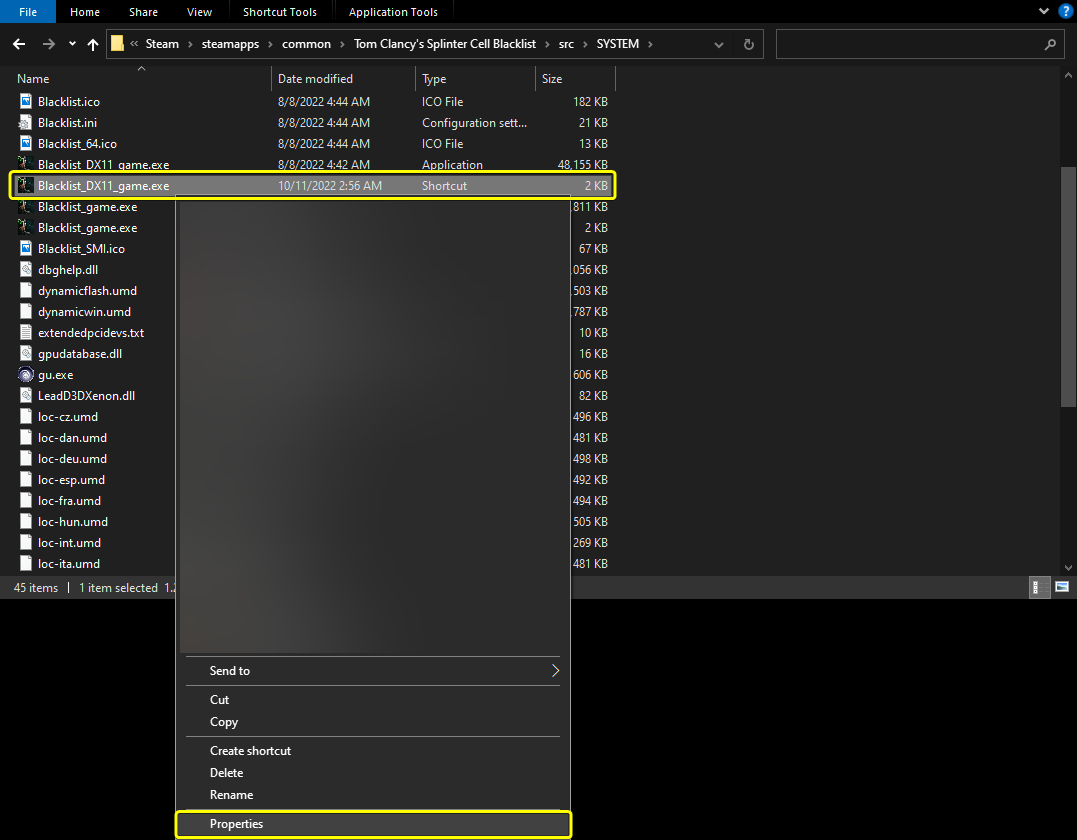
It should open up to the "Shortcut" tab Where you will find the "Target" field. Add the following parameters to the end of the existing text ...
-offline -offline_mode
so it reads something like...
"...\Steam\steamapps\common\Tom Clancy's Splinter Cell Blacklist\src\SYSTEM\Blacklist_DX11_game.exe" -offline -offline_mode
or
"...\Steam\steamapps\common\Tom Clancy's Splinter Cell Blacklist\src\SYSTEM\Blacklist_game.exe" -offline -offline_mode
Make sure you include a space between the close quote and the new parameters
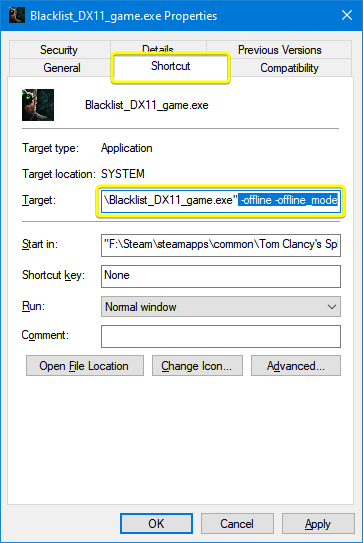
Rename it in the general tab and hit "OK"
Notes On the Hard Way
- Starting the game directly from the executable (not using any shortcut) still crashed for me.
- Using the method in "The Hard Way" will bypass steam entirely. You don't have to sign in and can leave steam off.
- With Steam off, I was able to get a wired DS3 to work fine without any 3rd party software. According to the Sony page I visited, a wired DS4 should also work fine in Windows 10.
- If you add the new shortcut as a "Non-Steam Game" it will still crash.
- Uplay Connect will still boot and (for me at least) it seems that the "Remember Me" toggle finally remembers.
Acknowledgments
Thanks to...
muadz
Whoever figured out "The Easy Way"
Special thanks to...
unixoide and everyone helping to keep this game alive in spite of ubisoft.
*****
To those who have expressed gratitude for the guide, thank you. To everyone who has found benefit from it, you're welcome - just glad I could help.
+
At one point I was asked about multi-player/co-op. Here's what I understand as of now*...
PS3: Yes. But due to the server shutdown, leveling is capped. The link below will take you to a discord server where you can get a 100% completed save file. (2023-07-17 - Don't know if the level cap issue changes if PC works)
https://discord.com/channels/752731606615064676/935631637193048124/1044634231122436146
Xbox: Yes
PC: Some
Main page: https://github.com/unixoide/5th-echelon
Releases page: https://github.com/unixoide/5th-echelon/releases/tag/2024-06-03
How-to videos:
https://www.youtube.com/watch?v=M5g8LkoDOBw
https://www.youtube.com/watch?v=KRDnqKv45VU
*The latest date this guide was updated.
My unsolicited opinion...
- Как заставить работать кооператив (2)★ 4 (82)9k views92 ♥2 minRussianUpdated 30 Oct, 2016
- Achievement Guide★ 4 (113)8.6k views172 ♥14 minUpdated 16 Oct, 2013
- Blacklist ALL Collectibles/Gear/Unlocks SAVE FILE★ 4 (132)8k views212 ♥2 minUpdated 27 Sep, 2020
- Если игра вылетает через каждые 30 – 40 минут.★ 4 (83)6.8k views117 ♥1 minRussianUpdated 1 Jan, 2023
- How to play Offline (and not CTD every 20+ mins)★ 4 (99)6k views145 ♥1 minUpdated 15 Nov, 2024
- Mission List★ 4 (99)5.7k views128 ♥1 minUpdated 16 May




- Upgrading to PremiumTeam Fortress 2★ 5 (20k)1441k views11k ♥6 minUpdated May 11, 2022
- No More Room in Hell Official ManualNo More Room in Hell★ 5 (2.8k)569k views2.1k ♥29 minUpdated Apr 22, 2019
- NMRiH Community Hosting GuidesNo More Room in Hell★ 5 (526)351k views653 ♥1 minUpdated Aug 10, 2022
- ULTIMATE GUIDE FOR GAME DEV TYCOONGame Dev Tycoon★ 5 (5.8k)326k views10k ♥4 minUpdated 23 Jan, 2014
- How to 'Git Gud' Soon™MORDHAU★ 5 (2k)318k views3k ♥68 minUpdated Nov 16, 2024
- Лучшие кооперативные игры SteamPAYDAY 2★ 5 (1.5k)315k views2.1k ♥56 minRussianUpdated Apr 27, 2025






This guide was created by its original author on the Steam Community. Are you the author and want it removed? Request removal.