Basic Port Forwarding
Step One - Get Access to Your Router!
First you need to access your router login
so you can add port forwarding numbers to it.
- To find this information, it is usually underneath the router.
- Type the IP address (looks something like this : 000.000.0.0) in your browser.
- Then type in the password thats on the back of the router and login in.
- Once your there, look for Port Forwarding and click on it. (Look in security or settings)
- Then type in a number anywhere from 4000 - 32767 for port starting and ending number. (ex: Start = 4000 , End = 4000). There is an option for TCP and UDP and both. Choose Both.
Then save it.
Step Two - Add the Same Number To Port in GunZ 2!
Warning! - Do NOT reveal your Port Forward Number to anyone!!!
Do NOT under any circumstances, reveal your port forward number to anyone else.
If you do, then they will have access directly to your computer, because the port bypasses the firewall.
So I repeat :
Do NOT under any circumstances, reveal your port forward number to anyone else.
Before & After Port Forward
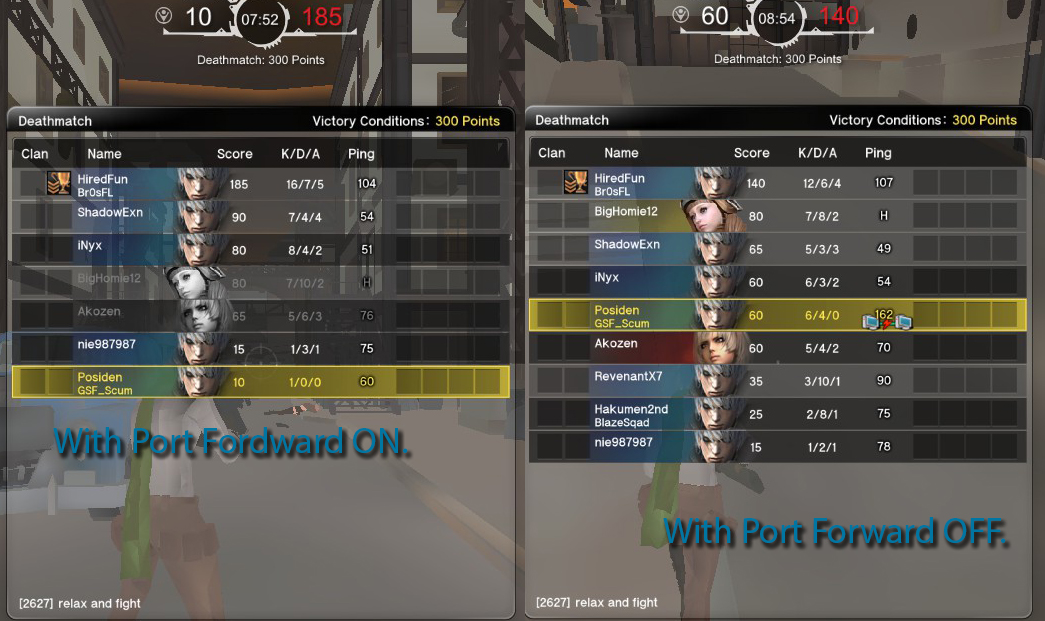
Check This site if you need more instructions
Not all routers are the same and can have extra steps. Please check this site to see if it has your router and if it does, it should tell you exactly what to do.
http://portforward.com/english/routers/port_forwarding/
Thanks to Freaker for the link.
- GunZ 2 "K-Style"/Advanced Melee Techniques Guide!★ 4 (144)10k views136 ♥2 minUpdated Dec 2, 2015
- Basic Guide to GunZ 2: The Second Duel★ 4 (90)7.3k views90 ♥14 minUpdated Feb 28, 2014
- Complete Beginner's Guide★ 4 (55)5k views40 ♥5 minUpdated Jun 25, 2014
- Руководство по игре★ 4 (142)4.6k views93 ♥24 minRussianUpdated Aug 9, 2018
- Basic Tesla Shop Guide★ 4 (37)3.4k views14 ♥1 minUpdated Oct 16, 2015
- The ultimate MAX Guide V2.0★ 4 (39)3k views24 ♥18 minUpdated Aug 7, 2014




- Upgrading to PremiumTeam Fortress 2★ 5 (20k)1441k views11k ♥6 minUpdated May 11, 2022
- No More Room in Hell Official ManualNo More Room in Hell★ 5 (2.8k)569k views2.1k ♥29 minUpdated Apr 22, 2019
- NMRiH Community Hosting GuidesNo More Room in Hell★ 5 (526)351k views653 ♥1 minUpdated Aug 10, 2022
- ULTIMATE GUIDE FOR GAME DEV TYCOONGame Dev Tycoon★ 5 (5.8k)326k views10k ♥4 minUpdated 23 Jan, 2014
- How to 'Git Gud' Soon™MORDHAU★ 5 (2k)318k views3k ♥68 minUpdated Nov 16, 2024
- Лучшие кооперативные игры SteamPAYDAY 2★ 5 (1.5k)315k views2.1k ♥56 minRussianUpdated Apr 27, 2025






This guide was created by its original author on the Steam Community. Are you the author and want it removed? Request removal.