Best Graphics Settings in BeamNG.drive WITHOUT USING MODS
HIGH-END
You can use this settings on any RTX cards.
- RTX 4060, RTX 3060 but not RTX 3050
Mesh Quality: Ultra
- (Doesn't take so much fps)
Texture Quality: High
- (Doesn't take so much fps)
Lighting Quality: Low
- (Looks similar like high but its not for long shadows it gives a lot fps)
Shadows Resolution: Medium
- (Looks similar like high)
Shadows Visibility: All
- (Doesn't take so much fps)
Shader Quality: High
- (Doesn't take so much fps)
Anisotropic Filtering: x16
- (Doesn't take so much fps)
Anti-Aliasing: SMAA
- (SMAA for sharp, FXAA for blur in sharp places)
Ambient Occlusion Quality: HighBloom: OnLight Rays: OnDOF: On
- (Depth of Field)
Motion Blur: On/Off
- (its on you)
Dynamic Reflection:Resolution: 256px
Update Rate: 2
Detail: 1.0
Distance: 750mDetailed mirrors: OffTire marks amount: 8000Grass Density: 1.00
MID-END
Great for all 10, 16 GTX cards
- (GTX 1050 ti, RTX 3050, GTX 1650, GTX 1660, GTX 1660 SUPER)
Mesh Quality: High
- (Doesn't take so much fps)
Texture Quality: High
- (Doesn't take so much fps)
Lighting Quality: Low
- (Looks similar like high but its not for long shadows it gives a lot fps)
Shadows Resolution: Medium
- (Looks similar like high)
Shadows Visibility: All
- (Doesn't take so much fps)
Shader Quality: Medium
- (Doesn't take so much fps)
Anisotropic Filtering: x16
- (Doesn't take so much fps)
Anti-Aliasing: SMAA
- (SMAA for sharp, FXAA for blur in sharp places)
Ambient Occlusion Quality: HighBloom: OnLight Rays: OnDOF: On
- (Depth of Field)
Motion Blur: On/Off
- (its on you)
Dynamic Reflection:Resolution: 256px
Update Rate: 1
Detail: 1.0
Distance: 500m if playing with steering wheel if not 100mDetailed mirrors: OffTire marks amount: 500Grass Density: 1.00
LOW-END
Great for GTX or GT cards
- (GTX 980, GTX 970, GTX 960, GT 1030 etc.)
Resolution: 1280x720
- (You can use lower but this one is 16:9)
Mesh Quality: Lowest
- (Doesn't take so much fps)
Texture Quality: Lowest
- (Doesn't take so much fps)
Lighting Quality: Lowest
- (Looks similar like high but its not for long shadows it gives a lot fps)
Shadows Resolution: Lowest
- (Looks similar like high)
Shadows Visibility: None
- (Doesn't take so much fps)
Shader Quality: Low
- (Doesn't take so much fps)
Anisotropic Filtering: Off
- (Doesn't take so much fps)
Anti-Aliasing: SMAA
- (SMAA for sharp, FXAA for blur in sharp places)
Ambient Occlusion Quality: NormalBloom: OffLight Rays: OffDOF: Off
- (Depth of Field)
Motion Blur: On/Off
- (its on you)
Dynamic Reflection:Resolution: 128px
Update Rate: 1
Detail: 0
Distance: 50mDetailed mirrors: OffTire marks amount: 500Grass Density: 0
NVIDIA GPU LIST
High-End
- RTX 2060 Super
- RTX 2070
- RTX 2070 Super
- RTX 2080
- RTX 2080 Super
- RTX 2080 Ti
- RTX 3060 Laptop
- RTX 3060
- RTX 3060 Ti
- RTX 3070
- RTX 3070 Ti
- RTX 3080
- RTX 3080 Ti
- RTX 3090
- RTX 3090 Ti
- RTX 4050 Laptop
- RTX 4060
- RTX 4060 Ti
- RTX 4070
- RTX 4070 Super
- RTX 4080
- RTX 4080 Super
- RTX 4090
- RTX 5050
- RTX 5060
- RTX 5060 Ti
- RTX 5070
- RTX 5070 Ti
- RTX 5080
- RTX 5090
Mid-End
- RTX 2050 Laptop
- RTX 2060
- GTX 1660 Ti
- GTX 1660
- GTX 1650 Super
- GTX 1650
- GTX 1630
- GTX 1080 Ti
- GTX 1080
- GTX 1070
- GTX 1060
- GTX 1050 Ti
Low-End
- GTX 1050
- GT 1030
If you cannot find your GPU, please ask in the comments below.
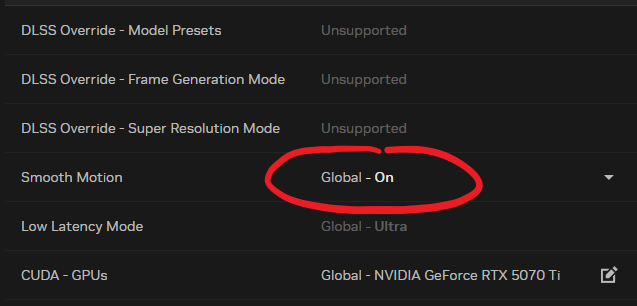
I also recommend if you have Nvidia and 40xx - 50xx series please enable in Nvidia App Smooth Motion, it works great in BeamNG.
AMD GPU LIST
High-End
- RX 7900 XTX
- RX 9070 XT
- RX 9070
- RX 7900 XT
- RX 7700 XT
- RX 9060 XT
- RX 7600 XT
- RX 7900 XTX
- RX 7900 XT
- RX 7800 XT
- RX 7700 XT
- RX 6700 XT
- RX 7600 XT
- RX 7600
- RX 7600S
- RX 6950 XT
- RX 6750 XT
- RX 6700 XT
Mid-End
- RX 6600 XT
- RX 6600
- RX 5700 XT
- RX 6600 XT
- RX 5700
- RX 5600 XT
- RX 5600 XT
- RX Vega 64
Low-End
- RX 5500M
- RX 5500 XT
- RX 590
- RX 580 (8 GB)
- RX 570
- RX 480
- RX 560
Please keep in the mind I don't really know AMD cards for example if you have RX 6600 XT you may run the game for High-end settings not Mid-end!
More BeamNG.drive guides
- Мультиплеер BeamNG.drive: настройка BeamMP★ 5 (700)83k views1.3k ♥3 minRussianUpdated Dec 2, 2025
- BeamNG.Drive Vehicle Mods Part 2 (21 Mods!)★ 5 (476)43k views915 ♥4 minUpdated Jun 11
- BeamNG.Drive Vehicle Mods (15 Cars!)★ 5 (417)34k views836 ♥2 minUpdated Mar 27, 2024
- БОЛЬШАЯ сборка лор-модов для BeamNG.Drive★ 5 (371)27k views796 ♥12 minRussianUpdated Jun 28, 2024
- Formula 1 Tracks (F1 Map Mods) | BeamNG★ 5 (409)20k views720 ♥5 minUpdated Dec 12, 2024
- Lego Cars in BeamNG (Mod)★ 5 (330)17k views350 ♥1 min




🔥 Popular guides
- Upgrading to PremiumTeam Fortress 2★ 5 (20k)1441k views11k ♥6 minUpdated May 11, 2022
- No More Room in Hell Official ManualNo More Room in Hell★ 5 (2.8k)569k views2.1k ♥29 minUpdated Apr 22, 2019
- NMRiH Community Hosting GuidesNo More Room in Hell★ 5 (526)351k views653 ♥1 minUpdated Aug 10, 2022
- ULTIMATE GUIDE FOR GAME DEV TYCOONGame Dev Tycoon★ 5 (5.8k)326k views10k ♥4 minUpdated 23 Jan, 2014
- How to 'Git Gud' Soon™MORDHAU★ 5 (2k)318k views3k ♥68 minUpdated Nov 16, 2024
- Лучшие кооперативные игры SteamPAYDAY 2★ 5 (1.5k)315k views2.1k ♥56 minRussianUpdated Apr 27, 2025






This guide was created by its original author on the Steam Community. Are you the author and want it removed? Request removal.