Can't instance particle system? Try this.
Problem
Lately while using SFM, I’ve noticed that there’s been an issue with using particles. Specifically, whenever I try to “Instance Particle System,” nothing seems to happen.
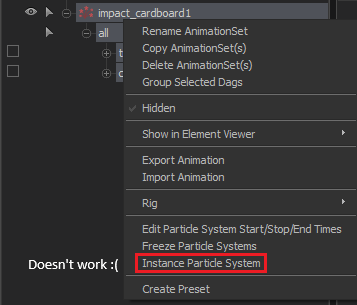
Until I noticed this console error:
Until I noticed this console error:
"Could not execute the command:
dmxconvert -allowdebug -i "[Steam Folder]/sourcefilmmaker/game/[Your Particle]" -ie binary -o "[Steam Folder]\sourcefilmmaker\game\[…] \_temp_conversion_file_.dmx" -oe binary -of pcf
Windows gave the error message:
"The system cannot find the file specified."
This was really annoying and I had no idea how to fix this. Until I came across a discussion thread where someone was having the same problem. And user atari916 seems to have found a solution. After following his instructions, my particles are now working! This seems to be becoming a more frequent problem. So, I decided to post this guide just in case anyone else is having this problem.Solution
Basically, you want to edit your system environmental path. Which just tells windows where to find executables. You will likely need admin privileges for this.
Step 1
Go to start and type "environment variables" and click the first result. Again, click environment variables.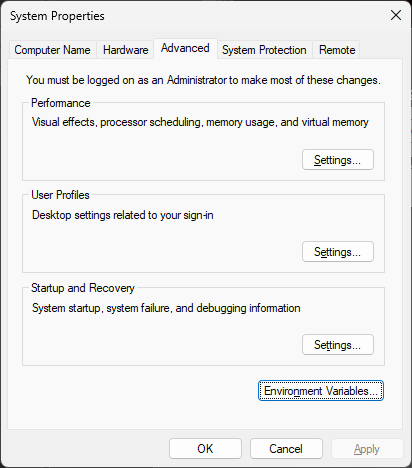
Step 2
Find the "Path" variable and click edit.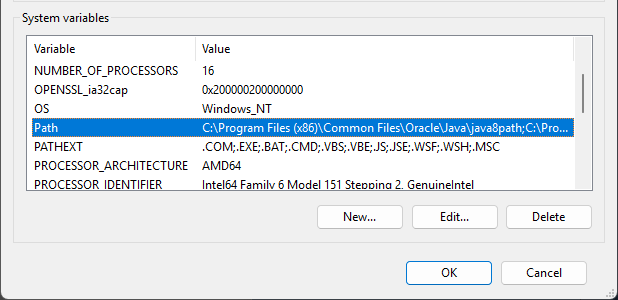
Step 3
Click "New" and add the location of SFM's /bin/ folder. It will be where ever you installed SFM. Take care to not delete/edit the other entries.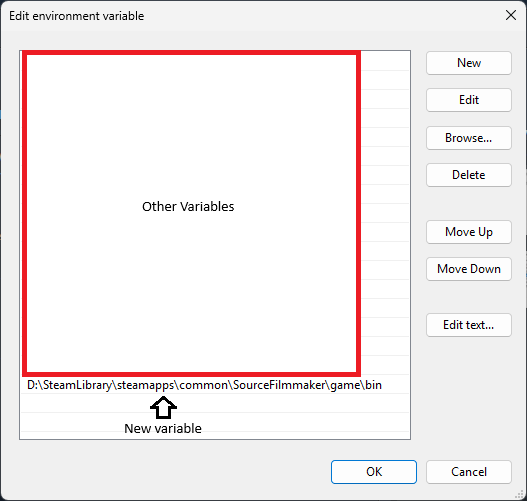
Step 4
Restart your computer and hopefully the problem should be fixed!
More Source Filmmaker guides
- Changing Textures Using Material Overrides★ 5 (1.4k)41k views2.7k ♥5 minUpdated Jul 26, 2014
- Manually Updating TF2 Content★ 5 (1.3k)35k views1.9k ♥2 minUpdated Nov 26, 2025
- The Fundamentals of SFM: For Beginners★ 5 (1.3k)25k views3.3k ♥55 minUpdated Apr 29
- Ваш первый постер★ 5 (1.1k)22k views2k ♥5 minRussianUpdated Oct 22, 2024
- Getting Gmod Workshop stuff too SFM★ 5 (510)15k views1.3k ♥1 minBulgarianUpdated Aug 4, 2015
- Animation Guide★ 5 (704)14k views1.9k ♥6 minUpdated Apr 9, 2023





🔥 Popular guides
- Upgrading to PremiumTeam Fortress 2★ 5 (20k)1441k views11k ♥6 minUpdated May 11, 2022
- No More Room in Hell Official ManualNo More Room in Hell★ 5 (2.8k)569k views2.1k ♥29 minUpdated Apr 22, 2019
- NMRiH Community Hosting GuidesNo More Room in Hell★ 5 (526)351k views653 ♥1 minUpdated Aug 10, 2022
- ULTIMATE GUIDE FOR GAME DEV TYCOONGame Dev Tycoon★ 5 (5.8k)326k views10k ♥4 minUpdated 23 Jan, 2014
- How to 'Git Gud' Soon™MORDHAU★ 5 (2k)318k views3k ♥68 minUpdated Nov 16, 2024
- Лучшие кооперативные игры SteamPAYDAY 2★ 5 (1.5k)315k views2.1k ♥56 minRussianUpdated Apr 27, 2025






This guide was created by its original author on the Steam Community. Are you the author and want it removed? Request removal.