Change FOV for Bioshock
cautionary note
cautionary note
- this might not work with every resolution
- this might not work with windows 7 or lower
- do not have bioshock opened / launched while doing all this
- i am living in your floorboards
- this might not work with every resolution
- this might not work with windows 7 or lower
- do not have bioshock opened / launched while doing all this
- i am living in your floorboards
the thing
so first you wanna go to tha properties in steam for bioshock
then hit the 'builds' folder, then hit 'release' folder, now find the thing called startup.ini
aight next open that in notepad, it should look like this:
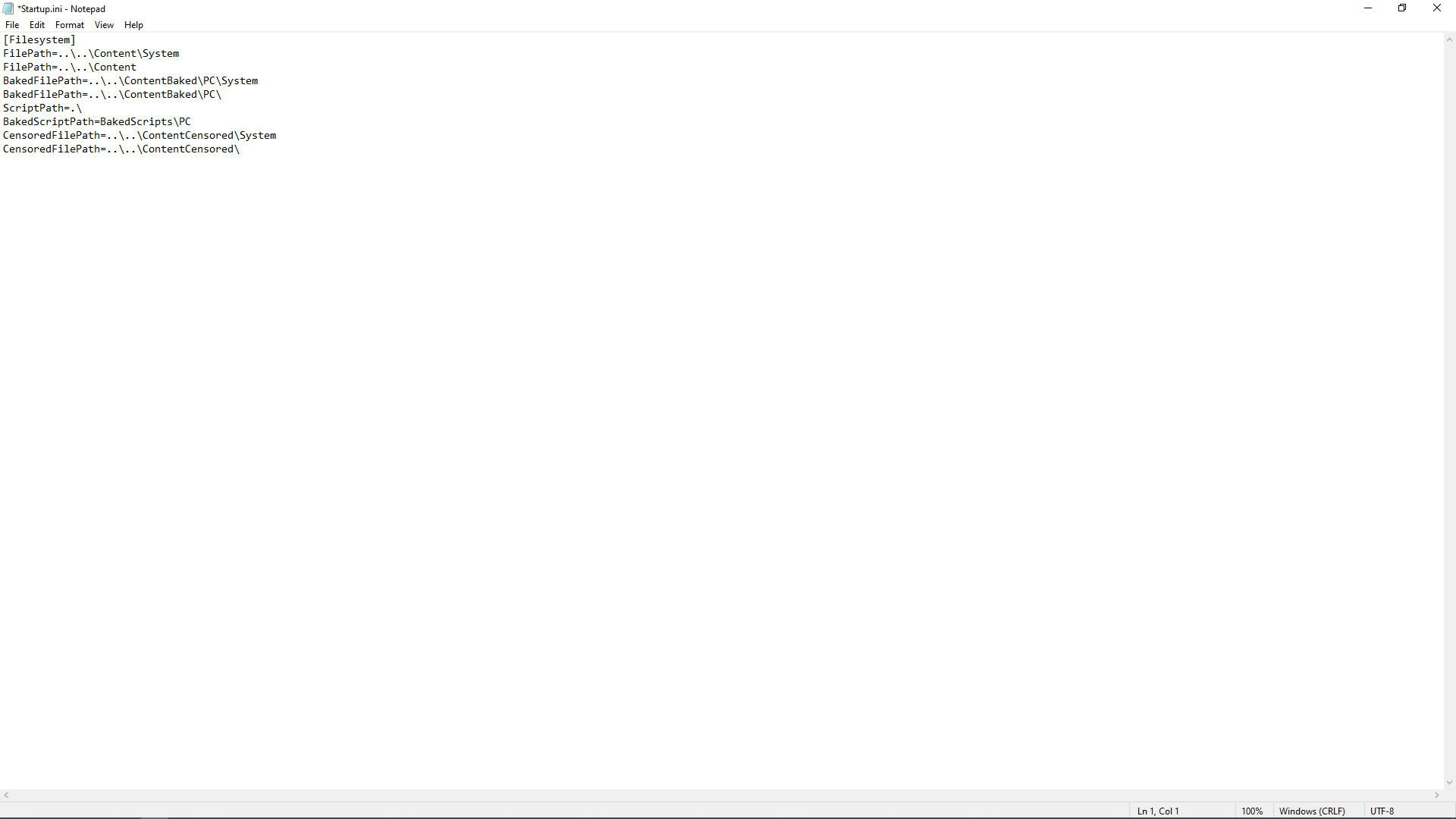
now you wanna make a new line at tha top and just type 'fov xxx' (picture for reference)
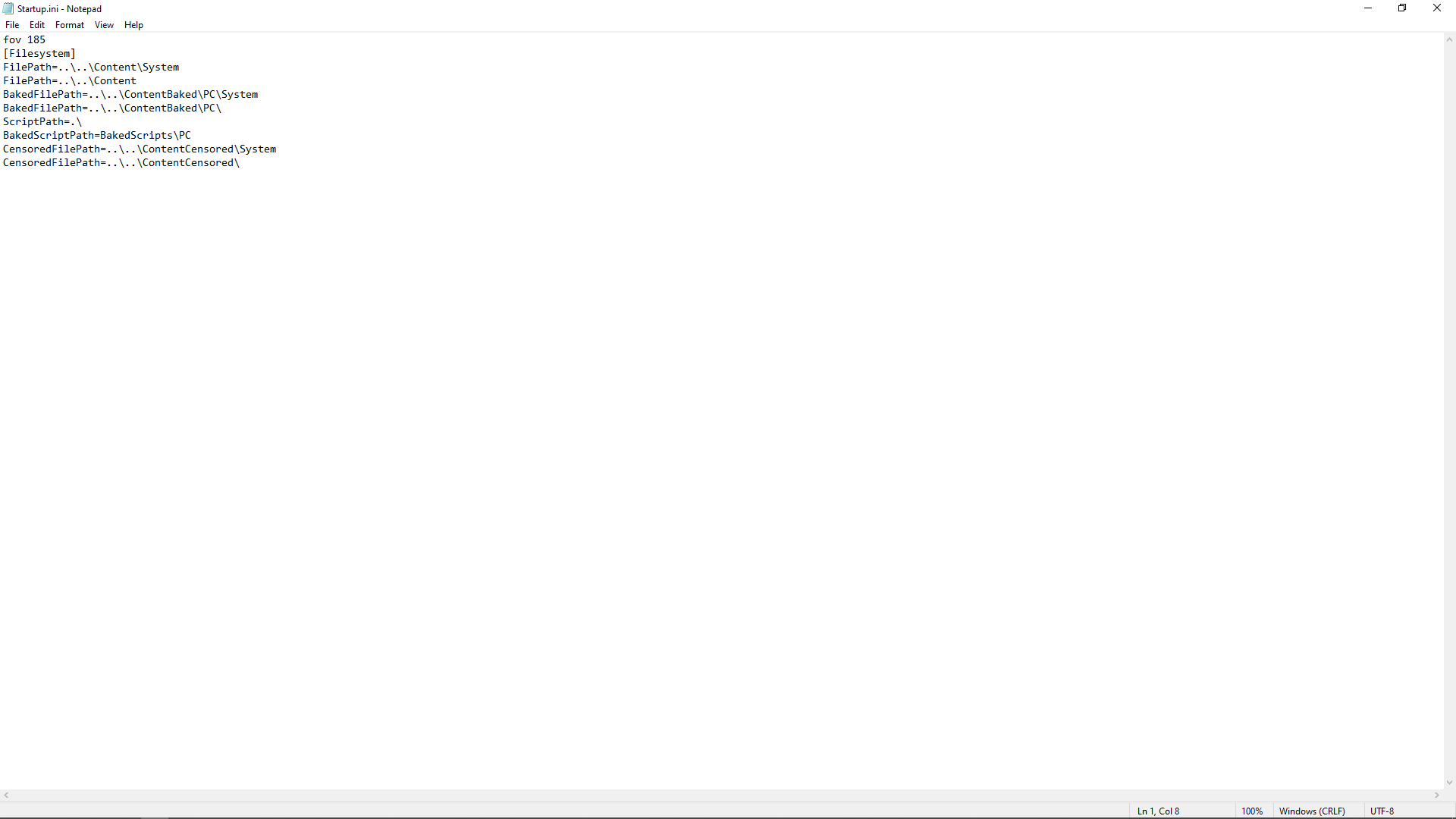
now we not done yet
hit save and close the notepad, then go to startup.ini and go to its properties (by right clicking)
then hit 'read only'
now anytime you wanna edit that notepad you have to uncheck read only otherwise your computer will detonate killing you and your family.
(OPTIONAL)
next, go the launch options of bioshock. type in -dx9 (it just makes it look better with FOV zoom).
then hit the 'builds' folder, then hit 'release' folder, now find the thing called startup.ini
aight next open that in notepad, it should look like this:
now you wanna make a new line at tha top and just type 'fov xxx' (picture for reference)
now we not done yet
hit save and close the notepad, then go to startup.ini and go to its properties (by right clicking)
then hit 'read only'
now anytime you wanna edit that notepad you have to uncheck read only otherwise your computer will detonate killing you and your family.
(OPTIONAL)
next, go the launch options of bioshock. type in -dx9 (it just makes it look better with FOV zoom).
FOV suggestions
here are some suggestions for FOV's
FOV 90 (for the slow pokes and the bozos)
FOV 120 (perfect for casual play without the crappy default FOV)
FOV 150 (perfect for people who like the advantage of seeing more)
FOV 185 (all you play is FPS games and cant live without it being zoomed out)
FOV 200 (speed)
FOV 200< (dont)
FOV 90 (for the slow pokes and the bozos)
FOV 120 (perfect for casual play without the crappy default FOV)
FOV 150 (perfect for people who like the advantage of seeing more)
FOV 185 (all you play is FPS games and cant live without it being zoomed out)
FOV 200 (speed)
FOV 200< (dont)
More BioShock guides
- Bioshock Crash, Resolution, Change Language, No Sound and FOV fix★ 5 (764)39k views863 ♥4 minUpdated Jun 28, 2019
- RU: Рус-тор Bioshock 1С + Решение многих проблем!★ 5 (919)29k views1.4k ♥5 minRussianUpdated May 25, 2025
- Choppy Physics Fix★ 5 (434)14k views442 ♥1 minUpdated Jul 21, 2018
- How to get BioShock (Non Remaster) to run★ 4 (135)12k views183 ♥6 minUpdated Apr 8, 2025
- BioShock INI Tweaks (Cheats)★ 4 (148)11k views230 ♥7 minUpdated Sep 26, 2016
- Guide to Weapon Upgrade Stations★ 5 (175)11k views330 ♥2 min




This guide was created by its original author on the Steam Community. Are you the author and want it removed? Request removal.