Creating Your Snoutfits (DLC)
Preparation
At the moment you need to own Snoutfit DLC to enable skin-related features in the game. You can buy it here:
https://store.steampowered.com/app/826650/Iron_Snout__Snoutfit_DLC/
Iron Snout will detect and load local outfits from these directories:
Windows: %localappdata%\IronSnout\content\local\outfits\
Linux: ~\.config\IronSnout\content\local\outfits\
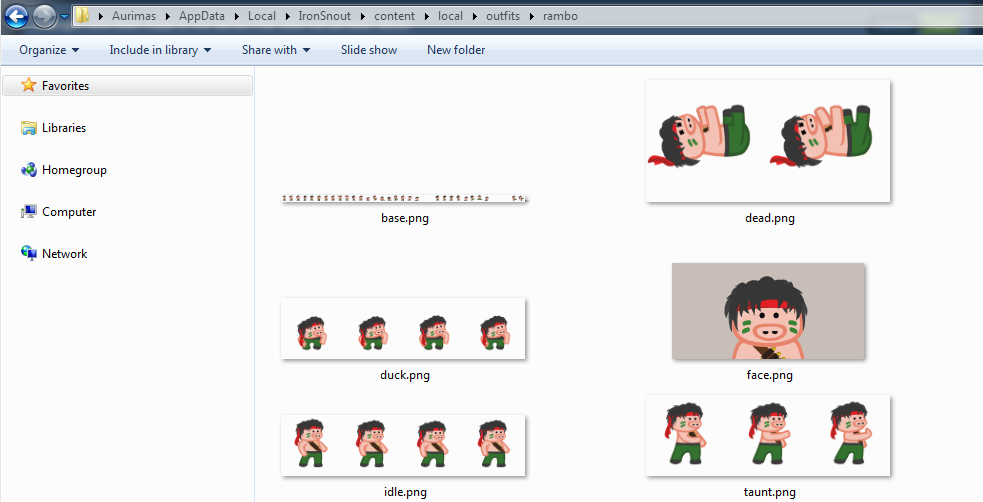
An option to choose your own outfit directory is coming in the future updates!
For a skin folder to be recognized by game and added to the outfit selection list it has to contain at least thumbnail image called face.png, which must be 192x92.

Other spritesheets needed to get your piglet fully dressed are base.png and dead.png.
Download SVG, PDF and PNG templates here:
http://games.snoutup.com/data/iron-snout/template.zip
Strike trails are removed from these sprite sheets, so it's up to you either to add your own (keep them in separate layers) or leave it as it is until I'll add in-game trails.
If you'd like to check out built-in outfits to have as an example, dig around the "media" folder in Iron Snout installation directory.
Upcoming Changes
- base.png gaps will be removed, but since that will change total frame count, I should be able to detect outdated skins and adapt game code to support both sheets
- strike trails MIGHT be removed from base.png and will be drawn in-game, I plan to add a support of outfit settings file where you could define if outfit has strike trails or not
- taunt, death and idle animations will allow custom frame count, which will not affect any existing outfits, but can be something to look forward to if you have a cool idea for a completely new animation
- it's possible that Steam Workshop integration will be available in the future, but I can't give any promises regarding it right now
Sprite Sheet Requirements
Game will attempt to load these sprite sheets from your outfit directory. Keep in mind, some of the requirements for these image files might change in the future, but most important parts like frames being 192x192 will stay the same.
Size: 192x96
Thumbnail image for your outfit.
Size: 6720x192
Main sprite sheet for all important pig fighting actions. Refer to section below to see which frames refer to which specific move. Currently it has some intentional gaps, which might get filled or removed in the future, but don't worry about it yet.
Size: 384x192
An unfortunate piglet laying all dead-ish. Currently has two frames, but in future support for longer death animations will be added.
Size: 768x192
Four frames of standing idle animation. Doesn't have to be added, but takes the outfit to another level and is pretty easy to make when you already have frame #1 done.
Size: 768x192
Four frames of crouching idle animation. Also optional.
Currently not supported, but custom taunts will be available in near future. To use taunt in the game with default skin, hold left or right key for a bit longer.
Frame Reference List
Best Practices
- keep the line thickness similar like it is in the base pig
- avoid "harsh" colors if possible and use game screenshots as references
- keep in mind where character and his strike hitboxes are
- if you choose to go for vector art, I use and recommend Inkscape as it's very easy to learn
- have things like strike trails in different layers in case you'd have to remove them
- keep frames in 192x192 grid, so you wouldn't lose their position
- keep backups of your art
Final Words
Best of luck! I can't wait to see what you will do with this! Don't forget to share your progress or final outfit in the artwork section or send it to me!
If you can't afford the DLC, but really want to create outfits, draw one frame of a skin you'd like to make and send me an email!
In case you have any questions, don't hesitate to contact me:
[email protected]
https://discord.gg/7gZPtJ
https://twitter.com/SnoutUp
https://www.facebook.com/snoutup/
- Achievement Balloon Popper★ 5 (219)7.3k views68 ♥1 minBulgarianUpdated Jun 5, 2016
- Ultimate Guide How to 100%, big highscore afk, tips and more★ 4 (183)6.6k views76 ♥5 minUpdated Jan 10, 2019
- Путеводитель по достижениям★ 5 (280)5.7k views133 ♥9 minRussianUpdated Sep 9, 2016
- [Achievement] Light Up the Level & Shields Won't Help You★ 4 (106)3k views28 ♥1 minUpdated May 17, 2019
- Advanced guide to scoring 500+ and reking dem scrubwolves★ 4 (77)1.9k views22 ♥7 minUpdated Aug 8, 2016
- Iron Snout: All Achievements★ 3 (66)1.5k views15 ♥1 min


- Upgrading to PremiumTeam Fortress 2★ 5 (20k)1441k views11k ♥6 minUpdated May 11, 2022
- No More Room in Hell Official ManualNo More Room in Hell★ 5 (2.8k)569k views2.1k ♥29 minUpdated Apr 22, 2019
- NMRiH Community Hosting GuidesNo More Room in Hell★ 5 (526)351k views653 ♥1 minUpdated Aug 10, 2022
- How to 'Git Gud' Soon™MORDHAU★ 5 (2k)318k views3k ♥68 minUpdated Nov 16, 2024
- Лучшие кооперативные игры SteamPAYDAY 2★ 5 (1.5k)315k views2.1k ♥56 minRussianUpdated Apr 27, 2025
- Desert Eagle Heat Treated | Blue GemCounter-Strike 2★ 5 (1.6k)293k views1.5k ♥2 minUpdated Jan 16





This guide was created by its original author on the Steam Community. Are you the author and want it removed? Request removal.