Deadfire Performance Increase
Disclaimer
Intro
Surprised by how terribly this game ran on my meager machine, and the lack of graphical configuration options in-game, I decided to try tweaking some of the settings to see what I could do. No config files or .ini files were found in my search, so after searching through google a bit, I found that the settings are actually set through the registry, which I found odd.
The Registry
Type in
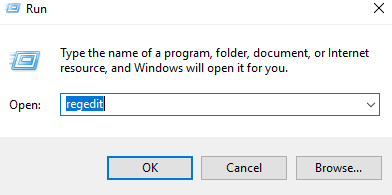
This will open the registry editor. Obviously. Here in this window, clear everything in the address bar up top and paste this:

Press enter to browse to that registry entry.
In the window panel on the right of the Registry Editor, you should see a metric f*ckton of items, thankfully, they are in alphabetical order. Search the for the item labeled
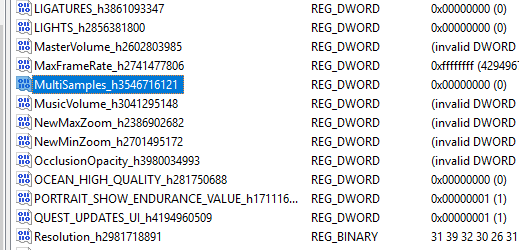 Or, in the events that this option was changed, something along the lines of MultiSample. Once the item has been found, double click it, and change the Value Data to zero. The number 0, not the word. This will effectively disable the Multisampling and give you (hopefully) a decent FPS boost.
 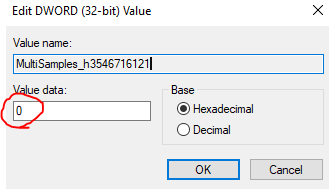 You can also mess around with the value labeled
 TL;DR
Note
Like I stated earlier this also cleared up the general stuttering as well as the freezing I had when heavy FX were being played. (Summons, AoE spells, etc.) Although I should probably clarify that i'm not sure if it was moving it to an SSD or the registry tweak that fixed the stuttering...
Anyway, I hope this also works for you, as it did for me, and I hope that obsidian sees and takes note of this issue and can maybe allow us a little more control over the graphical settings in the future.
I'll update this guide if I find anything else useful. Like and favorite this guide so others can see it, even if it didn't work for you, it could work for someone else! Also, if anyone were curious about my specs, while not great, they are:
- Xoti the Lightbringer (Harvester of Gaun) – POTD Build Guide★ 5 (290)29k views1.5k ♥5 minUpdated Jun 8, 2018
- Characters and classes: How to make a GOOD character ?★ 4 (200)24k views343 ♥30 min
- Eder the Blackguard (Fighter/Rogue) - POTD Build Guide★ 5 (257)23k views1.4k ♥4 minUpdated Jun 17, 2018
- Aloth the Arcane Master (War Mage) – POTD Build Guide★ 5 (187)22k views1.1k ♥6 minUpdated Jun 15, 2018
- 100% Achievement Guide [SPOILERS] (including DLC)★ 5 (414)16k views829 ♥24 minUpdated Apr 1, 2024
- Pallegina, Herald of Hylea (Valkyrie) - POTD Build Guide★ 4 (158)16k views837 ♥5 minUpdated Jun 5, 2018






- Upgrading to PremiumTeam Fortress 2★ 5 (20k)1441k views11k ♥6 minUpdated May 11, 2022
- No More Room in Hell Official ManualNo More Room in Hell★ 5 (2.8k)569k views2.1k ♥29 minUpdated Apr 22, 2019
- NMRiH Community Hosting GuidesNo More Room in Hell★ 5 (526)351k views653 ♥1 minUpdated Aug 10, 2022
- Лучшие кооперативные игры SteamPAYDAY 2★ 5 (1.5k)315k views2.1k ♥56 minRussianUpdated Apr 27, 2025
- Desert Eagle Heat Treated | Blue GemCounter-Strike 2★ 5 (1.6k)292k views1.5k ♥2 minUpdated Jan 16
- Treasure Hunt Puzzle SolutionsTotal War: WARHAMMER II★ 5 (6.9k)281k views15k ♥3 minUpdated Aug 19, 2021






This guide was created by its original author on the Steam Community. Are you the author and want it removed? Request removal.