[ENG / FR] 100% completed save file
[English]
Description:
The following file contains my save file of the game completed at 100% in "Suicide Mission" and "FUBAR" difficulty modes. During my progression, I also unlocked 100% of the achievements, which should be unlocked for you too.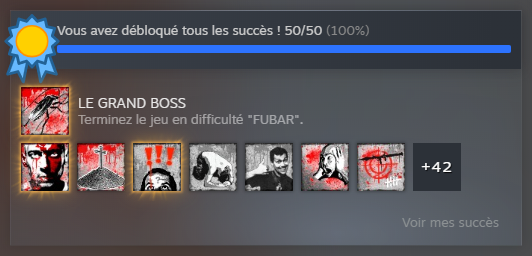
Please note that using this file will theoretically unlock all the achievements simultaneously on your profile. It is therefore best to use it as a last solution, if you have no alternative.
File path:
In order to use this backup, you must download the "Spec.Ops.The.Line.save.file.Enata.zip" archive proposed below and extract the "profile.bin" and "theline_cp0.sav" files wherever you want.Once extracted, these files must be placed in your existing save files folder.
This one can be found in your Steam directory, following this path:
Steam/userdata/"your account"/50300/remote/
If you don't want to replace your existing save files in this folder, you may consider making a backup of your "remote" folder before implementing the files provided below.File download:
This file has been scanned with Virustotal: you can check its report here.[www.virustotal.com]Size: 3,56 Kb
SHA3-512 hash:
f297859750115011a58d9f08528f1c34aaab69dc79915f984b579ca88dc15aa4
Conclusion:
This is the end of this guide. I hope that it would have been useful to you and that it would have helped you completing the game at 100%. If the file doesn't work or if you still have any question after having read this, do not hesitate to let me know in the comments below and I'll try to answer quickly.You can find my other contents over there:
https://steamcommunity.com/sharedfiles/filedetails/?id=887851693
[Français]
Description:
Le fichier qui suit contient ma sauvegarde du jeu terminé à 100% dans les modes de difficulté "Mission suicide" et "FUBAR". Au cours de ma progression, j'ai également obtenu 100% des succès, qui devraient donc être débloqués pour vous aussi.Veuillez noter que l'utilisation de ce fichier débloquera théoriquement la totalité des succès simultanément sur votre profil. Il est donc préférable de ne l'utiliser qu'en dernier recours, si vous n'avez pas d'autre alternative.
Chemin du fichier:
Afin de pouvoir utiliser cette sauvegarde, il faut télécharger l'archive "Spec.Ops.The.Line.save.file.Enata.zip" proposée ci-dessous et en extraire les fichiers "profile.bin" et "theline_cp0.sav" à l'endroit de votre choix.Une fois extrait, ces fichiers doivent être placés dans votre dossier de sauvegardes déjà existant.
Celui-ci se trouve dans votre répertoire Steam, en suivant le chemin suivant:
Steam/userdata/"votre compte"/50300/remote/
Si vous ne souhaitez pas remplacer vos fichiers de sauvegarde déjà existants dans ce dossier, pensez à effectuer une sauvegarde de votre dossier "remote" avant d'y implanter les fichiers fournis ci-dessous.Téléchargement du fichier:
Ce fichier a été analysé avec Virustotal, vous pouvez consulter le rapport ici.[www.virustotal.com]Poids: 3,56 Ko
Hachage SHA3-512:
f297859750115011a58d9f08528f1c34aaab69dc79915f984b579ca88dc15aa4
Conclusion:
Ainsi se clôture ce guide; j'espère qu'il vous aura été utile et qu'il vous aidera à compléter le jeu à 100%. Si le fichier ne fonctionne pas ou s'il vous reste des questions après votre lecture, n'hésitez pas à me le faire savoir dans les commentaires ci-dessous, j'essaierai d'y répondre rapidement.Vous pouvez retrouver mes autres contenus ici:
https://steamcommunity.com/sharedfiles/filedetails/?id=887851693
🏆
Beat Spec Ops: The Line's 100% run?
Flex it — let your friends know you pulled it off.
More Spec Ops: The Line guides
- Spec Ops: The Line Achievement Guide★ 5 (1.6k)31k views1.4k ♥20 minUpdated Jan 23, 2013
- Tweaks For A Better PC Experience★ 5 (403)28k views543 ♥2 min
- Spec Ops : The Line. Гайд по достижениям (RU)★ 5 (2.5k)27k views2k ♥11 minRussianUpdated Mar 7, 2016
- How to get the good ending★ 5 (820)26k views174 ♥1 minUpdated Dec 25, 2015
- Intel Locations★ 5 (1.7k)25k views1.7k ♥6 minUpdated Dec 24, 2012
- How to get preorder DLC - Fubar pack★ 5 (364)23k views356 ♥1 minUpdated Jun 15, 2019



This guide was created by its original author on the Steam Community. Are you the author and want it removed? Request removal.