Everything you should know about KiD config
Prologue
en: Idk what to say about this game. It's so silly and so charming. I was really enjoying the gameplay until the game crashed. I was like "Damn, completing entire mission again". But when i tried to launch it again, i got this cuttie
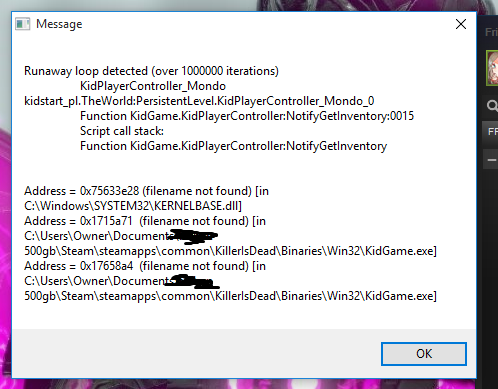 After few hours spent with futile attempts to fix the game, I was ready to give up. But finally I found the solution and want to share everything I've learned with you.
ru: не знаю, как описать эту игру. Одна достаточно глупая, чрезмерно пафосная, но этим она и очаровывает. Перчик начинал дымить, когда я получил первую ААА оценку задания и я уже начинал входить во вкус, как на боссе в 3 миссии я словил краш. Это меня озадачило, ведь мне предстояло перепройти уровень сначала. Наивно было думать, что это моя главная проблема. При перезаходе я банально словил очередной краш, после чего больше не мог зайти в игру. Выглядело это чудо как-то так
После нескольких часов поиска информации в интернете и перепробовав уже и hex эдитор и магию вуду, я было уже сдался. Но вдруг я нашел тот самый совет, который позволил мне вновь начать игру. И я хочу им поделиться.
After few hours spent with futile attempts to fix the game, I was ready to give up. But finally I found the solution and want to share everything I've learned with you.ru: не знаю, как описать эту игру. Одна достаточно глупая, чрезмерно пафосная, но этим она и очаровывает. Перчик начинал дымить, когда я получил первую ААА оценку задания и я уже начинал входить во вкус, как на боссе в 3 миссии я словил краш. Это меня озадачило, ведь мне предстояло перепройти уровень сначала. Наивно было думать, что это моя главная проблема. При перезаходе я банально словил очередной краш, после чего больше не мог зайти в игру. Выглядело это чудо как-то так
После нескольких часов поиска информации в интернете и перепробовав уже и hex эдитор и магию вуду, я было уже сдался. Но вдруг я нашел тот самый совет, который позволил мне вновь начать игру. И я хочу им поделиться.
Let's get started(fixing bugs)
en:Time to beat this demon a.k.a. "runtime loop detected"!
Method 1(worked for me):
Maybe, it's way too radical, so you should try method 2 first. Method 2:
If method 2 didn't fix the problem I recommend to use method 1. There is one more bug that I know how to fix.
If you're using ♥♥♥ voice and sometimes it plays some sound in eng, you should
Method 1(worked for me):
- Go to "%steam folder%\steamapps\common\KillerIsDead\KidGame\SaveData"
- Find "KID.sav"
- Сruelly delete it
Maybe, it's way too radical, so you should try method 2 first. Method 2:
- Go to "%steam folder%\steamapps\common\KillerIsDead\KidGame\Config"
- Find "KidEngine.ini"
- In [XAudio2.XAudio2Device] section use this parametrs MaxChannels=64 CommonAudioPoolSize=320 MinCompressedDurationGame=0.3 MinCompressedDurationEditor=500 LowPassFilterResonance=0.9 WorkAroundXDKRegression=FALSE
- Download this[community.pcgamingwiki.com] file
- Go to "%steam folder%\steamapps\common\KillerIsDead\Binaries\Win32\"
- Replace KidGame.exe with the crashfix.
If method 2 didn't fix the problem I recommend to use method 1. There is one more bug that I know how to fix.
If you're using ♥♥♥ voice and sometimes it plays some sound in eng, you should
- Open "%steam folder%\steamapps\common\KillerIsDead\KidGame\Config\KidEngine.ini"
- Change Language from INT to JPN
FPS unlock
Raise frame rate smoothing value and QTE values
- Open <path-to-game>\KidGame\Config\KidEngine.ini
- Find MaxSmoothedFrameRate and replace the value with bit over desired value (e.g. 60 FPS, put 62)
- Save your changes and mark the file as Read Only to prevent game for resetting the value
- Open <path-to-game>\KidGame\Config\DefaultGame.ini and update the Mika-Revive QTE by changing mRevive values:
60 FPSChange mRevive_MassageRecoveryRate to 2.6 Change mRevive_MassageHealtDownRate to 0.98 Change mRevive_MassageDownPowerMax to 10.0120 FPSChange mRevive_MassageRecoveryRate to 5.2 Change mRevive_MassageHealtDownRate to 0.96 Change mRevive_MassageDownPowerMax to 20.0 - Save your changes and close the file.
Widescreen resolution
Set resolution and FOV
- Open "%steam folder%\steamapps\common\KillerIsDead\KidGame\Config\KidEngine.ini"
- Change ResX= and ResY= to the desired values(from 800x600 to 1920x1080)
- (optional)Use Flawless Widescreen[www.flawlesswidescreen.org] to fix the FOV and HUD scaling
Epilogue
I hope it'll help you to fix crashes and to adjust game settings. Most info was taken here[pcgamingwiki.com].
Thanks for reading this far.

P.S. русскую часть ВОЗМОЖНО когда-то доделаю. Но главное, что переведено вступление, в дальнейшем все ясно и без перевода.
Thanks for reading this far.
P.S. русскую часть ВОЗМОЖНО когда-то доделаю. Но главное, что переведено вступление, в дальнейшем все ясно и без перевода.
More Killer is Dead guides
- How to Change FPS from 30 to 60 / 120★ 5 (852)41k views924 ♥2 minUpdated 7 Nov, 2023
- Mondo Girl's Guide★ 5 (433)21k views527 ♥8 minUpdated 12 Jan, 2016
- Scarlett Location Guide★ 5 (536)13k views565 ♥12 minUpdated 26 Jun, 2014
- 100% Achievement Guide (by THN)★ 5 (620)12k views660 ♥14 minUpdated 7 Jan, 2021
- How to make Mika revival work at higher framerates★ 5 (187)11k views192 ♥1 minUpdated 23 May, 2014
- AAA rank guide★ 5 (348)8.6k views462 ♥5 minUpdated 30 Nov, 2024



🔥 Popular guides
- Upgrading to PremiumTeam Fortress 2★ 5 (20k)1441k views11k ♥6 minUpdated May 11, 2022
- No More Room in Hell Official ManualNo More Room in Hell★ 5 (2.8k)569k views2.1k ♥29 minUpdated Apr 22, 2019
- NMRiH Community Hosting GuidesNo More Room in Hell★ 5 (526)351k views653 ♥1 minUpdated Aug 10, 2022
- ULTIMATE GUIDE FOR GAME DEV TYCOONGame Dev Tycoon★ 5 (5.8k)326k views10k ♥4 minUpdated 23 Jan, 2014
- How to 'Git Gud' Soon™MORDHAU★ 5 (2k)318k views3k ♥68 minUpdated Nov 16, 2024
- Лучшие кооперативные игры SteamPAYDAY 2★ 5 (1.5k)315k views2.1k ♥56 minRussianUpdated Apr 27, 2025






This guide was created by its original author on the Steam Community. Are you the author and want it removed? Request removal.