First time setup guide
1. Barebones setup
1. Install the game from Steam
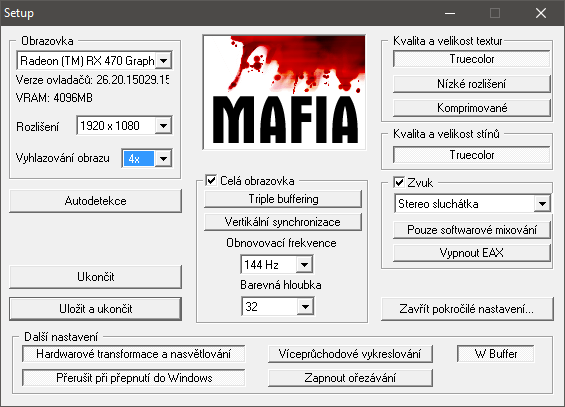
2. Open Settings
3. Max out resolution, antialiasing, refresh rate, color depth
4. Disable triple buffer, vsync
5. Enable Truecolor textures, disable low-res textures and compressed textures
6. Enable Truecolor shadows
7. Turn off EAX and turn off Software mixing
8. In advanced settings, turn on Hardware transofrmations, turn off the two middle settings.
9. Your settings should look a bit like this, but with resolution and refresh rate according to your own setup:
2. Open Settings
3. Max out resolution, antialiasing, refresh rate, color depth
4. Disable triple buffer, vsync
5. Enable Truecolor textures, disable low-res textures and compressed textures
6. Enable Truecolor shadows
7. Turn off EAX and turn off Software mixing
8. In advanced settings, turn on Hardware transofrmations, turn off the two middle settings.
9. Your settings should look a bit like this, but with resolution and refresh rate according to your own setup:
2. Game only opens settings bypass
!ONLY DO THIS IF THE GAME WON'T LAUNCH AND INSTEAD KEEPS OPENING THE SETTINGS WINDOW!
1. On bottom left on your taskbar, open the search bar and search for cmd
2. Launch cmd as an administrator.
3. Copypaste the following line into the opened terminal:
REG COPY "HKEY_LOCAL_MACHINE\SOFTWARE\Wow6432Node\Illusion Softworks\Mafia" "HKEY_CURRENT_USER\SOFTWARE\Illusion Softworks\Mafia" /s /f
4. Close command line and launch the game
5. If you are in the main menu, everything went well.
6. Close the game.
1. On bottom left on your taskbar, open the search bar and search for cmd
2. Launch cmd as an administrator.
3. Copypaste the following line into the opened terminal:
REG COPY "HKEY_LOCAL_MACHINE\SOFTWARE\Wow6432Node\Illusion Softworks\Mafia" "HKEY_CURRENT_USER\SOFTWARE\Illusion Softworks\Mafia" /s /f
4. Close command line and launch the game
5. If you are in the main menu, everything went well.
6. Close the game.
3. HD HUD, Better Draw Distance, and restored Music
1. Download the following file:
https://drive.google.com/file/d/1ePbXqo7sh-S7EfMmG4Nc6rmBF-Tmt53O/view
2. Unpack the .rar over your game's install folder (steamapps/common/Mafia/Mafia) and Overwrite All.
3. In steamapps/common/Mafia/Mafia/scripts, open Mafia_widescreen_fix.ini in notepad and replace everything inside with the following:
[WideScreen]
# Option will fix Field of View.
FOV Hor+ = 1
# Option will fix HUD scaling, 1 - 4/3 centered hud, 2 - widescreen hud.
Fix HUD = 2
# Option will fix black borders scaling during cutscenes.
Fix Borders = 1
# Option will fix map scaling. 1 - 4/3 centered, 2 - wide.
Fix Map = 2
# Option will fix text scaling.
Fix Text = 1
# Option will fix menu scaling.
Fix Menu = 1
# Option will fix video scaling. 1 - fill to screen, 2 - zoom to fullscreen.
Fix Movie = 2
[Draw Distance]
Change Distance = 1
New Distance = 4800.0
Skip Min Distance = 20.0
Skip Max Distance = 450.0
4.
[Other]
Write Log = 0
FPS Limit = 0
Ru Credits Fix = 0
4. Run the game from Steam and quickly jump into Free Ride.
5. If the speedometer in car is crisp and properly circular, and you can see far in the distance, everything went fine.
6. If you are experiencing bad framerates, lower the value in parameter "New Distance".
https://drive.google.com/file/d/1ePbXqo7sh-S7EfMmG4Nc6rmBF-Tmt53O/view
2. Unpack the .rar over your game's install folder (steamapps/common/Mafia/Mafia) and Overwrite All.
3. In steamapps/common/Mafia/Mafia/scripts, open Mafia_widescreen_fix.ini in notepad and replace everything inside with the following:
[WideScreen]
# Option will fix Field of View.
FOV Hor+ = 1
# Option will fix HUD scaling, 1 - 4/3 centered hud, 2 - widescreen hud.
Fix HUD = 2
# Option will fix black borders scaling during cutscenes.
Fix Borders = 1
# Option will fix map scaling. 1 - 4/3 centered, 2 - wide.
Fix Map = 2
# Option will fix text scaling.
Fix Text = 1
# Option will fix menu scaling.
Fix Menu = 1
# Option will fix video scaling. 1 - fill to screen, 2 - zoom to fullscreen.
Fix Movie = 2
[Draw Distance]
Change Distance = 1
New Distance = 4800.0
Skip Min Distance = 20.0
Skip Max Distance = 450.0
4.
[Other]
Write Log = 0
FPS Limit = 0
Ru Credits Fix = 0
4. Run the game from Steam and quickly jump into Free Ride.
5. If the speedometer in car is crisp and properly circular, and you can see far in the distance, everything went fine.
6. If you are experiencing bad framerates, lower the value in parameter "New Distance".
4. Czech Voice Acting
The english voice acting in this game is utterly atrocious, which diminishes the effect of this game's fantastic story. The czech voice acting is the exact opposite: Everyone delivers an oscar-worthy performance, blending themselves into the characters they portray, as if they were born for the role.
This section is for non-czech people who want the original czech performances, but also want to keep the rest of the game in their preferred language, so they can understand the story and quests.
1. Install the game from Steam in Czech (language settings can be found in Properties)
2. Download the following file:
https://www.moddb.com/games/mafia/downloads/mafia-cz-en-subtitles
3. Head over to your install directory (Steam/steamapps/common/Mafia/Mafia)
4. Unpack the downloaded rar file and overwrite all.
5. Congratulations, the game now has Czech voice acting, but subtitles and UI remain in English.
This section is for non-czech people who want the original czech performances, but also want to keep the rest of the game in their preferred language, so they can understand the story and quests.
1. Install the game from Steam in Czech (language settings can be found in Properties)
2. Download the following file:
https://www.moddb.com/games/mafia/downloads/mafia-cz-en-subtitles
3. Head over to your install directory (Steam/steamapps/common/Mafia/Mafia)
4. Unpack the downloaded rar file and overwrite all.
5. Congratulations, the game now has Czech voice acting, but subtitles and UI remain in English.
5. Anisotropic Filtering and Antialiasing
This section assumes you own an AMD graphics card. Everything mentioned in this section is possible even on nVidia graphics cards, but you will have to find the right settings yourself in the nVidia Control Panel.
1. Open your GPU driver settings
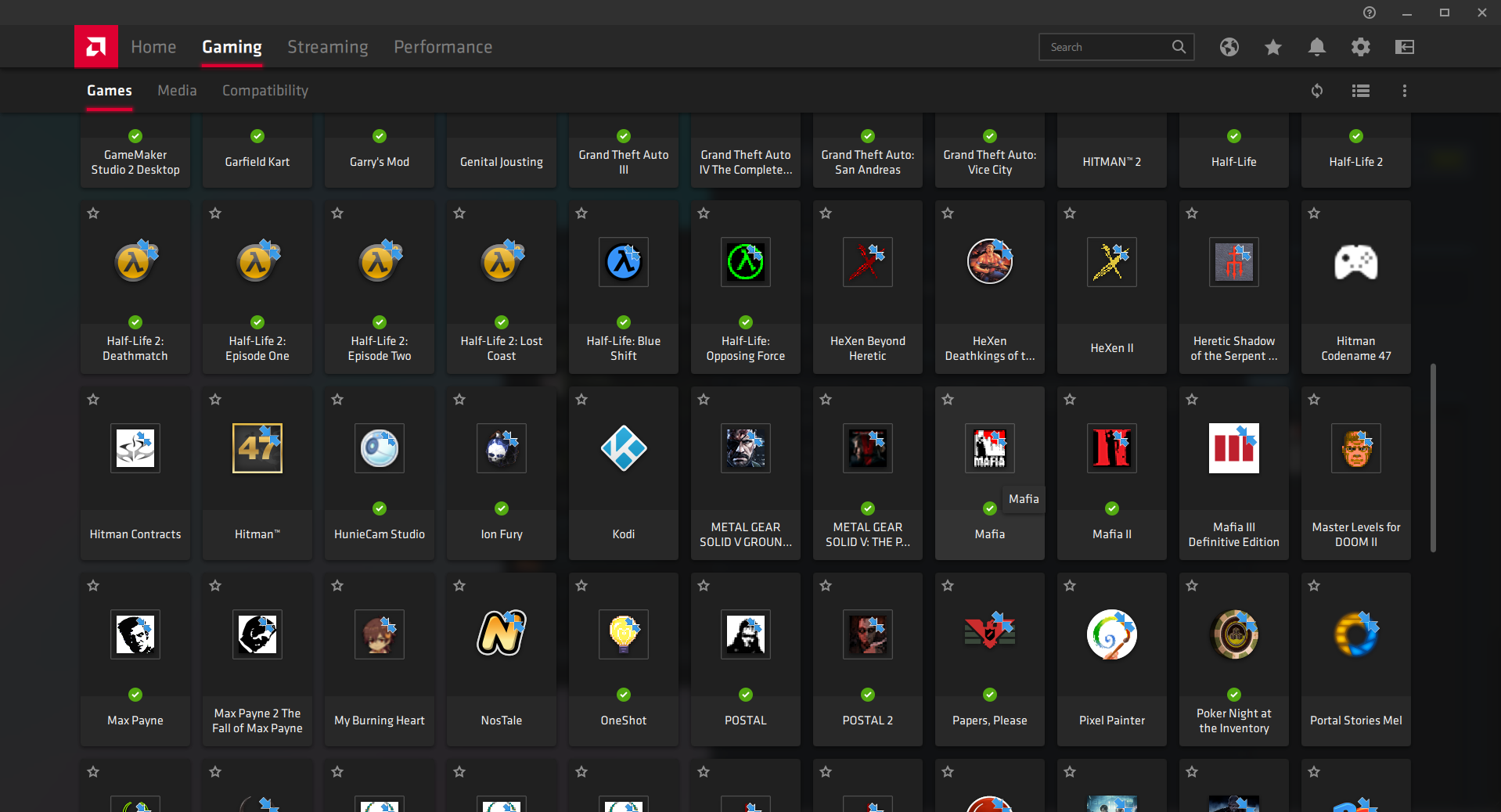
2. In the gaming section, find Mafia.
3. Set Anisotropic Filtering to On and turn it up to max. It barely affects performance.
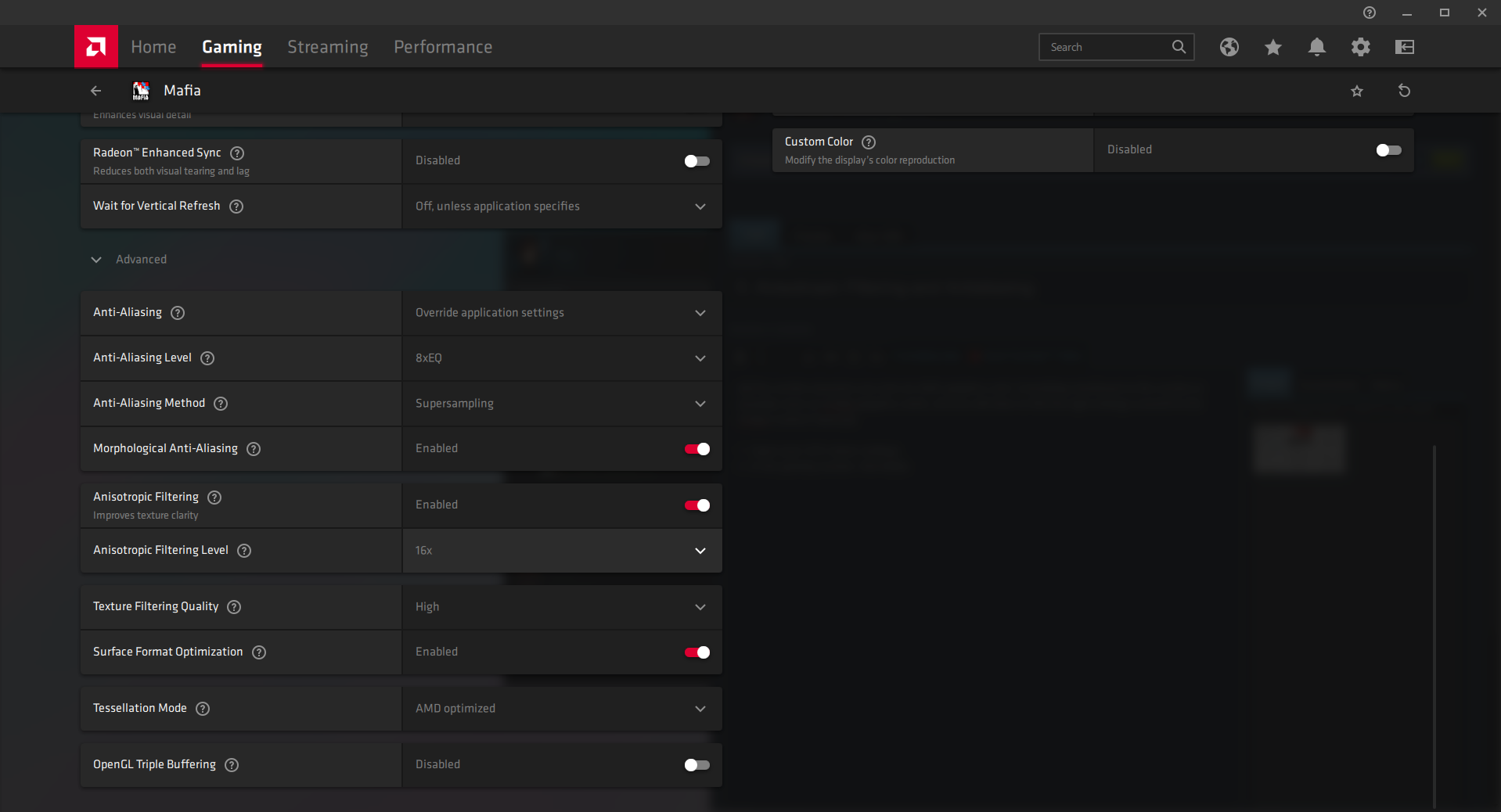
4. Set antialiasing as high as possible. Supersampling 8x is the best, but if you notice substantial FPS drop, use a lower value and Multisampling.
1. Open your GPU driver settings
2. In the gaming section, find Mafia.
3. Set Anisotropic Filtering to On and turn it up to max. It barely affects performance.
4. Set antialiasing as high as possible. Supersampling 8x is the best, but if you notice substantial FPS drop, use a lower value and Multisampling.
6. CAN I PLAY YET??????????????????
Yes! You've done it! You can now hop into a New Game and enjoy the phenomenal story of Thomas Angelo!
More Mafia guides
- Не запускается Mafia | Решение★ 5 (742)32k views475 ♥1 minRussianUpdated Jan 13, 2025
- Исправление проблемы с запуском/Startup issues fix (RU/EN)★ 5 (732)26k views627 ♥1 minRussianUpdated Dec 30, 2017
- How to restore the original music to MAFIA: TCoLH★ 5 (576)22k views628 ♥1 minUpdated Dec 4, 2024
- Mafia doesn't start (FIX)★ 5 (188)21k views300 ♥5 minUpdated Apr 17, 2024
- Mafia Graphics Improvements + HD mod (Texture Upscaling)★ 5 (180)15k views354 ♥4 minUpdated Jun 5, 2021
- Возвращение музыки. Сочетание текста и звука.★ 5 (632)15k views733 ♥1 minRussianUpdated Nov 24, 2017



This guide was created by its original author on the Steam Community. Are you the author and want it removed? Request removal.