Fistful of Frags Map Preview Thumbnail Archive
0 - Revision history
1 - About this archive
This update for Fistful of Frags (FoF) provides an installable archive of map preview thumbnails (images) - which are used to show in-game which map is currently in use on each of the servers shown in the FoF multi-player interface.
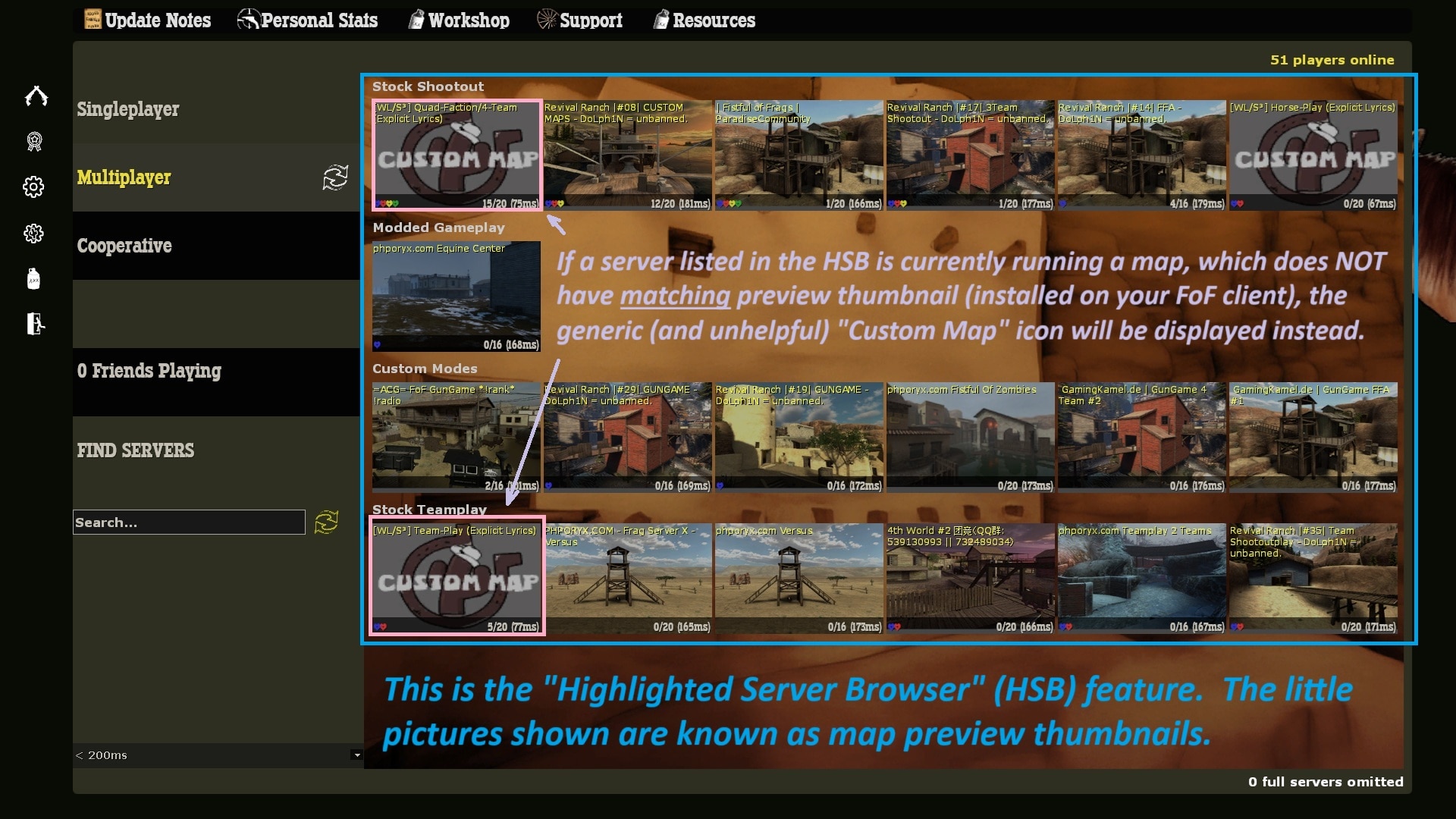
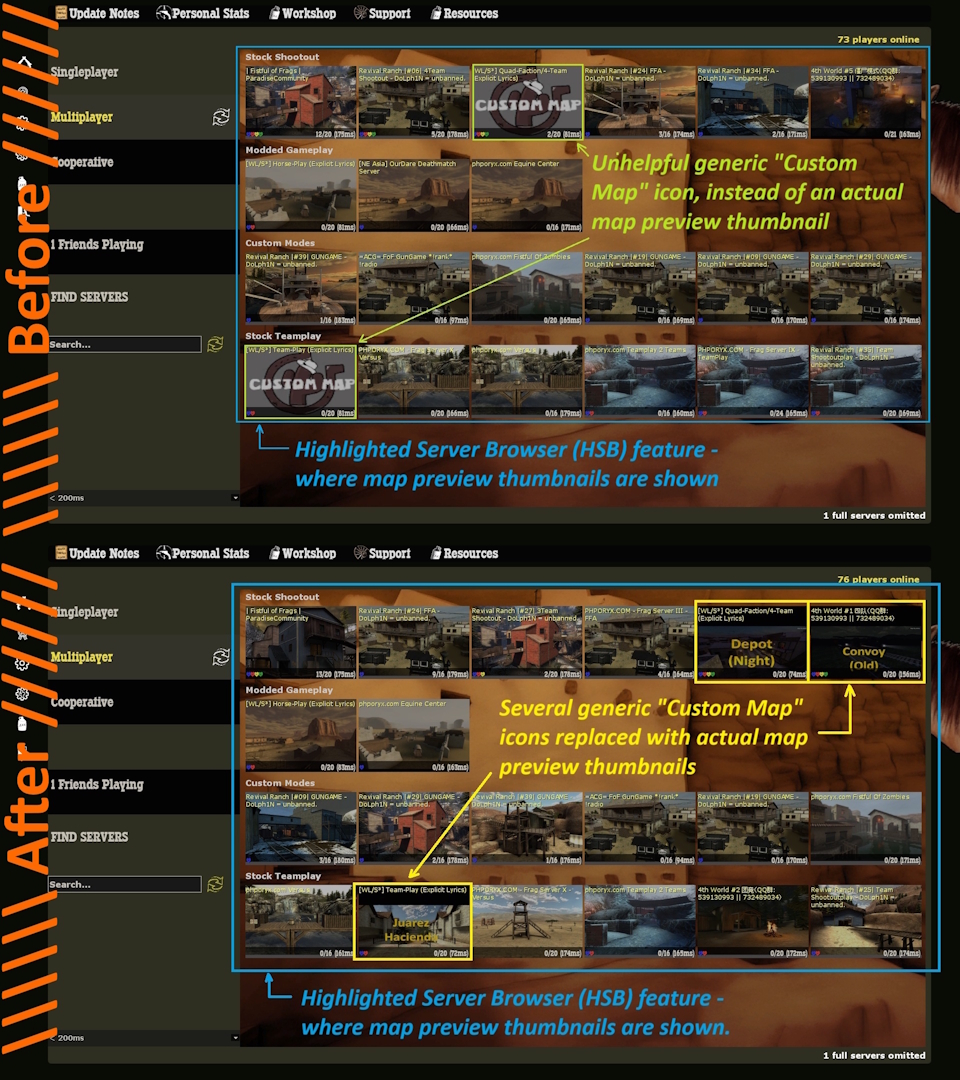
- This archive includes map preview thumbnails for custom maps that are not part of the default FoF installation.
- When installed, these thumbnails are shown in FoF's "Highlighted Server Browser" (HSB) feature, instead of the generic "Custom Map" place-holder.
- In addition to the thumbnails being a small visual representation of the map, they are generally also overlayed with the name of the map.
- Installing the previews makes it easier for players to identify which map an FoF server is currently running before joining it.
- This archive currently represents sixty (60) maps - ranging from completely original maps, to older or alternative versions of default/stock FoF maps.
2 - Wait, which "server-list"?
Fistful of Frags (FoF) actually has two different lists of servers, which are related but not the same. This can cause some confusion, especially for new players.
These two server-list features are:- The "Highlighted Server Browser" (or "HSB") list.
- The "Full" server-list.
Highlighted Server Browser (or HSB):
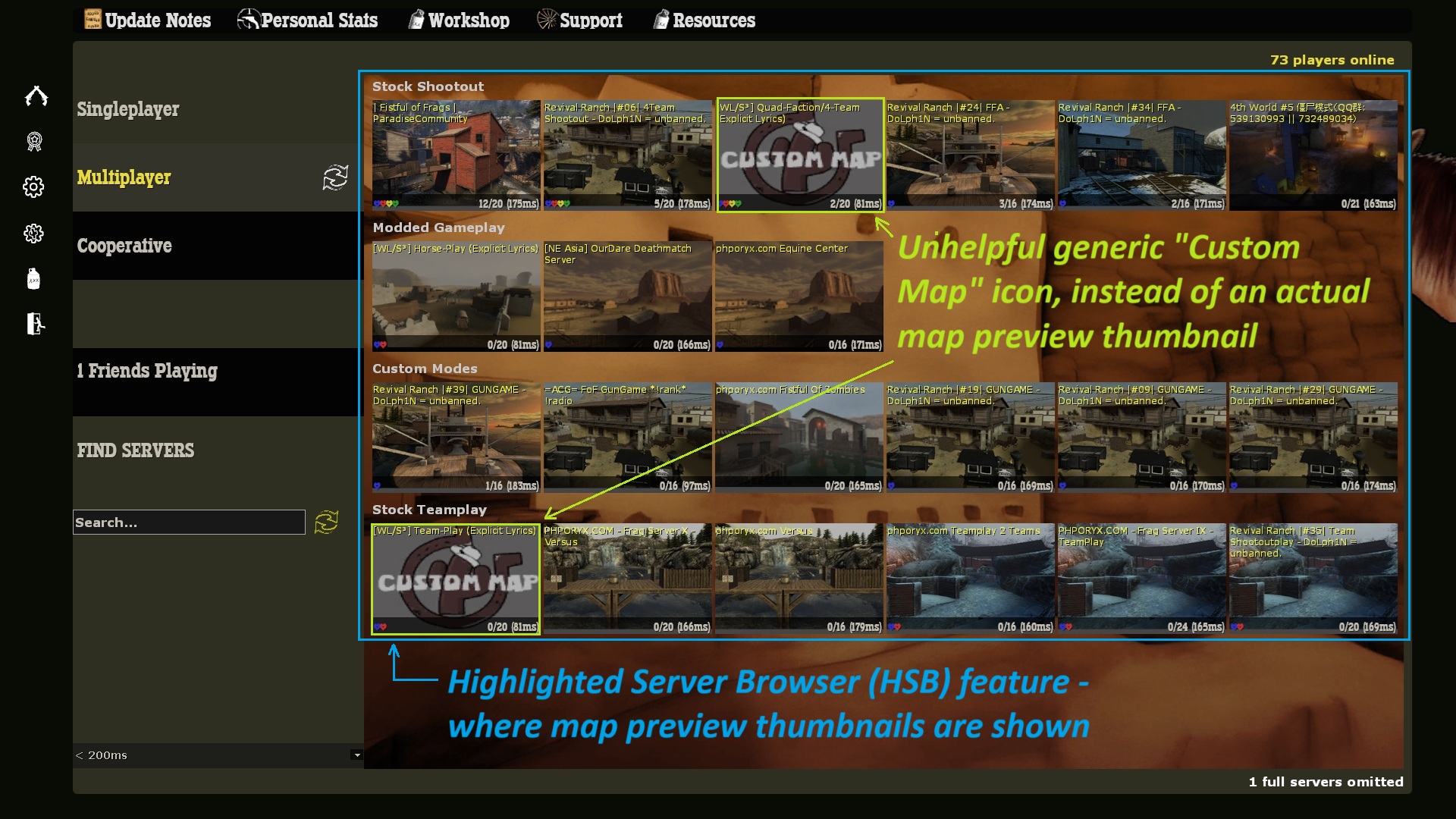
- This is the screen you see when you first enter the game, showing thumbnail preview images of different maps running on available game-servers. Because of its visual nature (images), this is referred-to as the Highlighted Server Browser (or HSB).
- This feature is how most Fistful of Frags (FoF) players find and connect to servers to play the game. This is especially true for those new to the game.
- This list is heavily curated to only include select servers that are "known-good" so-to-speak. By default, the behind-the-scenes source for the HSB server-list is only updateable by the game developer directly. Unfortunately, the developer has been effectively missing-in-action for some time.
- Unfortunately, FoF currently only includes preview thumbnails for maps that shipped with the game at the time of its last update - nearly two (2) years ago. So no preview thumbnails are included for any custom maps released by the community - resulting in the generic "Custom Map" icon being shown instead of an actual map preview.
- This update installs map preview thumbnails for a wide-array of community-generated maps. Installing this update will replace the generic Custom Map with an actual preview thumbnail for most community maps.
Full Server List ("Find Servers"):
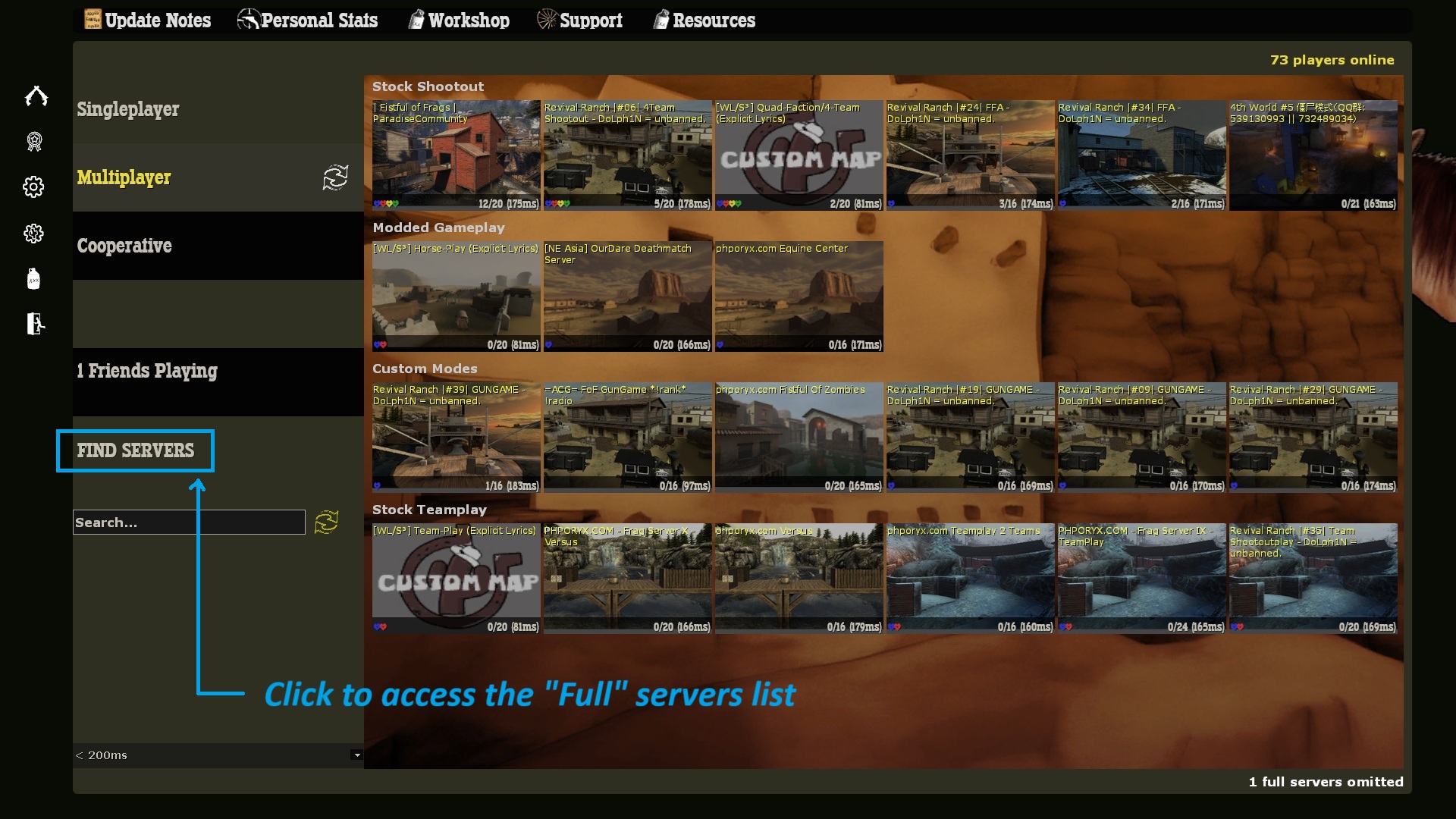
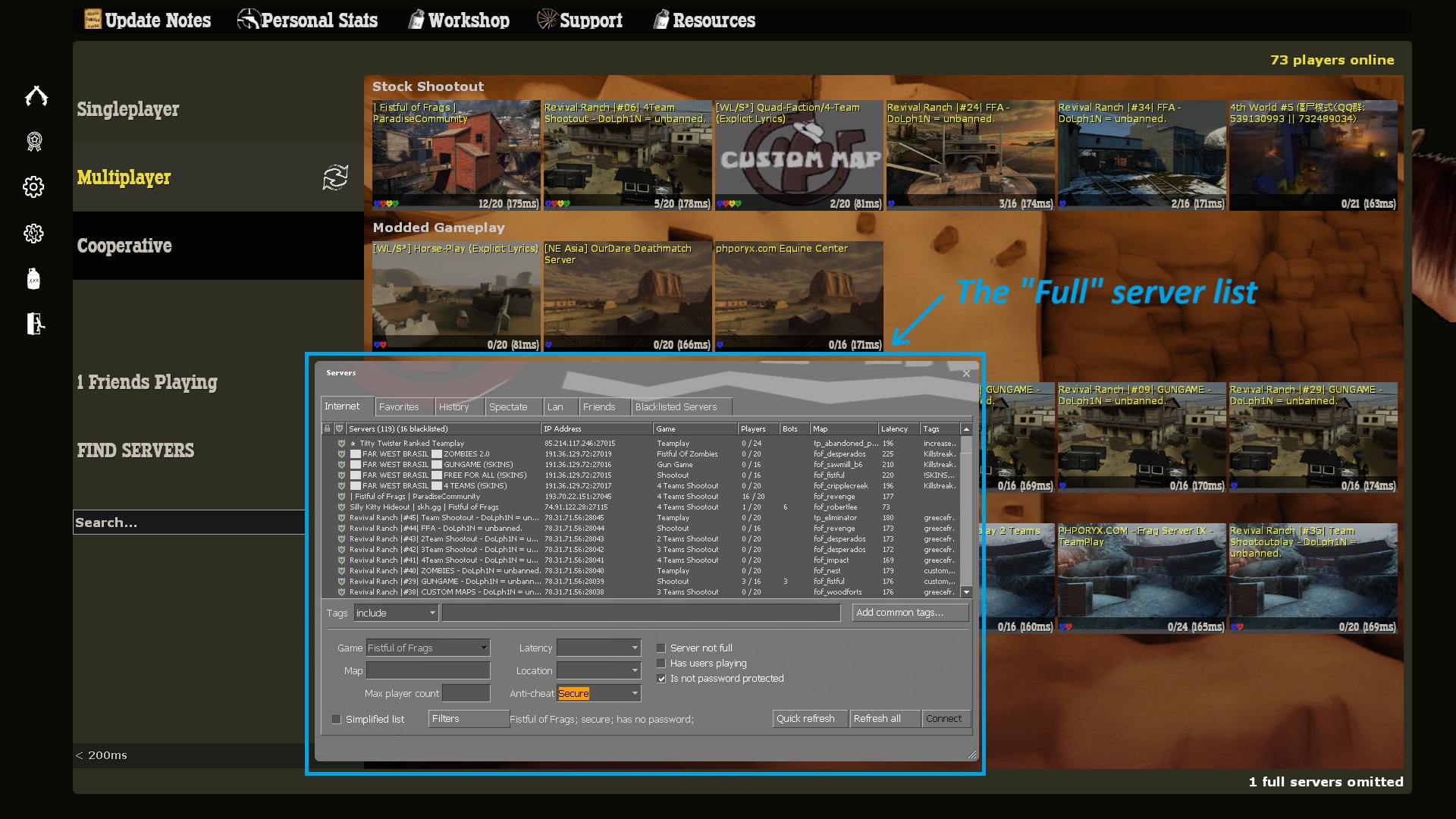
- On the initial screen, there is also a Find Servers option. This will display a more complete list of current Fistful of Frags (FoF) game-servers, but without any map-preview images.
- This feature is how many Fistful of Frags (FoF) long-term players find and connect to servers to play the game. In particular the "Favorites" tab is used extensively by experienced players.
- That list is also entirely un-curated, and may contain servers that are too electronically distant from you to be playable, or are otherwise problematic.
- This update does not alter the way that "Full" server list works in any way.
- If you use this feature and like it, please feel free to continue doing-so. I still recommend you apply the update. However, if you rarely use the HSB you may see little benefit.
3 - Prerequisites
- You must already have Fistful of Frags (FoF) installed.
- If you have Fistful of Frags (FoF) open, close it.
- If you did not install FoF to the default location, then you must know exactly where you specified to have it installed. For example, you might have installed it to a different Steam "Library" on a different hard-drive, resulting in it being installed somewhere else, such as:D:\SteamLibrary\steamapps\common\Fistful of Frags
- Within the Fistful of Frags installation location, should be a sub-folder named "fof". The scripts used for installing the map preview thumbnails must be downloaded to inside that "fof" sub-folder.
- Generally, you should not need any special "Administrator" or "Elevated" privledges on your computer to download, install and use the map preview thumbnail archive.
4 - Where to get the archive?
Simple scripts for easily downloading and installing the archive are hosted in a dedicated GitHub[github.com], specificaly this one:
https://github.com/Mecha-Weasel/fof-map-preview-thumbnail-archive
Installation scripts are available for both Windows and Linux Mint.
5a - Installing the archive (Windows)
- Download the "install-fof-map-thumbnails.cmd" file. You can browse for it in the list of files in the GitHub Repo[github.com] Or, you can use this direct link to that specific script file here:
- Copy the downloaded the "install-fof-map-thumbnails.cmd" file to the "fof" sub-folder where Fistful of Frags (FoF) is installed. Typically the the location where you should put the installation script is:C:\Program Files (x86)\Steam\steamapps\common\Fistful of Frags\fof
- Open a Windows Command Prompt.
- Use the "cd" command to change to the directory where the script was placed. Since the path has spaces in it, you must put quotation marks around it. For example:cd "C:\Program Files (x86)\Steam\steamapps\common\Fistful of Frags\fof"
- Run the script file, it will verify that the expected/required Fistful of Frags (FoF) installation is present, and then it will download the archive (in .zip format), and extract it in the required location. The command to start the installation script is simply the name of the script:install-fof-map-thumbnails.cmd
- Assuming you have it in the correct directory (folder) and no errors are encountered, the output will be something like this:C:\Users>cd C:\Program Files (x86)\Steam\steamapps\common\Fistful of Frags\fof C:\Program Files (x86)\Steam\steamapps\common\Fistful of Frags\fof> C:\Program Files (x86)\Steam\steamapps\common\Fistful of Frags\fof>install-fof-map-thumbnails.cmd ===================================================================== Download and install an archive of map review thumbnails for custom/ 3rd-party maps for use in echo the Fistful of Frags (FoF) Highlighted Server Browser (HSB) feature. ===================================================================== [x] NOTICE: steam.inf file found. Contents of steam.inf file ... PatchVersion=614 ProductName=fof appID=265630 ServerAppID=295230 ===================================================================== [x] NOTICE: Correct AppID (265630) found in steam.inf file. A subdirectory or file materials already exists. A subdirectory or file materials\vgui already exists. A subdirectory or file materials\vgui\maps already exists. ------------------------------------------------- 1. Downloading the thumbnails archive ... ------------------------------------------------- % Total % Received % Xferd Average Speed Time Time Time Current Dload Upload Total Spent Left Speed 100 918k 100 918k 0 0 1849k 0 --:--:-- --:--:-- --:--:-- 1863k ------------------------------------------------- 2. Extracting the thumbnails archive ... ------------------------------------------------- {... a bunch of stuff will happen here ...} ------------------------------------------------ 3. Deleting the cached thumbnails archive ... ------------------------------------------------ ------------------------------------------------- 4. Listing installed archive contents ... ------------------------------------------------- Volume in drive C is Virtual1-System Volume Serial Number is 32C0-38A9 Directory of C:\Program Files (x86)\Steam\steamapps\common\Fistful of Frags\fof\materials\vgui\maps 02/20/2026 09:00 PM <DIR> . 02/18/2026 02:18 PM <DIR> .. 02/13/2026 10:14 AM 149 menu_thumb_fofhr_ponyville_r3.vmt 02/13/2026 10:14 AM 33,254 menu_thumb_fofhr_ponyville_r3.vtf {... a bunch more stuff here ...} 02/13/2026 10:14 AM 139 menu_thumb_tp_snowy.vmt 02/13/2026 10:14 AM 33,254 menu_thumb_tp_snowy.vtf 120 File(s) 2,002,768 bytes 2 Dir(s) 119,294,562,304 bytes free ===================================================================== [x] FINISHED! Additional map preview thumbnails should show in FoF. ===================================================================== Press any key to continue . . . Microsoft Windows [Version 10.0.26200.7840] C:\Program Files (x86)\Steam\steamapps\common\Fistful of Frags\fof>
5b - Installing the archive (Linux Mint)
- dos2unix, which is used to convert text files to formats that are easier to parse on Linux.
- unzip, which is used to extract files from compressed .zip archives.
- Download the "install-fof-map-thumbnails.sh" file. You can browse for it in the list of files in the GitHub Repo[github.com] Or, you can use this direct link to that specific script file here:
- Copy the downloaded the "install-fof-map-thumbnails.sh" file to the "fof" sub-folder where Fistful of Frags (FoF) is installed. Typically the the location where you should put the installation script is:/home/$USER/.steam/debian-installation/steamapps/common/Fistful of Frags/fof
- Open a Linux Terminal.
- Use the "cd" command to change to the directory where the script was placed. Since the path has spaces in it, you must put quotation marks around it. An ending semicolon (";") is optional. For example:cd "/home/$USER/.steam/debian-installation/steamapps/common/Fistful of Frags/fof";
- Before you can run the script file, you may need to mark it as executable. This is can be done in the terminal using the "chmod" command, like this:chmod +x install-fof-map-thumbnails.sh;
- Run the script file, it will verify that the expected/required Fistful of Frags (FoF) installation is present, and then it will download the archive (in .zip format), and extract it in the required location. The command to start the installation script is simply the name of the script - prefixed with "./":./install-fof-map-thumbnails.sh;
- Assuming you have it in the correct directory (folder) and no errors are encountered, the output will be something like this:YourUserName@YourComputer:~$ cd "/home/$USER/.steam/debian-installation/steamapps/common/Fistful of Frags/fof"; YourUserName@YourComputer:~/.steam/debian-installation/steamapps/common/Fistful of Frags/fof$ chmod +x install-fof-map-thumbnails.sh; YourUserName@YourComputer:~/.steam/debian-installation/steamapps/common/Fistful of Frags/fof$ ./install-fof-map-thumbnails.sh; ===================================================================== Download and install an archive of map review thumbnails for custom/ 3rd-party maps for use in echo the Fistful of Frags (FoF) Highlighted Server Browser (HSB) feature. ===================================================================== [x] NOTICE: steam.inf file found. Contents of steam.inf file ... PatchVersion=614 ProductName=fof appID=265630 ServerAppID=295230 ===================================================================== dos2unix: converting file ./steam.inf to Unix format... AppID Expected: 265630 AppID Found: 265630 ===================================================================== [x] NOTICE: Correct AppID (265630) found in steam.inf file. mkdir: cannot create directory ‘materials’: File exists mkdir: cannot create directory ‘materials/vgui’: File exists mkdir: cannot create directory ‘materials/vgui/maps’: File exists ------------------------------------------------- 1. Downloading the thumbnails archive ... ------------------------------------------------- % Total % Received % Xferd Average Speed Time Time Time Current Dload Upload Total Spent Left Speed 100 918k 100 918k 0 0 1548k 0 --:--:-- --:--:-- --:--:-- 1546k ------------------------------------------------- 2. Extracting the thumbnails archive ... ------------------------------------------------- Archive: FoF-Map-Thumbnails-Latest-GameServer.zip inflating: menu_thumb_fof_canyum_230506.vmt inflating: menu_thumb_fof_canyum_230506.vtf {... a bunch of stuff will happen here ...} inflating: menu_thumb_tp_snowy.vmt inflating: menu_thumb_tp_snowy.vtf ------------------------------------------------- 3. Deleting the cached thumbnails archive ... ------------------------------------------------- ------------------------------------------------- 4. Listing installed archive contents ... ------------------------------------------------- total 2.4M drwxrwxr-x 2 YourUserName YourUserName 12K Feb 20 21:22 . drwxrwxr-x 4 YourUserName YourUserName 4.0K Feb 10 08:48 .. -rw-rw-r-- 1 YourUserName YourUserName 148 Feb 13 10:14 menu_thumb_fof_canyum_230506.vmt -rw-rw-r-- 1 YourUserName YourUserName 33K Feb 13 10:14 menu_thumb_fof_canyum_230506.vtf {... a bunch more stuff here ...} -rw-rw-r-- 1 YourUserName YourUserName 139 Feb 13 10:14 menu_thumb_tp_snowy.vmt -rw-rw-r-- 1 YourUserName YourUserName 33K Feb 13 10:14 menu_thumb_tp_snowy.vtf ===================================================================== [x] FINISHED! Additional map preview thumbnails should show in FoF. ===================================================================== YourUserName@YourComputer:~/.steam/debian-installation/steamapps/common/Fistful of Frags/fof$
6 - Who created this archive?
- Weasel (as mentioned above) = A long-time community server operator for FoF (and other games, dating back to 1999).
- Judge = A long-time FoF community advocate / community organizer, active player and some-time server operator.
- Paralhama = A long-time active FoF player, server operator, and community map contributor.
- Wolfgang = A long-time active FoF player.
- The "Saloon / Bad-Ass Gunslingers" (a long-established mostly public FoF-supportive community)
- The "Salty Spitoon Saloon" (a private FoF-supportive community)
7 - Additional information
- Weasel's Lair (Steam Community)
- The related GitHub repo[github.com]
- Information about the related GitHub repo[github.com]
- Fistful of Frags Console Commands★ 5 (313)21k views542 ♥4 minUpdated Feb 6, 2016
- How to set up a "Listen Server"!?★ 5 (216)17k views285 ♥5 minUpdated Mar 13, 2016
- The Weapons of FOF★ 5 (247)13k views243 ♥23 minUpdated Dec 3, 2024
- A dumb FoF player-types guide (No pictures, sorry!)★ 5 (315)11k views280 ♥15 minUpdated Jan 6, 2018
- Создание сервера для игры с друзьями★ 4 (150)9.2k views254 ♥1 minRussianUpdated Jun 19, 2018
- "Курс Молодого Ковбоя" от русского сообщества по FoF★ 5 (210)9k views208 ♥30 minRussianUpdated Nov 14, 2018





- Upgrading to PremiumTeam Fortress 2★ 5 (20k)1441k views11k ♥6 minUpdated May 11, 2022
- No More Room in Hell Official ManualNo More Room in Hell★ 5 (2.8k)569k views2.1k ♥29 minUpdated Apr 22, 2019
- NMRiH Community Hosting GuidesNo More Room in Hell★ 5 (526)351k views653 ♥1 minUpdated Aug 10, 2022
- ULTIMATE GUIDE FOR GAME DEV TYCOONGame Dev Tycoon★ 5 (5.8k)326k views10k ♥4 minUpdated 23 Jan, 2014
- How to 'Git Gud' Soon™MORDHAU★ 5 (2k)318k views3k ♥68 minUpdated Nov 16, 2024
- Лучшие кооперативные игры SteamPAYDAY 2★ 5 (1.5k)315k views2.1k ♥56 minRussianUpdated Apr 27, 2025






This guide was created by its original author on the Steam Community. Are you the author and want it removed? Request removal.