Fix crashes for Dark Messiah of Might & Magic
Introduction
The game Dark Messiah of Might & Magic is a 32-bit application and can therefore theoretically allocate a maximum of 4 GB of RAM. Practically, only 2 GB are allocated. The remaining 2 GB are reserved for the operating system. We can allow the game to use the full 4 GB of RAM. However, the game will still be a 32-bit application after you apply the 4 GB fix. This means that once 4 GB of RAM is exceeded, the game will crash. This can happen, for example, when using the maximum graphics settings and playing on large maps. In practice, with the following fixes you will get rid of almost all crashes and have a pleasant gaming experience.
Minimum system requirements:
- 64-bit operating system
- 6 GB RAM
Minimum system requirements:
- 64-bit operating system
- 6 GB RAM
How To
1. Set game launch options via Steam:
+datacachesize "128" +map_background none -novid
2. Allow the game to allocate 4 GB of RAM instead of only 2 GB
Step 1: Install a HEX-Editor
Note: I recommend to install Notepad++ and the plugin "Hex-Editor" via Plugins > Plugins Admin
Step 2: Open the file mm.exe with a HEX-Editor
Note: If you use Notepad++, open mm.exe with Notepad++ and change the view via Plugins > Hex Editor > View in Hex
Step 3: Go to Address 00000dd0
Step 4: At position 6 change the value from 0f to 2f
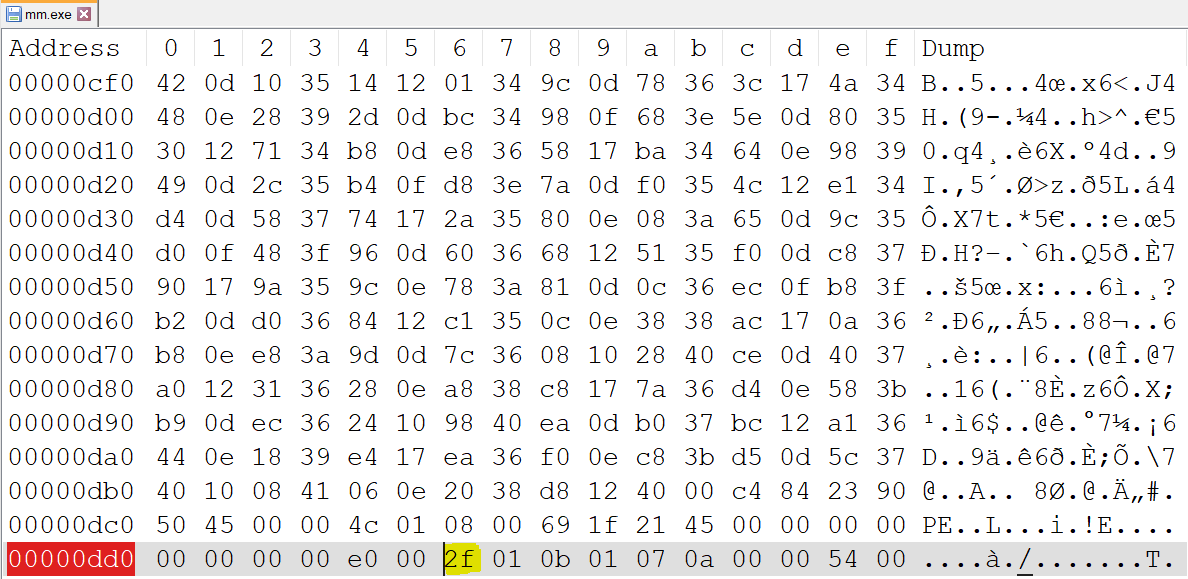
Step 5: Save changes
3. Don't change the advanced video settings in-game.
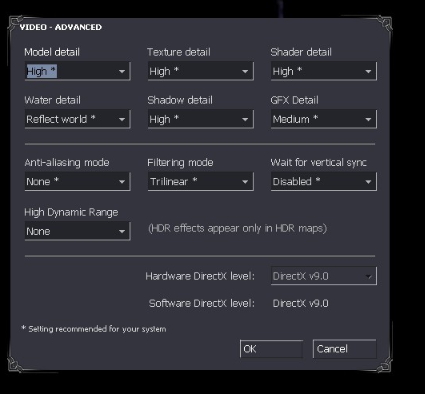
For more tips and tricks I recommend you to visit the corresponding page on PCGamingWiki or other Steam community guides.
Credits:
PCGamingWiki: https://www.pcgamingwiki.com/wiki/Dark_Messiah_of_Might_and_Magic
Steam Guide: Fixes for Dark Messiah of Might & Magic by hexaae
+datacachesize "128" +map_background none -novid
2. Allow the game to allocate 4 GB of RAM instead of only 2 GB
Step 1: Install a HEX-Editor
Note: I recommend to install Notepad++ and the plugin "Hex-Editor" via Plugins > Plugins Admin
Step 2: Open the file mm.exe with a HEX-Editor
Note: If you use Notepad++, open mm.exe with Notepad++ and change the view via Plugins > Hex Editor > View in Hex
Step 3: Go to Address 00000dd0
Step 4: At position 6 change the value from 0f to 2f
Step 5: Save changes
3. Don't change the advanced video settings in-game.
- The advanced video settings will be reset after restarting the game anyway
- You can use the resolution of your monitor as display resolution (2560x1440 worked for me. Unfortunately, I don't know how stable the game runs with higher resolutions (e.g. 4k)).
For more tips and tricks I recommend you to visit the corresponding page on PCGamingWiki or other Steam community guides.
Credits:
PCGamingWiki: https://www.pcgamingwiki.com/wiki/Dark_Messiah_of_Might_and_Magic
Steam Guide: Fixes for Dark Messiah of Might & Magic by hexaae
More Dark Messiah of Might & Magic Single Player guides
- Unlimited Edition mod★ 5 (826)41k views1.6k ♥8 minUpdated May 10, 2020
- Fixes for Dark Messiah of Might & Magic★ 5 (240)26k views431 ♥7 minUpdated Dec 27, 2025
- Тайники и секреты - Dark Messiah of Might and Magic★ 5 (867)23k views1.3k ♥33 minRussianUpdated Feb 13, 2016
- What should I know before playing Dark Messiah of M&Ms?★ 5 (251)21k views311 ♥2 minUpdated Sep 28, 2023
- Проблемы в игре★ 5 (292)21k views402 ♥2 minRussianUpdated Mar 30, 2019
- Dark Messiah: Console Commands★ 5 (338)18k views659 ♥4 minUpdated Aug 27, 2020




This guide was created by its original author on the Steam Community. Are you the author and want it removed? Request removal.