Fix: Crashing on Startup [Windows 10]
Adding Crysis2 as an Exclusion
If you are running Window 10:
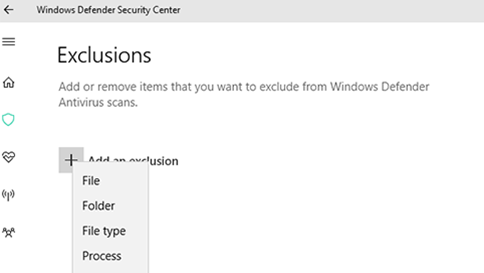
- Open Windows Defender Security Center, and then select Virus & threat protection > Virus & threat protection settings > Add or remove exclusions.
- Under Add an exclusion, select the file option
- Navigate to the Crysis2.exe (Usually \steam\steamapps\common\Crysis 2 Game of the Year\bin32\Crysis2.exe)
Crysis2 should now run.
update: you must be logged in as an administrator to make these changes.
More Crysis 2 Maximum Edition guides
- CRYSIS 3 BOW IN CRYSIS 2★ 5 (285)26k views233 ♥1 minUpdated Oct 13, 2016
- Crysis 2 Easter Eggs★ 4 (149)14k views62 ♥1 minUpdated Feb 21, 2021
- Crysis 2 Ultra HD Texture, Tessellation and DirectX 11 mod★ 4 (108)12k views96 ♥1 minUpdated Jun 5, 2020
- Как разблокировать все находки в игре (кампания) | How to find all souvenirs in campaign★ 5 (465)10k views589 ♥10 minUpdated Jul 6, 2020
- TF2 Classes in Crysis 2★ 4 (97)9.4k views56 ♥2 minUpdated Feb 15, 2014
- Получение всех оружейных модулей в одиночной кампании игры Crysis 2★ 5 (213)7.3k views251 ♥2 minRussianUpdated May 8, 2024






This guide was created by its original author on the Steam Community. Are you the author and want it removed? Request removal.