HD Texture Pack
Intro

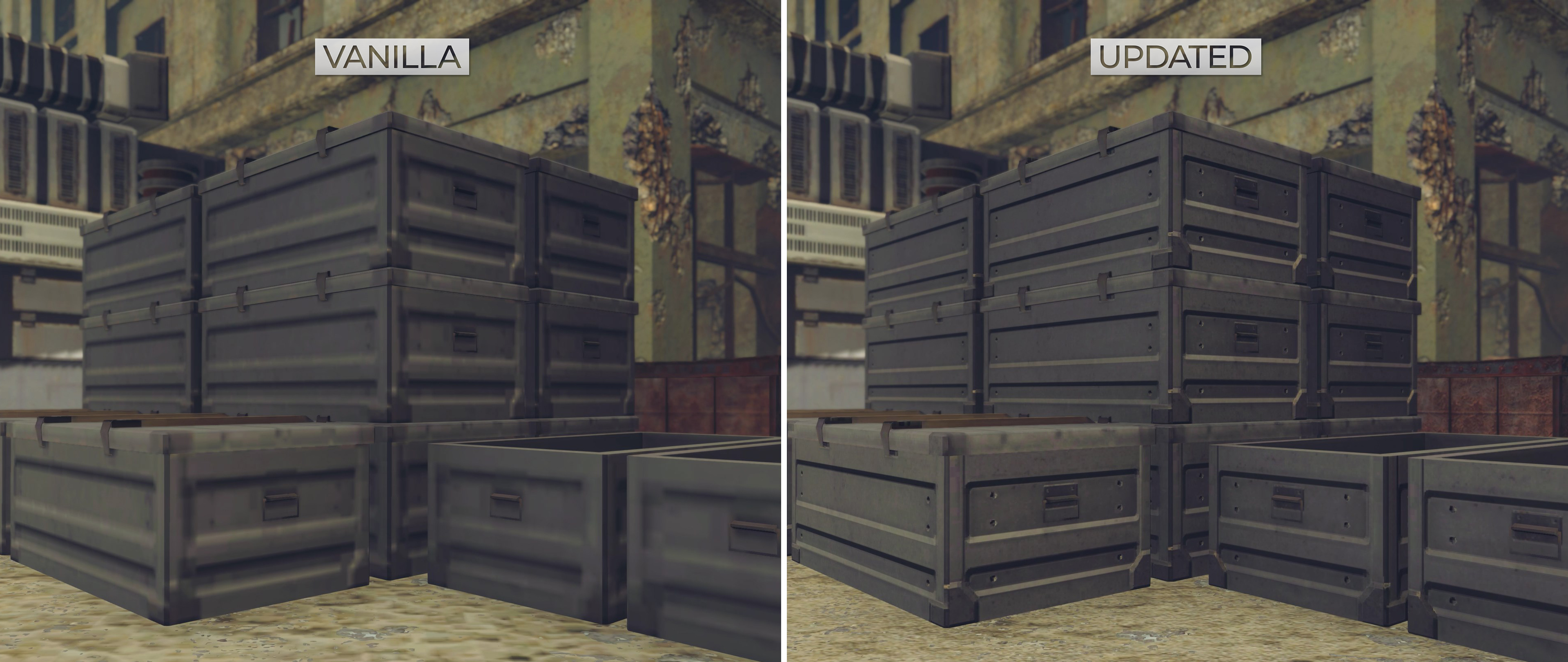
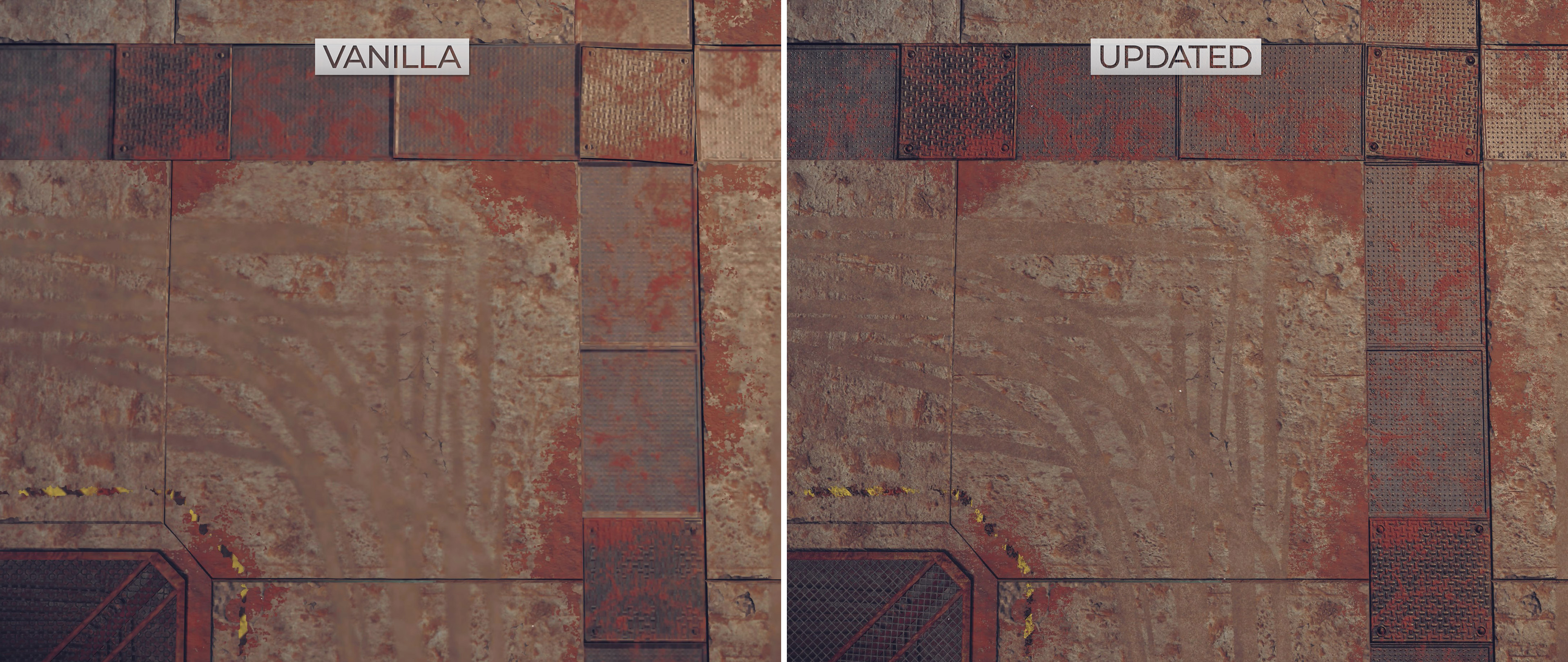
NieR: Automata is one of my favourite games. Unfortunately, it suffers from some blurry textures that hurt the presentation. My goal is to provide a natural restoration to the low-res textures, maintaining the intended look.
Join my Discord server[discord.gg]
The NieR:Automata Texture Pack requires Kaldaien's Fix Automata Resolution mod or Special K for the Steam version.
Windows Store users check here.[wiki.special-k.info]
VIDEO COMPARISON

SCREENSHOTS

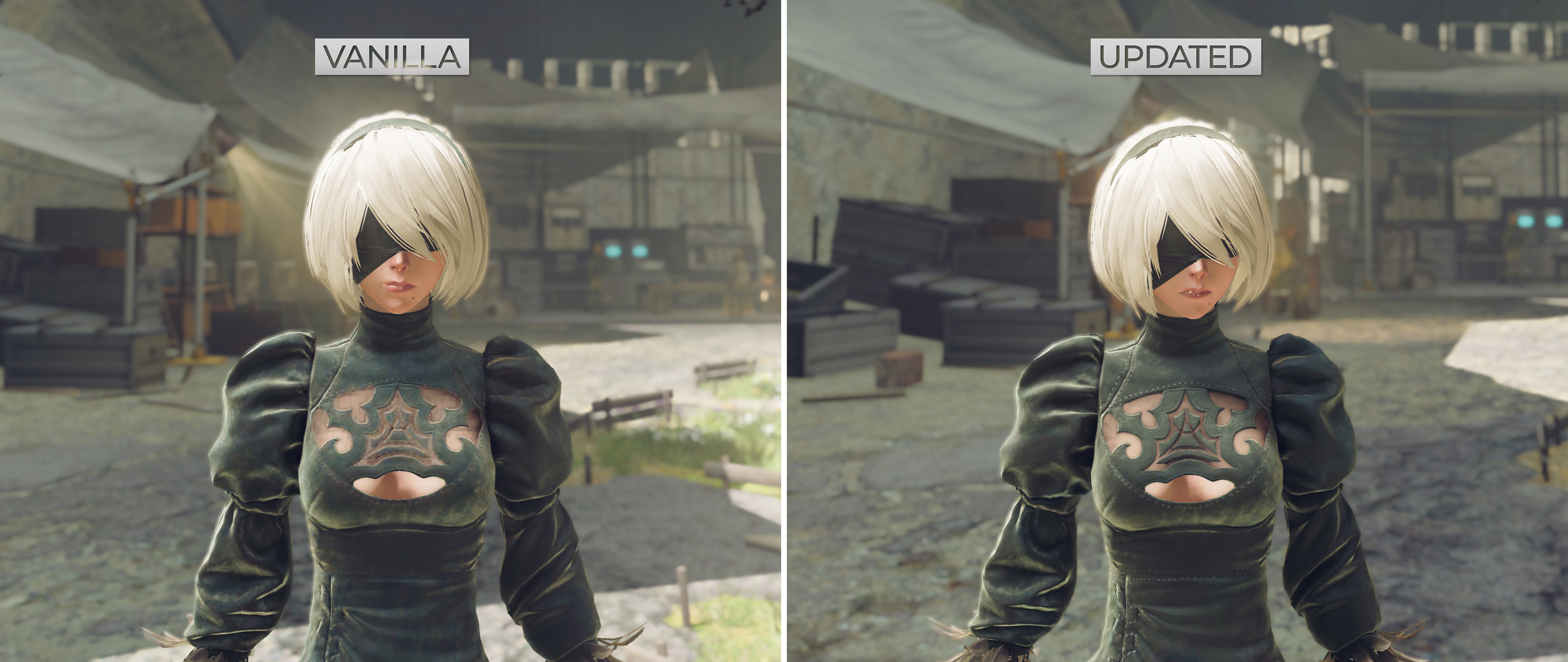
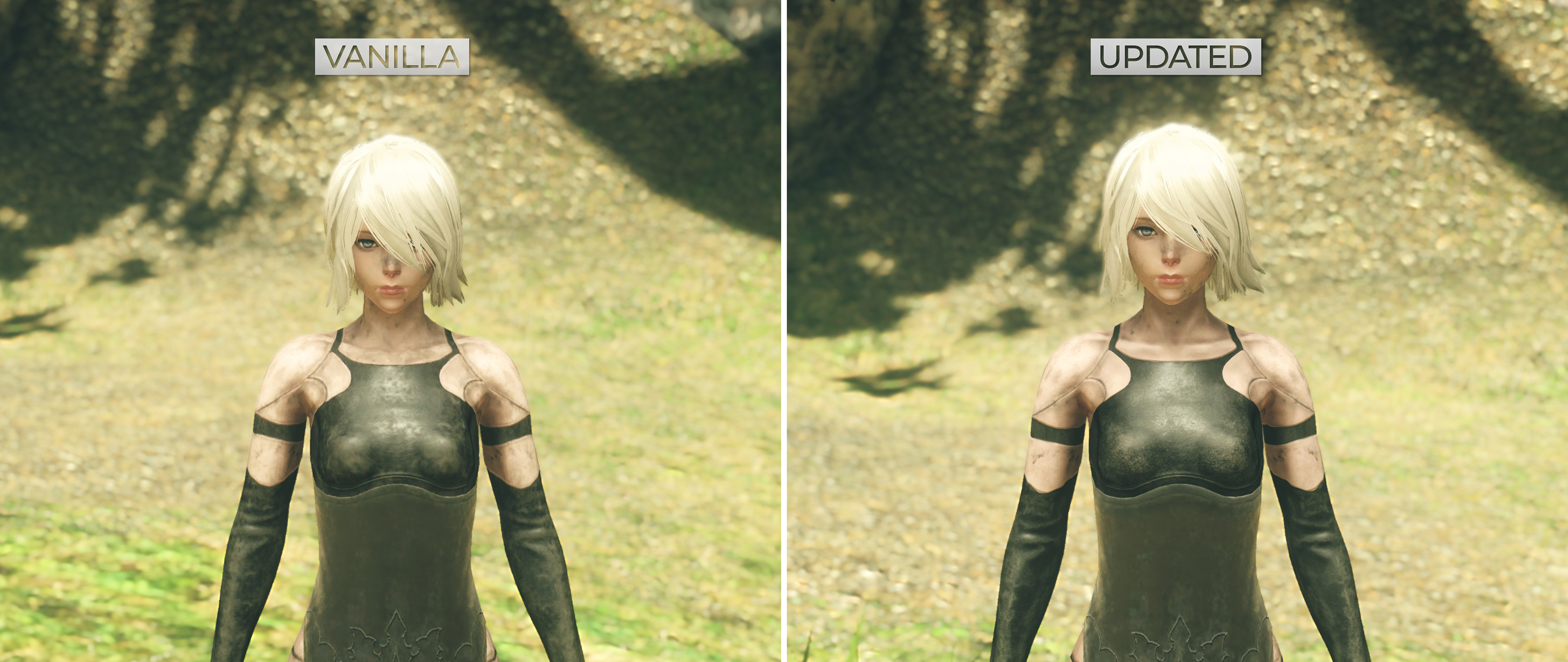
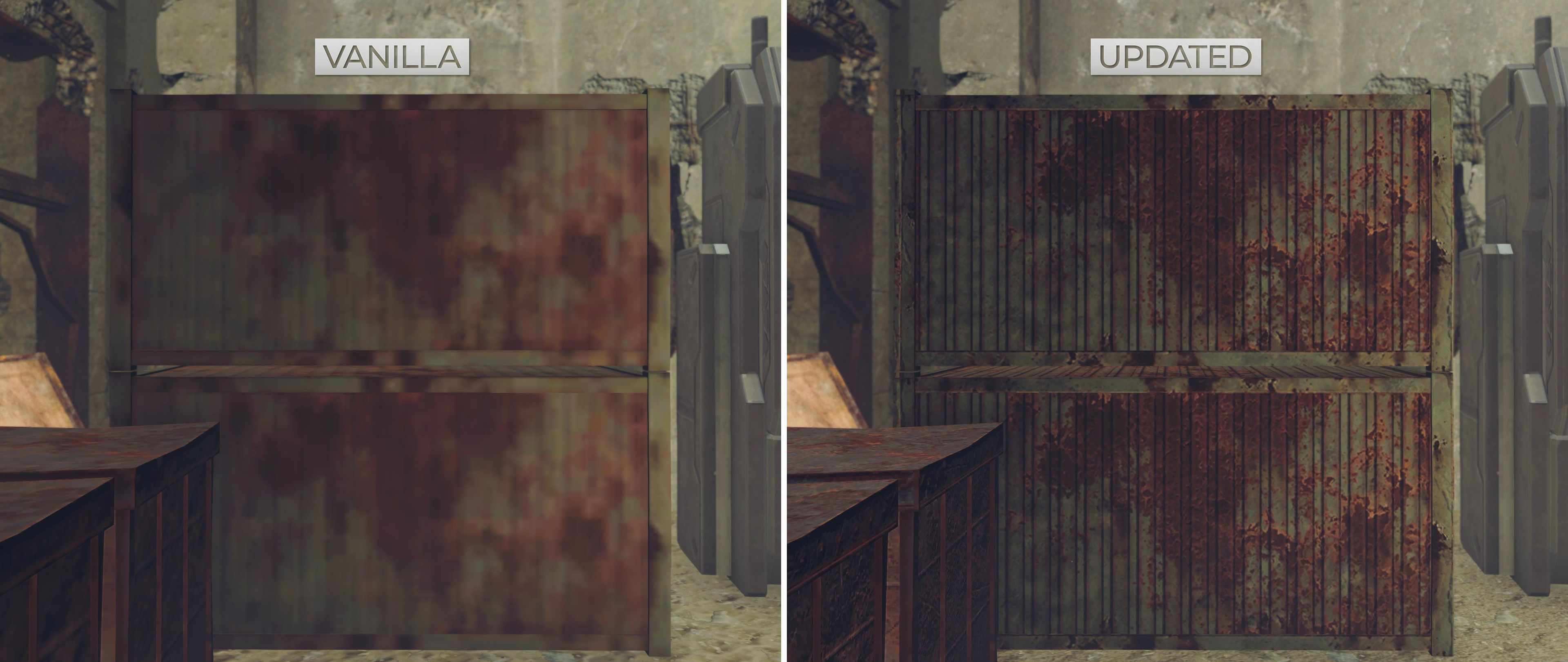
DOWNLOAD

INSTALLATION
This Texture Pack is quick to apply if you already have the latest version of the FAR (Fix Automata Resolution)[wiki.special-k.info] mod installed:
After installing FAR, check the DOWNLOAD section in this guide and download the latest texture pack version. Extract the downloaded file and copy the 'SK_Res' folder to the game's directory. The texture pack should be installed.
Refer to Aemony's guide for FAR installation:
http://steamcommunity.com/sharedfiles/filedetails/?id=914437196
(User)\Documents\My Mods\SpecialK\Profiles\NieRAutomata(dot)exe\
- you may need to start the game once with Special K active to create a profile folder
Refer to the Special K wiki guide for more info on the Windows Store version
https://wiki.special-k.info/SpecialK/Custom/FAR_MS#texture-mods-incl-resorep
- Make sure you use the 'automated' FAR install option, as opposed to 'manual'. - Additional info is in Aemony's FAR guide listed above.
- Open dinput8.ini/dxgi.ini in NieR: Automata's folder directory. Search for '[Textures.D3D11]' - make sure the below values are the same:
[Textures.D3D11] Cache=true PreciseHash=false Dump=false Inject=true ResourceRoot=SK_Res InjectionKeepsFormat=false GenerateMipmaps=false
You can increase your texture cache with the slider in SK/FAR’s control panel under the texture management settings. If you have a 6gb GPU or higher, i suggest a value of at least 3.5 gigabytes. Do not max out this setting.
Alternatively, you can inject the textures from a drive location that's different from where the game is installed.
Keep in mind the vanilla game already suffers from some default stutters even with an SSD, due to fundamental design flaws. These stutters are true for consoles too, as made evident in tests by Digital Foundry.
More Mods
https://steamcommunity.com/sharedfiles/filedetails/?id=3546173523
https://steamcommunity.com/sharedfiles/filedetails/?id=1188257825
http://steamcommunity.com/sharedfiles/filedetails/?id=1159691355
Alien: Isolation Tweaker[www.nexusmods.com]
https://steamcommunity.com/sharedfiles/filedetails/?id=2566111310
Subscribe to the Youtube Channel for my latest content.
FAQ
 Requirements - Will I be able to run this mod?Yes, anyone who can run the default game should be able to run this mod. Run the game or texture pack on an SSD for best performance.Which version should I run?If you're confident in the power of your system, run the default texture pack. If you're running into some stutter, or are unsure of your system's capabilities then run the Lite version. If you have a 1080p monitor, use the 1080p version. The Lite and 1080p versions are optimised to still hold up well against the default version.New texture resolution?Mostly 4096x4096 aka 4k textures for the regular version. Lite version includes carefully reduced texture quality. Some textures are downscaled, some are removed and few remain at 4k for good reason.Can I re-use your character textures?Yes, anyone's permitted to re-use my A2/2B textures, whether they want to modify their own versions or want to use the textures in a different game. Just remember to credit me :)Does this work with the Game Pass version?Yes. Check the installation section for the Windows Store version.Why NexusMods?NexusMods has a download revenue system and Youtube revenue on its own is very low. It's a small ask to deal with NexusMods' default bandwidth limitations for what is a free texture pack. I don't plan to host the texture pack anywhere else.
DONATIONS & FINAL NOTES
Donate with Paypal[www.paypal.com]
All my mods are free, but donations are highly appreciated.
Credits:
TriforceGuard – for working on the HUD textures and expressing motivation for the project.
Thanks to (in alphabetical order):
Aemony
Evergreen
JBeckman
Kaldaien
Kerilk
Petrarca
And huge thanks to everyone who has donated and waited patiently for the final update.
Consider subscribing to my YouTube Channel for more graphics mods!
- Русификатор★ 5 (2.9k)131k views5.8k ♥2 minRussianUpdated Sep 28, 2024
- Tradução para o Português do Brasil (SEM INSTALADOR)★ 5 (507)15k views478 ♥1 minUpdated Apr 16, 2023
- NieR:Automata на 100% без покупки достижений★ 5 (272)12k views978 ♥24 minRussianUpdated Apr 19
- Українізатор "Nier: Automata"★ 5 (1.2k)10k views1.2k ♥1 minUkrainianUpdated Mar 15, 2025
- 𝐍𝐢𝐞𝐑:𝐀𝐮𝐭𝐨𝐦𝐚𝐭𝐚 𝟏𝟎𝟎% (𝐄𝐬𝐩𝐚ñ𝐨𝐥)★ 5 (433)9k views770 ♥45 minSpanishUpdated Mar 1, 2025
- NieR:Automata | Руководство по достижениям★ 5 (212)7.3k views656 ♥18 minRussianUpdated Jun 3





- Upgrading to PremiumTeam Fortress 2★ 5 (20k)1441k views11k ♥6 minUpdated May 11, 2022
- No More Room in Hell Official ManualNo More Room in Hell★ 5 (2.8k)569k views2.1k ♥29 minUpdated Apr 22, 2019
- NMRiH Community Hosting GuidesNo More Room in Hell★ 5 (526)351k views653 ♥1 minUpdated Aug 10, 2022
- How to 'Git Gud' Soon™MORDHAU★ 5 (2k)318k views3k ♥68 minUpdated Nov 16, 2024
- Лучшие кооперативные игры SteamPAYDAY 2★ 5 (1.5k)315k views2.1k ♥56 minRussianUpdated Apr 27, 2025
- Desert Eagle Heat Treated | Blue GemCounter-Strike 2★ 5 (1.6k)292k views1.5k ♥2 minUpdated Jan 16





This guide was created by its original author on the Steam Community. Are you the author and want it removed? Request removal.